• TalkBass has been independent since 1998. Add your voice.
    Create a free account to reply to discussions, view embedded media, and browse with fewer display ads.
    Join freeLog in
    Want zero display ads or expanded classifieds tools? Compare plans.

Audacity and bass recording over a song

Hi!

Problem is, how to get more bass sound, when recording over a song. Now, i dont hear nothing. Only when listening that bass alone, i hear very quiet that.

The problem is explained on this topic (reddit), i put the link, so i dont have to write everything all over again.


 
Well, there are Output knob, but didnt make any difference..

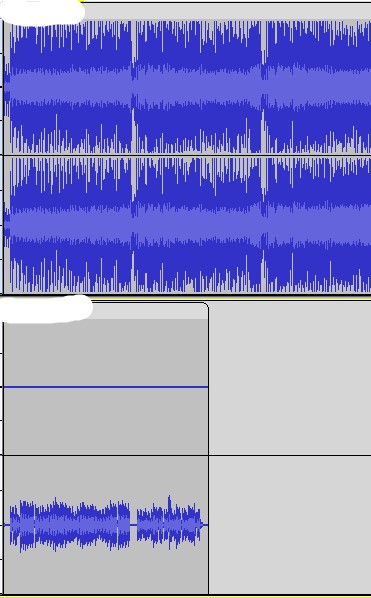
Here are the capture of recording (image). Upper track is a song, and below is bass recording. When listening only bass track, i can heard it very quiet and only my right headphone.


Ok, well the bass was recorded mono into a stereo track, that's part of it. Why the bass signal is so low is the question - do you have the Audacity input volume slider set to 100%?
 
Hey JJBB8,

first of all the "song" signal looks pretty strong, maybe to the point of clipping? And then, yes your bass signal should be routed to a mono or two (left/right) channels of a stereo track - some interfaces have switches or software to do that for you. I'm on Linux where you can route things with a program called Jack...

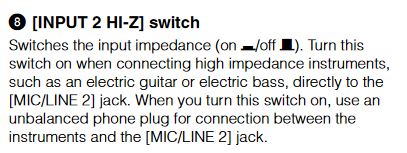
About the loudness of your instrument: does your interface have a Hi-Z input for instruments? If not you could try using a DI box like in live situations, and put the output of that into an XLR mic in of your interface. Maybe your interface input simply has to be switched from 'Line' to 'Instrument' or something? Which one do you have?
 
  • Like
Reactions: bholder
Ok, that's good already. I just looked at Audacity, and you can add mono tracks there, that would solve the problem with the bass coming out only in the right channel... about the loudness of your interface input, not sure how I can help you there (mine is from Focusrite). Does it come with software like mine? Maybe you'll have to set the input level higher in software as well?
 
  • Like
Reactions: bholder
I see you are using a Steinberg UR22C interface. Have you tried adjusting the mix knob? It balances the sound coming from the computer (the song), and from the input (the bass). If the bass signal is quiet, it should be turned a bit to the left. Also make sure the mono switch is engaged.

This won’t solve the issue with recording level, but it should enable you to hear the song and the bass at the same time while playing.
 
Last edited:
I see you are using a Steinberg UR22C interface. Have you tried adjusting the mix knob? It balances the sound coming from the computer (the song), and from the input (the bass). If the bass signal is quiet, it should be turned a bit to the left. Also make sure the mono switch is engaged.

This won’t solve the issue with recording level, but it should enable you to hear the song and the bass at the same time while playing.

Yes i have tried the mix knob, but like you said, this dont solve the problem.

Also, just to be sure, since I didn’t see it in your previous posts… Are you using input 2, and is its gain it set to the max?

Yes, i´m using input 2 and gain is not set to the max, because the "peak" light is starting to flash, when playing. Sot its clipping then.
 
Yes, i´m using input 2 and gain is not set to the max, because the "peak" light is starting to flash, when playing. Sot its clipping then.

Ah, that is helpful info - so we know that the signal from your bass into the interface is okay, and it has to be between the interface, driver, and your computer somewhere.

Have you tried to normalize the bass after recording it? I'm using Ardour on Linux, and while working with single tracks I keep everything at -6dB (peaks), and -23LUFS (average loudness). That way I can use compressors, equalizers and so on without clipping the channels. On mixdown, I export for the target, like -16LUFS and -2dBTP for compatibility with most streaming services (like YouTube, Soundcloud, and the like)...

Meaning that if you'd try to level everything in a second step, your problem could be solved?
 
Yeah, that´s the problem. I dont know how to get those sound levels equal (=bass more louder).

Have you tried to normalize the bass after recording it? I'm using Ardour on Linux, and while working with single tracks I keep everything at -6dB (peaks), and -23LUFS (average loudness). That way I can use compressors, equalizers and so on without clipping the channels. On mixdown, I export for the target, like -16LUFS and -2dBTP for compatibility with most streaming services (like YouTube, Soundcloud, and the like)...

I have to check that Ardour. Seems like it also available on Windows too.
 
Yeah, that´s the problem. I dont know how to get those sound levels equal (=bass more louder).
I have to check that Ardour. Seems like it also available on Windows too.

In Audacity, if you select a channel/track, then under 'Effects' in the menu, you can select 'Normalize', on mine it looks like this:

Screenshot from 2022-07-29 14-36-34.png
 

Attachments

  • Screenshot from 2022-07-29 14-36-34.png
    Screenshot from 2022-07-29 14-36-34.png
    19.7 KB · Views: 27
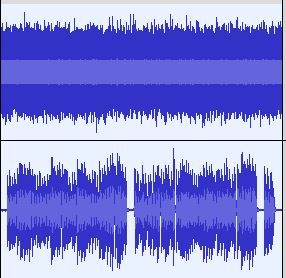
I suspect you left the ‘normalize stereo channels independently’ option checked. That will indeed make the noise in the left channel very loud and unpleasant.

First thing I’d do is split the stereo file by removing the left channel: How to convert a stereo audio file to mono using Audacity

But it’s better to record in mono in the first place.

Seems like you have set your input levels correctly. If the bass is too quiet relative to song, you could also turn the song’s volume down, and turn the master volume up.

I have no idea why the mix knob doesn’t work. In most audio recording apps, you could work around this by turning on input monitoring for the track you’re recording into, but that doesn’t seem to be a usable option in Audacity.
 
  • Like
Reactions: wjl