• TalkBass has been independent since 1998. Add your voice.
    Create a free account to reply to discussions, view embedded media, and browse with fewer display ads.
    Join freeLog in
    Want zero display ads or expanded classifieds tools? Compare plans.

Fender Rumble 500v3 Fan Noise - My Troubleshooting and Resolution Journey

Up-front Caveat: I had years of education, training, and hands-on experience with electrical theory, safety, design, and repair. If you aren't familiar with electronics, safe practices for anything electrical, etc., please do not try to do this yourself. Please take your amp to someone who is qualified to prevent hurting yourself or damaging your amp.


Part 1: Noise and stock fan replacement


I bought my first Rumble 500 about a year ago. When played in a silent environment (me practicing in my music room), a low-level but annoying whining noise could be heard from its fan.

Searching here on TB revealed a few posts about R500 fan noise, followed by responses from other owners that their fans couldn't be heard.

I assumed it was simply a defective fan, so I got the model number from the original fan and bought a new one. When I ran the replacement fan next to the amp, sitting on a blanket, it was silent. But once it was installed the the amp, the replacement fan's whining sound was even louder than the original, by a tiny bit.

I was able to replicate the noise outside of the amp by putting the fan on a flat thin metal plate. The noise is from fan vibration that transmits into the metal fan intake shroud, in the amp.

Here's a clip of the fan noise. This is the replacement fan.
 
Last edited:
  • Like
Reactions: Miles_ONeal
Part 2: Noctua replacement?

Since that stock replacment fan didn't improve things, I bought a fan that I know to be near silent: the Noctua NF-A6x25 FLX.

The Noctua was very quiet running on the flat thin metal plate.

Heeding the advice from @agedhorse to ensure fan speeds and static pressure are comparable, I did side-by-side tests with the original.

I measured the fan voltage coming from the amp at idle at 6 VDC. The circuit block diagram shows it's tied into output to the speakers, so the fan speed voltage increases as the speaker output (volume) increases.

R500 block diagram.jpg

The listed speeds for the two fans at 12V are different (3800 RPM stock vs 3000 RPM Noctua).
The listed static pressures for the two fans are different (3.8mm stock vs 2.18mm Noctua).

I decided to physically test the fans at 6V and 9V.

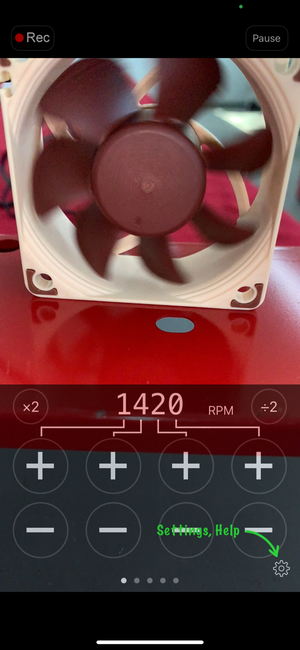
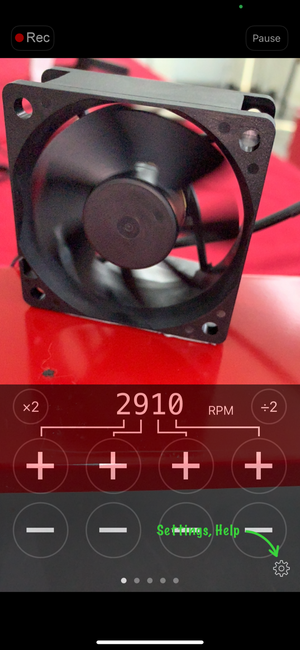
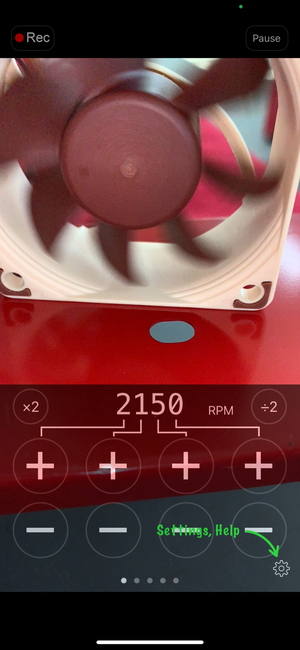
Using Video Tachometer, I was able to capture their speeds.

At 6V, the stock fan ran at 2010 RPM. The Noctua ran at 1420.
At 9V, the stock fan ran at 2910 RPM. The Noctua ran at 2150.

Even with the Noctua's slightly more efficient design, that RPM delta is too high to match the stock fan's airflow.

So while the reduced airflow of Noctua fan might work, I am not willing to take that risk.

I decided to stick with the stock fan, but see if I could minimize the vibration.

Here are the fan speeds
a4 MF stock speed at 6v.PNGa5 Noctua speed at 6v.PNG

a6 MF stock speed at 9v.PNGa7 Noctua speed at 9v.PNG
 
Last edited:
  • Like
Reactions: Miles_ONeal
Part 3: Vibration isolation

The stock fan has foam strips on its bottom and top, but nothing between it and the air intake shroud.

With the fan outside of the amp, on the thin metal plate, I experimented with combinations of different materials to reduce the vibration transfer. Duct tape reduced it a bit. A single layer of foam reduced it more. Multiple layers of foam even more. And then multiple layers with 2 different foams even more.

Pictures and sound clips:

Just the fan

a8.JPG

With duct tape

a9.JPG

With 3x foam

a91.JPG

So I reinstalled the stock fan with the 2 different foams.
a92 MF installed with foam.jpg
a93 MF installed with foam.jpga94 MF installed with foam.jpg

Sound clip after foam install. Not silent, but improved.


I lived with that noise level, as it was milder and I assumed I was just being over sensitive. It was still annoying, though.
 
Last edited:
  • Like
Reactions: Miles_ONeal
Part 4: Rumble 500 #2

Separately from all of this, I was experimenting with amp tone. I was curious whether two R500's would somehow magically sound even better than one.

So I bought a second one. When I turned it on, it was near silent. Only the light whooshing sound of the air movement could be heard, without any annoying whine.

Sound clip
 
  • Like
Reactions: Miles_ONeal
Part 5: Different stock fans

I removed the amp from R500 #2 and found that its stock fan was a different part number.

R500 #1 fan: SUNON model MF60251V2-1000C-A99 (this is the part I replaced it with the first time)
R500 #2 fan: SUNON model MB60251V2-000C-A99

Looking at the SUNON website, the fans appear to be identical in specifications.

The first 2 characters ("MF" and "MB") are the Series Code, and the second-to-last characters (1000C and 000C) are the Customer Code. Everything else is the same.

I found fans with that "MB" part number and put one in R500 #1 in stock fashion, without all the extra foam.

Silence, just like R500 #2.
 
  • Like
Reactions: Miles_ONeal
Part 6: Conclusion?

The fan vibration that causes the whining isn't there on that MB fan.

I don't know if I just got 2 dud "MF" fans (one in the amp and one replacement) or if all MB "series" fans are just smoother.

I just know that I'm very happy that R500 #1 is finally silent.


NOTE: When I was recently in GC, I was playing through an R500 and didn't hear any fan noise. But when I put my ear to the back of the amp, the whining was there. I just couldn't hear it over the sounds in the store. So this probably isn't an issue for most, especially those who use their amps for gigs and anywhere else that isn't completely silent.

But for anyone else who plays their R500 in a silent place and has a whining fan and is annoyed by it, hopefully this helps.
 
Last edited:
They are very different fans, the MB series uses mag-lev bearings which are quieter. The MF uses a vapo-sleeve style bearing which are not as quiet.

With OEM fans, one of the biggest challenges is availability. It's entirely possible that the MB fans weren't available at the time of the build and they were forced to use the MF series. If it was built around the time of COVID, lead times for some parts were over 1 year.
 
Noctua has a 5 V version of the 6 cm fan called NF-A6x25 5V
You could then use a buck circuit to drop voltage to 5 V or a resistor in series to drop voltage proportionally to supply.

Edit: You could also use the 12 V PWM version. There are boost circuits which convert controller voltage to 12 V PWM (with adjustable sensitivity), so the fan would run at its maximum speed when needed.
 
Last edited:
Noctua has a 5 V version of the 6 cm fan called NF-A6x25 5V
You could then use a buck circuit to drop voltage to 5 V or a resistor in series to drop voltage proportionally to supply.

Edit: You could also use the 12 V PWM version. There are boost circuits which convert controller voltage to 12 V PWM (with adjustable sensitivity), so the fan would run at its maximum speed when needed.
Those converters can be really electrically noisy.
 
  • Like
Reactions: SharpCat
The solution is the correct fan IMO.
Considering the replacement fan (new/revised part number) did the job, then that's absolutely right.

But still, there are some excellent fans available that will do the job even better.

And my suggestion would be to only add a foam frame to form a duct to direct the airflow and isolate the mounting points by using soft fan mounting pins instead of screws.
 
According to spec I would not be concerned about that Noctua Fan.

View attachment 7489942View attachment 7489943
The reason you might not be concerned is because you don’t understand how fan specs work.

The specified air flow and static pressure work together to determine actual air flow in an application. When the air flow is specified at a lower static pressure, the air flow will end up being LOWER in that application.
 
And my suggestion would be to only add a foam frame to form a duct to direct the airflow and isolate the mounting points by using soft fan mounting pins instead of screws.
Why bother when the correct replacement solved the problem?

What you proposed is a solution looking for a problem IME.