
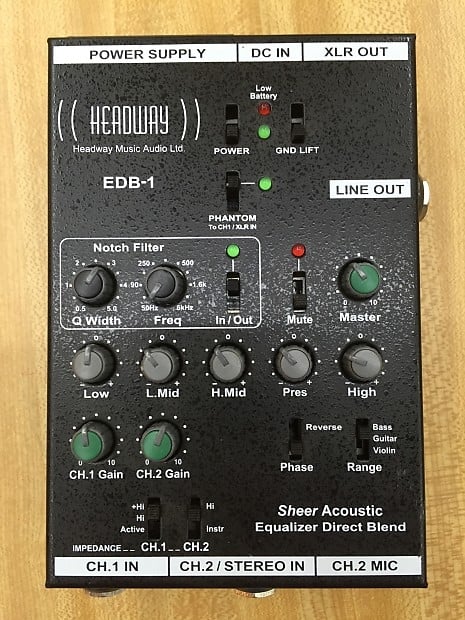
Can anyone familiar with this preamp give me a few pointers on how to find and eliminate an unwanted boomy frequency using the nitch filter? Thanks in advance.

TalkBass has been independent since 1998. Add your voice.
Create a free account to reply to discussions, view embedded media, and browse with fewer display ads.
Join free Log in
Want zero display ads or expanded classifieds tools? Compare plans.

Thanks.Whats a good starting setting for the width control when locating the offending frequency?Turn the freq control to find the offending frequency and use the width control to select how wide or narrow the cut will be.
So, 0.5 is the widest and 5.0 is the narrowest. Not very intuitve (at least for me). That's probably why I was having difficulty. Gracias.Start at the 0.5 mark which is the widest slice to remove and turn slowly to 5.0 to narrow the cut as much as you want or need to.

According to the manual for this preamp, 0.5 is the narrowest Q and 5.0 is the broadest. This is nomenclature of every other notch filter I’ve used that has an adjustable Q as well.Start at the 0.5 mark which is the widest slice to remove and turn slowly to 5.0 to narrow the cut as much as you want or need to.
According to the manual for this preamp, 0.5 is the narrowest Q and 5.0 is the broadest. This is nomenclature of every other notch filter I've used that has an adjustable Q as well.
Thanks Wasnex for that practical hands on advice.I don't have any experience with this particular device, but I have rung out upright basses plenty of times.
Here's how I would do it:
Do the adjustment with the bass in the playing position. Consider some sort of wrap to dampen the strings so they do not ring. You'll need both hands free to fiddle with the controls. Turn up the gain slowly to avoid a super strong feedback spike. Turn up the gain until the bass starts to ring and then back the gain off till it's just on the verge ringing. If strong feedback does occur, turn the gain down quickly.
With the filter Q/Width set to fairly narrow, sweep slowly from low to to high until the frequency is no longer on the verge of ringing. Slightly increase gain as necessary and then simultaneously narrow the bandwidth while adjusting to the precise frequency of the feedback.
It's easier with a parametric because you can peak the filter to narrow in on the problem frequency and then make the notch.
Since I have not used this particular preamp, I can't say whether you would adjust the filter to be as narrow as possible or maybe leave it open a hair. Experiment and decide based the results you get...results may vary from one setup to the next.
AFAIK, that's backwards... 0.5 is about 2.5 octaves. 5 is a bit narrower than 1/3 octave.
Here's a calculator: Q factor vs bandwidth in octaves band filter -3 dB pass calculator calculation formula quality factor Q to bandwidth BW width octave convert filter BW octave vibration mastering slope dB/oct steepness EQ filter equalizer cutoff freqiency - sengpielaudio Sengpiel Berlin


I've had a similar experience with mine. As soon as I engage it, I can't deal with the massive tone suck, no matter what the setting. Probably operator error, but that's been my experience.I owned this preamp when they were first released. What I found was unless I absolutely had to use it because of feedback issues then it was switched off. While I found it particularly useful with a microphone, I didn't generally use it with a pickup. The way it scoops out the band of low frequencies
isn't nearly as usefull as a low cut filter. Just my take. The three position low cut switch works far better for my needs.



