
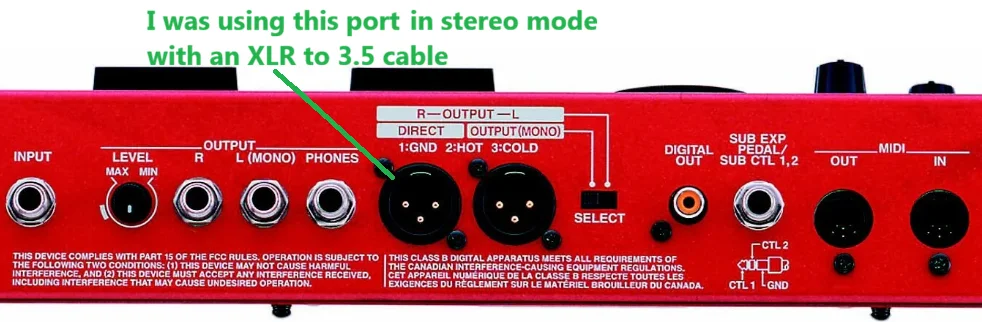
My old Windows 7 laptop had a 3.5 microphone line-in port that would automatically recognize my Boss GT-6B as a line-in and record it in high quality stereo sound, using an XLR to 3.5 cable.
My new Windows 11 laptop has a crappy 3.5 combo jack that doesn't recognize the Boss GT-6B as a microphone line-in, despite using that exact same XLR to 3.5 cable.
I tried plugging in a basic headphone/microphone Y splitter cable into the new Windows 11 laptop's 3.5 combo jack, but it only records the Boss GT-6B in low quality mono sound.
What cables or adapters do I need to get a high quality stereo sound delivered to this new Windows 11 laptop, like I used to have on my old Windows 7 laptop with its dedicated microphone line-in port?
Or should I just go through the Boss GT-6B's "Digital Out" port, instead of the XLR port I was accustomed to using?
Or maybe some sort of USB based setup is the best option?
My new Windows 11 laptop has a crappy 3.5 combo jack that doesn't recognize the Boss GT-6B as a microphone line-in, despite using that exact same XLR to 3.5 cable.
I tried plugging in a basic headphone/microphone Y splitter cable into the new Windows 11 laptop's 3.5 combo jack, but it only records the Boss GT-6B in low quality mono sound.
What cables or adapters do I need to get a high quality stereo sound delivered to this new Windows 11 laptop, like I used to have on my old Windows 7 laptop with its dedicated microphone line-in port?
Or should I just go through the Boss GT-6B's "Digital Out" port, instead of the XLR port I was accustomed to using?
Or maybe some sort of USB based setup is the best option?


