
I am brand new to midi, and to the M9. The new update allows you to control the loop function by using a seperate midi controller. So Ive been searching google for midi controllers and am basically given 2 choices- the camand center mothership style, or the midi mouse style. I was hoping to find something of similar design to a true bypass strip with 4-5 buttons, which would fit perfectly below my M9 on my board. Is there such thing? If not, who could build something like that? On a similar note, if it were a custom build, I'd possibly have an additional 2 buttons for up/down mode control of my Whammy 4.

Enjoy the benefits of a premium membership!
Upgrade Account
-
TalkBass has been independent since 1998. Add your voice.
Create a free account to reply to discussions, view embedded media, and browse with fewer display ads.
Join free Log in
Want zero display ads or expanded classifieds tools? Compare plans.
You are using an out of date browser. It may not display this or other websites correctly.
You should upgrade or use an alternative browser.
You should upgrade or use an alternative browser.
Midi controller to use with Line6 M9?
- Thread starter amfmsb
- Start date
More options
Who Replied?
I was on this very same search not too long ago...
The MidiMouse won't work as it only sends program change messages. The M9 needs Control change (CC's) message to use the looper functions.
I have been using a Behringer FCB1010 to accomplish this, but it is too big. My solution is having This1smyne rehouse it into one of his looper enclosures and it will be significantly smaller. I'll let you know how it turns out.

The MidiMouse won't work as it only sends program change messages. The M9 needs Control change (CC's) message to use the looper functions.
I have been using a Behringer FCB1010 to accomplish this, but it is too big. My solution is having This1smyne rehouse it into one of his looper enclosures and it will be significantly smaller. I'll let you know how it turns out.

I have been using a Behringer FCB1010 to accomplish this, but it is too big. My solution is having This1smyne rehouse it into one of his looper enclosures and it will be significantly smaller. I'll let you know how it turns out.
Oooooh. Keep us informed on this shrinking of the FCB.



This might be useful for the DIY crowd.
[Invalid or Expired Link Removed]
It looks relatively simple actually...
[Invalid or Expired Link Removed]
It looks relatively simple actually...

pharaohamps
Commercial User
- May 30, 2006
- 773
- 56
- Disclosures
- Owner, Disaster Area Designs / Alexander Pedals
I just got an M9 and was thinking I'd go ahead and post this: I'm working on a 6-button foot controller that will either control the 6 looper functions OR switch scenes OR switch individual FX, depending on how it is configured. I suspect most folks would use it to run the looper but there are a lot of possibilities.
It's housed in a Hammond 1950DD, which is twice the size of a Voodoo Labs pedal or an EHX XO Big Muff, and has six momentary foot switches. Each switch has its own LED, and it sends MIDI CC messages to the M9 that correspond to the standard loop controls (or scene select, or FX on/off, depending on the mode it is in.) Mode is selected with a switch and may be changed on the fly. It has MIDI IN and OUT, and it passes any MIDI data from IN to OUT so you could chain more than one to get full MIDI control of any valid parameter on the M9. Note that many of the parameters like FX settings aren't available as MIDI...
I'm making at least one for myself, but since I have to have a run of printed circuit boards fabricated I will be selling the others. I have the switching logic working correctly and the M9 is responding to commands, but my prototype looks a bit like a science experiment. Once I finalize the design I'll be sending the boards to the board house and then I'll be gathering material to make a run of (probably) five pedals. If there is interest I may make an additional run.
Per the TB Commercial User Policy I won't post ads selling them here. I will post pics of my first unit when it is completed, for those who are interested.
It's housed in a Hammond 1950DD, which is twice the size of a Voodoo Labs pedal or an EHX XO Big Muff, and has six momentary foot switches. Each switch has its own LED, and it sends MIDI CC messages to the M9 that correspond to the standard loop controls (or scene select, or FX on/off, depending on the mode it is in.) Mode is selected with a switch and may be changed on the fly. It has MIDI IN and OUT, and it passes any MIDI data from IN to OUT so you could chain more than one to get full MIDI control of any valid parameter on the M9. Note that many of the parameters like FX settings aren't available as MIDI...
I'm making at least one for myself, but since I have to have a run of printed circuit boards fabricated I will be selling the others. I have the switching logic working correctly and the M9 is responding to commands, but my prototype looks a bit like a science experiment. Once I finalize the design I'll be sending the boards to the board house and then I'll be gathering material to make a run of (probably) five pedals. If there is interest I may make an additional run.
Per the TB Commercial User Policy I won't post ads selling them here. I will post pics of my first unit when it is completed, for those who are interested.

Very intersting! Looking forward to hearing about this since my rehouse seems like it will never arrive.

pharaohamps
Commercial User
- May 30, 2006
- 773
- 56
- Disclosures
- Owner, Disaster Area Designs / Alexander Pedals

I just got an M9 and was thinking I'd go ahead and post this: I'm working on a 6-button foot controller that will either control the 6 looper functions OR switch scenes OR switch individual FX, depending on how it is configured. I suspect most folks would use it to run the looper but there are a lot of possibilities.
It's housed in a Hammond 1950DD, which is twice the size of a Voodoo Labs pedal or an EHX XO Big Muff, and has six momentary foot switches. Each switch has its own LED, and it sends MIDI CC messages to the M9 that correspond to the standard loop controls (or scene select, or FX on/off, depending on the mode it is in.) Mode is selected with a switch and may be changed on the fly. It has MIDI IN and OUT, and it passes any MIDI data from IN to OUT so you could chain more than one to get full MIDI control of any valid parameter on the M9. Note that many of the parameters like FX settings aren't available as MIDI...
I'm making at least one for myself, but since I have to have a run of printed circuit boards fabricated I will be selling the others. I have the switching logic working correctly and the M9 is responding to commands, but my prototype looks a bit like a science experiment. Once I finalize the design I'll be sending the boards to the board house and then I'll be gathering material to make a run of (probably) five pedals. If there is interest I may make an additional run.
Per the TB Commercial User Policy I won't post ads selling them here. I will post pics of my first unit when it is completed, for those who are interested.
SCIENCE WIN, sounds great man.
pharaohamps
Commercial User
- May 30, 2006
- 773
- 56
- Disclosures
- Owner, Disaster Area Designs / Alexander Pedals
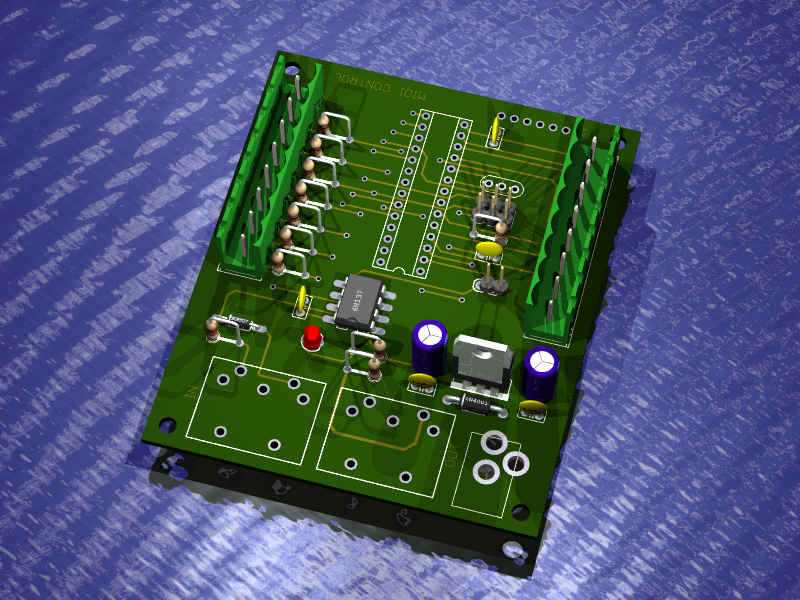
Quick post: rendering of PCB. These should be here soon, and I'll be posting a quick movie about the operation of the controller here tonight or tomorrow morning.

If not for something 'custom', the FCB1010 is going to be the best option, it's Behringers best product. But it is pretty big...problem is it has cornered the market for midi foot-controllers due to its cost, there is little else around in that price range.
pharaohamps
Commercial User
- May 30, 2006
- 773
- 56
- Disclosures
- Owner, Disaster Area Designs / Alexander Pedals
Status update:
The M9 is a funny beast. If I send the CC for "Overdub" while IN looper mode, nothing happens. If I send "Overdub" when in Scene Select or FX Select mode, it works just fine. This is OK, as you'd never be IN looper mode while using an external MIDI controller to run the looper.
I've done some work on the user interface to eliminate some gratuitous buttons and switches, and here's what I have so far:
On power up, the controller tests its hardware, and lights each of its 6 LEDs in sequence. During this power-on test, hold down the footswitch for the mode you'd like to use.
Record - looper mode
Play - FX select mode
Play Once - FX select mode (reverse order)
Undo - Scene Select mode
Half Speed - Utility Mode
This setting is saved in the controller and persists even with the power turned off.
Looper Mode - just like the internal Looper mode, but the Undo and Play Once LEDs behave a little differently. If you need the LEDs to behave exactly as on the internal setting, use the controller in a different mode and use the M9 controls for looping
FX Select Mode - just like the internal mode. LEDs are smart and know who should be on or off.
FX Select Mode (reverse order) - the M9 is kind of dumb, and if you're in 3 > 2 > 1 order, you should use this mode to make sure the controller LEDs correspond to what is on the M9.
Scene Select Mode - selects the 6 scenes from Folder 1 only. If you need more folder access, see...
Utility Mode - allows selection of 4 scene folders (1 for each footswitch) plus Tap and Tuner.
You can chain together one or more of these controllers, and I can do custom controllers with a smaller subset of functionality. These controllers are also capable of sending MIDI CC / expression data using a standard volume pedal although lower-impedance passive pedals like the EB VPJr 25K are best for this.
I am trying to post a movie but here's something to tide you over until then:
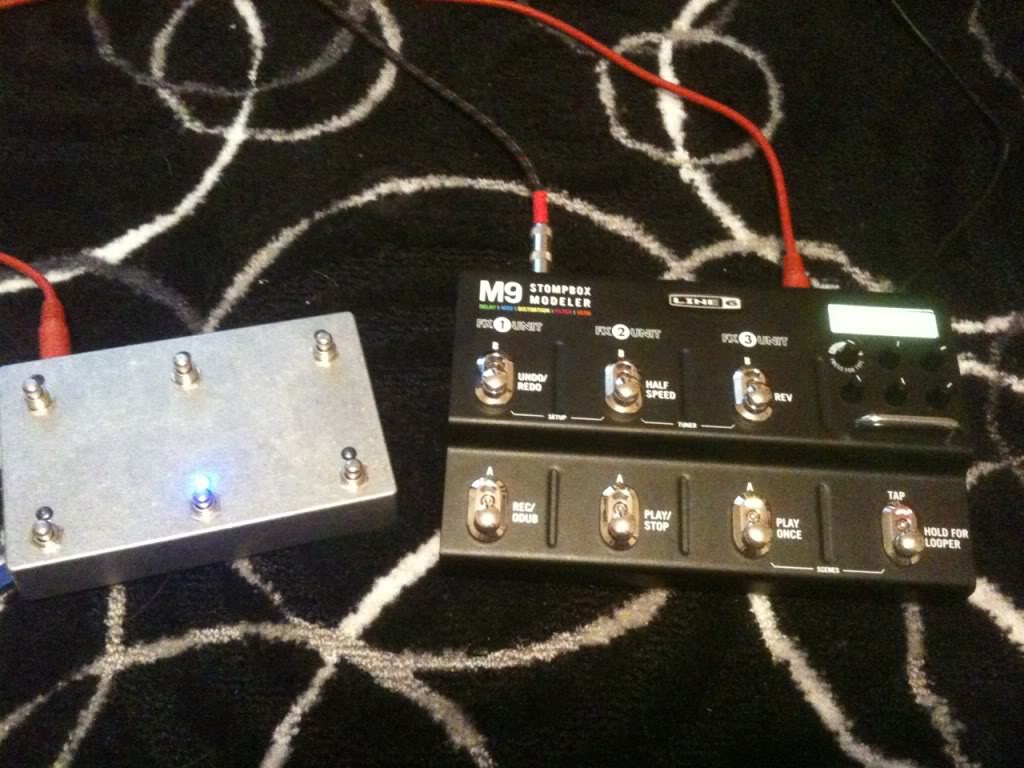
The M9 is a funny beast. If I send the CC for "Overdub" while IN looper mode, nothing happens. If I send "Overdub" when in Scene Select or FX Select mode, it works just fine. This is OK, as you'd never be IN looper mode while using an external MIDI controller to run the looper.
I've done some work on the user interface to eliminate some gratuitous buttons and switches, and here's what I have so far:
On power up, the controller tests its hardware, and lights each of its 6 LEDs in sequence. During this power-on test, hold down the footswitch for the mode you'd like to use.
Record - looper mode
Play - FX select mode
Play Once - FX select mode (reverse order)
Undo - Scene Select mode
Half Speed - Utility Mode
This setting is saved in the controller and persists even with the power turned off.
Looper Mode - just like the internal Looper mode, but the Undo and Play Once LEDs behave a little differently. If you need the LEDs to behave exactly as on the internal setting, use the controller in a different mode and use the M9 controls for looping
FX Select Mode - just like the internal mode. LEDs are smart and know who should be on or off.
FX Select Mode (reverse order) - the M9 is kind of dumb, and if you're in 3 > 2 > 1 order, you should use this mode to make sure the controller LEDs correspond to what is on the M9.
Scene Select Mode - selects the 6 scenes from Folder 1 only. If you need more folder access, see...
Utility Mode - allows selection of 4 scene folders (1 for each footswitch) plus Tap and Tuner.
You can chain together one or more of these controllers, and I can do custom controllers with a smaller subset of functionality. These controllers are also capable of sending MIDI CC / expression data using a standard volume pedal although lower-impedance passive pedals like the EB VPJr 25K are best for this.
I am trying to post a movie but here's something to tide you over until then:

just to let you know I find this a really cool project (but I already let you know via pm  )
)
Herwig
)Herwig
pharaohamps
Commercial User
- May 30, 2006
- 773
- 56
- Disclosures
- Owner, Disaster Area Designs / Alexander Pedals
pharaohamps
Commercial User
- May 30, 2006
- 773
- 56
- Disclosures
- Owner, Disaster Area Designs / Alexander Pedals
Long story short - my first batch of PCBs had an error and had to be discarded. New PCBs are on their way and are smaller. Now they'll fit in a Boss-sized box!
They'll be available with 1, 2, 4, or 6 footswitches + LEDs. Custom firmware is available but the stock firmware will allow for reconfiguration over USB from a Windows PC. Any switch can perform pretty much any MIDI function - continuous controller (CC,) program change (PC,) or note on. Want a box that will trigger a kick sample from your keyboard with a foot press? Done. Want something that will engage the M9 tuner without pressing TWO switches on the top row? Done. Whatever you want, this can do.
First boards built next week.
They'll be available with 1, 2, 4, or 6 footswitches + LEDs. Custom firmware is available but the stock firmware will allow for reconfiguration over USB from a Windows PC. Any switch can perform pretty much any MIDI function - continuous controller (CC,) program change (PC,) or note on. Want a box that will trigger a kick sample from your keyboard with a foot press? Done. Want something that will engage the M9 tuner without pressing TWO switches on the top row? Done. Whatever you want, this can do.
First boards built next week.
pharaohamps
Commercial User
- May 30, 2006
- 773
- 56
- Disclosures
- Owner, Disaster Area Designs / Alexander Pedals
Price estimate for the 6 button controller? Also, your YouTube video says you do the firmware programming- do you work for Line6? Whats up with them not releasing something like this?
The breakdown goes like this: 1 button for $99, 2 button for 129, 4 button for $169, 6 button for $199 shipped CONUS. It's a little more pricey than the MIDI Moose (for example) but it does a lot more than just change patches.
I do the firmware programming of the MIDI controller. I leave all the M9 firmware stuff to Line6


