• TalkBass has been independent since 1998. Add your voice.
    Create a free account to reply to discussions, view embedded media, and browse with fewer display ads.
    Join freeLog in
    Want zero display ads or expanded classifieds tools? Compare plans.

Please help - Very amateur recording equipment

J_Bass

Supporting Member
Feb 7, 2008
4,857
19,542
Porto, Portugal
Hello,

I have searched the forum for the answers, but couldn't find anything that could directly help me, so I thought of making a dedicated thread.


Ok, I would like to record some lines on my bass , maybe guitar, microphone and midi keyboard or midi instrument.


Right now I have:


HARDWARE:

- Bass and other minor instruments (ahah).

- Zoom BFX-708 multi effects pedal.

- MAC computer, 3GHz Core 2 Duo, IOS Sierra 10.12.6.

- M-Audio Fast Track, that it is not recognized, I guess. I read something about it not being compatible with OS Sierra.

- Normal Jack cables and one XLR-Jack cable.

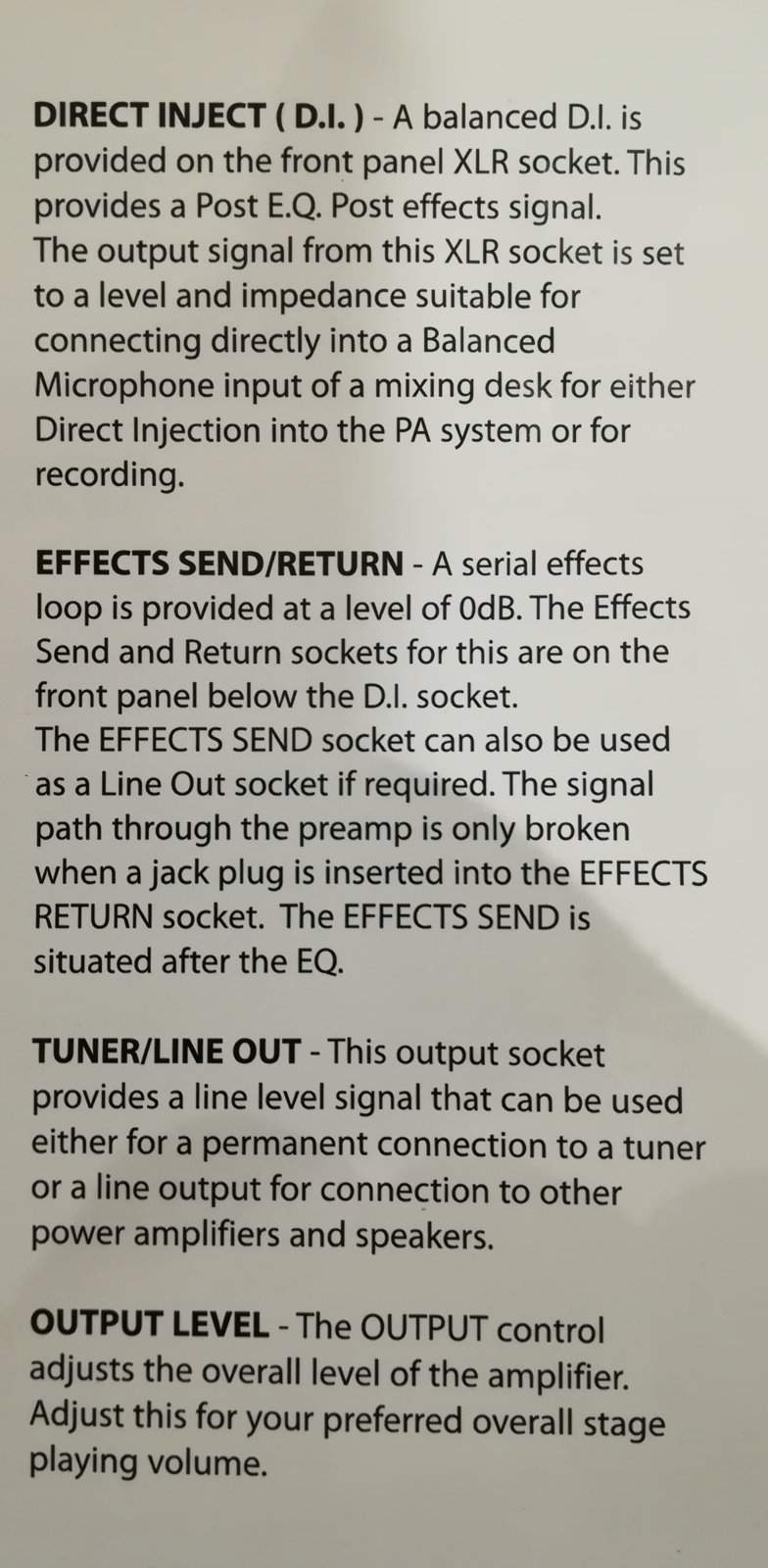
- Ashdown MAG 300 with the usual Passive/Active Input and with DI output, effects send/return and Tuner/Line Output:

IMG_20170921_195945.jpg


In the amp manual it says:

IMG_20170921_201410.jpg


SOFTWARE:

- GarageBand.

- Pro Tools SE, which I can't open, doesn't recognize the m-audio fast track (Drivers?).

-----------------------------

Ok, so this are my questions/problems:

Question 1 - With garage band I hear a lot of unwanted noise. But the main issue (besides the fact that I may be the only one using it on TB) is that the volume is very, very low. I have to put the MAC sound on max (inboard speakers) so that I can hear what was played, and even then it is difficult.

ProTools SE is not working.

After reading some TB threads on the subject, I downloaded REAPER, and I intend to make it my editing software. The price is very reasonable (60 dollars), and I wouldn' mind paying that instead of using other free software, unless you could recommend me one. Is this the right choice? I don't need anything too difficult or with many functions, just want something to record instruments (like GarageBand does).


QUESTION 2 - What Recording device should I buy, to replace the M-Audio Fast Track? I would like something similar to this one. It has microphone, Instrument, Headphone Inputs and Line Outputs left and right and USB connection (that is what I used in the past):

Captura de ecrã 2017-09-21, às 20.38.42.png


Don't want to spend a lot of money, because this is just for me, I am just an amateur. Top money, maybe 200 euros if it is really worth it, but around 100 would be great. I would like to buy something that is recent (so I don't have the same problems again), compatible with the computer and chosen software, and simple to use. I am not a knob guy.


Question 3 - How do I connect the Bass to the device? I would like to run it through the amp first, I think.

Is it IN Bass - Passive Input - OUT XLR - Recording device? Should I use the XLR to output the signal from the amp, or the Effects out?

If I am using the Zoom pedal multi-effects how do I do it?
Is it Bass - Zoom pedal - Amp?

And from the recording deviceto the computer? USB? Line Outputs?


Question 4 - Can I go by using the inboard speakers of the computer? Should I buy some computer speakers? If yes, which one would you recommend (cheap)?


Some other information:

- The room is very wrong for recording, it has windows, doors and stairs that don't have door. I don't have isolation, but I don't think I need any of this, I just want to record my instrument and put drum loops or something like that.

- I would like to actually can tell the difference in the sound of the bass, from the recording. For instance, the difference between playing with 2 pups, or just 1, the presets on the amp, things like that. Nothing to fancy, but I would like to hear the bass from the recording and not sound like it was recorded with a cassette player, that is what it looks like now.


Ok, I ask the forum for help, hope you guys can do it.

I know that a lot of you do this for a living and must be in shock with all the mistakes on my setup, but again, I am just a guy that is severely addicted to music, with a very stressful job, and the Bass is my medication. Not trying to be arrogant or anything, just want a cheap setup to record my very lousy playing.


Thank you!
 
So, I've been doing some reading and actually there are several threads similar to this one, sorry for that.


It seems that I can fix various issues with something like the Audio Box 96 studio bundle.

Several TBers recommend not to connect the Bass to the amp, but connect it directly to the AI, is that right?

So, I think that if I bought this bundle, that would do it! What do you guys think?


Thank you.
 
I've had no luck at all with any M-Audio equipment I've ever tried. I have no doubt the problem was more me than it was the equipment, but you sound like you might have about the same level of technological ineptitude/aptitude that I do.

Don't take that the wrong way.

I've had painlessly outstanding results with GarageBand on my iPad, input through the iRig 2 and with a pair of studio monitors. It's ideal for low-level, low-pain recording, but I've found it's quite loud enough if you run it not through a pair of headphones, but through a subwoofer. The cheapest kind.

Good luck.
 
  • Like
Reactions: J_Bass
I use garageband on my Mac quite successfully using an Avid A/D box. Works great, but I can't imagine listening back to anything on the computer speakers.

It should work, maybe with some more experience you'll get it figured out...

Good Luck with it!
 
You ought to get a more recent interface, like a Focusrite Scarlett or something similar. You can check out Sweetwater.com or GAK.

Don't buy computer speakers. Get a set of headphones. Really, any set so long as they aren't the absolute cheapest and they aren't earbuds. If you want speakers, then your best bet might be something like M-audio's cheapest "studio monitors." Since your room isn't designed for acoustics, you won't get great sound from any set of speakers regardless of price.

Don't bother using your amp for this. Plug straight into the interface, because the DI on your amp isn't doing anything to help your sound that an amp modeler and some EQ in Garageband can't do.

Until you get a better interface, search Google for "M-audio Mac Driver." You may be missing a driver that let's the M-audio work properly with your version of Garageband.
 
  • Like
Reactions: J_Bass
First of all, I use Reaper and I LOVE IT! Well worth the $60 and anyone who does not pay for it is a SCHMUCK if they continue to use it! Every bit as good as Pro-Tools that you would pay more than $600!

I also have Pro-Tools SE (which I started with) and it actually requires connection of the audio interface that came with it as it functions a sort of a "License Dongle" and will not work without the computer detecting this device. I got away from Pro-Tools SE when I wasn't able to add third-party plug-ins like Steven Slate Drums.

If you can make that audio interface work with Reaper, why not just use it? I eventually replaced my M-Audio interface with a Scarlett 18i8 which is gives me 4 inputs plus expansion for much more. I do not see myself growing out of this any time soon! Scarlett also makes a smaller interface that would be more within your price range if needed. Audio interface connects to computer via USB interface and may require download the appropriate driver.

There really is no need to use that Ashdown amplifier but if you wanted to be really fancy, run the XLR out from the amp to the XLR in of the audio interface and plug the bass into the amp. you may even want to "Split" the signal and run the base "Dry" (Direct) into the second channel and you use an amp simulator and other plugins. Reaper has a really good amp simulator ("JS: Convolution Amp/Cab Modeler") that I pretty much use exclusively!

You may also want to take a good look at that Zoom pedal. If it has a USB, you might be able to use it as an audio interface as well. I have a Boss ME-25 that I allows me to use it as a recording interface without plugging into a separate audio interface. Enter your model # and check the specs online to verify this.

And yes you NEED to get external speakers instead of using the computer speakers. The Audio Interface will replace (used instead of) the standard audio card in your computer and the audio output of this interface is either via the line out jacks or the headphone jack. You can purchase a set of M-Audio speakers for around $100 which are "OK" but the best bet is to use powered monitors that will run you about $300/Pair
 
  • Like
Reactions: J_Bass
Thanks so much for the help!

I got the m-audio fast track working with garageband again. The only thing is that the bass sound just seems weak, I don't know.

I am going to try Reaper to work with the m-audio, yesterday I couldn't do it.

I figure I have 2 main options, if I want something more recent than the m-audio:

- Buy a new AI, was thinking of either the Scarlett 2i2 or the AudioBox 22VSL and use Reaper with license.

- Buy a bundle, like Scarlett 2i2 Studio 2nd generation or Presonus AudioBox 96 Studio. My doubt here is the software, I would like something with quality, but easy to work with. The first one comes with Ableton Lite and ProTools-First. The second one comes with Sudio One 3 Artist.


Any experience on this different software?


Thank you.
 
Almost forgot, my zoom pedalboard is very old, I think I bought it 15 years ago, or something. Maybe more.

I read on other threads people using the zoom B3N as multi effects and AI? Could this be a good solution? Could I record more instruments with this hardware, like a guitar?


Thank you.
 
Thanks so much for the help!

I got the m-audio fast track working with garageband again. The only thing is that the bass sound just seems weak, I don't know.

I am going to try Reaper to work with the m-audio, yesterday I couldn't do it.

I figure I have 2 main options, if I want something more recent than the m-audio:

- Buy a new AI, was thinking of either the Scarlett 2i2 or the AudioBox 22VSL and use Reaper with license.

- Buy a bundle, like Scarlett 2i2 Studio 2nd generation or Presonus AudioBox 96 Studio. My doubt here is the software, I would like something with quality, but easy to work with. The first one comes with Ableton Lite and ProTools-First. The second one comes with Sudio One 3 Artist.


Any experience on this different software?


Thank you.

I haven't used either of of those DAWS, but most of the software bundled with interfaces is hobbled in some way. They want to get you used to their DAW, but make it so you can't do too much without the full version. On PT First, you can't use 3rd Party VSTs, you have to buy them from ProTools. Reaper is going to be way better. It comes packaged will very good VSTs, and there are thousands of great free VSTs available. Kjaerhus makes a great set of freebies. Use the freebies until you outgrow them. Then you can slowly buy great VSTs as you need them.

Regarding your quiet bass on the recording, can you get screen shots of the playback (specifically the waveform and the channel meter)? It will help us figure out where the volume problem is coming from.

What was your recording chain? Bass - instrument cable - Amp (DI out) - mic cable - Fast track interface - computer?

It may seem like avoiding the question, but there is no one correct way to record anything, and there are no wrong ways. If your method gets the sound you wanted, or even a sound that you didn't know you wanted, it is correct. You can plug straight into the interface. You can run through your amp and use the DI, or preamp out. You can mic your cab. Any way you can get sound recorded is valid.
 
So, I've been doing some reading and actually there are several threads similar to this one, sorry for that.


It seems that I can fix various issues with something like the Audio Box 96 studio bundle.

Several TBers recommend not to connect the Bass to the amp, but connect it directly to the AI, is that right?

So, I think that if I bought this bundle, that would do it! What do you guys think?


Thank you.

If you can afford the Audiobox It would be the easiest solution for what you want to accomplish. Audiobox comes with Studio One 3 DAW, and it will be a lot easier to use, and is a full feature software with all the DAW functions (not the light or free version).

As for going DI or Direct In, that would be the easiest and most efficient way to get your bass lines and guitar lines recorded. You can use a amp and or mic, but it will take you a lot of trial and error to get your mics and eq set up for optimal sound. Going DI you can EQ and add fx on the digital track.

Also, Studio One 3 DAW, has midi drum kits, and ability to do drum loops, and synth loops with a midi keyboard controller. Or you can use the free drum and snyth loops that comes with the software, and edit them to your liking without using a controller.

Thus, Audiobox will do everything you need, and it's all compatible with the DAW Studio One 3.
Setting it up requires a download from Presonus for the DAW, and added bundle of loops and fx.
Check the YouTube for tutorials on how to download and set up Studio One 3. Good luck and happy recording.
 
  • Like
Reactions: J_Bass
If you can afford the Audiobox It would be the easiest solution for what you want to accomplish. Audiobox comes with Studio One 3 DAW, and it will be a lot easier to use, and is a full feature software with all the DAW functions (not the light or free version).

As for going DI or Direct In, that would be the easiest and most efficient way to get your bass lines and guitar lines recorded. You can use a amp and or mic, but it will take you a lot of trial and error to get your mics and eq set up for optimal sound. Going DI you can EQ and add fx on the digital track.

Also, Studio One 3 DAW, has midi drum kits, and ability to do drum loops, and synth loops with a midi keyboard controller. Or you can use the free drum and snyth loops that comes with the software, and edit them to your liking without using a controller.

Thus, Audiobox will do everything you need, and it's all compatible with the DAW Studio One 3.
Setting it up requires a download from Presonus for the DAW, and added bundle of loops and fx.
Check the YouTube for tutorials on how to download and set up Studio One 3. Good luck and happy recording.

Thank you, very useful help!

Thank you all, you really helped make up my mind.

I will go with the audiobox 96 bundle, that software looks great, for me, was what made the difference comparing with the others. I was looking for something like that, all the same brand, easy to config.
 
Thank you, very useful help!

Thank you all, you really helped make up my mind.

I will go with the audiobox 96 bundle, that software looks great, for me, was what made the difference comparing with the others. I was looking for something like that, all the same brand, easy to config.

Exactly. That's the reason I went with Presounus audiobox. The DAW is a full feature DAW with a lot of features like MIDI drums, synth ability, and all the stuff you find in pro digital audio workstations. And, the Audiobox VSL44 has a great preamp and sounds very good. The hardest part of Audiobox, is getting it set up on the PC or MAC, and there are a lot of online tutorials to help get setup. And, once you have it set up, everything is gravy.

They have a lot of updates on the DAW all the time, my system has never crashed using Presonus. And, the Studio One 3 DAW is very easy to navigate for complex tasks. Makes recording and mixing efficient and fast.
 
  • Like
Reactions: J_Bass