2013 is going to be the Year Of The Demo Video here at Rocket Music! We've toyed around with the concept the past couple of years with marginal results. This year, we're going to actually make it happen. Realistically, I'm hoping we're able to push out a new video every week or so (once we're fully setup)...
Step 1 on the path to getting fully setup has been revisiting the branding that we want to have as a component of every video we produce. That involves an intro and an outro segment along with some audio that will hopefully become well recognized and associated immediately with us. It's a concept called "audio branding". Think Intel's ubiqitous "boom bah booh bing" or NBC's three tone "chimes" theme. You hear those short, simple themes, and you know immediately who's involved.
Personally, no matter what the marketing professors might say, I still want to go a little bit beyond the 3-4 tone thing. Danny's a guitar guy, I'm a bass guy... I want our "audio brand" to reflect that. So I've taken another run at the previous video intro theme that we came up with some time back. I've simplified the instrumentation, and I REALLY massaged the mix to the best of my abilities. I think I'm on Day 4 mixing this little 16-second jingle. I'm still learning to mix properly, and this little project was just another excuse for me to push my skills beyond where they were. Destructive EQ was the name of the game this week: I spent a lot of time removing un-neccessary frequency content from every instrument in the mix. You know you're a perfectionist when you spend 45 minutes tweaking the EQ on the tamborine.


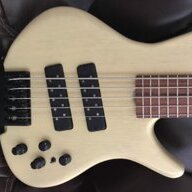
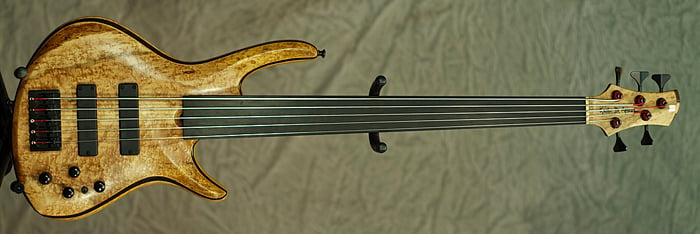
Being a little happy with the progress I've made on fretless over the past couple years, I decided to re-record the bassline using my Roscoe Century Signature V fretless. I figure that if I'm going to have to listen to this jingle every week for the next however many months or years, I probably want it to be something that represents my most recent playing style. It's hard to capture that in just 16 seconds, but I took a stab at adding a little fretless pizazz in what little time the tune provides.
The bass went direct through my REDDI tube DI and my P1 preamp (both by A-Designs). I added quite a bit of "seasoning" to the bass tone in the final mix: there's some subtle distortion, chorus and reverb mixed in with the clean direct tone. More on that below. For now, while we're talking about her - let's take a look. Oooh, la, la!
Step 2 was to buy some new video editing software. We had Avid's Media Composer, but that was just too much tool for us. It's waaaaay too complicated for what we need to do. After a quick bit of research, I decided to grab a copy of Adobe Premier Elements 11. I think it's exactly what I'm looking for. It's more powerful than some of the free stuff out there like Windows Movie Maker (which I've used for some personal stuff with limited success), but the big selling point is that the Adobe software is much, much easier to use than Avid MC. So I dropped my $79, installed the software and very quickly ported over the old video work that Danny had done in MC. Then I integrated the new audio, and Boom! Here's the latest version of our video intro segment!
"Rocket Music Video Intro"
Now onto the bass tone. I was really striving to get a tone as close to Geddy Lee's as I could on a fretless. That means adding a bit of hair to the tone, and I did that all in the box in Sonar. The final bass tone consists of the direct track plus a band-passed dirty version of that track, plus chorus and reverb.
Here's the direct track, which is really the raw material for the entire final bass tone:
"Rocket Music Video Intro" (direct bass track, no EQ, panning or FX)
Here's the dirty version of the clean/direct track. I used a send from the bass track to run to a bus that used tube saturation and a band pass filter to add some dirt/crunch in the 600Hz - 2500 Hz range. It sounds thin and weak all by itself, but that leaves the lower frequencies on the direct track uncluttered by fuzzy tone.
"Rocket Music Video Intro" (direct bass distorted and run through a band pass filter.)
Here's the amount of chorus I added:
"Rocket Music Video Intro" (direct bass track run through a chorus effect)
And here's the amount of Reverb I added:
"Rocket Music Video Intro" (direct bass track run through a reverb effect)
Add all that nonsense together, and you get a pretty nice bass tone:
"Rocket Music Video Intro" (everything combined and panned right up the middle)
Next up, we'll throw together a quick video outro segment. I just quickly lashed together the audio that I want to underpin that segment. The lead guitar part from the intro is our equivalent to the NBC chimes, so I stripped away everything else and built the outro audio around that. I found a cool rocket launch sound sample out there on the interwebs, and I've used that to add a little audio interest to the segment. The rocket slowly pans across the stereo spectrum to make you feel like you're watching a launch at Cape Kennedy. Rocket. Rocket Music. Get it?
Tomorrow I'll see if I can massage the "burning letters" from the intro video for use in the outro. It might not be that simple... but that's my hope!
Here's the preliminary outro audio:
"Rocket Music Video Outro Audio"
Once we have the intro and outro segments done, then we just need to get setup to shoot some actual video content to cram between the two segments. That'll probably involve some carpentry here at the new store, so it won't happen right away. But we're gonna get on it!! We're on a mission!!
Lastly - if any of you marketing geniuses out there think we're missing the mark or if you just have a good idea for us, please do speak up!! I'm an engineer, not a marketing guy...
Step 1 on the path to getting fully setup has been revisiting the branding that we want to have as a component of every video we produce. That involves an intro and an outro segment along with some audio that will hopefully become well recognized and associated immediately with us. It's a concept called "audio branding". Think Intel's ubiqitous "boom bah booh bing" or NBC's three tone "chimes" theme. You hear those short, simple themes, and you know immediately who's involved.
Personally, no matter what the marketing professors might say, I still want to go a little bit beyond the 3-4 tone thing. Danny's a guitar guy, I'm a bass guy... I want our "audio brand" to reflect that. So I've taken another run at the previous video intro theme that we came up with some time back. I've simplified the instrumentation, and I REALLY massaged the mix to the best of my abilities. I think I'm on Day 4 mixing this little 16-second jingle. I'm still learning to mix properly, and this little project was just another excuse for me to push my skills beyond where they were. Destructive EQ was the name of the game this week: I spent a lot of time removing un-neccessary frequency content from every instrument in the mix. You know you're a perfectionist when you spend 45 minutes tweaking the EQ on the tamborine.
Being a little happy with the progress I've made on fretless over the past couple years, I decided to re-record the bassline using my Roscoe Century Signature V fretless. I figure that if I'm going to have to listen to this jingle every week for the next however many months or years, I probably want it to be something that represents my most recent playing style. It's hard to capture that in just 16 seconds, but I took a stab at adding a little fretless pizazz in what little time the tune provides.
The bass went direct through my REDDI tube DI and my P1 preamp (both by A-Designs). I added quite a bit of "seasoning" to the bass tone in the final mix: there's some subtle distortion, chorus and reverb mixed in with the clean direct tone. More on that below. For now, while we're talking about her - let's take a look. Oooh, la, la!
Step 2 was to buy some new video editing software. We had Avid's Media Composer, but that was just too much tool for us. It's waaaaay too complicated for what we need to do. After a quick bit of research, I decided to grab a copy of Adobe Premier Elements 11. I think it's exactly what I'm looking for. It's more powerful than some of the free stuff out there like Windows Movie Maker (which I've used for some personal stuff with limited success), but the big selling point is that the Adobe software is much, much easier to use than Avid MC. So I dropped my $79, installed the software and very quickly ported over the old video work that Danny had done in MC. Then I integrated the new audio, and Boom! Here's the latest version of our video intro segment!
"Rocket Music Video Intro"
Now onto the bass tone. I was really striving to get a tone as close to Geddy Lee's as I could on a fretless. That means adding a bit of hair to the tone, and I did that all in the box in Sonar. The final bass tone consists of the direct track plus a band-passed dirty version of that track, plus chorus and reverb.
Here's the direct track, which is really the raw material for the entire final bass tone:
"Rocket Music Video Intro" (direct bass track, no EQ, panning or FX)
Here's the dirty version of the clean/direct track. I used a send from the bass track to run to a bus that used tube saturation and a band pass filter to add some dirt/crunch in the 600Hz - 2500 Hz range. It sounds thin and weak all by itself, but that leaves the lower frequencies on the direct track uncluttered by fuzzy tone.
"Rocket Music Video Intro" (direct bass distorted and run through a band pass filter.)
Here's the amount of chorus I added:
"Rocket Music Video Intro" (direct bass track run through a chorus effect)
And here's the amount of Reverb I added:
"Rocket Music Video Intro" (direct bass track run through a reverb effect)
Add all that nonsense together, and you get a pretty nice bass tone:
"Rocket Music Video Intro" (everything combined and panned right up the middle)
Next up, we'll throw together a quick video outro segment. I just quickly lashed together the audio that I want to underpin that segment. The lead guitar part from the intro is our equivalent to the NBC chimes, so I stripped away everything else and built the outro audio around that. I found a cool rocket launch sound sample out there on the interwebs, and I've used that to add a little audio interest to the segment. The rocket slowly pans across the stereo spectrum to make you feel like you're watching a launch at Cape Kennedy. Rocket. Rocket Music. Get it?
Tomorrow I'll see if I can massage the "burning letters" from the intro video for use in the outro. It might not be that simple... but that's my hope!
Here's the preliminary outro audio:
"Rocket Music Video Outro Audio"
Once we have the intro and outro segments done, then we just need to get setup to shoot some actual video content to cram between the two segments. That'll probably involve some carpentry here at the new store, so it won't happen right away. But we're gonna get on it!! We're on a mission!!
Lastly - if any of you marketing geniuses out there think we're missing the mark or if you just have a good idea for us, please do speak up!! I'm an engineer, not a marketing guy...