• TalkBass has been independent since 1998. Add your voice.
    Create a free account to reply to discussions, view embedded media, and browse with fewer display ads.
    Join freeLog in
    Want zero display ads or expanded classifieds tools? Compare plans.

Video Question...

I've been working on a short instructional video for a friends son, he is a Down Syndrome young man so the standard online lessons can be a bit difficult. Anyway as I wander down the video rabbit hole... First thought was to use my phone, it's a Nokia android and while perfectly functional as a smart phone it's pretty clunky for making music videos and this is all pretty much new territory for me...

Where I've been so far,

First step was to try Lightworks to get a feel for the software. While it's a good editor it's not a video capture tool. I found Logitech Capture and figured that would be an easy solution. We have an older Canon digital SLR camera, apparently it's too old (2008). I have a couple of web cam's for Zoom meetings (a Logitech and a Microsoft) both are not supported by the latest version of Capture (while I did find a way to add the Logitech) the audio was a little ahead of the video. That was when I learned that my CPU in my studio is an I5 Gen3, and the min. req. I5 Gen7 for Capture. Surprisingly enough the video quality was not bad from my Logitech C 270 HD webcam (unsupported). My studio PC has an I5 CPU with 32GB of RAM, WIN10. The big plus was that my DAW (Cakewalk) supports video editing and was surprisingly easy to use, plus I redo the bass parts and remove the poor audio recorded with the webcam (plus add and edit dialog).

Could really use some guidance on other easy software that I can capture my video with (that will be compatible with my hardware) and before I order an upgraded webcam.

Camera: I'm thinking along these lines as it seems it would be more of a dual purpose camera than a webcam. The entry price seems very reasonable with many good reviews.
Software: This seems to have good reviews and could be used for streaming as well. While it is compatible with the I5 processor it's recommending Gen6 or higher.

I'm definitely open for recommendations. Easy learning curves preferred ;)
 
Last edited:
Lesson's learned with this first deep dive... my I5 Gen3 CPU is pretty well tasked with any of the newer video software. OBS Studio seems to be the current winner, open source and not as dependent on the newer processors. The AKASO camera arrived today, video is quite good but really slows down the recording app (basically everything in stop frame). Seems the inexpensive Logitech C310 HD webcam is the best performer. As many new skills can become captivating, so the journey begins.

While the EK7000 was too much of a resource hog to use, a combination of the C310, and a Microsoft LifeCam 3000 (my office Zoom cam) allowed me to create a working project. With one cam on the fretboard and the other on my right hand I was pretty impressed at the capabilities at hand. Although a complete newbie, with an hour or so viewing YouTubes (there is a bit of a learning curve) I was able to hammer out an record a rough lesson.

As we seem to justify our passions, adding video capability to the studio seems a natural progression. I ordered a new PC this morning i7 CPU 3.49 GHz, 32GB, 512GB SSD, and dedicated graphics card. Not cutting edge, but a solid upgrade from my existing setup. While my current system does work, the slower CPU bogs down even at 720p resolution. New hardware will be in next week, went for refurb so it's not breaking the bank (like to keep my marriage in the pleasant zone). Stay tuned...
 
Last edited:
  • Like
Reactions: lildrgn and DirtDog
Any camera should be able to do what you want to and you should be able to find one to fit your budget for your initial use case.

BUT... as appealing as a cheap action cam would be on budget and convenience, I'd say forget that get yourself a decent entry level DSLR and a nice prime lens (50mm oughta do) and you'll future proof your capabilities for years. Action cams are pretty bad in low-light, indoor settings and have bells and whistles that are wasted on non-action filming. Although that AKASO is cheap enough if you decide you've grown out of it, it's not a tough pill to swallow.

Next, software. OBS is interesting but is meant more for broadcast video/streaming so has functionalities particular to that space. DaVinci Resolve is more of a "filmmaker" solution...strengths in non-linear editing, colour correction, effects and whatnot. Resolve, to me, is the budget-conscious alternative to Adobe Premiere.

Any video software will make hard demands on your CPU. Get the computer to do the work you want to do instead of letting the computer limit what it is you can do. I struggled to do even simple video editing in Premiere on a 2020 Mac Mini (with the Intel chip). I upgraded to a Mac Studio (with M1 Max chip) and it runs Premiere like a champ. YMMV.

Then there's lighting techniques and principles of good cinematography. The rabbit holes are deep if you want to dive in that far. I'm still very much on the steep part of the learning curve.
 
Last edited:
  • Like
Reactions: mambo4
Lesson's learned with this first deep dive... my I5 Gen3 CPU is pretty well tasked with any of the newer video software. OBS Studio seems to be the current winner, open source and not as dependent on the newer processors. The AKASO camera arrived today, video is quite good but really slows down the recording app (basically everything in stop frame). Seems the inexpensive Logitech C310 HD webcam is the best performer. As many new skills can become captivating, so the journey begins.

While the EK7000 was too much of a resource hog to use, a combination of the C310, and a Microsoft LifeCam 3000 (my office Zoom cam) allowed me to create a working project. With one cam on the fretboard and the other on my right hand I was pretty impressed at the capabilities at hand. Although a complete newbie, with an hour or so viewing YouTubes (there is a bit of a learning curve) I was able to hammer out an record a rough lesson.

As we seem to justify our passions, adding video capability to the studio seems a natural progression. I ordered a new PC this morning i7 CPU 3.49 GHz, 32GB, 512GB SSD, and dedicated graphics card. Not cutting edge, but a solid upgrade from my existing setup. While my current system does work, the slower CPU bogs down even at 720p resolution. New hardware will be in next week, went for refurb so it's not breaking the bank (like to keep my marriage in the pleasant zone). Stay tuned...

Is the lagginess occurring when you're editing (specifically, when you're previewing the edited video). If so, you can change some settings to bypass this. I don't use OBS, but in Resolve and Premiere there's a function that you can preview edited video at lower resolution (e.g., 1/2, 1/4, 1/8) that will improve the speed and remove any lagginess. Also working with high frame rate video can be problematic. Sure, if you're doing dramatic slow motion stuff, 60 or 120fps is nice. But for your use case, 24 fps is all you'll need. Maybe 30 fps. With your AKASO camera, I'd probably opt for the 4K/25fps or 2.7K/30fps as my default setting.
 
I should ask - is your use case live-streaming your instructional video to your student - in real time? Or recording then post-processing and THEN sharing the content with your student after the fact?

There's a couple of things you wrote that led me to believe it was the latter, but now I'm not so sure.
 
DD,

Really appreciate the info and feedback. In this case it will be a recorded video uploaded to YouTube to share, no streaming. OBS came up in my search for Video Recording SW with older PC's. When I downloaded it for recording, it was the first product that actually worked pretty well with two camera sources and a desktop audio source. Since I'm working by myself, I need to be able see the videos on screen. OPS allows you to choose between recording and streaming modes. Again, this is all pretty new, so I'm not set on any particular product. The other software products I tried were constantly buffering with one source, and freezing with two.

Camera's: Web Cams seem to be the easiest at the moment, easy to configure and low on resources. We do have an older Canon G10 PowerShot DSLR, while it works for recording and downloading it can't feed directly to the computer. If the AKASO doesn't work for the studio, it will become our paddleboard cam. I'm sure it would probably be fine in record and download mode like the G10, picture quality is quite good.

Editing: I downloaded Lightworks for editing, seems to have good reviews. I was watching a couple of tutorials yesterday, one on synchronization and timestamps, the other layering video. What seems to work is to do any actual playing with two cameras running concurrently to capture the right and left hand movements with music. Then build around those segments, beefing up the bass parts and voice tracks through the DAW and layering with the editor.

Hopefully the better computer will improve the studio recording platform as well. I'm trying to keep this as basic as possible and get a grip on the video tools. I agree even at this level it's a deep dive.

Cheers
 
Last edited:
  • Like
Reactions: lildrgn and DirtDog
DD,

Really appreciate the info and feedback. In this case it will be a recorded video uploaded to YouTube to share, no streaming. OBS came up in my search for Video Recording SW with older PC's. When I downloaded it for recording, it was the first product that actually worked pretty well with two camera sources and a desktop audio source. Since I'm working by myself, I need to be able see the videos on screen. OPS allows you to choose between recording and streaming modes. Again, this is all pretty new, so I'm not set on any particular product. The other software products I tried were constantly buffering with one source, and freezing with two.

Camera's: Web Cams seem to be the easiest at the moment, easy to configure and low on resources. We do have an older Canon G10 PowerShot DSLR, while it works for recording and downloading it can't feed directly to the computer. If the AKASO doesn't work for the studio, it will become our paddleboard cam. I'm sure it would probably be fine in record and download mode like the G10, picture quality is quite good.

Editing: I downloaded Lightworks for editing, seems to have good reviews. I was watching a couple of tutorials yesterday, one on synchronization and timestamps, the other layering video. What seems to work is to do any actual playing with two cameras running concurrently to capture the right and left hand movements with music. Then build around those segments, beefing up the bass parts and voice tracks through the DAW and layering with the editor.

Hopefully the better computer will improve the studio recording platform as well. I'm trying to keep this as basic as possible and get a grip on the video tools. I agree even at this level it's a deep dive.

Cheers

Sounds like you've got a plan! Good luck and happy video-ing!
 
  • Like
Reactions: tothemax
Well so not to hijack the other video thread, it's better to update my original. Spent some time last night "working" with DaVinci Resolve 17 and while a very cool product the learning curve is steep. After some trial and error...
  • The budget AKASO action cam (which will find a home on the bow of our paddle boards).
  • Using our 15 year old Canon G10 - which outputs in .wmv format. Not a great fit,
    • Video quality is good but monitor is on the back of the camera and difficult solo work. I do have a converter that sends the feed to OBS as a source but the sound is lost.
    • Found a free efficient tool to convert the .wmv files to .mp4
  • Using a couple video conferencing web cams and using OBS to capture the video.
    • Using various mic stands with clamp adapters to position the web cams - worked but not great
    • Web cam built in mic's worked ok, but not the best sound
  • Tried my NOKIA cell phone to capture video, in reverse mode (selfie) camera options were limited.
    • Sorry, we are not Apple folks
  • Tried the Logictech Capture software - video is OK, sound is terrible
  • My DAW processes video sound pretty well
    • Honestly, I never made it far enough with the video production to move into the sound production.
So the results of this effort are, the video project has been renamed from "Learning to play Green Onions" to "Why I really shouldn't be making videos".

Findings:
  • Video like sound production is a lot of work and requires knowledge and understanding of the tools
    • Having the basics is very helpful
      • Camera you are comfortable with (and a way to monitor your video)
      • Camera mounting options - tripod, etc...
      • A good way to capture the video you are working with
        • Camera - self contained
        • Capture software you are familiar with if saving on PC
      • Lastly a computer with the horsepower to process video
Since I'm not really serious into video, I may pick up a decent web cam and a USB mic which would allow me to do projects like this one in the studio for a modest investment. It is fun to dabble in and DaVinci is pretty amazing with what it can do. Having a better way to mount a camera would have been really helpful.

Thought I would share...
 
Similar journey here with videoing. Due to laziness and lack of funds, I have stayed with using my cell phone camera for any recording, a Focusrite Scarlett interface for my bass, DaVinci Resolve and ProTools First (free version) for video and audio recording. I'm trying to branch out to Reaper for audio recording as it seems more flexible than PTF, but it seems a little more complicated as well. The combination of these tools has been great for my simple bass cover videos for YouTube.

/thread hijack somewhat following

What I'm trying to do now is a crash course in streaming a rehearsal/performance. So many options and services, but after a little research last night, I found something called Prism Live Studio, that seems to get the job done. Similar to OBS, the program resides on a PC, and then I downloaded the mobile version, which allows me to use my phone as a streaming camera, WIFI connected to the PC. I did a trial "live" stream on Facebook, got the stream key, entered it into the Prism front end and within a few seconds, I was streaming.

Keep in mind, I was the only viewer and it was all local to me, so video quality and framerate seemed adequate. Not sure how it will look in my BL's house with his WIFI, etc. Today's plan is to try hooking up a second cell phone as a camera source and see if I can do multi-cam streaming.

I would love to use my old Canon Rebel T1i as a camera source, but alas, it's just old enough that I can't stream from it or use it in any connected fashion. :/

The rabbit hole is deep. Thank goodness for the University of YouTube.
 
Last edited:
As an Amazon Associate, TalkBass may receive commissions from qualifying purchases made via links on this site.
  • Like
Reactions: lildrgn
Lil D,
You may want to try one of these audio video converters. I picked this up to digitize some older VHS videos and over the weekend I connected the video out from our Cannon G10 and it showed up as a source on my PC, sadly, no audio (and that may have been me...). For $10 bucks might work for you.


Actually, I did look at capture cards yesterday. They have USB on one end, and HDMI on the other. My camera has a mini HDMI, so I'd need a cable too, but theoretically I should be able to get video off the camera. Thanks for the reminder!
 
As an Amazon Associate, TalkBass may receive commissions from qualifying purchases made via links on this site.
I've been working on a short instructional video for a friends son, he is a Down Syndrome young man so the standard online lessons can be a bit difficult. Anyway as I wander down the video rabbit hole... First thought was to use my phone, it's a Nokia android and while perfectly functional as a smart phone it's pretty clunky for making music videos and this is all pretty much new territory for me...

Where I've been so far,

First step was to try Lightworks to get a feel for the software. While it's a good editor it's not a video capture tool. I found Logitech Capture and figured that would be an easy solution. We have an older Canon digital SLR camera, apparently it's too old (2008). I have a couple of web cam's for Zoom meetings (a Logitech and a Microsoft) both are not supported by the latest version of Capture (while I did find a way to add the Logitech) the audio was a little ahead of the video. That was when I learned that my CPU in my studio is an I5 Gen3, and the min. req. I5 Gen7 for Capture. Surprisingly enough the video quality was not bad from my Logitech C 270 HD webcam (unsupported). My studio PC has an I5 CPU with 32GB of RAM, WIN10. The big plus was that my DAW (Cakewalk) supports video editing and was surprisingly easy to use, plus I redo the bass parts and remove the poor audio recorded with the webcam (plus add and edit dialog).

Could really use some guidance on other easy software that I can capture my video with (that will be compatible with my hardware) and before I order an upgraded webcam.

Camera: I'm thinking along these lines as it seems it would be more of a dual purpose camera than a webcam. The entry price seems very reasonable with many good reviews.
Software: This seems to have good reviews and could be used for streaming as well. While it is compatible with the I5 processor it's recommending Gen6 or higher.

I'm definitely open for recommendations. Easy learning curves preferred ;)

I've most definitely been down the rabbit hole. Most of the suggestions you read on forums are filled with over-complexity, too high in cost, instability due to equipment incompatability, etc.

IMHO, the best way to get good results easily is to use smartphone video capture and edit with Reaper.

I use a relatively low level Motorola (Android) smartphone with the Open Camera app. Open Camera is free, and most importantly, allows you to lock focus and white balance so your phone won't do automatic focus and white balance that makes a lot of Youtube videos unwatchable.

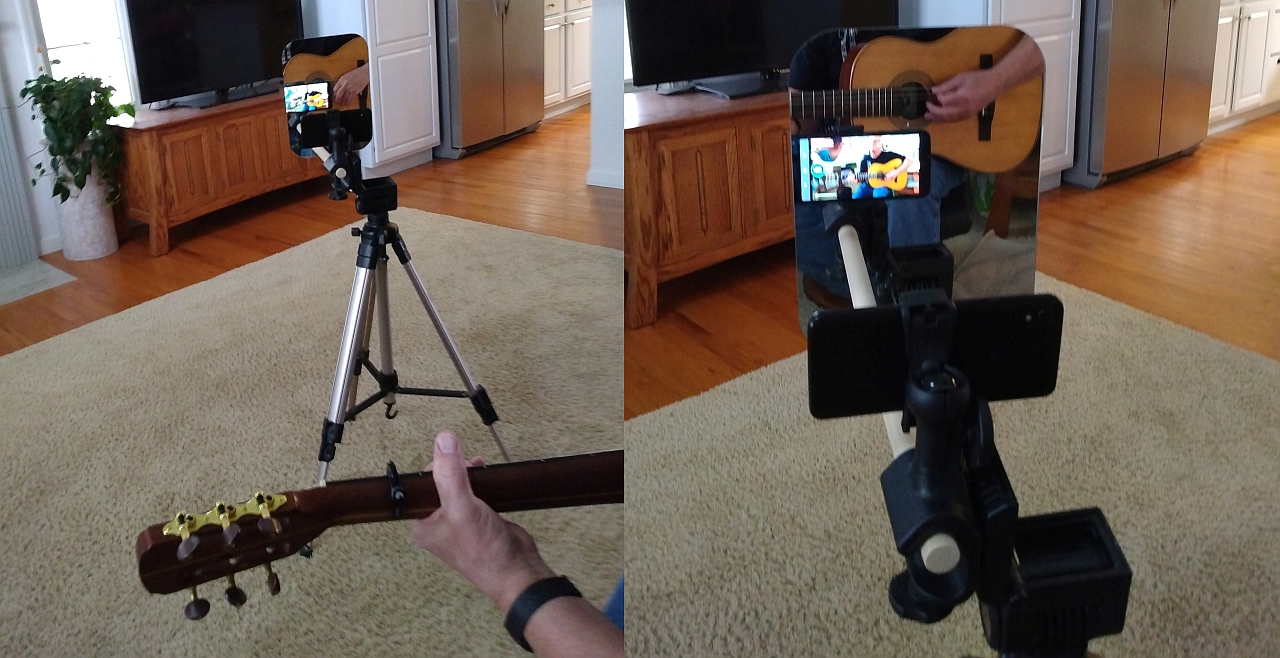
Mount the phone on a cheap tripod and use the FRONT camera! The selfie camera is normally much lower resolution, resulting in poor video quality. The secret ingredient to using the front camera is finding a way to frame your shot easily. I use a cheap plastic mirror so I can see the smartphone screen from the front of the phone. It works great for framing your shot.

YMb5TMZ.jpg


I transfer phone video to my PC and use Reaper for audio and video editing. It's inexpensive and works well for editing purposes and rendering your video to the appropriate parameters to upload to Youtube.

For general purpose use the phone microphone will work OK if the room sounds good. I use a couple of different methods of improving the audio when necessary. I have a Saramonic mic pre that supplies phantom power for a good condenser mic and plugs directly into the smartphone. That's the quickest and easiest method of getting good audio.

The second method I use is to record the audio with a separate recorder and combine the audio and video using Reaper. That's not particularly difficult and allows you to add additional instruments either on your audio recording device or directly into Reaper on the PC.

I've been doing this stuff for years and I'm ALL about easy and cheap.

I've written extensively about this on other forums, but there's not enough traffic here on Talkbass to make it worthwhile. Here's a quick post about the mirror option with the cell phone video, detailing the exact tripod, phone holder and mirror I'm using:

Invalid Link Removed

Here's an example of what I do with video, generally to capture stuff I've written.

 
Last edited: