
We have a Chauvet GigBar 2, a couple Chauvet RGB wash lights, a Chauvet 4Bar fixture, and a half dozen cheap LED can lights from amazon. We don't use a centralized controller - just set em up and forget em. Works well, adds some interest to the show, easy to schlep around...

Enjoy the benefits of a premium membership!
Upgrade Account
-
TalkBass has been independent since 1998. Add your voice.
Create a free account to reply to discussions, view embedded media, and browse with fewer display ads.
Join free Log in
Want zero display ads or expanded classifieds tools? Compare plans.
You are using an out of date browser. It may not display this or other websites correctly.
You should upgrade or use an alternative browser.
You should upgrade or use an alternative browser.
Weekend Warrior Stage Lighting Discussion
- Thread starter Stinsok
- Start date
More options
Who Replied?
Anyone use these Rockville PAR 6RF lights? The feature set is pretty vast for $90:
Rockville BATTERY PAR 6RF Rechargeable RGBWA+UV Wireless DMX LED Light+RF Remote
Being able to have the option of hardwired power or battery powered, and wired or wireless DMX seems like it would make for a really flexible system.
Rockville BATTERY PAR 6RF Rechargeable RGBWA+UV Wireless DMX LED Light+RF Remote
Being able to have the option of hardwired power or battery powered, and wired or wireless DMX seems like it would make for a really flexible system.

I have added a set of Freedom Sticks to might lights. I set them on auto. I like to set these up even at gigs that need minimal lights as they still add a nice movement. They set up in minutes and auto slave together.
Chauvet DJ Freedom Stick X4 Pack
Note: these are not affiliate links.
Chauvet DJ Freedom Stick X4 Pack
Note: these are not affiliate links.
New Year's bump.
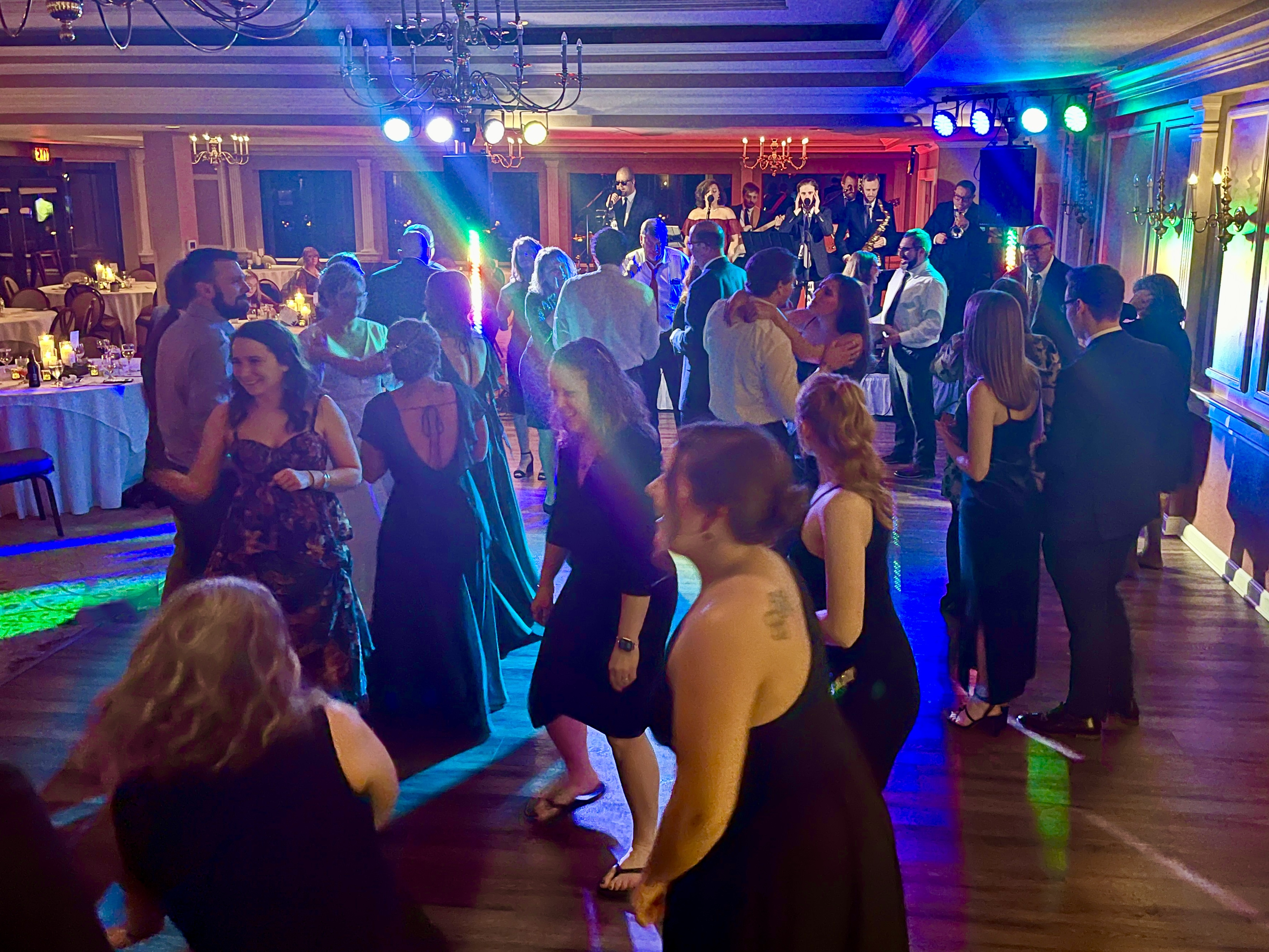
Pic from last weekend's wedding gig. I'm using pair of Chauvet Wash FX for back/ceiling wash and a Chauvet ColorRail vertically on each speaker stand – using the Photon2 iOS DMX app with a DMX digital interface. On top of each main (using a DIY bracket attached to the fly points), I have 4-bars set to sound-active mode, with an amber LED par can to wash the musicians. Set up only takes a few minutes, and the DMX app is reliable and easy to use. It's simple, but effective.
For this year, I purchased a pair of Chauvet Eliminator motion LEDs to add to the rig. I'm not looking forward to the DMX programming. I may also simplify the dance floor lights to 2 par cans plus the amber wash per side. The 4-bars take up a lot of valuable packing space in my car.
Pic from last weekend's wedding gig. I'm using pair of Chauvet Wash FX for back/ceiling wash and a Chauvet ColorRail vertically on each speaker stand – using the Photon2 iOS DMX app with a DMX digital interface. On top of each main (using a DIY bracket attached to the fly points), I have 4-bars set to sound-active mode, with an amber LED par can to wash the musicians. Set up only takes a few minutes, and the DMX app is reliable and easy to use. It's simple, but effective.
For this year, I purchased a pair of Chauvet Eliminator motion LEDs to add to the rig. I'm not looking forward to the DMX programming. I may also simplify the dance floor lights to 2 par cans plus the amber wash per side. The 4-bars take up a lot of valuable packing space in my car.

What DMX interface are you using?New Year's bump.
Pic from last weekend's wedding gig. I'm using pair of Chauvet Wash FX for back/ceiling wash and a Chauvet ColorRail vertically on each speaker stand – using the Photon2 iOS DMX app with a DMX digital interface. On top of each main (using a DIY bracket attached to the fly points), I have 4-bars set to sound-active mode, with an amber LED par can to wash the musicians. Set up only takes a few minutes, and the DMX app is reliable and easy to use. It's simple, but effective.
For this year, I purchased a pair of Chauvet Eliminator motion LEDs to add to the rig. I'm not looking forward to the DMX programming. I may also simplify the dance floor lights to 2 par cans plus the amber wash per side. The 4-bars take up a lot of valuable packing space in my car.
View attachment 5303838
Pknight ArtNet bi-directional DMX Ethernet Lighting Controller Interface | one universeWhat DMX interface are you using?
https://a.co/d/bsjMGGK
I plug that into the dual band router I use with my Soundcraft mixer. I never have any issues with connectivity. I'm also using wireless DMX transmitters. https://a.co/d/hkENpM7
As an Amazon Associate, TalkBass may receive commissions from qualifying purchases made via links on this site.
Thanks I’ll check these out. I just use the preprogrammed scenes on my lights (Wash FX2) but have been wanting to add a few new ones like a strobe on command, and maybe 2 or 3 main scenes.
I demo'ed several iOS DMX apps before going with Photon2. I like the simplicity of it, although more experienced users might see that as a negative. I am a novice with DMX, but I was able to get up and running pretty quickly once I had my fixtures addressed correctly and set in the right mode. Creating scenes and programming sequences is pretty easy once you get in the groove. My show runs in sound-active mode, with the most scenes changing every 16 beats (or is it 32?)...usually just a slow fade with the Wash FX while the ColorRails alternate between solid color and animated/blinky FX. I have a couple of presets for strobe FX and solid colors. I also like that there is a master dimmer slider in Photon2...it's really easy to throttle down the brightness of the WashFX. One downside is that there are not a lot of YouTube tutorials for Photon2, but hey, I was be to figure it out.Thanks I’ll check these out. I just use the preprogrammed scenes on my lights (Wash FX2) but have been wanting to add a few new ones like a strobe on command, and maybe 2 or 3 main scenes.

I'll be playing on a stage that has a giant US flag for a backdrop behind the band. Normally, I put some uplights on the floor against the back wall and play my flashing lights scenes against the wall. But for this one I'm wondering if anyone might take offense to flashing my colored lights against the flag. What do y'all think?

Anyone using the Wolfmix DMX unit, I am sort of wanting to up my lighting game.
Currently I have
2 Yorkville LED4X (bring every gig)
2 ADJ MegaBars I hang on above stands
1 Yorkville LED4 (older style) (bring as Requiered)
2 ADJ Megapar 4 packs (Bring out once or twice a year)
4 ADJ Panel RGBA lights
I have a couple of lasers and a mover coming in to test as well, I guess I should probably add a hazer to my list too..
Currently I have
2 Yorkville LED4X (bring every gig)
2 ADJ MegaBars I hang on above stands
1 Yorkville LED4 (older style) (bring as Requiered)
2 ADJ Megapar 4 packs (Bring out once or twice a year)
4 ADJ Panel RGBA lights
I have a couple of lasers and a mover coming in to test as well, I guess I should probably add a hazer to my list too..
Last edited:
Anyone using the Wolfmix DMX unit, I am sort of wanting to up my lighting game.
Currently I have
2 Yorkville LED4X (bring every gig)
2 ADJ MegaBars I hang on above stands
1 Yorkville LED4 (older style) (bring as Requiered)
2 ADJ Megapar 4 packs (Bring out once or twice a year)
4 ADJ Panel RGBA lights
I have a couple of lasers and a mover coming in to test as well, I guess I should probably add a hazer to my list too..
So I ordered the Wolfmix, and a Chauvet Hazer as well as one more mover, my first order with Sweetwater, it is very nice to have a sales contact to guide you through as there was one item not in stock but he confirmed it was just days away so it could ship complete, being in Canada, I only want to pay brokerage once.
All in all Sweetwater was about 300 Cheaper for me on the whole package, Curious to see if that holds out once it all lands.
View attachment 5317820These are my Yorkville Light bars, what I want to do is add some movement or something extra, I usually just have these set to a slow fade between colours, You can sort of make out the Mega bars hanging in this pic, this Bar also has front lighting if you are wondering why I have them placed where I do,
For movement without moving lights I would take 3 or 4 lights and point them along the back wall or the ceiling and have them flashing colors there. Something simple during the verses and more complex at the peak of the song. Stop the flashing when the music stops. To me, it looks amateur when the lights keep flashing.
Keep the band members lit with steady or slow fading pastel colors. Nothing worse than lighting a person's skin with saturated greens, blues, etc.

I have been using a slow fade on my Yorkville bars, but my plan was to control it to be able to select the fade colours then movers and effects on a bar above the washes basically would adjust the aim of those based on the room.
About a year ago, I bought a MaestroDMX controller. Besides playing in my own cover band, I was also running sound for a wedding band. Before that, I was using the Photon2 DMX app. It worked fine for basic lighting, but it was limited to static scenes that I programmed myself and couldn't react to the music. MaestroDMX is on a whole different level. Their marketing calls it AI, but it's really a combination of smart machine learning and some clever algorithms that analyze the music and drive the lights accordingly.
Getting started was surprisingly easy. Just download your fixtures' DMX profiles from the MaestroDMX website, import them into the software, then use the setup wizard to assign addresses and lay out your stage. You can be up and running pretty quickly.
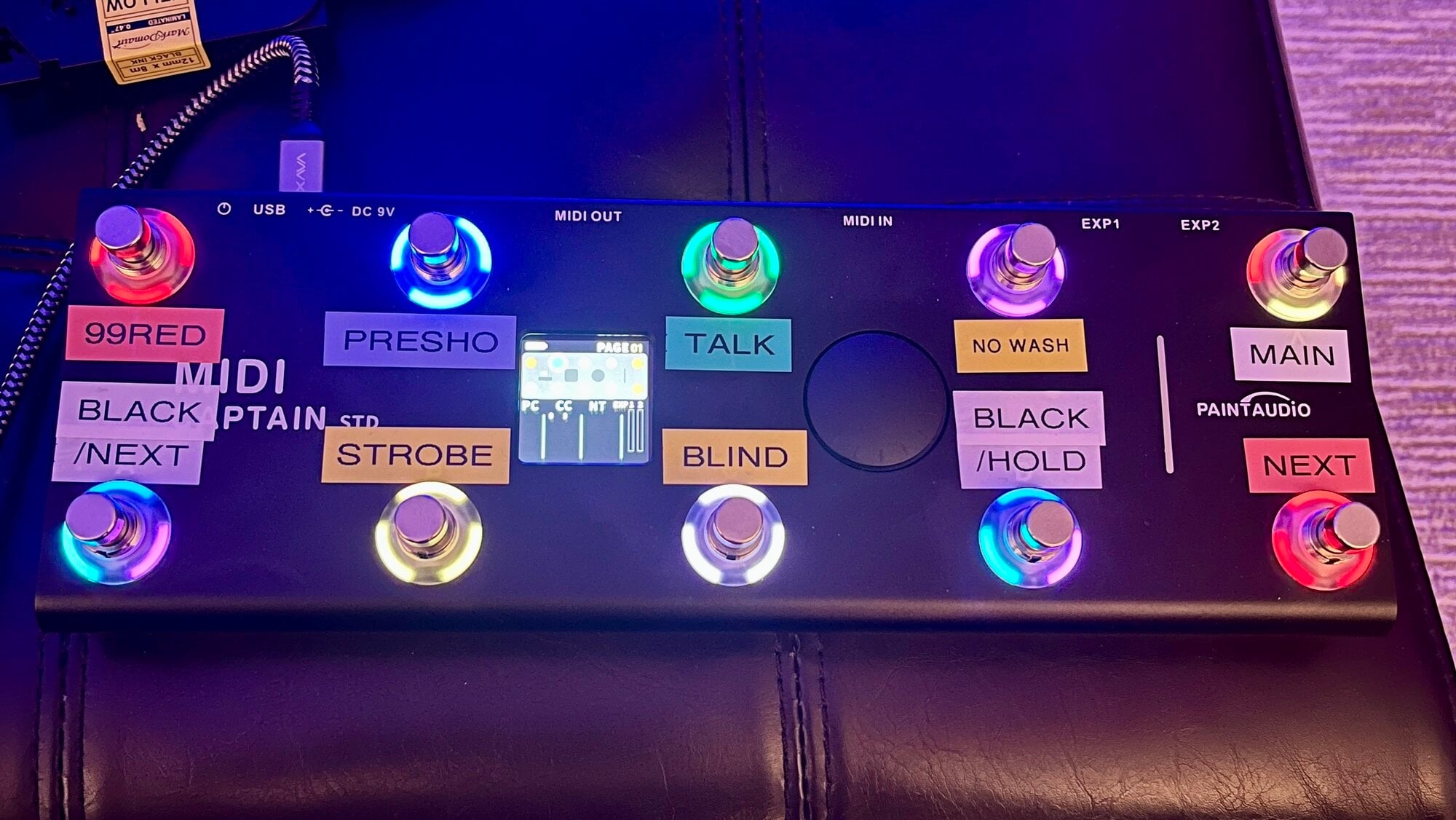
The built-in programs are good, but the real fun starts when you create your own color palettes and dial in the activity level to fit your band. After using it for about a year, I recently revamped all of my main show cues—the scenes I step through from song to song—and added a MIDI Captain foot controller. Now I can change scenes hands-free, plus I have dedicated switches for blackout, strobe, and blinder effects, along with shortcuts for preshow lighting and the time between songs when we're tuning or talking to the audience.
Personally, I like a warm amber wash on the singers, saturated color washes on the walls and ceiling, and just enough movement over the dance floor to add some excitement without turning it into a laser show. The venue we play do not allow haze/fog, so I've not bothered with FX lights, beams, or lasers.
If you're curious about what it's capable of, check out some videos on YouTube. People have come up with some incredible setups. It's one of those products that's easy to use right away, but there's plenty of depth if you want to customize it.
This is just a video with about half of my fixtures set up in the living room, clicking through my cues. YT rejected my background music, so there's no audio.
Gig video.
Getting started was surprisingly easy. Just download your fixtures' DMX profiles from the MaestroDMX website, import them into the software, then use the setup wizard to assign addresses and lay out your stage. You can be up and running pretty quickly.
The built-in programs are good, but the real fun starts when you create your own color palettes and dial in the activity level to fit your band. After using it for about a year, I recently revamped all of my main show cues—the scenes I step through from song to song—and added a MIDI Captain foot controller. Now I can change scenes hands-free, plus I have dedicated switches for blackout, strobe, and blinder effects, along with shortcuts for preshow lighting and the time between songs when we're tuning or talking to the audience.
Personally, I like a warm amber wash on the singers, saturated color washes on the walls and ceiling, and just enough movement over the dance floor to add some excitement without turning it into a laser show. The venue we play do not allow haze/fog, so I've not bothered with FX lights, beams, or lasers.
If you're curious about what it's capable of, check out some videos on YouTube. People have come up with some incredible setups. It's one of those products that's easy to use right away, but there's plenty of depth if you want to customize it.
This is just a video with about half of my fixtures set up in the living room, clicking through my cues. YT rejected my background music, so there's no audio.
Gig video.
Last edited:
I’ve really been intrigued by the Maestro but $900 is way too high for my use case. We only use 2 Chauvet Wash FX2 lights and only need to bring lighting for 50% of our shows. If you have more lights and use them more than I can see the benefit. Too bad they don’t offer a more cost effective version.

Me too. Just a Wash FX and a Wash FX2. I've been using the Chauvet Obey 70, and it's pretty beat up after many years of duty.I’ve really been intrigued by the Maestro but $900 is way too high for my use case. We only use 2 Chauvet Wash FX2 lights and only need to bring lighting for 50% of our shows. If you have more lights and use them more than I can see the benefit. Too bad they don’t offer a more cost effective version.
The Maestro would be a super upgrade, but really overkill for a couple of wash lights. I'd love to find a unit with USB connectivity for programming, and foot switches, for around $200.
I can always dream, can't I.

I agree, MaestroDMX is expensive for weekend warriors. In my case, five years of running sound for a wedding band as a hobby has padded my slush fund so it was a luxury I could afford.Me too. Just a Wash FX and a Wash FX2. I've been using the Chauvet Obey 70, and it's pretty beat up after many years of duty.
The Maestro would be a super upgrade, but really overkill for a couple of wash lights. I'd love to find a unit with USB connectivity for programming, and foot switches, for around $200.
I can always dream, can't I.
Check out Photon2 if you are on iOS. I believe it's MIDI capable for using a footswitch or sync'ing with Ableton. That's what I used previously (mentioned in previous posts in this thread).
MaestroDMX certainly added value to the overall show. In fact, the bandleader from that wedding band bought a MaestroDMX for his own rig a couple of weeks ago. I helped him set it up and program the lights, and he took it out to a gig the following weekend. He said it worked flawlessly out of the box and got rave reviews from the client and guests. He also had a much larger budget for fixtures – 8 light tubes, 8 PARs, 2 movers, and a bunch of PAR uplights — for starters. The more lights you have in your rig, the more interesting the results from MDMX. And in his case, he can add lighting as a premium pricing option when booking gigs.


