• TalkBass has been independent since 1998. Add your voice.
    Create a free account to reply to discussions, view embedded media, and browse with fewer display ads.
    Join freeLog in
    Want zero display ads or expanded classifieds tools? Compare plans.

Behringer XR18 Aux Out to IEMs?

Howdy!

I just got an XR18 mixer to use for practice for my two bandmates and me: guitar, bass, and drums.

We're happy with wired, mono monitoring using our IEMs, so I am planning to get three female XLR to female 1/8" (3.5 mm) cables, so we can each connect our IEMs to our own Aux outs on the XR18 to each create our individual IEM mixes.

Can I do it this way, or will I blow up the IEMs? 🧯

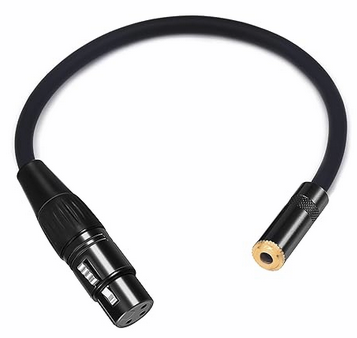
I'm looking at getting three of this cable to run from the XR18 Auxes to our individual IEMs:
Female XLR to Female 1/8" (3.5 mm) cable
1740123427022.png


I know I can buy a P16-D and some P16-M or P16-HQ units and use the cool Ultranet feature, and I'd be tempted to go that route, if only I had an extra $700.

I'm wondering if what I described above is a viable low-budget option.

Thank you for your help and advice!

buzz
 
Last edited:
As an Amazon Associate, TalkBass may receive commissions from qualifying purchases made via links on this site.

Howdy!

I just got an XR18 mixer to use for practice for my two bandmates and me: guitar, bass, and drums.

We're happy with wired, mono monitoring using our IEMs, so I am planning to get three female XLR to female 1/8" (3.5 mm) cables, so we can each connect our IEMs to our own Aux outs on the XR18 to each create our individual IEM mixes.

Can I do it this way, or will I blow up the IEMs? 🧯

I'm looking at getting three of this cable to run from the XR18 Auxes to our individual IEMs:
Female XLR to Female 1/8" (3.5 mm) cable
View attachment 7157514

I know I can buy a P16-D and some P16-M or P16-HQ units and use the cool Ultranet feature, and I'd be tempted to go that route, if only I had an extra $700.

I'm wondering if what I described above is a viable low-budget option.

Thank you for your help and advice!

buzz
Generally, aux outputs aren't powerful enough to drive headphones. Some reportedly do it acceptably well, but I don't know that the XR18 is one of those. Even if so, I believe there may issues that still make using a headphone amp the better alternative.

Edit: To not assume that you're familiar with headphone amp options (since you only mention the P16), I'd suggest doing an amazon search for "Behringer P2", and you'll find a number of options including that and others from $25 and up. Be aware that there are passive monitor packs (e.g., Behringer PM1) that are effectively correctly wired adapters similar in function to the cable you were asking about with volume control added...look for "amp" in the description. Hardly a budget-busting proposition.
 
Last edited:
As an Amazon Associate, TalkBass may receive commissions from qualifying purchases made via links on this site.
Ordinarily I’d say “no.” The XLR out is a balanced mono signal, with signal (+), signal (-) and shield. A headphone jack is signal (L+), (R+) and signal (-).

It COULD work if the XLR signal (+) is split to the headphone jack’s (L+) and (R+) terminals. But there’s no indication of how the adapter is wired. Like @drpepper noted, there are probably better alternatives.

That said, there are reviews with people saying it worked for headphones, and one mentions the XR18 specifically.

The page is flagged as a “frequently returned item,” but it can’t hurt to give it a try.

Regards,
Wayne A. Pflughaupt

Make Your Own Cables: A How-To Guide Unique Arrangements of Hymns, P&W Standards, and Original Tunes
Official Pedulla Club #45
Administrator, Official Heartfield Club #36
Administrator, Official Tobias Club #133
Administrator, Official Pre-Gibson Tobias Owners Club
Administrator, Fretless Club #943
Big Cabs Club #23
My Basses
My Rig: Stage and FOH Friendly
Make Your Own Cables: A How-To Guide
 
Last edited:
  • Like
Reactions: buzzby and drpepper
No, it won't work.

You might hear very low level audio going that route - even with the AUX out levels maxxed, but you need some form of headphone amp between the AUX out and your buds.
Use the $$ you were going to spend on those cables and buy a Behringer P2 (or equivalent model) which run from $35 to $60 on Amazon. Nowhere near $700.
Get each band member to buy their own. Then they are invested.
 
Last edited:
Ordinarily I’d say “no.” The XLR out is a balanced mono signal, with signal (+), signal (-) and shield. A headphone jack is signal (L+), (R+) and signal (-).

It COULD work if the XLR signal (+) is split to the headphone jack’s (L+) and (R+) terminals. But there’s no indication of how the adapter is wired. Like @drpepper noted, there are probably better alternatives.

That said, there are reviews with people saying it worked for headphones, and one mentions the XR18 specifically.

The page is flagged as a “frequently returned item,” but it can’t hurt to give it a try.

Regards,
Wayne A. Pflughaupt

Make Your Own Cables: A How-To Guide Unique Arrangements of Hymns, P&W Standards, and Original Tunes
Official Pedulla Club #45
Administrator, Official Heartfield Club #36
Administrator, Official Tobias Club #133
Administrator, Official Pre-Gibson Tobias Owners Club
Administrator, Fretless Club #943
Big Cabs Club #23
My Basses
My Rig: Stage and FOH Friendly
Make Your Own Cables: A How-To Guide
Yes^^^^^^

If that adapter cable is straight through wired you would be hearing some weird phase issues due to left and right being 180 degrees out of phase.
I have connected to headphones directly to XLR line outs for troubleshooting and test and some outputs will drive them fairly well.

All said get your self a P1 or P2 headphone amp, a good XLR mic cable and for less than a $100 short of the ear buds your set for IEM monitors.
Practice with that, one you get that dialed in you can upgrade from there if you need to.
 
Last edited:
Thank you everyone! I appreciate the knowledge/experience dumps--and fast, too!

I've decided to go with three P2 amps and the three XLR cables to connect them to the mixer. Seems the lowest cost option and many seem satisfied with it.

@erayser: I'm interested in going to stereo outs at some point. That would be a luxury!
Would you PM me (or message here) what hardware you used to accomplish this? I'm so new to this (just got my mixer yesterday). I'm not sure how that all goes together. Maybe it'll make more sense when I get the P2s.

Thank you all again!

buzz
 
  • Like
Reactions: s0c9
Thank you everyone! I appreciate the knowledge/experience dumps--and fast, too!

I've decided to go with three P2 amps and the three XLR cables to connect them to the mixer. Seems the lowest cost option and many seem satisfied with it.

@erayser: I'm interested in going to stereo outs at some point. That would be a luxury!
Would you PM me (or message here) what hardware you used to accomplish this? I'm so new to this (just got my mixer yesterday). I'm not sure how that all goes together. Maybe it'll make more sense when I get the P2s.

Thank you all again!

buzz
Let us know how the P2's and mixing your own IEM's works out for you , so you can share your experiences with others going down that path!
Plus, feel free to post XR18 questions here.. .plenty of us have used the unit..

PS: If you look at the bottom right of the mixer, you'll see a headphone jack, with a volume knob to the right.
That is designed to run headphones or buds and is an amplified signal.
The AUX outs will not do that.
 
@erayser: I'm interested in going to stereo outs at some point. That would be a luxury!
Would you PM me (or message here) what hardware you used to accomplish this? I'm so new to this (just got my mixer yesterday). I'm not sure how that all goes together. Maybe it'll make more sense when I get the P2s.

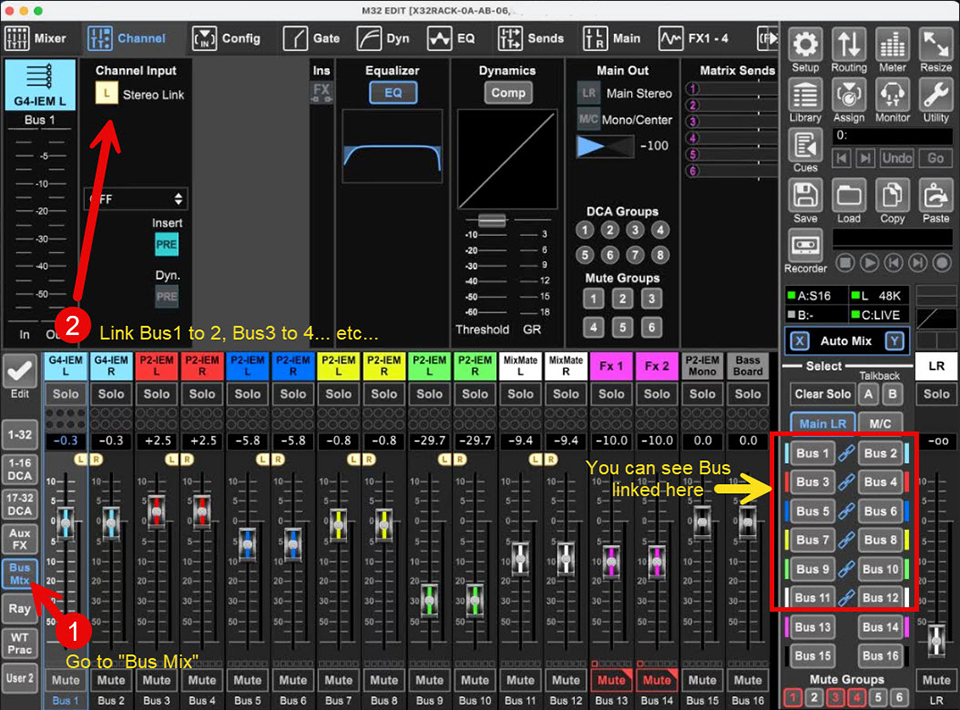
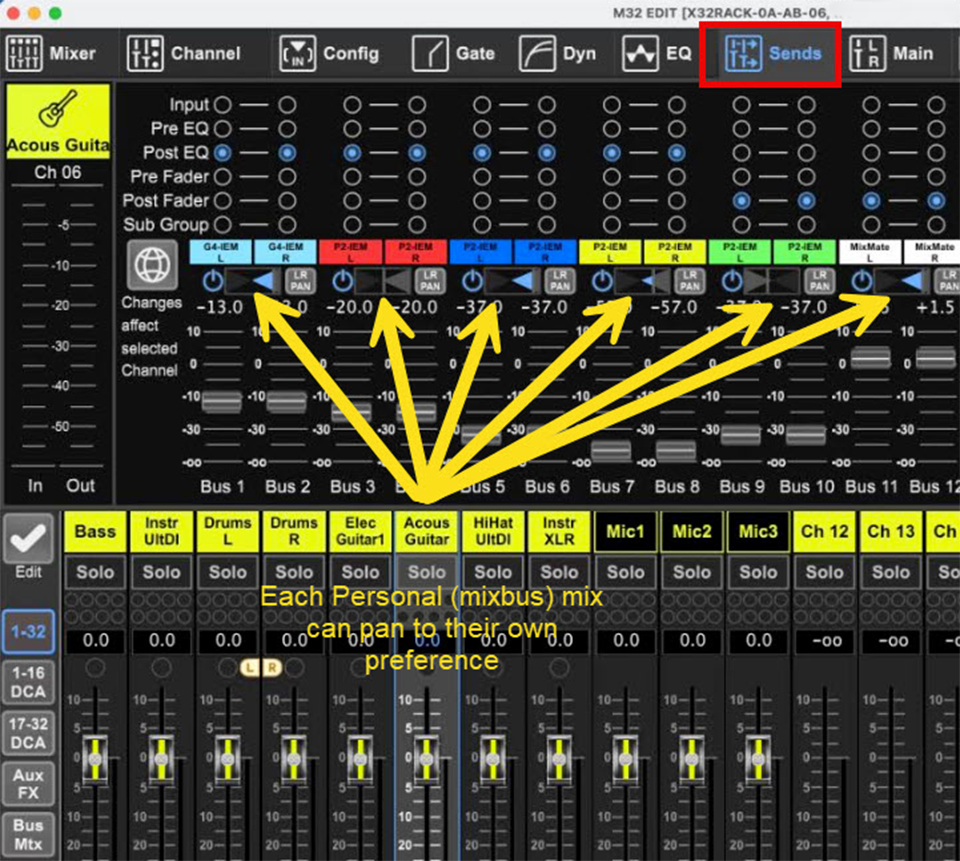
I have a X32 Rack, but I'm pretty sure the setup is similar to the XR18. It's easier to show you in screenshots... the XR18 mixer software interface is different, but it should hopefully give you an idea.

Basically I go to the mixbus channels and link 1-2, 3-4... etc..., then you can go to your channels, and do the panning on the "Sends" tab...

mixbuslink.jpg


chanpan.jpg


I used these cables to go from my mixbus outputs to the P2's:

Hope this helps...
 
As an Amazon Associate, TalkBass may receive commissions from qualifying purchases made via links on this site.

  • Like
Reactions: buzzby and WayneP
I can't believe how much I just learned from your post. Thank you, @erayser !

On the hardware side, I see you used a 2 x XLR to 1/4" TRS cable.
I assume you plugged the two XLRs into the linked Aux outs on the mixer.
My P2 (the one I ordered; I haven't received it yet) has an XLR connector to the mixer side and 3.5mm to my IEMs.
What do I do with the 1/4" TRS on the cable that you use?
Would I need a 2 x XLR to XLR cable instead... or does that defeat the purpose?

Thank you again!

buzz
 
I can't believe how much I just learned from your post. Thank you, @erayser !

On the hardware side, I see you used a 2 x XLR to 1/4" TRS cable.
I assume you plugged the two XLRs into the linked Aux outs on the mixer.
My P2 (the one I ordered; I haven't received it yet) has an XLR connector to the mixer side and 3.5mm to my IEMs.
What do I do with the 1/4" TRS on the cable that you use?
Would I need a 2 x XLR to XLR cable instead... or does that defeat the purpose?

Thank you again!

buzz
The Behringer P2 can take both XLR and 1/4 inch connectors.

8850294308894.jpg


If you want stereo, you would use the cable I linked. The 1/4" TRS (Tip, Ring, Sleeve) splits into left and right XLR connectors. You would plug in the left and right XLR mixbus outputs you linked as stereo on the XR18, and the TRS 1/4" goes in the input of the P2. A 2x XLR to XLR cable would just be a splitter, so it won't be in stereo... and would be a waste of a mixbus that could be used for another band member.
 
  • Like
Reactions: buzzby
The Behringer P2 can take both XLR and 1/4 inch connectors.

8850294308894.jpg


If you want stereo, you would use the cable I linked. The 1/4" TRS (Tip, Ring, Sleeve) splits into left and right XLR connectors. You would plug in the left and right XLR mixbus outputs you linked as stereo on the XR18, and the TRS 1/4" goes in the input of the P2. A 2x XLR to XLR cable would just be a splitter, so it won't be in stereo... and would be a waste of a mixbus that could be used for another band member.

Doh! I didn't notice that (I can't find things in the fridge that are in plain sight, either). Thank you again for your help with this!

By the way, your avatar/profile photo is excellent. Nice work on that!

Thank you again!

buzz
 
  • Like
Reactions: erayser
The Behringer P2 can take both XLR and 1/4 inch connectors.

8850294308894.jpg


If you want stereo, you would use the cable I linked. The 1/4" TRS (Tip, Ring, Sleeve) splits into left and right XLR connectors. You would plug in the left and right XLR mixbus outputs you linked as stereo on the XR18, and the TRS 1/4" goes in the input of the P2. A 2x XLR to XLR cable would just be a splitter, so it won't be in stereo... and would be a waste of a mixbus that could be used for another band member.
To use those with a 1/4 inch TRS stereo input there is an internal switch to put it in stereo operation.
 
  • Like
Reactions: buzzby and erayser
I have two 8 channel headphones amplifiers that we’ve used to power wired IEMs. Though mostly used in our practice studio, we did use them live a few times. We’re wireless these days, and both of those units are now listed for sale on FB….
 
No, it won't work.

You might hear very low level audio going that route - even with the AUX out levels maxxed, but you need some form of headphone amp between the AUX out and your buds.
Use the $$ you were going to spend on those cables and buy a Behringer P2 (or equivalent model) which run from $35 to $60 on Amazon. Nowhere near $700.
Get each band member to buy their own. Then they are invested.
Headphones and ear buds are inductive loads while most op-amps prefer to drive resistive loads. There are some op-amps that will work, but most will won't do well. OP will be at the mercy of whatever op-amp the mixer uses for sends.

Behringer's P1 uses RC4580 op-amps that are high output current that can work with buds. The P2 probably does as well.