
Enjoy the benefits of a premium membership!
Upgrade Account
-
TalkBass has been independent since 1998. Add your voice.
Create a free account to reply to discussions, view embedded media, and browse with fewer display ads.
Join free Log in
Want zero display ads or expanded classifieds tools? Compare plans.
You are using an out of date browser. It may not display this or other websites correctly.
You should upgrade or use an alternative browser.
You should upgrade or use an alternative browser.
converting .m4a files to .wav or .aif
- Thread starter Bob_Ross
- Start date
More options
Who Replied?

You can try VLC Media Player by VideoLan.
It is a Free open source media player that will convert audio file and video file formats. It runs on just about everything. This is an extremely popular media player.
Official download of VLC media player, the best Open Source player - VideoLAN
It is a Free open source media player that will convert audio file and video file formats. It runs on just about everything. This is an extremely popular media player.
Official download of VLC media player, the best Open Source player - VideoLAN
Last edited:


well, voice memo is likely lossy compressed (aac), so you'd better convert it to lossless, not to another lossy format. there used to be a 'convert to mp3' option in iTunes though, but re-coding of one lossy format to another gets you drawbacks of both. convert it to flac and call it a day.
on windows I use foobar2000 for all my audio converting purposes. last time I needed audio conversion on mac, I used this program.
on windows I use foobar2000 for all my audio converting purposes. last time I needed audio conversion on mac, I used this program.

Not sure what DAW you have, but you can import/export .m4a files in Logic X.
I'm using an ancient version of MOTU Digital Performer, version 4.something, that was invented long before the .m4a file format was.

You might also look at iTunes - it can convert formats
Convert a song to a different file format with the Apple Music app or iTunes for Windows
Also, of course, Audacity can do this
Convert a song to a different file format with the Apple Music app or iTunes for Windows
Also, of course, Audacity can do this
I find that hard to believe, the latest revision to the standard was published in 2003.I'm using an ancient version of MOTU Digital Performer, version 4.something, that was invented long before the .m4a file format was.
If you're actually running on a 17+ year old system you've got bigger problems.
Digital Performer - WikipediaAfter a complete rewrite, MOTU released Digital Performer 4.0 in May 2003, which ran exclusively on Mac OS X.
Well I'll be shaged.
Bro, time to shell out for the upgrade....

I use the current Adobe Audition. But that used to be CoolEdit back in the day, since it’s become Adobe Audition the CoolEdit has become kind of abandony so you can download it and the AAC Audition plug in has been purported to work based on a googling.Anyone have any experience converting .m4a files -- the default file format for an iPhone Voice Memo recording -- into a .wav or .aif or, hell, even an .mp3 file?
My DAW doesn't recognize .m4a files. Wut do?
Thanks.

For Audacity to work you need to add their optional FFmpeg library.
Hey, if the audio output is still decent, there's a transfer method that even predates your DAW and always works; going to analog and back!
Hey, if the audio output is still decent, there's a transfer method that even predates your DAW and always works; going to analog and back!


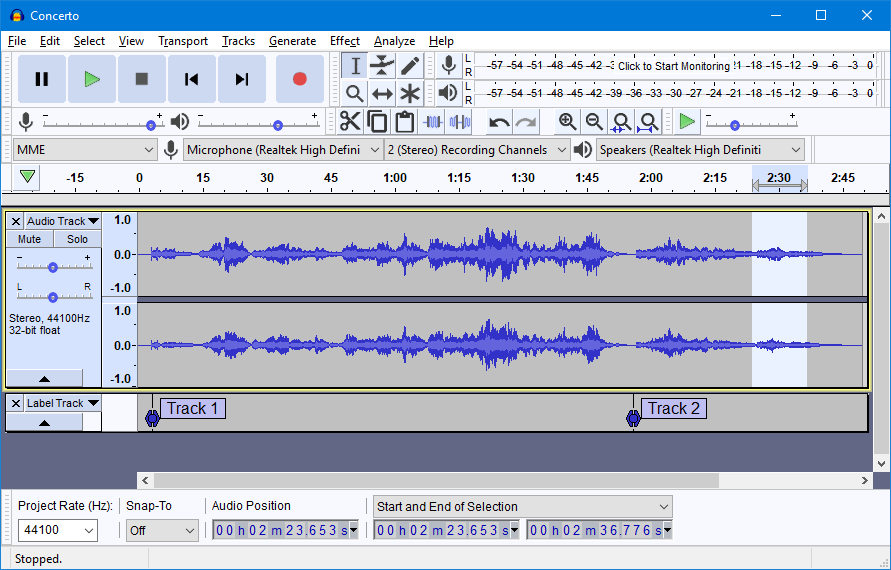
Audacity audio editor is free and available for Windows and Mac.
It supports many audio formats including m4a.
Has some other great editing, effects, and features.
This app is also great at recording streamed audio to file too.
Audacity Download link
It supports many audio formats including m4a.
Has some other great editing, effects, and features.
This app is also great at recording streamed audio to file too.
Audacity Download link
Last edited:

There are several free online converters if you search "converting .m4a files to .wav"

Hummergeist
Commercial User
- Jul 21, 2020
- 1,269
- 3,084
- Disclosures
- Tutorials, reviews, and interviews for Future Publishing.
Yep, Apple Music and iTunes still do it.You might also look at iTunes - it can convert formats
Convert a song to a different file format with the Apple Music app or iTunes for Windows
Also, of course, Audacity can do this

Anyone have any experience converting .m4a files
As it's not been mentioned, ffmpeg converts any video/audio to anything else. It's a bit basic looking, though I believe there are GUIs for it.
FFmpeg

I use this online converter and it is quite versatile . . .
Online converter - convert video, images, audio and documents for free
Online converter - convert video, images, audio and documents for free


