• TalkBass has been independent since 1998. Add your voice.
    Create a free account to reply to discussions, view embedded media, and browse with fewer display ads.
    Join freeLog in
    Want zero display ads or expanded classifieds tools? Compare plans.

Digital Audio Interface - Separate Playback from Recording...

I am really getting into writing and recording. But I'm also really new at this, so pardon any stupid questions that have obvious answers.

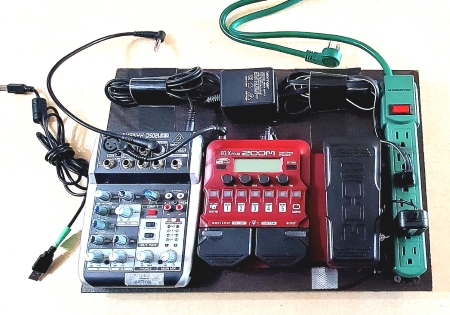
I am currently using a little Xenyx 4 track mixer to record my bass. The mixer connects to my laptop via USB and I use a variety of recording software but I usually use Reaper.

My bass is plugged into my Zoom B1X. My Zoom B1X goes into a Line In channel on my Xenyx mixer. The Xenyx mixer plugs into my laptop via USB for my recording software to record.

I want to record multiple (separate) tracks as I also play guitar, piano, synthesizer, etc. for editing later.

The problem I'm having is that anything and everything playing through my Xenyx mixer (whether it's previously recorded tracks, songs, etc. or my new bass track) is being recorded. Like I can playback track 1 so I can play along with it while I record my bass on track 2, but track 1 gets recorded again, along with the new track 2. No matter what settings I change in my software it makes no difference. Basically, if I can hear it in my headphones, it's getting recorded.

Maybe I'm just missing something obvious.

Is there a relatively inexpensive digital audio interface/mixer that sends the previously recorded track to my headphones (just to hear, not record), but also allows me to hear my bass as it's being recorded, yet keeping them separated? How do I physically separate the playback and recording. I've looked everywhere for answers, and nothing works given my hardware setup and software settings.

I'm willing to by an audio interface that does this, though I don't want to spend a lot. Just something functional.

Thanks for any help you can offer.
 
Last edited:

Yes, I disarmed it. I've also tried every other setting related to track 1 with no luck. I've tried everything suggested in countless Google searches but nothing works. If I'm hearing it (which I need to, in order to play along with it), it's getting recorded. I just can't get the playback on one track separated from the recording of new one.
 
So track one is going back out to the mixer for monitoring, then being combined with track two when you record it. You could try muting track one while you record track two but you won't hear it. Or on the track one Output, switch it to No Output but again you probably won't hear track one when you record track two. Just use Reaper metronome to keep time. I think it could be one of the draw backs of the Xenyx mixer in that it's not designed to do overdubs. It's designed to record multiple tracks in one go like in a live situation. That's my best guess.
 
Last edited:
  • Like
Reactions: M-Mittlesteadt
You could try monitoring from the computer instead of the mixer. So in the computers sound settings, switch the output sound to the computer speakers. That way the audio won't be going back out to the mixer.
I may have tried that at one point but I'll try it again.

So...computer sound output to computer speakers, but in Reaper leave the sound output to USB?

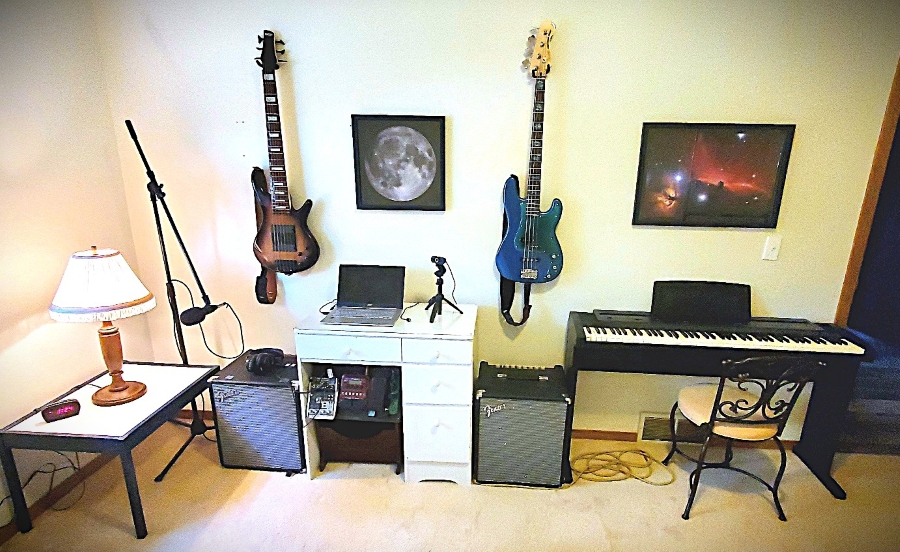
I currently do not use a stereo in my studio. I could route the computer sound output to my other Rumble 100 "aux" input and hear track one through the amp, while listening to my bass on Track2 (as it's being recorded) through the Xenyx headphone out. I'm not sure if Reaper will see the USB sound output if the computer's output is changed from USB to headphone speaker though. I am not usually using my bass amps in the studio.

All I can do is try.

My studio...

New-Studio.jpg


My bass recording setup going to my laptop...

pedalboard-web.jpg
 
Last edited:
Your Xenyx mixer’s USB output takes the main stereo mix from the mixer (the same thing you’re hearing in your headphones) and sends that exact same signal to your computer as the USB audio input. That means if your playback from your computer is also routed through the mixer into the main mix, it’s going back out through USB into your DAW, causing the “everything gets re-recorded” issue. This is called mix-minus routing but the Xenyx USB mixers don’t have it. They can’t send your live input to the computer without also sending the playback.

An audio interface with proper USB multitracking can send only your live instrument to the computer for recording, and send your DAW’s playback to your headphones/speakers without re-recording it. The key is that the interface needs separate input and output buses — not just “USB Main Mix.”

Is there a relatively inexpensive digital audio interface/mixer

As always, you need to name a specific budget or you'll get an inappropriate grab-bag of recommendations. I have a lot of experience with different audio interfaces and generally stay away the most popular inexpensive brands (Focusrite Scarlett, Behringer, M-Audio) and for the best audio quality and build generally recommend Audient, Universal Audio and SSL at low-to-moderate price points. (If you have iOS devices I also like the Arturia MiniFUSE line, which has a built-in USB-hub for external devices like a controller keyboard.)

The gold standard for detailed, compehensive and ad-free audio interface reviews is Julian Krause on YouTube. Gret for deep dives, with charts and comparisons to previously reviewed interfaces.


He posted this basics video a couple of years ago:

 
Last edited:
Your Xenyx mixer’s USB output takes the main stereo mix from the mixer (the same thing you’re hearing in your headphones) and sends that exact same signal to your computer as the USB audio input. That means if your playback from your computer is also routed through the mixer into the main mix, it’s going back out through USB into your DAW, causing the “everything gets re-recorded” issue. This is called mix-minus routing but the Xenyx USB mixers don’t have it. They can’t send your live input to the computer without also sending the playback.

An audio interface with proper USB multitracking can send only your live instrument to the computer for recording, and send your DAW’s playback to your headphones/speakers without re-recording it. The key is that the interface needs separate input and output buses — not just “USB Main Mix.”


As always, you need to name a specific budget or you'll get an inappropriate grab-bag of recommendations. I have a lot of experience with different audio interfaces and generally stay away the most popular inexpensive brands (Focusrite Scarlett, Behringer, M-Audio) and for the best audio quality and build generally recommend Audient, Universal Audio and SSL at low-to-moderate price points. (If you have iOS devices I also like the Arturia MiniFUSE line, which has a built-in USB-hub for external devices like a controller keyboard.)

The gold standard for detailed, compehensive and ad-free audio interface reviews is Julian Krause on YouTube. Gret for deep dives, with charts and comparisons to previously reviewed interfaces.


He posted this basics video a couple of years ago:


Thank you for you reply. It clears a lot up for me.

I'm looking at around $200 (US) for a budget. I'm not really looking for Supreme audio quality as much as I am learning how this all works first.

Baby steps.
 
These all have 2 combo inputs (mic/line/Hi-Z), and two have 'vintage' circuit buttons for a warmer preamp-like sound if you want.

Universal Audio Volt 2 is $170-$200,. Its Vintage mode models a 610 tube preamp for warmth. Has MIDI I/O (useful for synths and controllers). Direct monitoring switch. Solid build, quality converters for the price.

SSL's SSL 2 (there's also a newer $250 SSL 2+ that has 4 line outputs instead of 2, and has MIDI) is officially $229 but typically falls just under $200. Its “Legacy 4K” button adds subtle EQ/analog vibe from SSL’s big consoles. Great build quality and low noise floor. Big monitor knob and separate headphone control. Direct monitoring switch to blend input with playback. USB-C connection (works fine on USB-A with adapter). Clean sound for bass/guitar, plus instant “mix-minus” routing so playback isn’t re-recorded.

Audient EVO 4 is $160-$180 and has a big knob used for different functions. Super simple interface. “Smartgain” auto-sets your input gain and it works really well in practice. Separate headphone and monitor controls. Very clean, transparent preamps (Audient console lineage). Loopback feature for recording software audio (can be turned on/off as needed — unlike your Xenyx, it doesn’t always send playback).
 
  • Like
Reactions: M-Mittlesteadt
These all have 2 combo inputs (mic/line/Hi-Z), and two have 'vintage' circuit buttons for a warmer preamp-like sound if you want.

Universal Audio Volt 2 is $170-$200,. Its Vintage mode models a 610 tube preamp for warmth. Has MIDI I/O (useful for synths and controllers). Direct monitoring switch. Solid build, quality converters for the price.

SSL's SSL 2 (there's also a newer $250 SSL 2+ that has 4 line outputs instead of 2, and has MIDI) is officially $229 but typically falls just under $200. Its “Legacy 4K” button adds subtle EQ/analog vibe from SSL’s big consoles. Great build quality and low noise floor. Big monitor knob and separate headphone control. Direct monitoring switch to blend input with playback. USB-C connection (works fine on USB-A with adapter). Clean sound for bass/guitar, plus instant “mix-minus” routing so playback isn’t re-recorded.

Audient EVO 4 is $160-$180 and has a big knob used for different functions. Super simple interface. “Smartgain” auto-sets your input gain and it works really well in practice. Separate headphone and monitor controls. Very clean, transparent preamps (Audient console lineage). Loopback feature for recording software audio (can be turned on/off as needed — unlike your Xenyx, it doesn’t always send playback).
Thank you SO much for this info!!! I really appreciate it!
 
Thank you SO much for this info!!! I really appreciate it!

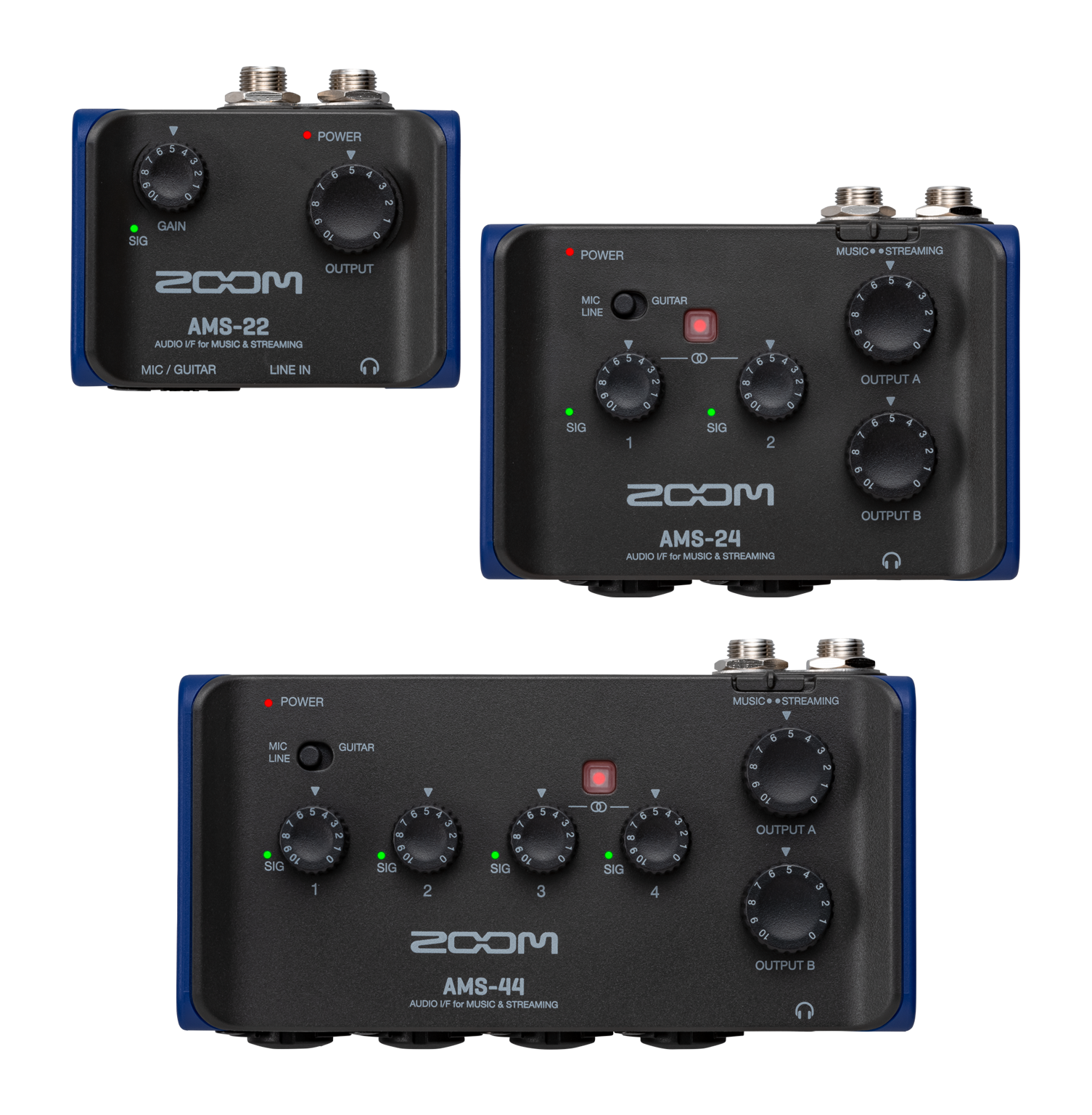
And there's other options that have decent reputations, although I'm not experienced with them. I remember you have a portable board you've got your mixer on, so you might want something even smaller. I have not looked into the specs but the tiny Zoom AMS line of audio interfaces look pretty neat and could squeeze onto your board. I remember several people on Reddit praised them. The U-22 sells for $80(!), the U-24 is $120, and the U-44 sells for $170


  • Like
Reactions: M-Mittlesteadt
On Mac, using GarageBand with the EVO is easy-peasy. You can easily select different input and output devices via a pop-up menu. By default, it records only the armed track’s input, not the entire mix. If you use EVO’s direct monitor knob/button, you'd turn off “Input Monitoring” in GarageBand to avoid echo. Alternatively, if you wanted GarageBand to handle monitoring, keep “Input Monitoring” on and disable direct monitoring on the EVO.

I’m not experienced with Reaper, but as far as I know, on Mac it expects a single Core Audio device to serve as both input and output. I believe Reaper used to allow separate input and output devices (like GarageBand and Logic do), but this feature was deprecated because it affected stability and performance. Not sure about the current version but earlier versions of Reaper had an “Allow use of different input and output devices” option in Preferences marked as legacy. (Has this been fixed or updated in Reaper for Mac? I don't know. Maybe!)

A common workaround was to use macOS’s Aggregate Device feature in the Audio MIDI Setup app to combine multiple devices into one for Reaper. However, this workaround can introduce some latency.

Anyway, when using an EVO interface with Reaper, to monitor your DAW playback in headphones and hear your bass while recording without re-recording old tracks I'd have the EVO as both the input and output device in Reaper’s preferences and set the sample rate. Then in the EVO’s mixer software, I'd go to the Loopback section and make sure it's disabled. (If loopback is on, DAW playback will feed back into the input signal.)

You can then choose between Direct Monitor (zero latency) or DAW Monitor (monitor through Reaper’s effects chain with some latency). The playback track should be set to “Master,” which sends sound to your EVO headphones but does not loop back into the recording. When recording, arm the new track and select the correct EVO input. This setup ensures only your live input is recorded while playback remains separate.
 
You’d need an outboard mixer with dedicated monitor/AUX mix outs. It’s all about the routing in the hardware in this type of solution. Your Xenyx doesn’t have that feature.

Going with a USB audio interface, you manage the routing in your software (for the most part, there are some exceptions). There are ton of sub $200 audio interface options and list of good suggestions so far. I’d recommend going that route for max flexibility. I’m a fan of the SSL2/2+.
 
If possible on your PC and in Reaper (it is posible on MacOS e.g. in GarageBand and in Logic), don't use the Xenyx as your playback device, only as your recording device. Use the built-in line out on your PC as your playback device instead, then plug its output into the 2-track input. Make sure to enable "2-tr to phones", disable "2-tr to mix". Then you should be able to monitor your previously recorded tracks in the headphones without having them on main out (in theory; we have a Xenyx in the rehearsal room as a keyboard submixer but we've never used its USB yet).
 
  • Like
Reactions: DirtDog
Make sure to enable "2-tr to phones", disable "2-tr to mix".
Maybe I'm just missing something obvious.
Hm…
Actually, looking at a detailed photo of the Q502USB, the buttons "to phones" and "to mix" are labeled as "USB/2-track".
Could it be that you have simply enabled the "to mix" button?
If so, then of course the USB input gets recorded again.
 
  • Like
Reactions: M-Mittlesteadt

Latest posts