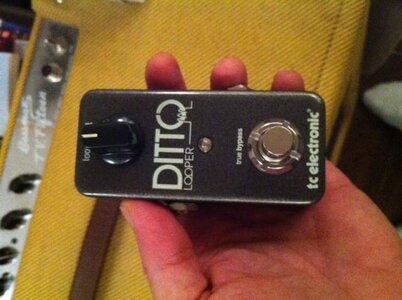
This is a bit geeky but I bought this pedal today, and thought I'd share my first impressions, and post a recording of the first thing I did with it.
The pedal is tiny, and it takes about 1 second to understand how to use it. As you can see from the second pic, the instructions are basically what you see right there, there is nothing else to figure out. It really does nothing more than record your loop, and play it back. For me, if I want anything more complicated, I record to my Mac and mess around with loops there, and I wanted this pedal just for the sole purpose of jamming with myself late at night. For that purpose, it's perfect.
The sound quality, as far as I can tell, is totally unaffected by the looper, and there is no noticeable latency of any kind when in use. In other words, you get exactly what you put in, and exactly at the time you record it. The attached audio file was recorded straight to my Mac using the DI from a Fender Bassman TV15 with an '83 P Bass, with some very old Dean Markley Blue Steel strings, with the tone rolled down to about half way. It's nothing spectacular, literally the first thing that I played, 3 layers of sound in a 1 bar loop, but it should be enough to indicate the instant appeal of this thing.
The cool thing about this is that I came up with this in about half a minute, and then I had it looping for about an hour, in which time I played along on my bass, and some percussion instruments, then made some coffee, came back to it, then played some more, then recorded it, and the simplicity of the whole process meant that this was a really enjoyable experience. I'm used to recording on my computer and generally dealing with audio in software a lot, and the process of starting, stopping, saving files etc can drain your creativity a lot of the time. This pedal is pretty much the opposite of that, it's a very fluid and intuitive way to play and make music.
I'm trying to think of any negatives - the only one I have is that it needs a power supply to work, because it's too small to hold a battery. That's extra cables, which is a pain for me, but I'm sure it won't bother most people. The pedal also has a USB slot for software updates, and this might have been a good opportunity to allow users to transfer files direct to computers, and as far as I know you can not do this. (although I haven't checked).
Overall - cool pedal, I'm definitely keeping it.
The pedal is tiny, and it takes about 1 second to understand how to use it. As you can see from the second pic, the instructions are basically what you see right there, there is nothing else to figure out. It really does nothing more than record your loop, and play it back. For me, if I want anything more complicated, I record to my Mac and mess around with loops there, and I wanted this pedal just for the sole purpose of jamming with myself late at night. For that purpose, it's perfect.
The sound quality, as far as I can tell, is totally unaffected by the looper, and there is no noticeable latency of any kind when in use. In other words, you get exactly what you put in, and exactly at the time you record it. The attached audio file was recorded straight to my Mac using the DI from a Fender Bassman TV15 with an '83 P Bass, with some very old Dean Markley Blue Steel strings, with the tone rolled down to about half way. It's nothing spectacular, literally the first thing that I played, 3 layers of sound in a 1 bar loop, but it should be enough to indicate the instant appeal of this thing.
The cool thing about this is that I came up with this in about half a minute, and then I had it looping for about an hour, in which time I played along on my bass, and some percussion instruments, then made some coffee, came back to it, then played some more, then recorded it, and the simplicity of the whole process meant that this was a really enjoyable experience. I'm used to recording on my computer and generally dealing with audio in software a lot, and the process of starting, stopping, saving files etc can drain your creativity a lot of the time. This pedal is pretty much the opposite of that, it's a very fluid and intuitive way to play and make music.
I'm trying to think of any negatives - the only one I have is that it needs a power supply to work, because it's too small to hold a battery. That's extra cables, which is a pain for me, but I'm sure it won't bother most people. The pedal also has a USB slot for software updates, and this might have been a good opportunity to allow users to transfer files direct to computers, and as far as I know you can not do this. (although I haven't checked).
Overall - cool pedal, I'm definitely keeping it.