
• TalkBass has been independent since 1998. Add your voice.
    Create a free account to reply to discussions, view embedded media, and browse with fewer display ads.
    Join freeLog in
    Want zero display ads or expanded classifieds tools? Compare plans.

Do You Know Your IP #?

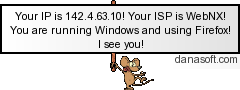
Funny thing is, I was at another site and saw someone with this in thier sig. I didn't give it much notice at first, then I thought to myself, hey that is my IP showing in that banner!
But everyone should only see thier own IP, not anyone elses.

azraelsig01.png


Invalid Link Removed
Treena
 
Originally posted by Treena Foster
Funny thing is, I was at another site and saw someone with this in thier sig. I didn't give it much notice at first, then I thought to myself, hey that is my IP showing in that banner!
But everyone should only see thier own IP, not anyone elses.


azraelsig01.png


Invalid Link Removed
Treena


Funny thing is--

my computer is cool. It DOES say that my IP is at baylor.edu, but it gives the wrong one :D

My firewall is virtually impenetrable.
 
When you connect to a website, your browser makes a request for the page and any associated content to be sent back to it. The protocol for doing this dictates passing a bunch of information including the IP address (or firewall), browser type and platform you are using.

It's not rocket science to extract it - although putting it in the graphic using some server side magic is a neat idea.

BTW, many websites are set up to not work if not viewed with IE because the designer hasn't checked them with anything else. To circumvent this other browsers, such as Opera, allow you to pretend to be using IE, thus giving the apparently erroneous result. FWIW, my setup - Firebird, running on Linux - is reported accurately :D

Wulf
 
Originally posted by soundoholic
why is it a big deal for them to "know" you ip. You can just look it up on your pc in My network connections. I can't remember how to do it on a MAC.

If you are running OS X go to system preferences > network. Then select whichever method you are using to connect (ethernet, airoport, etc). click on the TCP/IP tab and it shows you your IP address.

FWIW, I'm on my University's wireless network and it got my IP address right.