
• TalkBass has been independent since 1998. Add your voice.
    Create a free account to reply to discussions, view embedded media, and browse with fewer display ads.
    Join freeLog in
    Want zero display ads or expanded classifieds tools? Compare plans.

Unable to Duplicate Font change during editing

System:
  • Mac running up-to-date OSX Mavericks 10.9.4
Occurrence:
  • while writing a post, about one out of every two or three times I post
  • has been happening ever since the new forum software replaced vBulletin
Problem:
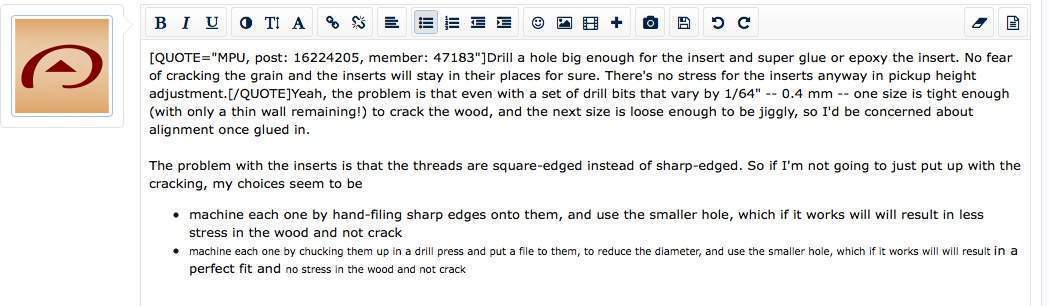
  • While writing a post, part of it will switch to a small font, for no apparent reason. It will change at the the typing cursor, and for some distance behind, as well as occasionally in other areas.
  • the text will be very small, and in a different font. I can then change the size to "3" to make it match fairly well to the unaffected text, but the font still does't match properly, even trying all three available sans serif fonts
Screen capture attached. The image was taken just as I was typing at the end of that text.
TBpost.jpg
 
  • Like
Reactions: paul
Thank you for the detailed report. Much appreciated. Is this safari? What version? I'll get this in front of the developers ASAP. There's one more member that has the same issue. Odd that I'm running the same software but have never had this bug.
 
@pilotjones waiting on some info from you (posts 2 and 3) to see if we can get this resolved. Thanks!
Oops, sorry, I sometimes miss replies when they're not in Luthier's corner.

Thank you for the detailed report. Much appreciated. Is this safari? What version? I'll get this in front of the developers ASAP. There's one more member that has the same issue. Odd that I'm running the same software but have never had this bug.
Current versions - I'm at Safari Version 7.0.5 (9537.77.4) and OS X 10.9.4 build 13E28.
Does it happen if you don't use any of the editor formatting buttons? (No bullets, special formatting, etc)
As far as I know, it happens independently of any formatting button use, and when I don't use any formatting at all. Although that post I screencapped did use bullets, so let me test.
  • item one
  • item two
  • item three
No problem, and I did use bullets. So, yeah, I think it just happens randomly. Also, correction to my first post - I try all four (not three) sans serf fonts, and none match the default font in the editing box.
 
Oops, sorry, I sometimes miss replies when they're not in Luthier's corner.

Current versions - I'm at Safari Version 7.0.5 (9537.77.4) and OS X 10.9.4 build 13E28.
As far as I know, it happens independently of any formatting button use, and when I don't use any formatting at all. Although that post I screencapped did use bullets, so let me test.
  • item one
  • item two
  • item three
No problem, and I did use bullets. So, yeah, I think it just happens randomly. Also, correction to my first post - I try all four (not three) sans serf fonts, and none match the default font in the editing box.

Thanks! I'm sorry one last question I forgot: Does your altered text then appear normally in the thread after you submit your post?
 
Thanks! I'm sorry one last question I forgot: Does your altered text then appear normally in the thread after you submit your post?
Good question. I'm not sure, since I have always fixed it right away. When it happens again (it did happen again yesterday day so it is a continuing problem) I'll try posting without correction, and see what happens.
 
OK, it happened again. Various words shrank or did not shrink in the compose post box. I did not get a screen shot of that. But I did post it without correcting the font, and I got this. I got this capture after posting, but before I went back and fixed it up.
post-font-size.jpg

Those various words decided on its own to stay large or to shrink - I did not do anything to them.