I had to turn my master volume on the amp down a bit but after that it seemed ok...The headphone out is too hot for the H4N input.
See post 15.

Enjoy the benefits of a premium membership!
Upgrade Account
-
TalkBass has been independent since 1998. Add your voice.
Create a free account to reply to discussions, view embedded media, and browse with fewer display ads.
Join free Log in
Want zero display ads or expanded classifieds tools? Compare plans.
You are using an out of date browser. It may not display this or other websites correctly.
You should upgrade or use an alternative browser.
You should upgrade or use an alternative browser.
How to record using Zoom H4n?
- Thread starter ReeV0
- Start date
More options
Who Replied?
I had to turn my master volume on the amp down a bit but after that it seemed ok...
You said this:
Seemed to work ok, quality wasn't that great and the H4n seemed to generate some noise/hiss.
The headphone out is too hot (no matter how much you turn it down). The only drawback with the H4n is that the inputs are mic level (not line level). You have to pad any line level signal with an attenuator to get rid of hiss. Doing this will give you a high quality recording.
You can use a DI between you amp and zoom (or between your amp and zoom). The DI needs to have a pad switch (most do, see photos below). Select -20db.
Alternately you can make or buy a simple in line attenuator (see examples attached).
Attachments

Hmm interesting! I can't see a pad switch, only a pre/post switch for the amp tone I'm guessingYou said this:
The headphone out is too hot (no matter how much you turn it down). The only drawback with the H4n is that the inputs are mic level (not line level). You have to pad any line level signal with an attenuator to get rid of hiss. Doing this will give you a high quality recording.
You can use a DI between you amp and zoom (or between your amp and zoom). The DI needs to have a pad switch (most do, see photos below). Select -20db.
Alternately you can make or buy a simple in line attenuator (see examples attached).
View attachment 4119586
View attachment 4119587
Ok do I bought a DI cable and hooked it all up, left the H4n on auto-level record. It reduced it to 70% but I noticed the clipping light was still flashing, but it didn't reduce the levels any more. Just put the recordings on my laptop and had a listen, they're all crazy distorted. Does this mean I can't use auto-level and have to set it manually myself each time?
Tbh I'm not really convinced that recording out of the DI will make the recording sound any better/clearer than if I recorded using the amp's mic-out
Tbh I'm not really convinced that recording out of the DI will make the recording sound any better/clearer than if I recorded using the amp's mic-out
Ok do I bought a DI cable and hooked it all up, left the H4n on auto-level record. It reduced it to 70% but I noticed the clipping light was still flashing, but it didn't reduce the levels any more. Just put the recordings on my laptop and had a listen, they're all crazy distorted. Does this mean I can't use auto-level and have to set it manually myself each time?
Tbh I'm not really convinced that recording out of the DI will make the recording sound any better/clearer than if I recorded using the amp's mic-out
Yes you need to manually set the levels. Auto level is for outdoors or a big room. When I am recording from with my Sansamp set at -20db, I have the H4N input level set at 25(ish).
The DI out on your amp can still be a too hot signal (it is not the same as a DI box).
Does your amp DI have an output level control that you can turn down?
What amp do you have?
Is your bass active (I cant remeber if you already mentioned this)?
If your bass is passive, try plugging it straight into the Zoom, set the inpout leve at 25 and listen to the result.
Then move on to getting you amp sound.
Im going out on errands now but when I get back I can record a couple of different tracks for you to hear and describe the setup for each.
Then move on to getting you amp sound.
Im going out on errands now but when I get back I can record a couple of different tracks for you to hear and describe the setup for each.
Ok I'll try setting in input level manually next time. The amp doesn't have an output level, the only thing that can reduce the DI volume is if I turn down the preamp gain, but it's already at 8 o'clock... It's a TC RH750 and the bass is an Ibanez SR500 (active preamp, passive pickups)Yes you need to manually set the levels. Auto level is for outdoors or a big room. When I am recording from with my Sansamp set at -20db, I have the H4N input level set at 25(ish).
The DI out on your amp can still be a too hot signal (it is not the same as a DI box).
Does your amp DI have an output level control that you can turn down?
What amp do you have?
Is your bass active (I cant remeber if you already mentioned this)?

OK sorry for the wait. I recorded some snips just now (after supper/before the dishes!).
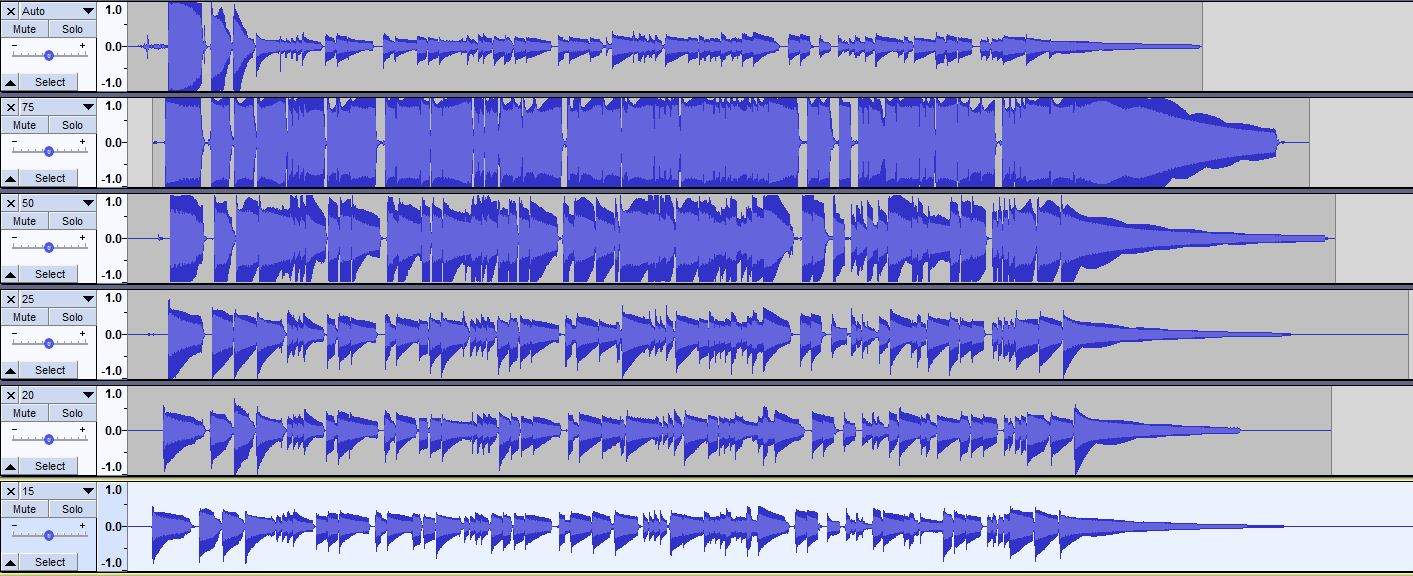
I have to say I was surprised the the autolevel did an OK job! It started out very saturated but levelled out in a few seconds.
All takes are out of the DI on my YBA-100 (no DI volume control like your TC RH750). Gain at 4 straight into the zoom. Track 1 Auto level, track 2 manual level set at 75, track 3 set at 50, track 4 set at 25, track 5 set at 20 and last track set at 15.
I did not use a passive DI to pad down more.
Audacity screenshot (note I did not edit the files). Links to audio further down.
[Invalid or Expired Link Removed]
[Invalid or Expired Link Removed]
[Invalid or Expired Link Removed]
[Invalid or Expired Link Removed]
[Invalid or Expired Link Removed]
[Invalid or Expired Link Removed]
I have to say I was surprised the the autolevel did an OK job! It started out very saturated but levelled out in a few seconds.
All takes are out of the DI on my YBA-100 (no DI volume control like your TC RH750). Gain at 4 straight into the zoom. Track 1 Auto level, track 2 manual level set at 75, track 3 set at 50, track 4 set at 25, track 5 set at 20 and last track set at 15.
I did not use a passive DI to pad down more.
Audacity screenshot (note I did not edit the files). Links to audio further down.
[Invalid or Expired Link Removed]
[Invalid or Expired Link Removed]
[Invalid or Expired Link Removed]
[Invalid or Expired Link Removed]
[Invalid or Expired Link Removed]
[Invalid or Expired Link Removed]

I have a Zoom H4n Pro. I'm not sure what the difference is between the "pro" and standard one. I used to use an H2 to record rehearsal live when we pushed air, and also with a stereo out from the mixing board when we rehearsed with headphones only. The h2 worked great for that, and the h4N does a great job as well.
I have recently been using the H4n as a USB interface into GarageBand with good luck. The USB cable powers the H4n so I don't have to use an AC adapter or worry about batteries.
I import tracks into GarageBand and play along with them using the Zoom between my bass and the computer. I record 2 tracks for bass - I plug into my SansAmo BDDI and use the parallel output into one channel and the affected signal into the other channel. This way I get a dry signal as well as the affected signal in case I want my sound to be different than the SABDDI tone.
The levels are easy to set with the side mouthed rocker switch. I have to make sure my SABDDI switches are instrument level and not line level.
I think the preamps on the H4n are supposed to be only OK, but I haven't noticed a ton of noise.
It seems that this device was meant to be used in this fashion as well as a field recorder. The newer ones, H5, H6, H8 have more inputs for simultaneous recording.
It's a super handy device. It also has drum patches for practice as well as some effects that seem similar to those on the B3.
I'm not an expert, and I'm still learning, but it seems to be working well for this.
I have recently been using the H4n as a USB interface into GarageBand with good luck. The USB cable powers the H4n so I don't have to use an AC adapter or worry about batteries.
I import tracks into GarageBand and play along with them using the Zoom between my bass and the computer. I record 2 tracks for bass - I plug into my SansAmo BDDI and use the parallel output into one channel and the affected signal into the other channel. This way I get a dry signal as well as the affected signal in case I want my sound to be different than the SABDDI tone.
The levels are easy to set with the side mouthed rocker switch. I have to make sure my SABDDI switches are instrument level and not line level.
I think the preamps on the H4n are supposed to be only OK, but I haven't noticed a ton of noise.
It seems that this device was meant to be used in this fashion as well as a field recorder. The newer ones, H5, H6, H8 have more inputs for simultaneous recording.
It's a super handy device. It also has drum patches for practice as well as some effects that seem similar to those on the B3.
I'm not an expert, and I'm still learning, but it seems to be working well for this.
Mine is a H4N pro also. I think the preamps are the same. Yes you are right, it is more suited to field recordings but it is also good as an interface. I have since gone up to an L12 then L20. The zoom products are a great value (cant be beat) for their price range.
Here are couple of H4N band practice recordings I dug up. Not super hi-fi but done 2 track with the onboard mics only. This brings back some memories, sorry if I got carried away!
Here are couple of H4N band practice recordings I dug up. Not super hi-fi but done 2 track with the onboard mics only. This brings back some memories, sorry if I got carried away!
Last edited:
Interesting! I tried again last night, had to have the H4n input set to "1" otherwise it would sometimes clip. There's no option to adjust the DI volume control on the RH750 unfortunately.OK sorry for the wait. I recorded some snips just now (after supper/before the dishes!).
I have to say I was surprised the the autolevel did an OK job! It started out very saturated but levelled out in a few seconds.
All takes are out of the DI on my YBA-100 (no DI volume control like your TC RH750). Gain at 4 straight into the zoom. Track 1 Auto level, track 2 manual level set at 75, track 3 set at 50, track 4 set at 25, track 5 set at 20 and last track set at 15.
I did not use a passive DI to pad down more.
Audacity screenshot (note I did not edit the files). Links to audio further down.
View attachment 4124134
[Invalid or Expired Link Removed]
[Invalid or Expired Link Removed]
[Invalid or Expired Link Removed]
[Invalid or Expired Link Removed]
[Invalid or Expired Link Removed]
[Invalid or Expired Link Removed]
Interesting! I tried again last night, had to have the H4n input set to "1" otherwise it would sometimes clip. There's no option to adjust the DI volume control on the RH750 unfortunately.
Woa level 1 is really low.
I did a little digging and found that the preamps did change from H4N to H4NPro, also that the H4N accepts line level signals only with the 1/4" connector (not XLR). H4NPro accepts line level through 1/4" and XLR. So maybe that is something...
As a test try plugging your active bass straight into you H4N (the connectors are combination XLR/1/4"). See what happens.
Or, one of these will work for sure: https://www.parts-express.com/Inline-XLR-Attenuator-Pad-20dB-240-416?quantity=1
So I tried recording on the H4n today, first out the DI and second with the bass straight into the H4n. Not much difference with each, even with the input set to 0.1 the input lights would still flash sometimes. I think my playing is too aggressive lolWoa level 1 is really low.
I did a little digging and found that the preamps did change from H4N to H4NPro, also that the H4N accepts line level signals only with the 1/4" connector (not XLR). H4NPro accepts line level through 1/4" and XLR. So maybe that is something...
As a test try plugging your active bass straight into you H4N (the connectors are combination XLR/1/4"). See what happens.
Or, one of these will work for sure: https://www.parts-express.com/Inline-XLR-Attenuator-Pad-20dB-240-416?quantity=1
Mine is a H4N pro also. I think the preamps are the same. Yes you are right, it is more suited to field recordings but it is also good as an interface. I have since gone up to an L12 then L20. The zoom products are a great value (cant be beat) for their price range.
Here are couple of H4N band practice recordings I dug up. Not super hi-fi but done 2 track with the onboard mics only. This brings back some memories, sorry if I got carried away!
]
those are great!!

this was recorded on one...
they're amazingly versatile little recorders.
if you have a "tuner out" 1/4" jack, that can go into one of the inputs as you wanted.
you could also use the DI obviously
Was this recorded with the mics only?

Was this recorded with the mics only?
i believe it was a DI from the sound board mixed with the mics.
Nice, I'm about to go buy either the H4N pro or H5. I'm looking at the zoom h4n pro just for a simple quick tool to record noodling without having to run my computer and interface and set the mic yaddi yadda. Just want something to press play real quick if I play a line I want to remember and stay in the moment. But as I'm watching reviews it seems the extra 40 or 50 for the H5 might be worth it in case I want to do more with it in the future
Nice, I'm about to go buy either the H4N pro or H5. I'm looking at the zoom h4n pro just for a simple quick tool to record noodling without having to run my computer and interface and set the mic yaddi yadda. Just want something to press play real quick if I play a line I want to remember and stay in the moment. But as I'm watching reviews it seems the extra 40 or 50 for the H5 might be worth it in case I want to do more with it in the future
Its worth getting the H5 IMO. Just having the easier to adjust level controls is worth it.
But interchangeable mics & other stuff make it an easy sell.


