
I know there are several threads about using an iPad live. I do not use one as I have most of the music we play memorized in my head. However our setlist archive has gotten pretty large so I am considering doing something for when we get requests for one we haven’t played in a long time. It could be chord list or a simple reminder what key the song is in. I am not looking for anything fancy. Really, a simple document management app would work where I can upload word docs or PDFs or even text files. The key is to be able to organize them in a way so I can find them easily on the iPad at a gig. So, I don’t need something like OnSong that costs $24.99. Just a simple app or even way to organize these files so I can scroll and access them quickly. Anyone have a simple solution?

Enjoy the benefits of a premium membership!
Upgrade Account
-
TalkBass has been independent since 1998. Add your voice.
Create a free account to reply to discussions, view embedded media, and browse with fewer display ads.
Join free Log in
Want zero display ads or expanded classifieds tools? Compare plans.
You are using an out of date browser. It may not display this or other websites correctly.
You should upgrade or use an alternative browser.
You should upgrade or use an alternative browser.
iPad for chords/notes/lyrics - a simple way or app?
- Thread starter huskies90
- Start date
More options
Who Replied?

s0c9
Supporting Member
I totally love OnSong, but I did buy it back when it was $9.99 
I'd also buy it for the current price...
I'd also buy it for the current price...



This. When I bought OnSong, it was less than $10...I totally love OnSong, but I did buy it back when it was $9.99
I'd also buy it for the current price...

I use igigbook. I've been using it since it first came out. It works really well for me. The ability to create different books can be nice.
The purpose built apps do make it easier although I've used the acrobat reader app in the past and it works fine as well if basic is good enough.
The purpose built apps do make it easier although I've used the acrobat reader app in the past and it works fine as well if basic is good enough.

Most of my gigs are subbing, so I'll need my notes for one or two nights.
I just make an ipad word prossesor page cause in general my notes on a song are this long-
D, G-G#, E, D, G, C, G, D
Bridge C, D, G, C.
I don't read while playing, I do a four second study during count in.
Most of my friend use Onsong cause they need lyrics, whole sets etc.
I just make an ipad word prossesor page cause in general my notes on a song are this long-
D, G-G#, E, D, G, C, G, D
Bridge C, D, G, C.
I don't read while playing, I do a four second study during count in.
Most of my friend use Onsong cause they need lyrics, whole sets etc.

SetLists app by Bombing Brain user here. I never cared for word or PDF docs - can't read them well on stage if the font is too small; also can't edit them (effectively) on the fly. SetLists has worked for me for years and for well over 100 gigs.
App is based on plain text. I can creat, edit and email myself a song just using Gmail. Copy and paste right into the app. Some use DropBox and pre-constructed .txt files.
App is based on plain text. I can creat, edit and email myself a song just using Gmail. Copy and paste right into the app. Some use DropBox and pre-constructed .txt files.

I really like Forscore. You can write quick charts like Paulabass in Word and save them as PDFs, or just save transcriptions directly to it as well. You can also use scanning apps to scan directly into Forscore. Once imported,
you can add all the metadata by song title, artist, genre, or tags like your band(s) names. It also has a crop function to make the print larger to fill the screen. And you can drag and drop those songs easily into set lists for your gigs. I would not hesitate to buy the app again.
you can add all the metadata by song title, artist, genre, or tags like your band(s) names. It also has a crop function to make the print larger to fill the screen. And you can drag and drop those songs easily into set lists for your gigs. I would not hesitate to buy the app again.

Burwabit
Likes guitars that tune good and firm feelin women
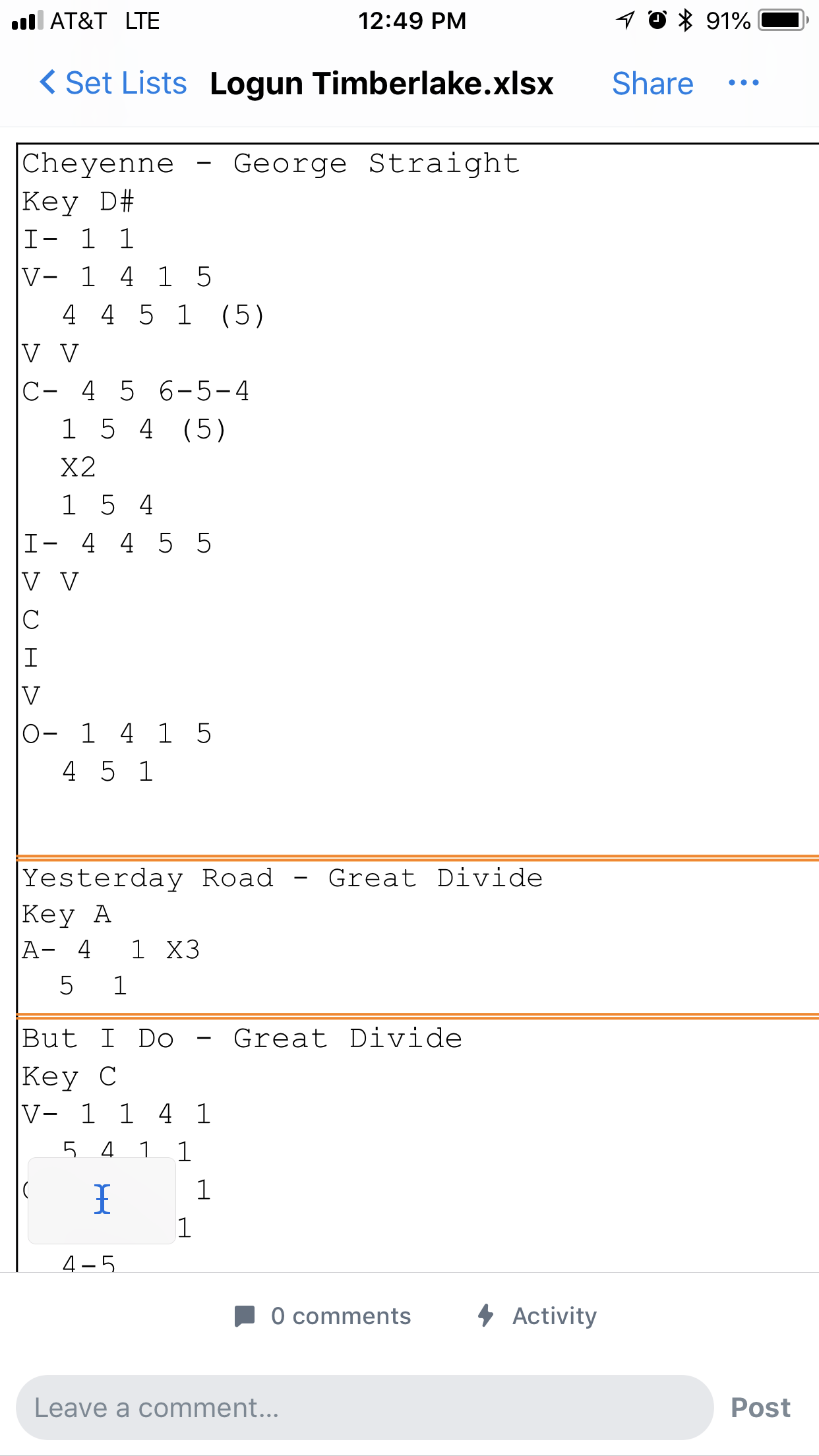
I use Excel and chart in Nashville numbers, saved in Dropbox for easy iPad access. Here’s a sample from a recent for-hire gig (44 songs in 1 week).



ForScore is pretty good.
It will import PDFs from Dropbox and Google drive
Sometimes I will find a chart online, take a screenshot, import the pic and crop it, then add notes if needed.
Or the low tech approach if there’s no wifi - just take a pic of someone else’s chart with your iPad and import that.
It will import PDFs from Dropbox and Google drive
Sometimes I will find a chart online, take a screenshot, import the pic and crop it, then add notes if needed.
Or the low tech approach if there’s no wifi - just take a pic of someone else’s chart with your iPad and import that.

Setlist Helper here. I also reverse my tablet's display colors. The docs show as black background with white letters. The tablet easily lasts for the whole gig, the notes are super easy to read, and it doesn't under light my face, (ie: it doesn't look like I'm using a tablet).

- Jun 6, 2012
- 4,837
- 6,859
- Disclosures
- I don't wait 30 minutes after eating, to go swimming.
I use SongBook.
SongBook for iOS
It supports the Chord Pro format (chords in brackets [Am] [Bm] and some other minor notation, but basically a text file.)
Chord Pro:
Welcome to ChordPro!
SongBook lets you transpose songs on the fly. This little tool here will convert your chord sheets to chord pro formatting:
Song Formater/Importer (Beta) from UkeGeeks Labs
Also, it works with drop box, so you put all of your files in drop box and anyone in your band can sync up and get your sheet music.
SongBook for iOS
It supports the Chord Pro format (chords in brackets [Am] [Bm] and some other minor notation, but basically a text file.)
Chord Pro:
Welcome to ChordPro!
SongBook lets you transpose songs on the fly. This little tool here will convert your chord sheets to chord pro formatting:
Song Formater/Importer (Beta) from UkeGeeks Labs
Also, it works with drop box, so you put all of your files in drop box and anyone in your band can sync up and get your sheet music.

I really like OnSong and use it to document all my covers and originals. But sometimes I like to just have the whole song visible at once without having to scroll around.
I've adopted this format that I create with a word processing program (Pages, Word, etc.), and save as a PDF. I can view it on a tablet or print it, and can share with others. I can't transpose or have chord diagrams like OnSong, but simple is sometimes better.

I've adopted this format that I create with a word processing program (Pages, Word, etc.), and save as a PDF. I can view it on a tablet or print it, and can share with others. I can't transpose or have chord diagrams like OnSong, but simple is sometimes better.

Dinosaur here... I use GoodReader and a folder each environment I find myself needing assistance... funny being a dinosaur with an iPad ;-)

I use onsong now but used to use dropbox - if you save files in it for offline use you can order them any way you want - I used to put them in setlist order. I use .rtf files for all my songs:
Link Removed
Note that the Android version of Dropbox can't do the "custom order" thing . I have a singer for whom that would be perfect if it worked on a $40 tablet...
Link Removed
Note that the Android version of Dropbox can't do the "custom order" thing
. I have a singer for whom that would be perfect if it worked on a $40 tablet...
Last edited:
Latest posts
-
-

-

-
-
 Double Bass Removing threaded post from bridge foot.
- Latest: Greg Clinkingbeard