
Could this be done in the c4 directly, via dry mix and an expression pedal or midi?The tricky part is I need to turn the dry signal on and off, while keeping the C4 on. I did have a chance to mess around with assigning a FS to just set the mixer volume, and that will work for my needs.
I will definitely try out the comp/shelving EQ with the EFX loop tip though. I've been having a bit of trouble with my synth patches not reacting quite the way I want, but I think I need to do some maintenance on my patches in the C4.

Enjoy the benefits of a premium membership!
Upgrade Account
-
TalkBass has been independent since 1998. Add your voice.
Create a free account to reply to discussions, view embedded media, and browse with fewer display ads.
Join free Log in
Want zero display ads or expanded classifieds tools? Compare plans.
You are using an out of date browser. It may not display this or other websites correctly.
You should upgrade or use an alternative browser.
You should upgrade or use an alternative browser.
Line 6 HX Stomp
- Thread starter been_effected
- Start date
More options
Who Replied?
That's weird, I don't remember the Magellan 350 I had having an effects loop. Did they add that, or am I remembering wrong? Regardless, I do remember that and the genzler cabs being really flat, if that's what you wanted, so I can imagine using an IR or cab directly through one.
No, you’re correct. I was thinking of my Ampeg which I just sold.


Posting here for maximum exposure:
Has anyone tried the tone factor HX Stomp patches for bass? Adam Kiser, Tanner Erickson, and Matt Ogden all have a Microsynth patch in their rig downloads. Any idea of the differences in them? Is one better than the others? I have one from Adam Truitt but I have never owned a real BMS so I have no idea how any of them actually compare.
Has anyone tried the tone factor HX Stomp patches for bass? Adam Kiser, Tanner Erickson, and Matt Ogden all have a Microsynth patch in their rig downloads. Any idea of the differences in them? Is one better than the others? I have one from Adam Truitt but I have never owned a real BMS so I have no idea how any of them actually compare.
Just a friendly reminder to those with a new HX family device, when you’re not getting any sound out, turn up the volume knob not just the pedal. 
Just got my LT and couldn’t figure out why there was no sound out. I had the global settings on my Stomp set so that the output was fixed and not dependent on the volume knob. The LT shipped with the knob all the way down.
Just got my LT and couldn’t figure out why there was no sound out. I had the global settings on my Stomp set so that the output was fixed and not dependent on the volume knob. The LT shipped with the knob all the way down.

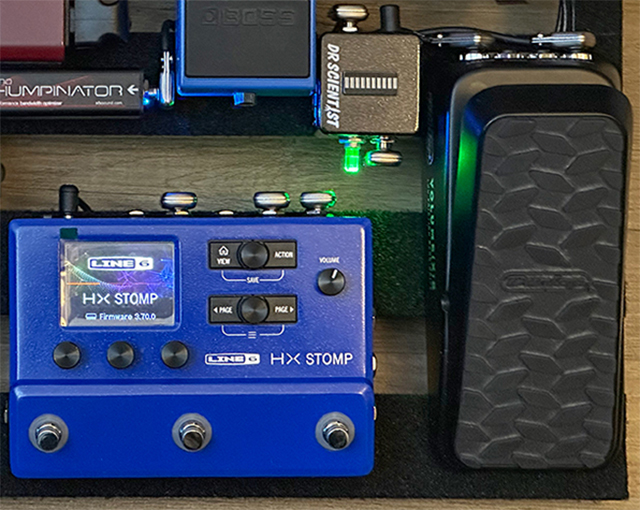
My volume know moves just from transporting my pedalboard... hahaha... Before I got my Dr. Scientist Boostbot level meter, I would always forget to check my volume knob... and won't notice until after we start playing. I mainly bought the Boostbot level meter just to check levels between patches, but it's been a great tool to visually see my levels instead of trusting what I hear in my IEM's. When I'm tuning... I know where my level is usually at... and since it's always on, I can tell instantly if my level is lower than usual, or maybe too hot. I know I can go into global settings to fix the output, but I still want control of the volume knob... just in case the sound guys asks me to adjust my gain.Just a friendly reminder to those with a new HX family device, when you’re not getting any sound out, turn up the volume knob not just the pedal.
Just got my LT and couldn’t figure out why there was no sound out. I had the global settings on my Stomp set so that the output was fixed and not dependent on the volume knob. The LT shipped with the knob all the way down.

I could have sworn I remembered reading about someone using their Stomp or Helix to MIDI control their FI or C4 that was in the loop. Unfortunately after multiple searches, I can't find the post. Am I crazy?

@bassvirtuoso the Stomp and Helixes can send and receive midi, so yes you can do that. Might be helpful to be more specific in your question if you want to know how to set it up.
I had posted about my MIDI setup in the C4 thread a little while back: https://www.talkbass.com/threads/source-audio-c4.1413121/page-188#post-28347836I could have sworn I remembered reading about someone using their Stomp or Helix to MIDI control their FI or C4 that was in the loop. Unfortunately after multiple searches, I can't find the post. Am I crazy?
I could have sworn I remembered reading about someone using their Stomp or Helix to MIDI control their FI or C4 that was in the loop. Unfortunately after multiple searches, I can't find the post. Am I crazy?
Used to do that regularly. Midi to midi if you're using the FI, and you need the single MIDI adapter or something like the Neuro Hub to control Source pedals directly. Just use command center to assign MIDI info and save the stomp preset once you have.
Btw, just thought I'd drop a pro-tip for the slower types like me (and a reminder for you savvy guys) that I really made use of this week.
Most know that parallel routing is one of the Stomp's greatest offerings, especially for us lords of the low end, but I didn't realize that you can pick different types of splits when you create them. A/B, Y splits, crossover, and even dynamic split paths. Game-changer for me over here!
Been working on a go-to patch for a couple of weeks now, and wasn't satisfied with the drive sound I was getting with clean tone on bottom and Sansamp model on top. It just didn't sound cohesive even though the type and 'amount' of drive was what I wanted.
Had been using a crossover split the whole time and had been trying all kinds of frequency points, had changed the order of signal path, and nothing really made it stop sounding like two basses being played at the same time UNTIL I changed to an A/B split and then boom, everything came together.
If you're like me and haven't tried the different versions of split paths, I highly recommend!
Most know that parallel routing is one of the Stomp's greatest offerings, especially for us lords of the low end, but I didn't realize that you can pick different types of splits when you create them. A/B, Y splits, crossover, and even dynamic split paths. Game-changer for me over here!
Been working on a go-to patch for a couple of weeks now, and wasn't satisfied with the drive sound I was getting with clean tone on bottom and Sansamp model on top. It just didn't sound cohesive even though the type and 'amount' of drive was what I wanted.
Had been using a crossover split the whole time and had been trying all kinds of frequency points, had changed the order of signal path, and nothing really made it stop sounding like two basses being played at the same time UNTIL I changed to an A/B split and then boom, everything came together.
If you're like me and haven't tried the different versions of split paths, I highly recommend!

Anybody have tips on settings for the Moo)))n amps that worked well for them? I am interested in trying it out, but don't really have a lot of time to sound check with my church most weeks. Would like to get a head start on making the sound guy's job easy, if I could.

Does anyone know if it’s possible to have an expression pedal control the mix of a split?
I’d like to set up a 3 block synth chain in path B that I could dial in with an expression pedal.
I’d like to set up a 3 block synth chain in path B that I could dial in with an expression pedal.

Of course.an expression pedal control the mix of a split?
Thank you. Realizing with snapshots I could also have completely separate options for the expression to control the mix of path B. Separating the octave from the overall synth mix but still exp controlled would be awesome.Of course.

Hello guys. I wanted to ask you about MIDI. I am really new to MIDI and yesterday I got a MIDI Baby 3. I programmed it to access the tuner, FS4 and FS5. FS4 and FS5 are set to scroll up and down presets. However, I wanted to ask, Is it possible to scroll up and down presets without "losing" FS4 and FS5? I mean, if I can assign FS4 and FS5 to blocks (just press the footswitch) and with a long press I could switch a preset up or down.

Hello guys. I wanted to ask you about MIDI. I am really new to MIDI and yesterday I got a MIDI Baby 3. I programmed it to access the tuner, FS4 and FS5. FS4 and FS5 are set to scroll up and down presets. However, I wanted to ask, Is it possible to scroll up and down presets without "losing" FS4 and FS5? I mean, if I can assign FS4 and FS5 to blocks (just press the footswitch) and with a long press I could switch a preset up or down.
Yes, absolutely, but it's a bit fiddly to set up. There's no MIDI command to scroll through presets, so you have to make the MIDI controller remember what preset is currently selected, so it can go to the next or previous one.
I don't have my MIDI Baby 3 anymore, so I can't access the editor, but what you need to do is something like this:
Dedicate one of the counters to be your preset tracks (doesn't matter which one, just make sure no other switches are using it). Then set one switch to increment that counter (from 0 to 127), and the other switch to decrement that same counter (from 127 to 0). Now make both switches send that value to the Stomp; I think it's sent as a PC (program change) message.
Edit: I can actually access the editor, just not use it for anything. So I think this should work as a preset increment command:
And this is the decrement command:
Yes, absolutely, but it's a bit fiddly to set up. There's no MIDI command to scroll through presets, so you have to make the MIDI controller remember what preset is currently selected, so it can go to the next or previous one.
I don't have my MIDI Baby 3 anymore, so I can't access the editor, but what you need to do is something like this:
Dedicate one of the counters to be your preset tracks (doesn't matter which one, just make sure no other switches are using it). Then set one switch to increment that counter (from 0 to 127), and the other switch to decrement that same counter (from 127 to 0). Now make both switches send that value to the Stomp; I think it's sent as a PC (program change) message.
Edit: I can actually access the editor, just not use it for anything. So I think this should work as a preset increment command:
View attachment 5461542
And this is the decrement command:
View attachment 5461543
Thank you so much!! I will try it later to see if it works

There's a couple methods actually. Naigewron's method works best imo if you just have a couple presets you're flipping between and don't want to scroll forever. The other way, according to MIDI is to send midi CC 72, with a value of 0-63 for preset down, or value of 64-128 for preset up. This is how I do preset scroll with my dmc micro pro. So one way you could set up you midi baby is to assign left and right foot switches to toggle FS4 and FS5 toggle on short press, and on long press send preset down and up respectivelyHello guys. I wanted to ask you about MIDI. I am really new to MIDI and yesterday I got a MIDI Baby 3. I programmed it to access the tuner, FS4 and FS5. FS4 and FS5 are set to scroll up and down presets. However, I wanted to ask, Is it possible to scroll up and down presets without "losing" FS4 and FS5? I mean, if I can assign FS4 and FS5 to blocks (just press the footswitch) and with a long press I could switch a preset up or down.
There's a couple methods actually. Naigewron's method works best imo if you just have a couple presets you're flipping between and don't want to scroll forever. The other way, according to MIDI is to send midi CC 72, with a value of 0-63 for preset down, or value of 64-128 for preset up. This is how I do preset scroll with my dmc micro pro. So one way you could set up you midi baby is to assign left and right foot switches to toggle FS4 and FS5 toggle on short press, and on long press send preset down and up respectively
I wasn't aware they'd added a preset up/down CC command. That's great; makes the setup a lot simpler.
The 3.00 manual states that CC72 is reserved for future use, so I guess it has to be quite a recent addition (and there won't be a new manual version until 4.00).
I've always loved Line 6 manuals because of this:

Last edited:


