• TalkBass has been independent since 1998. Add your voice.
    Create a free account to reply to discussions, view embedded media, and browse with fewer display ads.
    Join freeLog in
    Want zero display ads or expanded classifieds tools? Compare plans.

Loading an Existing Cab with WinISD

Count Bassie

Supporting Member
Jun 10, 2006
16,784
64,486
Smithfield, RI
Okay now... I've got an Eminence Kappalite 3015 coming, and it's going into this EAW VB-125 box:

EAW15Cab.jpg


The internal volume, according to the .pdf file for this cab, is 4.0 cu. ft. I've been figuring in Win ISD, learning it as I go (Help helps!), and the only TS parameter I appear to be missing is the one called "Pe". Can't seem to find it on the web, and without it I get a message that "Pe" AND "Qes", which I have punched into the specs for the driver are missing. This is apparent when I click on the "Vent" tab in the Project window.

Here are some screenshots and a play-by-play... this won't take long!

#1) Here's the Box tab, I'm starting here since I had the box first. Values are plugged in...
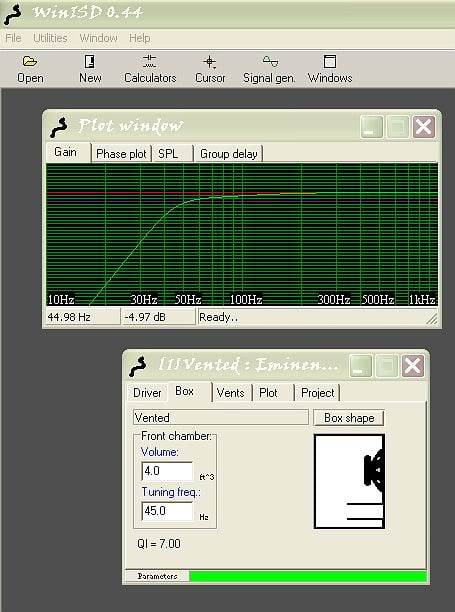
WinISDBox.jpg


#2) Here's the Driver tab, an Eminence Kappalite 3015. The value labeled "PE" is not plugged in, as I can't find it listed in any of the TS Paramter lists on the 'net...
WinISDDriver.jpg


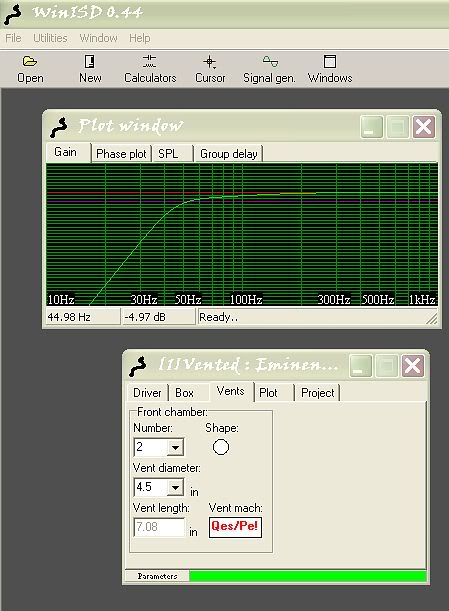
#3) The Vents tab. Notice QES/PE! in red- even though I do have "Qes" plugged into the parameters for the driver. I'm getting a greyed-out calculated length for my vents at 4.5" diameter, which is what the EAW cab here has as existing port holes in the baffle...
WinISDVents.jpg


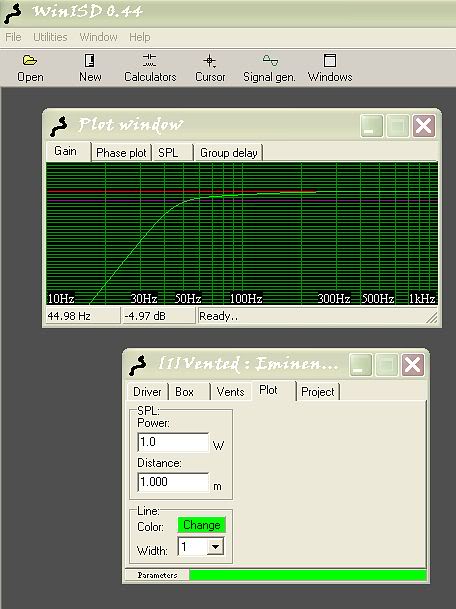
#4) Plot tab. I don't understand any of this intimately, but when I click on the SPL tab it looks more like what I want to see for numbers- around -3dB at 45 or so Hz. The curve is the same, but drop-off in dB reads differently. I get the feeling I shouldn't sweat it though...
WinISDPlot.jpg


I'm a little unsure if I have provided enough info here to come up with much, I'm still looking this over. All I really need out of this is to come up with proper lengths for my 4 1/2" ports, 2 of them. Thanks for any expertise that may show up! :cool:
 
Clear all your parameters, or start a new project, and enter the driver parameters in this order. As you go along, you'll see the others auto-populate.

MMS
BL
CMS
RE
SD
QMS

Sorry in advance if I've misunderstood the problem.

Is that the cab from the guy in Hudson?
 
Clear all your parameters, or start a new project, and enter the driver parameters in this order. As you go along, you'll see the others auto-populate.

MMS
BL
CMS
RE
SD
QMS

Sorry in advance if I've misunderstood the problem.

Is that the cab from the guy in Hudson?

Yes, same one. I've known John about a year or so now, we've done a couple deals.

Thanks, I'll try your method there!
 
Pe is the wattage of the speaker. From memory it's 450W, but you'd better check it. Enter the wattage as a value of PE and the PE/QES error will disappear.

Also the greyed out value in the vent tab is a value calculated by Winisd. It arrives at a length required to arrive at the tuning freq using the vent diameter(s) entered. In other words, if you change the vent data, or the tuning frequency, the vent length will recalculate automatically.

So if you're looking at that tab thinking "my cab has 2 x 4.5" vents that are 2" long, not 7" long", then the tuning freq you entered is wrong (assuming the box volume is correct of course). Keep changing the tuning freq until it arrives at the correct vent length to find out what the cab is currently tuned to.
 
Pe is the wattage of the speaker. From memory it's 450W, but you'd better check it. Enter the wattage as a value of PE and the PE/QES error will disappear.

Also the greyed out value in the vent tab is a value calculated by Winisd. It arrives at a length required to arrive at the tuning freq using the vent diameter(s) entered. In other words, if you change the vent data, or the tuning frequency, the vent length will recalculate automatically.

So if you're looking at that tab thinking "my cab has 2 x 4.5" vents that are 2" long, not 7" long", then the tuning freq you entered is wrong (assuming the box volume is correct of course). Keep changing the tuning freq until it arrives at the correct vent length to find out what the cab is currently tuned to.

Nice. I'll do this tonight, thanks Pete.

Kraigo, although I think Greenboy is a dude who often recommends one do their own work, maybe I'll give him a try...
 
So using the parameters I've gathered from the web, I find that the EAW VB-125, with the 2" ports, is tuned at 63 Hz. This is not where I want to be! So I'm going to see what has to happen to tune that thing down to 45 Hz...

Then I'll try those files. :ninja:

Edit: Lengthening the ports to just over 7" gets me to 45 Hz. It's that simple? Here's the 'shot... and what does the green type in the "Vent Mach" field signify?

WinISDTunePorts.jpg
 
You using the older beta version. IIRC green in that field means the air velocity in the ports is ok, won't chuff or make weird noises. Red means velocity is too high and they'll make noise. With a pair of pipes the size you're using you got nothing to worry about. And yeah longer = lower tuning. Calculate the space taken up by the longer pipes and subtract it from your net internal volume of the cab. Won't be much but you may end up shaving a little off to get the tuning just right but then again your ear won't hear the difference between a 44hz and 45hz tuning.
 
Overwhelming, much of it. But if it gets down to dealing with port length in relations to getting lows, I can deal with that.

I have one more question, and I appreciate everyone's time and offerings!... the outside diameter of the ports in this cab is 4.5". The inside dia. is about 4". Do I use the inside or the outside number of the port tubes to plug into the app?
 
Use the inside diameter to plug in to the app to get the proper length for the tuning you want.

Use the outside diameter to figure how much space the pipes are taking up inside the box.

This presents something WinISD doesn't mention in the Help file... do I need to get into that? How about I just go with what I have in the program and let the dern thing calculate the tubes' length...

Bit I get it, they take up space. The part about the tuning is the inside, where air goes... ok, thanks Will. :cool:
 
Yeah, to get an accurate result the box volume you enter in the program has to be the net volume meaning the airspace inside the box. You measure the inside then subtract anything that takes up space in there. Mainly the speaker itself, the ports and whatever bracing there may be. Really small stuff like the cup behind a handle or the back of a bullet tweeter is insignificant.

If you plug in 4cu.ft. and the speaker really only has 3.8 to work with your pipe length and thus your box tuning will end up being a bit off. That's where it's nice using pipes instead building shelf ports into the box. If it ends up not sounding right you just stick a bit shorter or longer ones till you're happy with it.....then glue 'em.
 
Yeah, to get an accurate result... ...Really small stuff like the cup behind a handle or the back of a bullet tweeter is insignificant....

That's where it's nice using pipes instead building shelf ports into the box. If it ends up not sounding right you just stick a bit shorter or longer ones till you're happy with it.....then glue 'em.

Now that's what ahm talkin' about! :)