
For the past several hours I've been sporadically re-directed to what looks to be a phony Google start page when I click on an increasing number of links on TalkBass.
In the most recent occurrence I was redirected to a site which the Firefox Add-on WOT (Web Of Trust) identified as being dangerous and thus blocked. In the ULR box of the intercepted redirect was 'http://results.google-analytics.com/', so I Googled 'http://results.google-analytics.com/, malware' and found that quite a few Windows and Mac users (I'm using Ubuntu 10.04) have been experiencing the same problem in Firefox and in Safari.
CAUTION. WOT tagged these links from the first page of the above Google search as being dangerous and there's likely more on other pages of the said search results:
Remove Results.google-analytics.com With Simple Remover Software ...
Results.google-analytics.com Removal Guide, Remove Search Hijacker ...
Results.google-analytics.com Removal Guide
--------
EDIT:
If you're running Firefox then you may wish to use the following Add-ons if you aren't doing so already, since they seem to harden Firefox against security issues in general, and the hijacking issue in particular--for now...
An updated list:
- Ghostery
- Adblock Plus
- NoScript
- [Invalid or Expired Link Removed]
- [Invalid or Expired Link Removed]
- WOT
- [Invalid or Expired Link Removed] "Super-Cookie Safeguard"
- [Invalid or Expired Link Removed]
- Flagfox
(And optionally, this time saving bookmark and password synchronizer):
- [Invalid or Expired Link Removed]
Please Google each of the above Add-ons in turn to learn what they do before installing them.
Also please download Firefox Add-ons only from Mozilla. Once one has the Add-on WOT (Web Of Trust) running, one can see that there are attack sites which use offerings of legitimate software to lure in computer users.
For Ubuntu: After using Xmarks to back up your bookmarks and passwords, BleachBit can be used wipe clean Firefox's (and other apps. & utils.) cache files etc to get rid of unwanted, performance impairing crud. It can be installed from the Ubuntu Repositories:
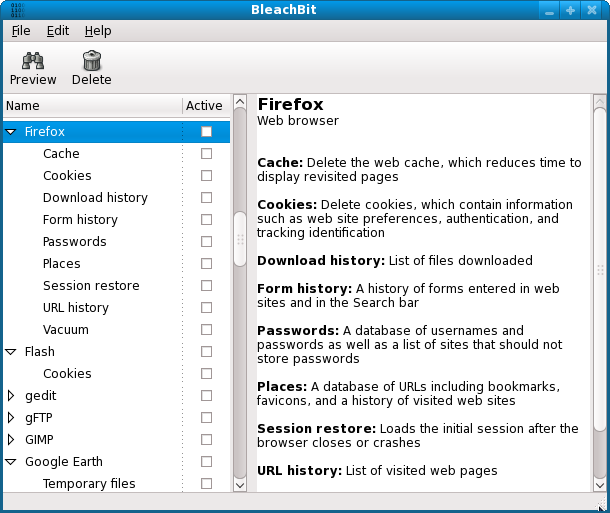
After backing up my bookmarks and passwords via Xmarks, I used BleachBit to clean out Firefox (all of the Add-ons I had installed were retained) and then restored said bookmarks & passwords from Xmarks' on-line server. The result was a slight but noticeable performance improvement in Firefox--and hopefully the elimination of anything nasty.
I've also posted a link to this thread in TalkBass Forums > Customer Service > Forum Usage Issues.
Thank you.
--------
BROWSER, REDIRECT, HIJACK, HIJACKING, SUPER COOKIES
In the most recent occurrence I was redirected to a site which the Firefox Add-on WOT (Web Of Trust) identified as being dangerous and thus blocked. In the ULR box of the intercepted redirect was 'http://results.google-analytics.com/', so I Googled 'http://results.google-analytics.com/, malware' and found that quite a few Windows and Mac users (I'm using Ubuntu 10.04) have been experiencing the same problem in Firefox and in Safari.
CAUTION. WOT tagged these links from the first page of the above Google search as being dangerous and there's likely more on other pages of the said search results:
Remove Results.google-analytics.com With Simple Remover Software ...
Results.google-analytics.com Removal Guide, Remove Search Hijacker ...
Results.google-analytics.com Removal Guide
--------
EDIT:
If you're running Firefox then you may wish to use the following Add-ons if you aren't doing so already, since they seem to harden Firefox against security issues in general, and the hijacking issue in particular--for now...
An updated list:
- Ghostery
- Adblock Plus
- NoScript
- [Invalid or Expired Link Removed]
- [Invalid or Expired Link Removed]
- WOT
- [Invalid or Expired Link Removed] "Super-Cookie Safeguard"
- [Invalid or Expired Link Removed]
- Flagfox
(And optionally, this time saving bookmark and password synchronizer):
- [Invalid or Expired Link Removed]
Please Google each of the above Add-ons in turn to learn what they do before installing them.
Also please download Firefox Add-ons only from Mozilla. Once one has the Add-on WOT (Web Of Trust) running, one can see that there are attack sites which use offerings of legitimate software to lure in computer users.
For Ubuntu: After using Xmarks to back up your bookmarks and passwords, BleachBit can be used wipe clean Firefox's (and other apps. & utils.) cache files etc to get rid of unwanted, performance impairing crud. It can be installed from the Ubuntu Repositories:
After backing up my bookmarks and passwords via Xmarks, I used BleachBit to clean out Firefox (all of the Add-ons I had installed were retained) and then restored said bookmarks & passwords from Xmarks' on-line server. The result was a slight but noticeable performance improvement in Firefox--and hopefully the elimination of anything nasty.
I've also posted a link to this thread in TalkBass Forums > Customer Service > Forum Usage Issues.
Thank you.
--------
BROWSER, REDIRECT, HIJACK, HIJACKING, SUPER COOKIES



 In IF: wlan0 Out IF: Port: 53 Length: 88 ToS: 0x00 Protocol: ICMP Service: DNS
 Harder...
 Harder still...
 Suck it up! We're goin' IN!
 , then this will help you to learn what those ports are used for:


