

Geri, I looked for my post where I explained all that but couldn't find it. So, here we go.
Basically, if you take you router off the 19.168.1.* range, you won't get pinged if your SSID is not being broadcast.
So making the 3rd node something other than "1" (between 2 and 255) obfuscates the router and your network.
The following example applies to any number you pick as the 3rd node.
PART 1:
Set your router IP to 192.168.37.1 Set it up as DHCP and set the DHCP starting node to be non-standard - something like 102, or 155.
That will give you (255 - n) dynamic IP's available from the starting point eg: 192.168.37.102 -->> 193.168.37.255
You are NOT going to have 60 devices connecting, so you could go as high as starting at 192.168.37.220.
Set your console to a static IP like 192.168.37.55 (outside the DHCP range).
Give the router a simple SSID, you CAN turn off SSID broadcast, but we don't.
Turn on WPA2 wireless security. Again.. keep it relatively simple and easy to remember as it's highly UNLIKELY anyone will be trying to hack your network during a gig.
That should keep any interference at a minimum.
PART 2: Get a tool like "[Invalid or Expired Link Removed]".
Before each gig, run it. It will display a graph of all networks it finds (see pic below) and the channels they are using in both 2.4 and 5Ghz bands.
If your router's 2.4Ghz chosen channel (1-12) is cluttered with other access points, login as admin and change your channel to the least busy. Channels 1 6 and 11 do NOT overlap, so those are good starting points. IIRC - channel 1 or 6 tends to be the default 2.4 channel on many routers. Note that channels 13 and 14 are NOT active in the US, but part of the 24Ghz spectrum.
Do the same for the 5Ghz channels. None of them overlap so that's not an issue.
Should be all set.
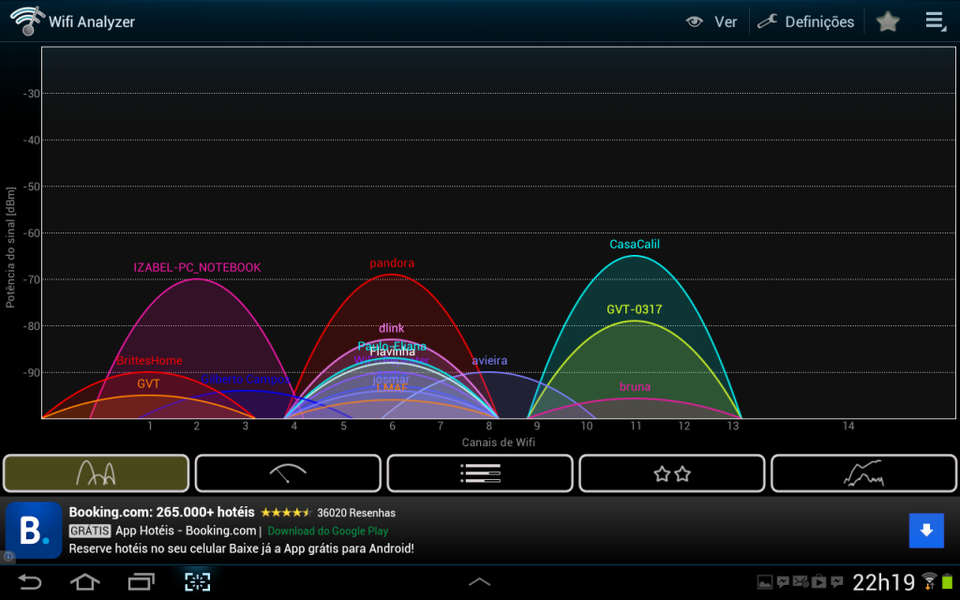
Good info here. So based on that graph what channel would you choose? 8?

 )
)


