• TalkBass has been independent since 1998. Add your voice.
    Create a free account to reply to discussions, view embedded media, and browse with fewer display ads.
    Join freeLog in
    Want zero display ads or expanded classifieds tools? Compare plans.

Newbie trying to hook mixer/soundcard/daw

Feb 19, 2003
2,223
3,273
53
Montreal, Qc
Hey everybody.
Happy New Year!

How would you hook up this sound card to this mixer?

My goal is pretty simple: to record and do overdubs into a DAW.
I'll be recording my bass and a keyboard, plus I want to use some software machines.

I grabbed this sound card used but I am a bit overwhelmed by the connection possibilities.
As for the mixer, I grabbed it for peanuts when my old one fried. I'm not sure if I can hook it up properly so I can record overdubs: If not, I'm eyeing purchasing a Mackie Mix8.

The card: M-Audio Audiophile 192
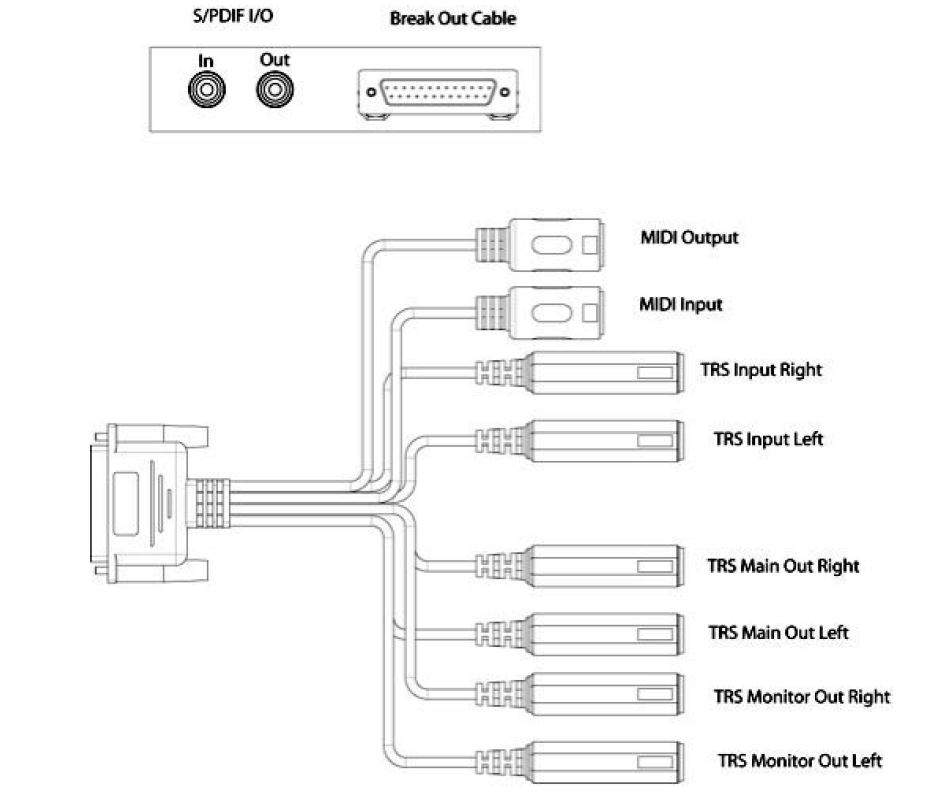
01.JPG


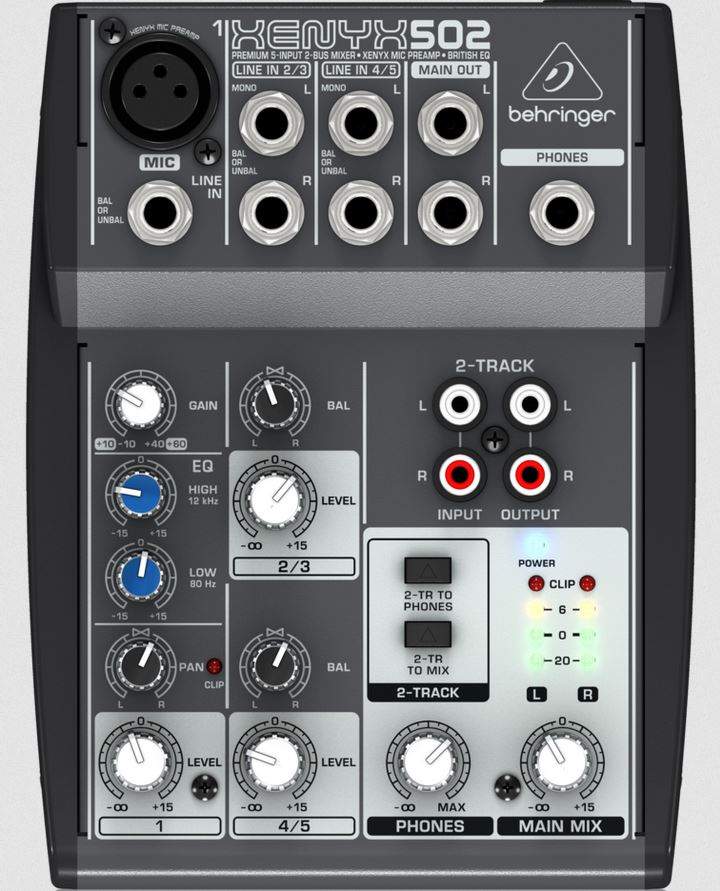
The mixer: Behringer Xenyx 502
02.JPG


I'm really clueless and I need some schooling.
 
If the main outs on the mixer are balanced (TRS), you should be able to hook them right to the sound card's TRS inputs. Then sound card to PC with usb and you're done, I think...
 
Happy New Year!

One way to do that is:

Bass -> DI -> Mixer XLR In (Input 1)

Mixer Main Out L -> MAudio TRS Input L
Mixer Main Out R -> MAudio TRS Input R

MAudio TRS Main Out L -> Speaker L
MAudio TRS Main Out R -> Speaker R

You can record the Bass via Mixer Input 1 (pan it Hard L, and record onto CH1 in your DAW).

The Keyboard via Mixer Input 2-3 (stereo, record onto CH1-2 in your DAW).

Midi Keyboard via the Midi Input on the MAudio. (As an alternative if the Midi Keyboard has a USB out, you can try connecting it into your Computer's USB input.)
 
Last edited:
  • Like
Reactions: Raman
That soundcard is a very old piece of equipment (as computer equipment goes) and may not be supported by newer PC operating systems.

A mixer is not really needed for most recording, the mixdown is done "virtually" in the DAW software. Your soundcard can record two mono sources or one stereo source simultaneously.

the main outs are unbalanced TS. Hmmm.
This really doesn't matter for home recording.
 
  • Like
Reactions: Raman and bholder
Happy New Year!

One way to do that is:

Bass -> DI -> Mixer XLR In (Input 1)

Mixer Main Out L -> MAudio TRS Input L
Mixer Main Out R -> MAudio TRS Input R

MAudio TRS Main Out L -> Speaker L
MAudio TRS Main Out R -> Speaker R

You can record the Bass via Mixer Input 1 (pan it Hard L, and record onto CH1 in your DAW).

The Keyboard via Mixer Input 2-3 (stereo, record onto CH1-2 in your DAW).

Midi Keyboard via the Midi Input on the MAudio. (As an alternative if the Midi Keyboard has a USB out, you can try connecting it into your Computer's USB input.)
I hadn't at all figured out that this card used TRS connectors when I grabbed it... Crazy how you can overlook information when you're clueless about it!
Should I look into TS-to-TRS adapters between the mixer and sound card?
 
No need for TR -> TRS adapters. Just try to keep the cables as short as feasible, and keep the audo cables separated from any power cables (to minimize noise).

No need to down the PC when disconnecting cables, as long as you have already muted your monitor speakers beforehand. I mute my inputs in the software, out of habit.
 
  • Like
Reactions: Raman
And another newbie inquiry:
When I plug/unplug cables from the sound card, can I do it live or is it better to shut down the pc? Are there risks of shorting something?

You should mute the channel(s) in your DAW before plugging/unplugging anything, or you might get a nasty loud POP which is not good for the speakers and more importantly ears.
 
  • Like
Reactions: Raman
Happy New Year!

One way to do that is:

Bass -> DI -> Mixer XLR In (Input 1)

Mixer Main Out L -> MAudio TRS Input L
Mixer Main Out R -> MAudio TRS Input R

MAudio TRS Main Out L -> Speaker L
MAudio TRS Main Out R -> Speaker R

You can record the Bass via Mixer Input 1 (pan it Hard L, and record onto CH1 in your DAW).

The Keyboard via Mixer Input 2-3 (stereo, record onto CH1-2 in your DAW).

Midi Keyboard via the Midi Input on the MAudio. (As an alternative if the Midi Keyboard has a USB out, you can try connecting it into your Computer's USB input.)
So finally getting some time to have a look at this...

I followed what you did :
Bass -> DI -> Mixer XLR In (Input 1)
Mixer Main Out L -> MAudio TRS Input L
Mixer Main Out R -> MAudio TRS Input R
MAudio TRS Main Out L -> Speaker L
MAudio TRS Main Out R -> Speaker R

Then I added :
MAudio Monitor Out (L/R) -> Mixer Tape In (L/R)

That was just because I want to be able to play through headphones.

I haven't had a chance to test recording yet, but so far :
-I get sound from the bass and from the pc in my headphones (headphones are hooked in the mixer).
-I also get sound from the pc into my speakers.
-But I can't get the bass to go through to speakers. It only comes out from the headphones.

I'm scratching my head...

...
Finally, the cables I'm using are pretty long. Just the cables I had immediately available. I thought I'd test the setup with them before looking for shorter ones.
But how long is too long?
 
Last edited:
I just figured out that I need to change the output source in my card's mixer interface. Presently, I can toggle it between hearing sound from the pc or sound from the mixer.
But if I want to record overdubs, I'll need to hear both sources at once...

upload_2021-1-12_22-15-46.png
 
Last edited:
Great you're getting somewhere! Here's what I'd do:

- Create a session in your DAW.
- Go to your settings in your DAW, and select your audio interface for your playback.
- Create a mono track for your bass in your DAW, and make sure your input is "1" and output is "1-2" on your interface.
- Press the "record enable" button on the bass track you created, and play the bass and see if you get any sound.
- If so, hit "record" and play.

For overdubs, you need to create new tracks and repeat above while the recorded track(s) are playing back.

Can you get sound from your DAW at all? To test that, create a session in your DAW, import a song onto a track (mp3 or whatever) and play it from your DAW. Again, make sure your audio interface is selected in your DAW as the playback engine, and the track's output is mapped to your audio interface output 1-2.

Playback from your PC (youtube etc.) Has nothing to do w/ your overdubs. If you want to hear your PC out from your sound card, you need to go to your PCs audio settings and select your audio interface as your output device (which you already did!).

Regarding the length of the unbalanced cables, there's no real rules and it depends on your setup.. As long as they're not longer than maybe let's say 6-feet long, and youre not getting any noise, you should be good. The balanced cables are good for preventing any noise interference from other electronic devices if they're too close by.

What is your DAW btw?
 
  • Like
Reactions: Raman
Great you're getting somewhere! Here's what I'd do:

- Create a session in your DAW.
- Go to your settings in your DAW, and select your audio interface for your playback.
- Create a mono track for your bass in your DAW, and make sure your input is "1" and output is "1-2" on your interface.
- Press the "record enable" button on the bass track you created, and play the bass and see if you get any sound.
- If so, hit "record" and play.

For overdubs, you need to create new tracks and repeat above while the recorded track(s) are playing back.

Can you get sound from your DAW at all? To test that, create a session in your DAW, import a song onto a track (mp3 or whatever) and play it from your DAW. Again, make sure your audio interface is selected in your DAW as the playback engine, and the track's output is mapped to your audio interface output 1-2.

Playback from your PC (youtube etc.) Has nothing to do w/ your overdubs. If you want to hear your PC out from your sound card, you need to go to your PCs audio settings and select your audio interface as your output device (which you already did!).

Regarding the length of the unbalanced cables, there's no real rules and it depends on your setup.. As long as they're not longer than maybe let's say 6-feet long, and youre not getting any noise, you should be good. The balanced cables are good for preventing any noise interference from other electronic devices if they're too close by.

What is your DAW btw?
Thanks! I'll do this and get back to you.
Really appreciate the help!

I'm using audacity so far. (I also downloaded the free version or Pro Tools.)
 
  • Like
Reactions: MYLOWFREQ