
Enjoy the benefits of a premium membership!
Upgrade Account
-
TalkBass has been independent since 1998. Add your voice.
Create a free account to reply to discussions, view embedded media, and browse with fewer display ads.
Join free Log in
Want zero display ads or expanded classifieds tools? Compare plans.
You are using an out of date browser. It may not display this or other websites correctly.
You should upgrade or use an alternative browser.
You should upgrade or use an alternative browser.
practice area setup question
- Thread starter 1dreday
- Start date
More options
Who Replied?



I’m liking this option but is there away to hook say an iPhone into it or do I need to go through the computer to get the musicView attachment 3643605
I'm not sure if you'd be able to plug an interface directly into an iphone honestly. It will work with a windows or mac PC. I mean.. the other option is just plugging your phone into a set of speakers and matching the volume with your amp.

Not yet read through the thread but either one of these and many others (preamp/di) will put a smile on your face.if i wanted to have my bass and backing/playalong music both running into my headphones what would i need to do that, i can play the backing music either off my windows computer or my iphone .
it seems like a basic dumb question but im not very tech savy atleast not yet any help appreciated

As @BOOG suggested, a preamp with an AUX input option is the easiest way to do it.
I use the an Ampeg SCR-DI. You can look at the manual here.
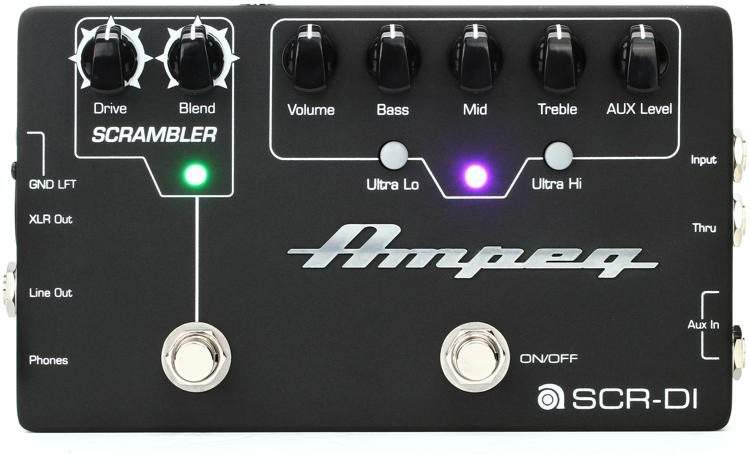
Plug your backing track source into the AUX jack, your bass into the regular input jack, and a set of good headphones into the PHONES jack and you’re set to go.
Doesn’t get easier than that. And best of all, it’s portable if you need to go somewhere. Why not take your practice “area” along for the trip?
I use the an Ampeg SCR-DI. You can look at the manual here.
Plug your backing track source into the AUX jack, your bass into the regular input jack, and a set of good headphones into the PHONES jack and you’re set to go.
Doesn’t get easier than that. And best of all, it’s portable if you need to go somewhere. Why not take your practice “area” along for the trip?

I use a Rolls PM351 Personal Monitor Station.
https://www.amazon.com/Rolls-PM351-Personal-Monitor-Station/dp/B001032IDS/
Allows me to mix my bass signal and audio source into the same pair of headphones. Small & cheap, and it goes with me when I travel so I can practice in hotel rooms. Das it mane.
https://www.amazon.com/Rolls-PM351-Personal-Monitor-Station/dp/B001032IDS/
Allows me to mix my bass signal and audio source into the same pair of headphones. Small & cheap, and it goes with me when I travel so I can practice in hotel rooms. Das it mane.
As an Amazon Associate, TalkBass may receive commissions from qualifying purchases made via links on this site.
As @BOOG suggested, a preamp with an AUX input option is the easiest way to do it.
I use the an Ampeg SCR-DI. You can look at the manual here.
View attachment 3643710
Plug your backing track source into the AUX jack, your bass into the regular input jack, and a set of good headphones into the PHONES jack and you’re set to go.
Doesn’t get easier than that. And best of all, it’s portable if you need to go somewhere. Why not take your practice “area” along for the trip?
Does look like better overall solution than the interface I linked. Can just plug phone or PC into the aux in.. and having an xlr out if you do later decide to get an interface for recording purposes later.

if you can find this unit used...reverb, eBay, etc. (no longer available new)
Invalid Link Removed
used for years to play along with CDs while listening on headphones
deconstruct/learn recorded bass lines, note-for-note, or invent your own
it's simple and it works
Invalid Link Removed
used for years to play along with CDs while listening on headphones
deconstruct/learn recorded bass lines, note-for-note, or invent your own
it's simple and it works
Last edited:
Does look like better overall solution than the interface I linked. Can just plug phone or PC into the aux in.. and having an xlr out if you do later decide to get an interface for recording purposes later.
Yes you can.
I'll run the SCR-DI into my DAW when I want some Ampeg tone on the raw track. I've found the less expensive interfaces I use (i.e. the Focusrite Scarlet series) sound a little better if you go XLR out from a preamp or basic DI into the interface rather than plug the bass straight in. Sometimes a colleague will send me a rough idea or a quick & dirty demo file and I'll just plug my phone into the AUX jack and jam along with it using the SCR-DI. That'll go to my interface and I'll record a rough draft of my take on it. Afterwards I'll send it back with a note asking if what I played for it sounded something like what they were thinking of.

if you can find this unit used...reverb, eBay, etc. (they are no longer available new)
https://www.sweetwater.com/store/detail/GB10--tascam-gb-10
used it for years to play along with CDs while listening on headphones
simple and it works
It was replaced by the GB-10. Good little unit for the price and will accomplish what the OP is looking for.
Invalid Link Removed
Yes you can.
I'll run the SCR-DI into my DAW when I want some Ampeg tone on the raw track. I've found the less expensive interfaces I use (i.e. the Focusrite Scarlet series) sound a little better if you go XLR out from a preamp or basic DI into the interface rather than plug the bass straight in. Sometimes a colleague will send me a rough idea or a quick & dirty demo file and I'll just plug my phone into the AUX jack and jam along with it using the SCR-DI. That'll go to my interface and I'll record a rough draft of my take on it. Afterwards I'll send it back with a note asking if what I played for it sounded something like what they were thinking of.
I apologize if my statement appeared to be a question.
 I was merely saying this looks like it fits the OP's bill.
Lots of good answers...I mainly practice into headphones and use a small mixer. I just saw a 4 channel mixer for $49 brand new!. My issue was finding headphones that would sound good enough for live bass.
i was even thinking what about a bass pedal with aux in?
Yes, you could plug your smartphone or PC into ANY pedal with an aux in.. but with something like the Scrambler, you could do that and not even need an amp if you have a pair of headphones, while retaining the option of running it through your amp.
Having a solid DI can't hurt either. You never know when you might end up in a situation where a good direct signal is all you need. My drummer pretty much has a studio in his basement, and we get personal headphone monitor mixes. The only thing I use my amp for when down there is for the built in DI. Was a pretty awesome surprise walking into his basement for the first time.
And then if you did decide to get into recording at home and later got something like that Presonus, having the DI is a plus there as well imo. But you can always throw a microphone in front of an amp.
Have to say I like the portability and the headphone out jack a lot. But I tend to enjoy the option of playing my bass quietly when it's not a performance. If I didn't already have some form of DI, or just wanted the capability to play along with pretty much any device anywhere - I'd probably not hesitate to throw $200 at a pedal like the scrambler personally.

I do that and have several simple ways to do that. Here are three:if i wanted to have my bass and backing/playalong music both running into my headphones what would i need to do that, i can play the backing music either off my windows computer or my iphone .
it seems like a basic dumb question but im not very tech savy atleast not yet any help appreciated
1. I plug the bass, phone/tablet and headphones into a pedal with a 3.5mm Aux input and a headphone output (mine’s an Ampeg SCR-DI, though many others work as well). I get my bass & playalong music in the phones and the Mrs. gets a peaceful evening.
2. My combo amp has a 3.5mm Aux input and a headphone output and a speaker Off switch. I plug the bass into its input, the phone/tablet into the 3.5mm input, the headphones into that output then switch off the speaker.
3. An amp with a class D output section can usually be used without a speaker at all. e.g. My Trace Elliot ELF has the needed in and out jacks and fits in the pocket of my case for travel. Not all amps work this way so research the specs before buying.

I have a Scarlett 2i2 ($100) as an interface for my iMac. I also have a cheap Ampeg Micro-CL ($100) 100 watt head that has a jack for phones and an aux in. Finally, for portability, I have a PJB BigHead ($250) that can go anywhere I want. Either the Ampeg or the PJB will work easily with my iPhone. The Scarlett is more for recording but will serve a similar purpose.

I bought a cheap mixer, used from a pawn shop for almost nothing. I use Transcribe on my laptop plugged into the mixer. Bass into pedalboard into mixer. Headphones out. Easy peasy and inexpensive.
Yep, cheap little mixer. There are dozens to choose from under $100. Cheaper - much cheaper - if you go used.
Headphone jack out from your computer into mixer; bass into mixer (after your preamp, pedals, etc).
I did this for years before I got serious about recording and got into audio interfaces. There’s some days when I’m just practicing and not recording that I think of going back to mixer setup just for the simplicity of it.

I have an Acoustic B300HD head with aux input and headphone input and run either an iPod or computer in the aux input and practice for hours. It works great!

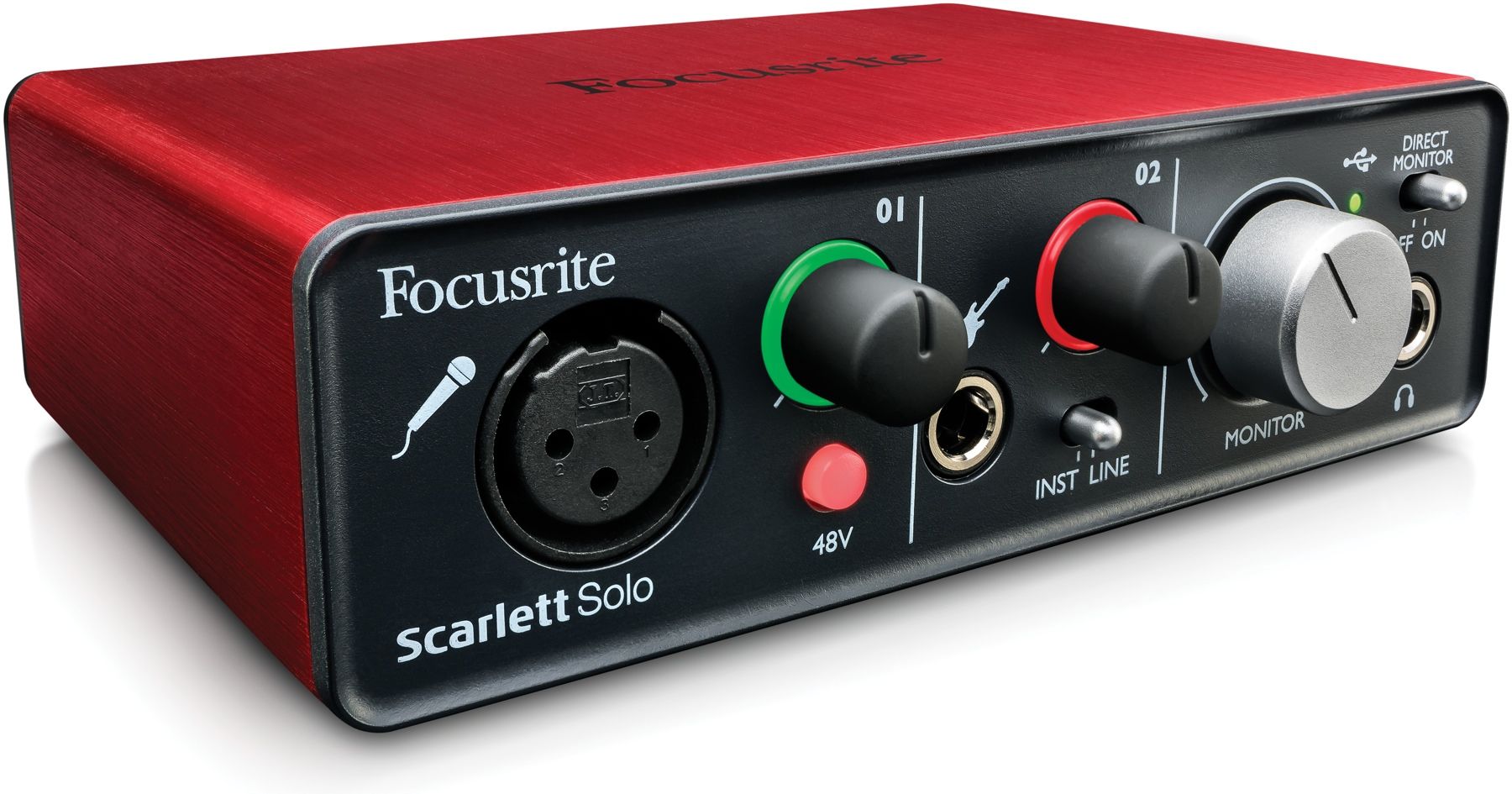
A little Focusrite Solo USB interface is reasonably cheap.
It works really nice for bass, it sounds much nicer than plugging directly into a mixer (at least the mixers I've used) and it allows you to easily play along to anything in your computer, record, etc... That would be my choice.
It's also so tiny that you can take it everywhere with you, a great portable solution.
Like this:
https://www.sweetwater.com/store/de...ite-scarlett-solo-3rd-gen-usb-audio-interface
It works really nice for bass, it sounds much nicer than plugging directly into a mixer (at least the mixers I've used) and it allows you to easily play along to anything in your computer, record, etc... That would be my choice.
It's also so tiny that you can take it everywhere with you, a great portable solution.
Like this:
https://www.sweetwater.com/store/de...ite-scarlett-solo-3rd-gen-usb-audio-interface


