• TalkBass has been independent since 1998. Add your voice.
    Create a free account to reply to discussions, view embedded media, and browse with fewer display ads.
    Join freeLog in
    Want zero display ads or expanded classifieds tools? Compare plans.

Simple Mac software effects guidance

Also, is there any benefit or advantage to using an actual decent studio monitor over an amp as a monitor?

Possibly upper frequency response. Some bass amps (well, it’s the cabinets really) roll off above 4khz or so. If yours has a tweeter, it’s probably fine.
 
What are some less expensive interfaces with minimal latency?
The interface itself is just one element; the way the interface communicates with the computer, the computer’s processing capabilities, memory load and software used as a DAW are all part of the equation that eventually extends/shortens latency.
In my experience, interfaces that use thunderbolt / firewire are consistently faster and reliable, where USB interfaces have not been my best experience, not only about latency but also when you upgrade the operative system or your software, given the plurality of uses these USB ports have. Depending how old your mac is, I would consider a thunderbolt interface. There are many options (motu, apogee, rme, roland) and pricing is linked to number of inputs/outputs, MIDI capabilities, preamp quality, number of communication ports (some have many).

if you are planning only to play bass, a single input/output unit would do the trick. Remember to think that one day you may want to have 2 basses connected if playing live, or record with other musicians, so depending on that you may want to consider your selection. If you could narrow down the options you want you will see that a few alternatives will come up and then you can decide where to invest. I hope this helped.
 
  • Like
Reactions: pmcdn
As many have stated, a good sound interface is a good and well justified investment; some come with preamp capabilities and many connections. I have actually never played bass through normal effects, always been a Mac guy and my experience has been of consistent reliability and satisfaction. Settings can be saved (any combination) and there are no interconnectivity/power/impedance crap to deal with… there’s other (software versions, drivers) but things you don’t need to deal at a gig.

Garageband will be sufficient to get you convinced that this may be the way you want to go. Once there, you may never turn back. I’ve used Mainstage from many years and I’ve tried massive multi-channel strip combinations with midi/synths of all sorts loaded with effects and this thing goes as far as your imagination would go.

Below an example, all Mainstage with Native Instruments Komplete loaded with reverbs and filters and the results is actually pretty nice. Enjoy the journey!


As many have stated, a good sound interface is a good and well justified investment; some come with preamp capabilities and many connections. I have actually never played bass through normal effects, always been a Mac guy and my experience has been of consistent reliability and satisfaction. Settings can be saved (any combination) and there are no interconnectivity/power/impedance crap to deal with… there’s other (software versions, drivers) but things you don’t need to deal at a gig.

Garageband will be sufficient to get you convinced that this may be the way you want to go. Once there, you may never turn back. I’ve used Mainstage from many years and I’ve tried massive multi-channel strip combinations with midi/synths of all sorts loaded with effects and this thing goes as far as your imagination would go.

Below an example, all Mainstage with Native Instruments Komplete loaded with reverbs and filters and the results is actually pretty nice. Enjoy the journey!



Sounds nice! So, just to clarify, if I start with GarageBand I should be able to use my Mac and experiment and change tones, effects, etc. and (for now) hear it fine through my amp like a monitor, right? I just want to be certain before I buy an interface.
 
Sounds nice! So, just to clarify, if I start with GarageBand I should be able to use my Mac and experiment and change tones, effects, etc. and (for now) hear it fine through my amp like a monitor, right? I just want to be certain before I buy an interface.
I assume you would be using an interface, and the answer is yes, absolutely. Your bass to the input, the interface sends the signals to the Mac for processing, then back to the interface to the outputs. From there you send a cable to your amp and that should do the trick.

Given the infinite amp software choices (even in Garageband there are dozens) you may end in the future using a PA amp that does not affect the tone. I use a Bose and what I hear there I would hear in a monitor, a recording or earplugs. To consider for the future.

I hope this helps
 
I assume you would be using an interface, and the answer is yes, absolutely. Your bass to the input, the interface sends the signals to the Mac for processing, then back to the interface to the outputs. From there you send a cable to your amp and that should do the trick.

Given the infinite amp software choices (even in Garageband there are dozens) you may end in the future using a PA amp that does not affect the tone. I use a Bose and what I hear there I would hear in a monitor, a recording or earplugs. To consider for the future.

I hope this helps
Yes, very helpful. I will be starting with a Scarlett Solo and GB and go from there. I feel like this might make my bass tones and trials much more dynamic than simply using an amp.
 
Also, is there any benefit or advantage to using an actual decent studio monitor over an amp as a monitor?
More things will sound good through a standard stereo speaker setup. A guitar or bass amp is tuned to sound like a guitar or bass amp, which is fine for your instrument but might make everything else sound off. And since whatever sound software you use will have amp simulators anyway, you may as well opt for neutral-sounding hardware.
 
  • Like
Reactions: pmcdn
I assume you would be using an interface, and the answer is yes, absolutely. Your bass to the input, the interface sends the signals to the Mac for processing, then back to the interface to the outputs. From there you send a cable to your amp and that should do the trick.

Given the infinite amp software choices (even in Garageband there are dozens) you may end in the future using a PA amp that does not affect the tone. I use a Bose and what I hear there I would hear in a monitor, a recording or earplugs. To consider for the future.

I hope this helps
I got my Scarlett solo 3rd gen. I connected it and installed the Scarlett main Mac software. I can hear the bass through the amp/monitor but no effects or emulation from GarageBand. GB sees the scarlet connected. I changed the midi settings also. See pic.
 
I got my Scarlett solo 3rd gen. I connected it and installed the Scarlett main Mac software. I can hear the bass through the amp/monitor but no effects or emulation from GarageBand. GB sees the scarlet connected. I changed the midi settings also. See pic.
Hi, i can’t see the attachment for some reason.
Can you connect the line out to an amplifier and hear what goes out of there? I ignore that the scarlett may be setup to send only the input into the monitor
 
I got my Scarlett solo 3rd gen. I connected it and installed the Scarlett main Mac software. I can hear the bass through the amp/monitor but no effects or emulation from GarageBand. GB sees the scarlet connected. I changed the midi settings also. See pic.
Are your headphone or monitors connected to the Mac or the Scarlet? You have to listen through the Mac to hear GarageBand's processing.
 
Are your headphone or monitors connected to the Mac or the Scarlet? You have to listen through the Mac to hear GarageBand's processing.

Not necessarily.

Within GarageBand's Preferences, on the Audio/Midi tab, set both the Input and the Output to the Scarlett:

upload_2021-7-13_19-38-7.png


Also, make sure the "Direct Monitor" isn't lit up on the front of the Scarlett. If it is, press the button to turn it off.
 
Hi, i can’t see the attachment for some reason.
Can you connect the line out to an amplifier and hear what goes out of there? I ignore that the scarlett may be setup to send only the input into the monitor
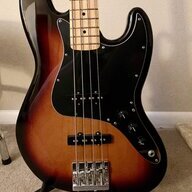
I figured it out. Needed to change the output. A side question: I got a new Squire CV 60s Jazz bass in March. I still have original strings on it. Is it probably a good idea to replace the strings? I want a brighter sound. Do you think these bass guitars come with low quality strings new?
 
I figured it out. Needed to change the output. A side question: I got a new Squire CV 60s Jazz bass in March. I still have original strings on it. Is it probably a good idea to replace the strings? I want a brighter sound. Do you think these bass guitars come with low quality strings new?
In that case I will not be the best reference; I like the feeling of new strings, but I have to admit I prefer a more muted sound, when strings have gone through the first 4-6 weeks of punishment.
At the same time, if I was into slapping or had a P bass I would keep strings new. With a Jazz as yourself, I would invest in a nice new string set (you are right, most instruments come with cheap strings) and wear it a little bit until you get a nice J sound. If I may suggest a brand, I really like the Black Beauties from DR strings (I play 6 string basses); they last forever, they are a little weird during the first few weeks but after that they sound pretty amazing.

Enjoy the interface!!! Glad you were able to work things out.