Who here has gotten sucked into the abyss of converting your home to a smart home? I started by adding a few switches or light bulbs here and there, but have since went a little crazy with adding new cameras, lights, switches, locks, plugs, sensors, a vacuum, multiple automations, etc. This is been SUCH a fun project, albeit a little pricey to get into. I've continued to chip away and upgrade things here and there, in hardware, software, automations, routines, etc. My house has become pretty damn cool lol. For hardware, I'm using:
It's all controlled by this tablet mounted on the kitchen wall (a 15" Android tablet from Amazon that's surprisingly very high quality!) A combination of Google Home, and Tapo Widgets controls most things. I know the screen is busy AF. I just got the vacuum literally last night. I am hoping the mapping feature of the vacuum, and Tapo's 3d floor plan creator in the app, work well enough together to create a floor plan that I can add all my gadgets to, If so, this will look markedly different once that's integrated and created. Time will tell...
For those of you into this stuff, share what you've done. I LOVE new ideas.
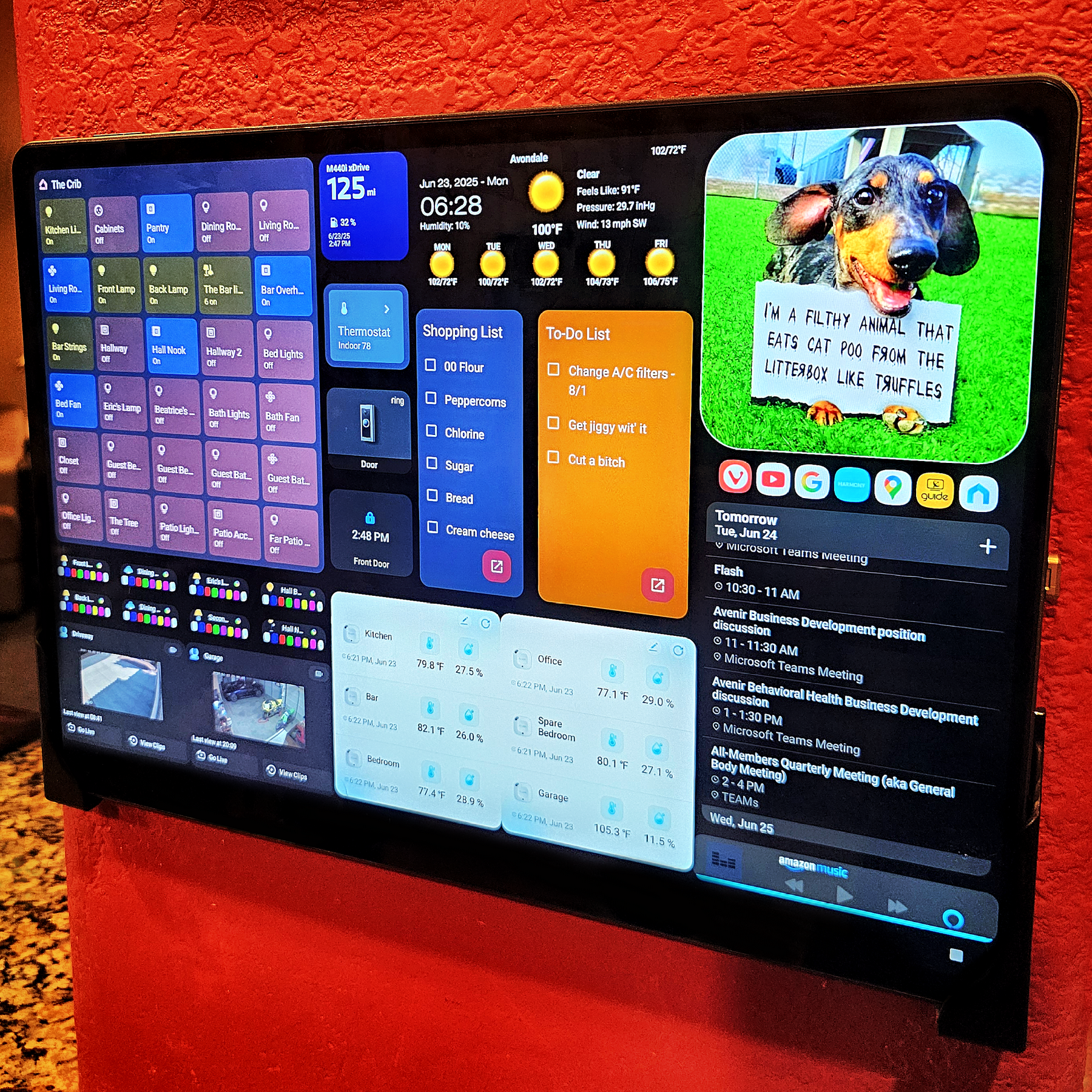
- Tablet - a cheapo ($350... but NICE) 15" Amazon tablet
- Voice commends - multiple Alexa devices throughout the house
- Hub - Tapo H100
- Contact Sensors - Tapo T110
- 3-Way Dimmer Switches - Tapo S515D
- Single Pole Dimmer Switches - Tapo S505D
- Single Pole Regular Switches - Tapo S505
- Motion Sensor Switches - Tapo S500DM
- Smart Plugs - Tapo T215M
- Cameras - Tapo C510W
- Deadbolts - Tapo DL110
- RGB Bulbs - Tapo L535E
- Robot Vacuum - Tapo RV30 MAX Plus
- Temp Sensors - Tapo T310 and Govee H5074
- Doorbell - Ring
- Thermostat - Nest 4th Gen.
It's all controlled by this tablet mounted on the kitchen wall (a 15" Android tablet from Amazon that's surprisingly very high quality!) A combination of Google Home, and Tapo Widgets controls most things. I know the screen is busy AF. I just got the vacuum literally last night. I am hoping the mapping feature of the vacuum, and Tapo's 3d floor plan creator in the app, work well enough together to create a floor plan that I can add all my gadgets to, If so, this will look markedly different once that's integrated and created. Time will tell...
For those of you into this stuff, share what you've done. I LOVE new ideas.