• TalkBass has been independent since 1998. Add your voice.
    Create a free account to reply to discussions, view embedded media, and browse with fewer display ads.
    Join freeLog in
    Want zero display ads or expanded classifieds tools? Compare plans.

Thunderbird Club

If this is a desktop computer and you're not using a Mac, 99% chance you're using Microsoft Windows. The Alt key is the keys on your keyboard on either side of the Space bar.
Oh. It's a HP all-in-one. That's what those are. SOB. I don't actually type(1 finger typist), so I never paid attention to keys I don't 'need'. I'll hafta try that-if I remember tomorrow. ATM, I'm working on getting fvcked up-by choice.
 
My keyboard doesn't have the thing-y over the "n", so on mine looks like it rhymes with banana.


Most windows keyboards have the option, ññññññ!!!! You should be able to convert your keyboard to English or Spanish, right next to the time and date on the bottom right mine says English, if I click on it it converts the keyboard to Spanish ¿comprende?
 
Last edited:
OK, I'll f---* with it and see if it works.


* ool


Put your model in Google and ask if it has additional languages for the keyboard. Trying to find the model number is another pain though. :laugh: Look up language preferences in your settings. In mine it says 'preferred languages' and I have English for my main language and Spanish for my second.
 
Put your model in Google and ask if it has additional languages for the keyboard. Trying to find the model number is another pain though. :laugh:
I suspect I'll follow the advice of "If at first you don't succeed, try, try again. Then give up and don't be a damn fool about it".
 
I suspect I'll follow the advice of "If at first you don't succeed, try, try again. Then give up and don't be a damn fool about it".


Look up language preferences in your settings. In mine it says 'preferred languages' and I have English for my main language and Spanish for my second. It's under Time and settings on mine. I'm not a computer wiz by any stretch of the imagination either.
 
How do you make an ñ on your keyboard?


Right next to my clock and date on the bottom right I can select either English or Spanish but I think I had to go into settings and select the second language but it's pretty simple to do. In mine it's under Time and Language, Language preferences. It changes it to a Spanish keyboard with all the upside down ¡! ¿? etc. The key with the semi colon and colon becomes the Ñ key
 
Last edited:
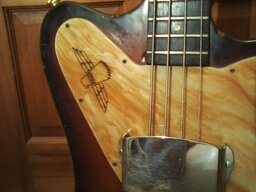
Thunderbird peeps in California, that’s our own JJR58!
1DDC8EC4-732B-441C-BAA0-45ECA4FA486B.jpeg