• TalkBass has been independent since 1998. Add your voice.
    Create a free account to reply to discussions, view embedded media, and browse with fewer display ads.
    Join freeLog in
    Want zero display ads or expanded classifieds tools? Compare plans.

Vocal microphone feedback in rehearsal space: A check list?

So this weekend we set up in one guys dining room, and fought mic feedback all after noon.
We are noobs at the correct mic and monitor setup to deal with it.

Square room, hard walls north and west, open south and east.
2x SM 58 or clone cardiod mics. 2 wedge monitors, but mostly stood vertically.
Fairly loud vocals to match the drums.
We do the stupid stand in a circle pointed at each other thing:
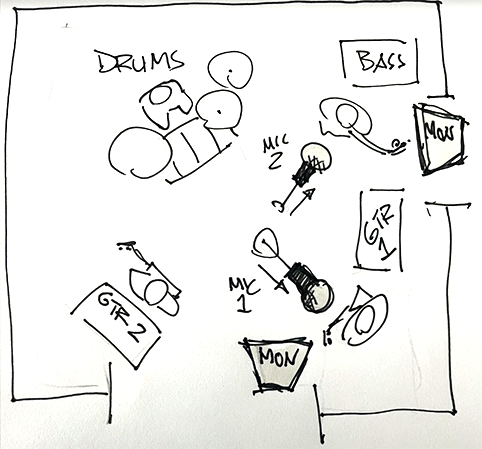
1779115544385.png


We tried moving the speakers around the room but really without any knowledge about how to think about the issue.
we tried mics pointed away from monitors but we still got feedback. It was suggested that montiors were too far away , maybe
but none of us really know anything
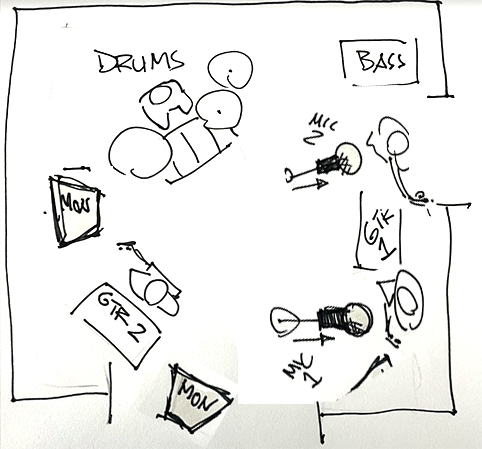
1779115988582.png


I'm fairly confident we can solve the issue by arranging mics and monitors the proper way.
We just don't know what the proper way is.

So, for those who have experience and knowledge:
What are the primary considerations when setting up mics and monitors to tame feedback?
is there a simple check list of dos and don'ts?

 
Mic pickup patterns vary somewhat, so the strongest null can vary a bit from one model of mic to the next:
1779116726076.png


Correct monitor placement for a cardioid mic, like an SM58, is directly behind the mic.
1779116620421.png

The monitor is placed in the null for optimum rejection of the direct sound traveling from the monitor to the mic.

Dealing with the reflected sound is more complicated. SPL drops off by 6dB for each doubling of distance. Getting a lot of volume in a small room is very challenging because the sound can bounce around and find an angle into the front of the mic without traveling over large distances.

The monitor should be aimed directly at your ears and getting the monitor closer to your head means the direct sound travels less distance from the speaker to the intended target (your ears).

Things that can be done.
1. Experiment with positioning to find a position for mics and monitors where more gain before feedback is available.
2. Acoustic treatment can be used to absorb and/or refract reflected sound. I am not an expert, but my guess is absorption will probably will be more effective in a small space. Things like carpets, drapes, soft furniture, etc.
3. If you have an appropriate EQ, you can try notching the most problematic feedback frequencies. Notching problem frequencies is very useful in a normal performance space, but IME is far less effective in a small room.
4. Reduce rehearsal volume so the monitors don't have to be pushed so hard.

An appropriate EQ for notching feedback is 30-31 band graphic or fully parametric EQ. Graphics with less than 30 bands don't work as well because the filters are too wide and center frequencies are too spread out. Basically they are not precise enough to do the job reliably. Fully parametric EQ allows you to choose center frequency, bandwidth, and how much cut to apply. IME usually you hit the point of diminishing returns with between 4 and 6 notches. There are electronic feedback devices that are essentially automatic notch filters.

When trying to tune a system to a small room, IME feedback comes on fast and strong :eek:. It's essentially to wear hearing protection. Also there is risk you will blow drivers, so make every effort to avoid strong feedback spikes. If any strong feedback spikes occur, make an effort to stop it immediately.


Other factors:
1. Compression will reduce gain before feedback. So avoid compression in monitors. Limiting is okay, but the limiter should be set so it rarely engages on normal monitor signal.
2. Distortion also reduces gain before feedback. AFAIK this is because distortion goes hand in hand with compression and because distortion increases harmonics. Even if you aren't using distortion as an effect, you need to consider gain staging and system headroom. If you push the mic channels too hard, it wil compress and add harmonics which reduce gain before feedback. This also occurs if the power amp used to push the monitor lacks sufficient headroom...or if any component in the signal path is pushed close to or over the edge.

You might try something like Galaxy HotSpots with volume controls.
1779118437703.png

The idea is to get the monitors close to your head. This allows you to hear with the monitor at a lower volume. Since the distance from the monitor to your ears is very short, the SPL drops off less, so you can run the monitors at a lower level. Running the monitor at a lower volume means less reflected sound bouncing around and causing problems.

The image above shows a HotSpot with an optional boom adapter. No idea how the boom adapter works as I have not used them.

Normally you place HotSpots on a tripod mic stand. It's important to use a tripod. If you use a mic stand with a narrow base, the weight of the HotSpot will make the stand extremely tippy. Even with a tripod you have to be somewhat careful.
1779118633182.png
 
  • Like
Reactions: Aloe and mambo4
1- just use one monitor, don't need two in a small space.
2- bass goes direct with DI to mixer.
3- guitars should use a amp sim pedal at the end of the pedalboard and go direct to mixer.
4- have the drummer plays more quietly
5- have the monitor just loud enough to play with the un-miced drums.
 
  • Like
Reactions: Wasnex
Just use one monitor, don't need two in a small space.
It's situational, but IMHO two monitors each on their own mix may work significantly better.
  • You can't really aim one monitor optimally at two people
    • If you do split the monitor between two singers, it will not be at 180 degree for either mic
  • People generally want to hear themself louder than other elements of the mix
    • When a mix is shared and both people sing at the same time, it's not possible to give both the desired headroom.
 
It's situational, but IMHO two monitors each on their own mix may work significantly better.
  • You can't really aim one monitor optimally at two people
    • If you do split the monitor between two singers, it will not be at 180 degree for either mic
  • People generally want to hear themself louder than other elements of the mix
    • When a mix is shared and both people sing at the same time, it's not possible to give both the desired headroom.
OP is talking about rehearsal in a dining room, not a gig on a stage.