• TalkBass has been independent since 1998. Add your voice.
    Create a free account to reply to discussions, view embedded media, and browse with fewer display ads.
    Join freeLog in
    Want zero display ads or expanded classifieds tools? Compare plans.

Choosing a Tablet for Reading Charts

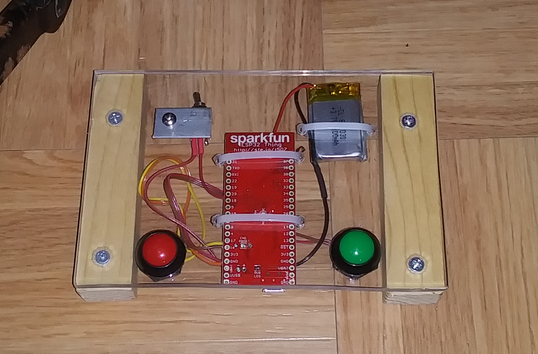
Strictly for amusement, I got my Bluetooth page turning pedal working. I'll create a GitHub repository for it.

But I've had remarkably little need for anything like it so far, outside of experimenting at home in preparation for the flood of gigs that's soon to come my way, LOL.

Being the bass player, I can get away with not having melodies, so if somebody calls a tune I don't know, then I can easily just use iRealPro. A friend gave me an old Nexus 7 tablet, that's big enough to see the nice big print in iRealPro, though anything with actual dots would be impossible. It's something I can throw in my gig bag and not worry about.
upload_2021-11-7_19-28-20.png
 
Strictly for amusement, I got my Bluetooth page turning pedal working. I'll create a GitHub repository for it.

But I've had remarkably little need for anything like it so far, outside of experimenting at home in preparation for the flood of gigs that's soon to come my way, LOL.

Being the bass player, I can get away with not having melodies, so if somebody calls a tune I don't know, then I can easily just use iRealPro. A friend gave me an old Nexus 7 tablet, that's big enough to see the nice big print in iRealPro, though anything with actual dots would be impossible. It's something I can throw in my gig bag and not worry about.


View attachment 4465406
That's wild, F! Very cool setup!
 
  • Like
Reactions: Ronzo and fdeck
Strictly for amusement, I got my Bluetooth page turning pedal working. I'll create a GitHub repository for it.

But I've had remarkably little need for anything like it so far, outside of experimenting at home in preparation for the flood of gigs that's soon to come my way, LOL.

Being the bass player, I can get away with not having melodies, so if somebody calls a tune I don't know, then I can easily just use iRealPro. A friend gave me an old Nexus 7 tablet, that's big enough to see the nice big print in iRealPro, though anything with actual dots would be impossible. It's something I can throw in my gig bag and not worry about.

View attachment 4465406

I have a Bluetooth page turner. Truthfully I find it easier to swipe the page. Knees not being those of a 20 year old, it's not yet easy to tap the pedal, but when sitting at practice or rehearsal is easier. The bulk of my music is one or two page, so in landscape mode not much need to turn pages within a tune and therefore practice page turning.

But your device might be an easier target.
 
  • Like
Reactions: fdeck
Here's my DIY page turner.

Not as sophisticated as fdecks, it's made from a cannibalised usb keyboard and the switches short out specific keys. I built it to drive Transcribe! Software from Seventh String and it sits under my piano at home, there's a mini desktop pc and a 22 inch monitor mounted behind the music rest.

The switches wouldn't be robust enough for stage use.

It can drive any s/w that needs keystroke inputs and I also use it as a page turner. It's purely USB, although I tried to build one with a bluetooth mouse, it didn't work for more than a few seconds at a time as they automatically power down after a minute or two, so fdecks solution is possible the best solution.20211108_204320.jpg
 
  • Like
Reactions: fdeck
There’s an app called IGigBook that has built-in indexes for the major jazz fake books (all the usual varieties and volumes of Real Books and more). You have to provide your own pdf copies (legal or otherwise) of the books, and figuring out how to load them in the software is a bit complex, but it’s great for being able to quickly look up the full lead sheet for a standard.

How can we make the process less complex?
 
  • Like
Reactions: JimmyM
How can we make the process less complex?
Great question, and I love that you’re asking! It’s been a long time since I loaded in PDFs, so maybe it’s gotten easier.

The easiest, of course, would be to pre-load the PDFs into the app, which I completely understand you can’t do.

Maybe allowing the user to view their files in cloud storage (Dropbox, Google drive, iCloud) and pick them even if they’re not named exactly right. Not sure if that might seem more straightforward.

I do really dig the app! I wish some of the PDFs were easier to get - I’d be happy to buy them legally, but it seems publishers are nervous about distributing PDFs.
 
Great question, and I love that you’re asking! It’s been a long time since I loaded in PDFs, so maybe it’s gotten easier.

The easiest, of course, would be to pre-load the PDFs into the app, which I completely understand you can’t do.

Maybe allowing the user to view their files in cloud storage (Dropbox, Google drive, iCloud) and pick them even if they’re not named exactly right. Not sure if that might seem more straightforward.

I do really dig the app! I wish some of the PDFs were easier to get - I’d be happy to buy them legally, but it seems publishers are nervous about distributing PDFs.

On the iPad you do have the ability to import from any Cloud Storage provider and you can select multiple items to import. We also have added a new set list titled Recently Imported which makes it easy to identify the multiple items you have just imported so that you can work with them more easily in the Set List Manager.

It's interesting to see these improvised page turners...What I personally use is an iPhone 5S with the iGigBook Pager app. I just drop the phone is my sock and simple tap of the foot advances the pages for me. I've done over a hundred reading gigs with this setup and it works great.
 
Last edited:
On the iPad you do have the ability to import from any Cloud Storage provider and you can select multiple items to import. We also have added a new set list titled Recently Imported which makes it easy to identify the multiple items you have just imported so that you can work with them more easily in the Set List Manager.

It's interesting to see these improvised page turners...What I personally use is an iPhone 5S with the iGigBook Pager app. I just drop the phone is my sock and simple tap of the foot advances the pages for me. I've done over a hundred reading gigs with this setup and it works great.
That is brilliant! But you need strong socks ;)
 
  • Like
Reactions: Phil Smith and oren
Just saw this thread. A few years back I started using an iPad on a music stand onstage. My favourite way to work was to create or recreate the bass chart in Sibelius (didn't usually take that long, and was a helpful learning experience in itself), export each page in landscape orientation into PowerPoint for some different visual editing options (eg bits of added text) then save as a PDF. Usually managed to get the majority of tunes down to one or two slides. Navigating pages, DS's and repeats with finger swipes could usually be seamless with good knowledge of the chart and careful placement of the occasional VS. But hey, we all managed to cope with that back when it was all paper, right?
 
  • Like
Reactions: fdeck
Hey, can you go backwards to pick up those DS's and repeats, too?

Yes, you can set up DC, DS and simple repeat so that you can jump back. The idea is to simplify what your foot needs to do. I've done gigs where I tried the multiple pedal route which led to some interesting situations.
 
  • Like
Reactions: JimmyM
Hey Phil! I don't have any input for you on that yet, but I may DL a demo in the next few days if Oren doesn't get back with you.

Unfortunately we don't have a demo version of the app that you can download from Apple or Google Play.

3. I have no idea what some decent software for organizing your music and making it easy to find quickly exists. Got suggestions for both Apple and Android?

The indexing we provide when it comes to fake books and real books is pretty revolutionary and probably the only solution available that can in seconds present you with all sources for a song by title. forscore that many use has a rudimentary way of doing this and I believe the added largely due to the existence of iGigBook.

When I created this app the problem I was trying to solve is how do you get access to the song you need in the shortest amount of time that exists in all of the music resources you own.
 
I just want to say that iGigBook has been one of the most used apps I’ve ever had. The ability to quickly reference multiple charts for a song has become an essential part of learning tunes for me. It’s unfortunate that the fakebook publishers don’t make it possible to buy PDF versions of their books to load into the app, as that forces one to use hand-me-down versions that are frequently incomplete or otherwise corrupted in some way.

thanks again to Phil for making such a great tool available!