
Enjoy the benefits of a premium membership!
Upgrade Account
-
TalkBass has been independent since 1998. Add your voice.
Create a free account to reply to discussions, view embedded media, and browse with fewer display ads.
Join free Log in
Want zero display ads or expanded classifieds tools? Compare plans.
You are using an out of date browser. It may not display this or other websites correctly.
You should upgrade or use an alternative browser.
You should upgrade or use an alternative browser.
Distortion Effects In Reaper
- Thread starter WannaJazz
- Start date
More options
Who Replied?
Try the Reaper forums
Especially try Neural Amp Modeler (NAM)
Neural Amp Modeler (NAM) - Cockos Incorporated Forums
Especially try Neural Amp Modeler (NAM)
Neural Amp Modeler (NAM) - Cockos Incorporated Forums

so, let's start with your statement "I know nothing about Reaper ..."
Reaper itself is a DAW and does not offer a ton of FX like distortion in the basic installation. There are some EQ's, Reverbs and a compressor or two in the basic installation, but no actual distortion or amp models (that I'm aware of).
To get a distortion in Reaper you need to add that capability by installing a plugin like @seamonkey suggested above. If you truly "know nothing about Reaper" I wasn't sure if you understood plugins/VST's and how they add capabilities to the DAW.
Might be good to understand the basic function of Reaper in order to be able to use it the way you want. It's a great DAW with lots of solid capabilities, but ultimately a tool like Reaper is only as good as the user's knowledge.
good luck and come back and ask more questions if you need to. I'm sure you'll get as much information as you need to get started. You'll also find the Cockos Forums very helpful too!
Reaper itself is a DAW and does not offer a ton of FX like distortion in the basic installation. There are some EQ's, Reverbs and a compressor or two in the basic installation, but no actual distortion or amp models (that I'm aware of).
To get a distortion in Reaper you need to add that capability by installing a plugin like @seamonkey suggested above. If you truly "know nothing about Reaper" I wasn't sure if you understood plugins/VST's and how they add capabilities to the DAW.
Might be good to understand the basic function of Reaper in order to be able to use it the way you want. It's a great DAW with lots of solid capabilities, but ultimately a tool like Reaper is only as good as the user's knowledge.
good luck and come back and ask more questions if you need to. I'm sure you'll get as much information as you need to get started. You'll also find the Cockos Forums very helpful too!


There is a built-in distortion plugin (3 of them). JS Distortion, JS Distortion (Fuzz), and JS Waveshaping Distortion.
It's pretty simple, put it on a track and see how you like it... maybe move some of the sliders around and see what it does.
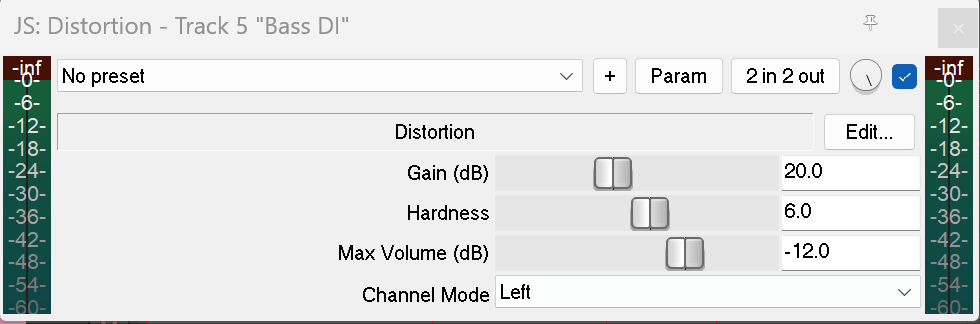
and definitely read the user manual to learn how to use Reaper in general
REAPER | User Guide
good luck and happy distorting!
It's pretty simple, put it on a track and see how you like it... maybe move some of the sliders around and see what it does.
and definitely read the user manual to learn how to use Reaper in general
REAPER | User Guide
good luck and happy distorting!
oh and what might be helpful for "light" distortion -- the mix knob on the top right. just to the left of the checkbox and to the right of where it says "2 in 2 out" on my screenshot above, that knob is the wet/dry mix. you can turn the gain down to get a light distortion, but you might also want to adjust the wet/dry mix to blend in some cleans and just add enough distortion to get you the grit you need without it being too over the top.
cool, I did not know that. I learn something every day!There is a built-in distortion plugin (3 of them). JS Distortion, JS Distortion (Fuzz), and JS Waveshaping Distortion.
It's pretty simple, put it on a track and see how you like it... maybe move some of the sliders around and see what it does.
View attachment 5026949
and definitely read the user manual to learn how to use Reaper in general
REAPER | User Guide
good luck and happy distorting!

You should spend some time looking into the JS plugins. If you want some really good free ones download the Tukan plugin suite. they even have a guitar amp modeler (varios guitar amps with cabs and mics)cool, I did not know that. I learn something every day!
You should spend some time looking into the JS plugins. If you want some really good free ones download the Tukan plugin suite. they even have a guitar amp modeler (varios guitar amps with cabs and mics)
I'll give it a listen, but the Reaper setup I use in my home studio is pretty much 99% for doing bass tracks for my songwriter clients and has rarely been used for anything besides that. I do have some nice Ampeg and Fender plugins for bass just to have some variety available. I generally just use a Noble and Cali76CB outboard for the tracks I do and people seem to like that. It's good to know there are those in the Reaper install. I've definitely seen the JS plugins when I go looking for the other ones I use. I'll have to check 'em out.
I've been using the JS Distortion plug in on a project. Had a wonky set up where it only distorted the LEFT channel and pulled everything off center. So just a setting to watch and make sure its in STEROE mode.


