• TalkBass has been independent since 1998. Add your voice.
    Create a free account to reply to discussions, view embedded media, and browse with fewer display ads.
    Join freeLog in
    Want zero display ads or expanded classifieds tools? Compare plans.

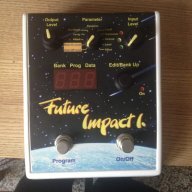
Future Impact now available!! WAS: deep impact reissue!!! interested?

Asked this in the Patch thread but i do it here as well.. Any one using the panda midi editor with a mac and getting a bit of the editor cropped out?
Screen%20Shot%202016-03-02%20at%209.23.39%20PM_zpshqn5wtmt.png


Played with resolution but its set as high as it can be (switching doesn't help) - not missing too much of the editor but its bothering the heck outta me. Im on a 13" macbook pro - seems like you can't resize the window at all

Well, we already shrinked the screen quite a few times, but we cannot test it on all monitors. The screen shot shows that it is not much out of border, maybe Zsolt can shrink it still a little bit. But let us know what is the screen resolution of the 13" macbook pro.

Andras Szalay
 
Thanks Andras, Ill send it to Zsolt via email but the resolution is 1280x800. You're right it is only just a bit outta screen..

Well, we already shrinked the screen quite a few times, but we cannot test it on all monitors. The screen shot shows that it is not much out of border, maybe Zsolt can shrink it still a little bit. But let us know what is the screen resolution of the 13" macbook pro.

Andras Szalay
 
Yesss! My FI finally arrived!

Checked all the presets and wow, this thing has a great overall playing feeling. You have to finetune some settings to compensate induvidual touch, instrument and stuff, but it works pretty good right out of the box! :thumbsup:

The endless rotary knobs sometimes feel a bit too touch sensitive, but that's the same as on the Chunk OS.

So, i wanted to use the editor but run into a few problems. After downloading the distribution package i wasn't able to find the mac editor in that zipfile (FI100B.ZIP). I checked the support page again an found that separate file for the sound editor, but can't run it on my system (os x 10.5.8). after double clicking the file it closes down immediatly. Has anybody else this problem? OS too old? (I know, i know leopard is so 2007...)

@Andras Szalay
As there is no compatibility list on the support page - which OS (mac) is required at least?
 
yeah most definitely your system is too old. i tested it down to 10.6.8 and that works. you could try my editor for puredata if you don't want to/cannot update your system. it is in the google drive folder posted in the patch sharing thread here at talk bass....
 
Can't get my FI to talk to my PC :( Probably being totally dumb, I'm going through my Akai EIE and the FI Editor recognises the midi channels but doesn't seem to want to connect or do anything sensible. Anyone used an EIE into W8.1 64 bit with their FI?

ficelles
 
That is right, we recognized this just a few days ago too, this is an accidental mistake in Program 54. I will send to Gabor for uploading a default program folder with corrected program 54 that is set to omni just like all other programs.

Andras Szalay

Actually, I'm pretty sure that 46 is another channel not set to OMNI. I tried to work around the '54' issue by setting my midi mouse to send on channel 2, now the programs stop at both 54 and at 46 (when using the midi mouse). I guess this means that program 46 listens only on channel 1.

Now I better download the editor :)
 
  • Like
Reactions: Dark Barn
yeah most definitely your system is too old. i tested it down to 10.6.8 and that works. you could try my editor for puredata if you don't want to/cannot update your system. it is in the google drive folder posted in the patch sharing thread here at talk bass....

Great, that puredata editor works even on my oldtimer mac... Thanks Lokki! :bassist:

The only function i'm missing seems to be the foldover distortion.

I used a simple ESI Midimate II, but did not yet try to write presets or to upgrade firmware.
 
Great, that puredata editor works even on my oldtimer mac... Thanks Lokki! :bassist:

The only function i'm missing seems to be the foldover distortion.

I used a simple ESI Midimate II, but did not yet try to write presets or to upgrade firmware.
the foldover distortion kicks in "automatically" if you set the level of the oscillators high enough (if the sum of one voice or all voices is higher than 127). see sound 21 to 27 in the soundsimon folder that is in the zip for examples and work from there :-)
 
Actually, I'm pretty sure that 46 is another channel not set to OMNI. I tried to work around the '54' issue by setting my midi mouse to send on channel 2, now the programs stop at both 54 and at 46 (when using the midi mouse). I guess this means that program 46 listens only on channel 1.

Now I better download the editor :)
yep, confirmed here...
 
So is that the M-Audio Midisport Uno? Are you using Windows?

If anyone can confirm a USB/midi interface that works with Windows 8.1 I would appreciate it! Not having any luck with the Akai EIE...

ficelles

I can confirm that the M-Audio UNO works on Mac.
 
I can confirm that the M-Audio UNO works on Mac.

As an iPad user I'm keeping my fingers crossed for an IOS version of the editor, I still have a PC which is why I was trying it with Windows but when that one stops working I doubt I'll replace it... except maybe with a Mac.

Frustrations with Windows aside, the FI is a really excellent bit of kit. I've been playing it for a day now and am only just scratching the surface of available sounds... tracking is very very good especially bearing in mind I play fretless not fretted. The FI isn't going bump the Super Synth off my pedalboard as it's still the king where tracking a fretless is concerned and has the best octaver, but for synth sounds the FI is absolutely the winner. And that's just bank zero :)

ficelles
 
  • Like
Reactions: BigBeatNut
Is there a list of what the firmware update fixed and added?
this document is in the package:

1.01:

1.) The Edit/Bank Up wheel was prelling on some devices. Prell suppression software enhanced.

2.) Detent position 10 (“LEVEL”) was slightly shifted on most devices. Moved higher.

3.) MIDI channel of the default programs 46 and 54 were not OMNI. Set to OMNI, just like in all other programs.
 
  • Like
Reactions: BigBeatNut
I have my FI now and it's definitely going to do everything I hoped it would. Although I've only had time to run through the presets a couple of times so far, I have a question:

I noticed that the presets do vary in sensitivity and tracking characteristics, some seem to need super clean playing technique, others are more forgiving. So I'm wondering if it's just a question of FI settings, or have other FI owners found that particular basses, or tone/pickup settings give better results with the FI?

Does it track better when you roll the treble off? Or up? How about pickup selection? Playing styles?
Have you tried it with different basses?

Curious to know what experiences are out there.
 
  • Like
Reactions: Jonny5bass
Once you get past the fact you need clean, monophonic playing technique you get into the following.

* Tracking: this should specifically refer to PITCH tracking. This will affect the VCO pitch, Harmonizer pitch, and VCF (filter) frequency if you've chosen the VCF pitch tracking option.
* Envelope: this should specifically refer to the amplitude based behaviors such as detecting a VCO note-on/off and VCF envelope retrigger.

I'm going to refer to bass synth patches using the VCO > VCF as opposed to Bass > VCF or Harmonizer.

Sometimes what you think is incorrect/poor/whatever "tracking" is really the VCF not retriggering the envelope on a new note. That can make it sound like a stuck note, or missed trigger, but is really just the filter not retriggering (filter remains stuck open so you get no filter movement). But the VCO may in fact have retriggered the new note. You can test this by using the editor and setting the Filter Type = OFF (control is at top right corner of official editor). Now have effectively soloed the VCO and removed the filter from the patch so you can focus on the VCO triggering and pitch tracking.

I haven't gone back to this lately, but when I first received mine I thought I noticed that if you do hit an actual pitch tracking issue it can be compounded if you happen to have VCF pitch tracking enabled as it will also be changing the filter frequency to match the triggered pitch. It can simply make pitch tracking issues more obvious.

I'd love to hear some more comments and corrections on this.
 
  • Like
Reactions: Blu bro