• TalkBass has been independent since 1998. Add your voice.
    Create a free account to reply to discussions, view embedded media, and browse with fewer display ads.
    Join freeLog in
    Want zero display ads or expanded classifieds tools? Compare plans.

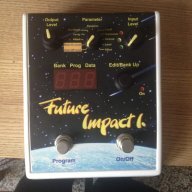
Future Impact now available!! WAS: deep impact reissue!!! interested?

I'm waiting for a few more live reports before pulling the trigger. @Mosfed 's didn't reassure me...

Oh dude don't let me dissuade you. It's pretty amazing. My quibbles are just quibbles.

It has more potential than any other synth pedal on the market, has amazing tracking and has all of the capabilities needed to be just out of this world.

 
Hi Lokki - yes I've selected the midi in and midi out device and FI is enabled but I just don't hear anything. I'm not even sure I should be hearing anything. I guess hitting the keys/notes on the virtual keyboard in the editor should play a currently selected patch thru my speakers. All is set up ok on my PC for listening to music through my speakers so no issues there.

I'm assuming any edits I try and make will not work if something is wrong in my setup.

As per my post above, despite my current issues, many thanks Lokki for this fantastic pedal. The possibilities seem endless and it is what myself and many other bass players have been waiting years and years for. :)
ok, let's get this worked out :-)

1) just to rule everything out, you have the output of the f.i. connected to your speakers, right? you get a signal when you plug your bass in and select a patch and enable it? (if not, then your setup is wrong) if yes, good...

2) midi out on your pc goes to midi in on the f.i. and midi out on the f.i. goes to midi in on the pc. do you see the display on the f.i. change when you do something in the editor? the display on the f.i. should read something like: "--5" that is, patch number should be replaced by two lines. if not, midi communication is not working properly.

please write about the outcome and we will take it from there.
 
Will one of these work on the future impact so I can firmware update/transfer/edit presets and all that jazz?

Invalid Link Removed

I have one being offered to me cheap and will pick it up if it will.

Not sure about that one but I have the newer version of this and it works. Also not sure if the newer version will work with firmware updates because we have not had one yet.

Which brings up a good point. Probably going to be impossible to speculate on many cheap midi devices if they will support a firmware update since there hasn't been one since the FI was released. I would say the only cover all bases concrete solutions will be what Andras has tested earlier in this thread and confirmed. They may be listed on their website as well.
 
Not sure about that one but I have the newer version of this and it works. Also not sure if the newer version will work with firmware updates because we have not had one yet.

Which brings up a good point. Probably going to be impossible to speculate on many cheap midi devices if they will support a firmware update since there hasn't been one since the FI was released. I would say the only cover all bases concrete solutions will be what Andras has tested earlier in this thread and confirmed. They may be listed on their website as well.

Andras did say that the current firmware is available for download and you can "test" an update with that. FWIW.
 
ok, let's get this worked out :)

1) just to rule everything out, you have the output of the f.i. connected to your speakers, right? you get a signal when you plug your bass in and select a patch and enable it? (if not, then your setup is wrong) if yes, good...

2) midi out on your pc goes to midi in on the f.i. and midi out on the f.i. goes to midi in on the pc. do you see the display on the f.i. change when you do something in the editor? the display on the f.i. should read something like: "--5" that is, patch number should be replaced by two lines. if not, midi communication is not working properly.

please write about the outcome and we will take it from there.

Hi Lokki - thanks so much for this.... and your patience :0)

Been away for a couple of days but will revisit this again in next few days as I am desperate to get this on my pedalboard ready for next week's gigs.
 
ok, let's get this worked out :)

I am sorted! Out of desperation last week I ordered an M-Audio Midi lead just in case there was something wrong with my Roland Um-One. Plugged in the M-Audio cable, reset the midi in and midi out device and I can hear the FI when "playing" the keyboard on the FI Editor.

I can only assume the Um-One is faulty so this will get returned.

Just need to practice editing, importing sounds from the Patch Sharing Thread/Google Drive page and moving around my favourite patches.

Thanks again Lokki !!
 
I am sorted! Out of desperation last week I ordered an M-Audio Midi lead just in case there was something wrong with my Roland Um-One. Plugged in the M-Audio cable, reset the midi in and midi out device and I can hear the FI when "playing" the keyboard on the FI Editor.

I can only assume the Um-One is faulty so this will get returned.

Just need to practice editing, importing sounds from the Patch Sharing Thread/Google Drive page and moving around my favourite patches.

Thanks again Lokki !!
glad it worked out!!!
 
My FI came today. Its not big has I thought it would be. Kept thinking it was moog size. Digging it so far. Got it hooked up to the computer and got editor working. Question, has anyone mentioned pitch bend being added at some point?
 
Just need to follow up to say that I really hope that the SY-300 routing thing works, that's really a brilliant solution, I wish I had thought of it before. I'll report back if I figure it out.
Did you get your FI working in thd send return of your Sy 300? Its so great. Then being able to use both set of outputs on the Sy 300 to have separate effects chains!!!!
 
Did you get your FI working in thd send return of your Sy 300? Its so great. Then being able to use both set of outputs on the Sy 300 to have separate effects chains!!!!

Yes, I did get it working. I haven't noticed the problems that someone else was mentioning about the FI tracking differently in the loop. The biggest problem with it is that is the default that they are evenly mixed, and there are plenty of times when I would just like one or the other, but I have a MIDI command set up to adjust this on the fly.

You're right, it's really great! Just the mix of a fat FI sound with a more ambient SY-300 sound can be really cool, and I haven't even scratched the surface of the cooler things you're talking about.
 
  • Like
Reactions: Witness412
I've discovered a weird bug, or at least a bad interaction, between the FI and midi mouse. The FI gets stuck at program 54.

The FI is set to direct mode, and the midi mouse gives me the option to cycle up or down easily through the programs. Trouble is, if I go up or down through 54 (as shown on the FI) the FI gets stuck at that number, and will only move off it id I use the buttons on the FI, at which point all goes back to normal.

It's perfectly repeatable. And powering off the FI doesn't get rid of the behaviour.

Anyone else see this weirdness with program 54 ?
 
I've discovered a weird bug, or at least a bad interaction, between the FI and midi mouse. The FI gets stuck at program 54.

The FI is set to direct mode, and the midi mouse gives me the option to cycle up or down easily through the programs. Trouble is, if I go up or down through 54 (as shown on the FI) the FI gets stuck at that number, and will only move off it id I use the buttons on the FI, at which point all goes back to normal.

It's perfectly repeatable. And powering off the FI doesn't get rid of the behaviour.

Anyone else see this weirdness with program 54 ?

For some reason, the MIDI channel is done on a patch-by-patch basis. Is there any chance that you changed the MIDI channel on Program 54?
 
  • Like
Reactions: Dark Barn
For some reason, the MIDI channel is done on a patch-by-patch basis. Is there any chance that you changed the MIDI channel on Program 54?

Well, I haven't yet connected it to a computer, and it doesn't look like you can re-assign midi from the pedals front panel ... so I'm pretty sure I can't have done it.

What you're saying sounds entirely plausible though .... I wonder if it happened during quality testing before dispatch ?