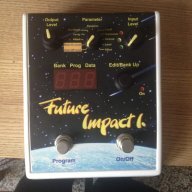
My FI recently started to go automatically to program 46 when powering it. Any tips how to keep it in the old set up where the FI would start with program you left it on last.

TalkBass has been independent since 1998. Add your voice.
Create a free account to reply to discussions, view embedded media, and browse with fewer display ads.
Join free Log in
Want zero display ads or expanded classifieds tools? Compare plans.

...is there any setting on the FI that you can think of that would replicate a violin patch, or even better strings...
Yes, setting the cutoff on the FI at highest point (with res minimized) lets through all frequencies or "opens" up the filter. Then what ever envelop follower placed post FI effectively replaces the FI filter.
I'm still a bit confused on the difference between the vintage and normal cutoff. Once I read the manual I expect it is easy to understand.
the main difference in the filter is actually:Check out my page here. I have a sound sample and patch shared for simulating a synth string. However, it requires a 100% wet reverb after the FI. pandaMidi Future Impact bass synth sound samples and patches - cgraham.com
In the editor you can set the VCF Type = OFF and bypass the filter completely.
The user manual covers this. The "vintage" mimics the original DI filter which apparently has some quirks. You'll observe the attack/decay/depth/etc. behaves differently. The "normal" filter sounds a bit more modern, again with different attack/decay/etc. behavior. This is most easily explored via the editor.

if you enable the vintage slider, modern is automatically disabled....@lokki
Interesting, so are the differences between vintage and modern blended when both are activate or is one automatically defeated by the other?

Check out my page here. I have a sound sample and patch shared for simulating a synth string. However, it requires a 100% wet reverb after the FI. pandaMidi Future Impact bass synth sound samples and patches - cgraham.com
In the editor you can set the VCF Type = OFF and bypass the filter completely.
The user manual covers this. The "vintage" mimics the original DI filter which apparently has some quirks. You'll observe the attack/decay/depth/etc. behaves differently. The "normal" filter sounds a bit more modern, again with different attack/decay/etc. behavior. This is most easily explored via the editor.

 We started to ship out the February batch last week, first units will hit you within minutes I think. We go on today with a few unit and keep posting packages every day as they are ready and tested.
I found out that FI will remember the last bank and program number by scrolling the edit/bank up knob and pressing it down, ie. for example choose bank 8, program 0 and scroll the edit/bank up for what ever number and press it down, shut down the FI and when powering it, the same settings will come up. In case you scroll up/down the programs with the program button but not scrolling the edit/bank knob and pressing it down the FI will not start with the settings you last played when powering it up.My FI recently started to go automatically to program 46 when powering it. Any tips how to keep it in the old set up where the FI would start with program you left it on last.

I found out that FI will remember the last bank and program number by scrolling the edit/bank up knob and pressing it down, ie. for example choose bank 8, program 0 and scroll the edit/bank up for what ever number and press it down, shut down the FI and when powering it, the same settings will come up. In case you scroll up/down the programs with the program button but not scrolling the edit/bank knob and pressing it down the FI will not start with the settings you last played when powering it up.
1) Choose whatever program by pressing the program button (single or double press depending going up or down on the foot switch itself or via your midi controlsI'd like to know more about this but I'm not following which buttons you are pressing when.

Hi everyone, here is the service provider speaking!
I gently ask everyone by email whose demand is near to ship with the payment options and nobody can be forgotten or left, we have enough supply now to fulfill all the needs for this month, really.
I think @gastric posted a modification earlier in this thread on how to make the knobs have more resistance.@Gabor_Gerenyi, @lokki @Andras Szalay
Have any changes been made on batch 2-3 re: the knobs etc? Or are they all the same as V1? I would gladly grab a new one if they have been stiffened up some.
I think @gastric posted a modification earlier in this thread on how to make the knobs have more resistance.
Anyone having issues with a high pitched tone coming from the FI when placed behind a B7k? The tone is actually always there (even when bypassed) but the B7k definitely makes it much more audible. I would imagine other boost/dirt pedals will also make it more apparent. I'm going to experiment with different power tonight to see if that helps. The pitch of the tone is high enough that it may not be audible to some.
I have the FI first in my chain so it gets the cleanest signal. I imagine anything boosting certain frequencies into it might mess with the tracking some.Anyone having issues with a high pitched tone coming from the FI when placed behind a B7k? The tone is actually always there (even when bypassed) but the B7k definitely makes it much more audible. I would imagine other boost/dirt pedals will also make it more apparent. I'm going to experiment with different power tonight to see if that helps. The pitch of the tone is high enough that it may not be audible to some.