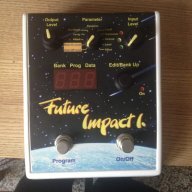
Hi all - I received my Future Impact and on first listen, the sounds and tracking are as just as good as I hoped. Just fantastic!
After the first play I thought, well some of these sounds are amazing, let's move the good ones down to one bank so my favourites are set to 1,2,3,4 etc to save hassle and lots of foot clicking on gigs. I have concluded that to do even this, I need to set up the midi side of things.
Reading the Future Impact Patch sharing thread, I bought the Roland Midi cable as I'll need it anyway to edit or create new patches. (
Invalid Link Removed )
Tried to install the UM-ONE software on my 10 month old iMac but the UM-ONE set up instructions don't seem to tie up with the settings available on my Mac...
I have installed UM-ONE software seemingly successfully on my PC and clicking on the UM-ONE shortcut opens a small popup window showing "MIDI IN setting" and a tick box for "Light Load" and just a link to open up the Read Me file.
UM-ONE is set to "COMP"
I open up the FI editor and have been staring at it for hours...
Is it just me that feels hopelessly out of my depth with this?
How do I move patches around?
I can see that there are lots of sliders to play with on the editor but can't see what patch number it will effect.
Do I need to plug the bass into the pedal and play? If so, should I hear something? Clicking on the "keyboard" keys at the bottom of the editor makes no noise. Should I be plugging a midi keyboard into the UM-ONE or the PC?
I'm guessing these are ridiculously silly questions but I am just a humble bass player.....
The Octavius Squeezer now seems very simple in comparison :0)
I have read the User Guide but it doesn't seem relevant to just moving patches around or fine tuning existing presets.
Can anyone offer any advice please? I'd like to:
- Move some of my favourite factory presets EG Analog Attack number 43 down into Bank / Presets 1- 10.
- Fine tune some of my favourite presets to my liking and also save in another bank somewhere.
Any advice most welcome guys - I am utterly lost :0)