I'm trying to understand something that happened today.
A friend called me to help him capture his band's rehearsal.
He had an analog Yamaha MG166 Cx, so no USB. And a Laptop with Windows 10. So, since I couldn't use an interface or ASIO driver, I downloaded Audacity.
Bare in mind, I'm still learning things. So I tried, three days ago, at home, with a simple analog mixer, to record some tracks in my living room. I plugged in the mics, used a double RCA to single 1/8" coming out from the mixer's Main Outs to the Line input of my Laptop, selected Stereo Mix as "Recording Device" in Audacity, it all worked all perfectly. And my laptop, like my friends, also only had one jack input.
Now, today:
Everybody looking at me, and I said: "don't worry, guys, I know what I'm doing". then my nightmare begun.
I did everything exactly like I had done before. The mics were capturing the sound, sending it to the mixer, perfectly. But no sound at all going into the laptop, to Audacity. With the same type of cable (RCA to single 1/8"), and appropriate adapters when necessary accordingly to the input jack, I must have tried EVERY combination possible from that god damn mixer to the laptop: Stereo Out, Monitor Out, Rec Out, 2 track in, left/right from channel 13/14, from channel 15/16; tried plugged only one RCA to the phone jack, to AUX1, to AUX2, I even tried foot switch!
I left there destroyed, knowing that, If only there was a f..cking interface there to work with, I would certainly make that thing not only capture the sound, but capture it much better than with that stupid Windows-driver ridden Audacity stupid worthless software.
Please, help me put my mind at ease: what, besides not sucking at this and using an interface, could I have done to make this work in this particular situation? What did I do wrong? Help a newbie - albeit, perhaps quite possibly in the verge of quitting all this - to understand.
Here are some pics to clarify:
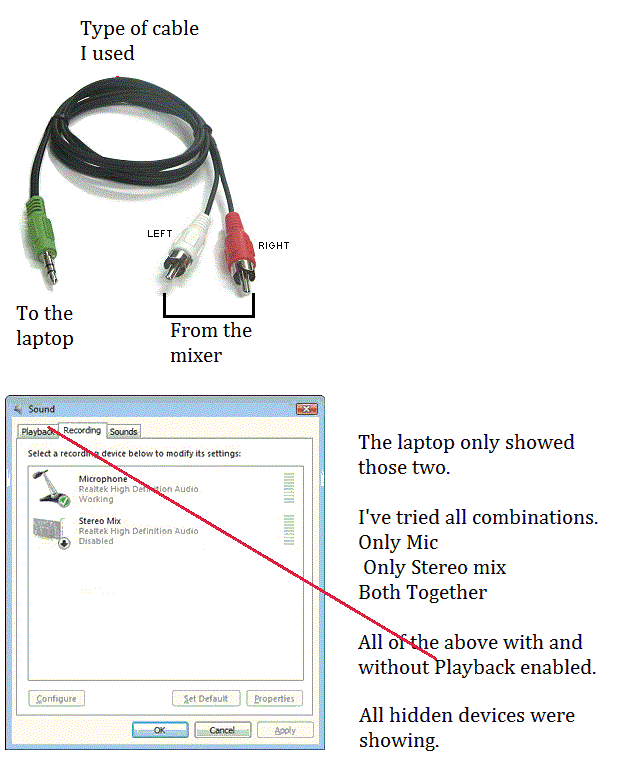
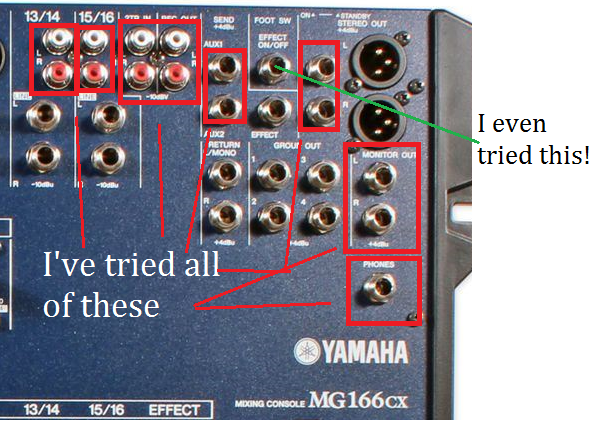
A friend called me to help him capture his band's rehearsal.
He had an analog Yamaha MG166 Cx, so no USB. And a Laptop with Windows 10. So, since I couldn't use an interface or ASIO driver, I downloaded Audacity.
Bare in mind, I'm still learning things. So I tried, three days ago, at home, with a simple analog mixer, to record some tracks in my living room. I plugged in the mics, used a double RCA to single 1/8" coming out from the mixer's Main Outs to the Line input of my Laptop, selected Stereo Mix as "Recording Device" in Audacity, it all worked all perfectly. And my laptop, like my friends, also only had one jack input.
Now, today:
Everybody looking at me, and I said: "don't worry, guys, I know what I'm doing". then my nightmare begun.
I did everything exactly like I had done before. The mics were capturing the sound, sending it to the mixer, perfectly. But no sound at all going into the laptop, to Audacity. With the same type of cable (RCA to single 1/8"), and appropriate adapters when necessary accordingly to the input jack, I must have tried EVERY combination possible from that god damn mixer to the laptop: Stereo Out, Monitor Out, Rec Out, 2 track in, left/right from channel 13/14, from channel 15/16; tried plugged only one RCA to the phone jack, to AUX1, to AUX2, I even tried foot switch!
I left there destroyed, knowing that, If only there was a f..cking interface there to work with, I would certainly make that thing not only capture the sound, but capture it much better than with that stupid Windows-driver ridden Audacity stupid worthless software.
Please, help me put my mind at ease: what, besides not sucking at this and using an interface, could I have done to make this work in this particular situation? What did I do wrong? Help a newbie - albeit, perhaps quite possibly in the verge of quitting all this - to understand.
Here are some pics to clarify: