
Enjoy the benefits of a premium membership!
Upgrade Account
-
TalkBass has been independent since 1998. Add your voice.
Create a free account to reply to discussions, view embedded media, and browse with fewer display ads.
Join free Log in
Want zero display ads or expanded classifieds tools? Compare plans.
You are using an out of date browser. It may not display this or other websites correctly.
You should upgrade or use an alternative browser.
You should upgrade or use an alternative browser.
Mainstage 3 with Scarlett Solo - NO AUDIO?
- Thread starter pmcdn
- Start date
More options
Who Replied?

Sorry, I can't help you with GB or Mainstage. Probably others could help if you list your hardware and software and connections.
Sorry, a bit late : you have to authorize mic input access to Mainstage in the Security settings (system preferences) of your Mac.iMac OSX Monterey, Focusrite Scarlett Solo, Mainstage 3 going to a combo bass amp. Again, GB works perfectly.
Hey. Thanks but I’ve done this and checked every setting possible a million times. I even created a new account on my Mac and even installed MS on my MacBook Pro.
still no joy.
still no joy.
Sorry, a bit late : you have to authorize mic input access to Mainstage in the Security settings (system preferences) of your Mac.

Weird… and there are no drivers on Mac as it’s treated as a generic USB audio device so you cannot « try » different ones as a fix.Hey. Thanks but I’ve done this and checked every setting possible a million times. I even created a new account on my Mac and even installed MS on my MacBook Pro.
still no joy.
Which Mac and Intel or Silicon (M1 or 2)?
Are you on Ventura? Quite a strange bug!I have tried on a 2000 1521 inch iMac and I have also tried it on my 2020 MacBook Pro. Same results.
Again, Garage band and Guitar Rig 6 work perfectly. It’s only MainStage that refuses to receive and putout the audio.
To say that I am frustrated is an understatement
**Oops, just saw your older post, Monterey.
Could be a bug on the Apple side (as MainStage is their product).
Everything is configured the same regarding the Solo outs in each software?
I know you said you tried everything but it’s the only things I’ve fo7nd:
If MainStage isn’t working
I would try the option 4: Drag the file called “com.apple.mainstage3.plist” from the Preferences folder to the desktop.
Again, I’m annoying, but you did authorize microphone and speaker for MainStage in the Security settings?
If you can’t record audio on a Mac using macOS Mojave or later
Forum
If MainStage isn’t working
I would try the option 4: Drag the file called “com.apple.mainstage3.plist” from the Preferences folder to the desktop.
Again, I’m annoying, but you did authorize microphone and speaker for MainStage in the Security settings?
If you can’t record audio on a Mac using macOS Mojave or later
Forum
Are you on Ventura? Quite a strange bug!
**Oops, just saw your older post, Monterey.
Could be a bug on the Apple side (as MainStage is their product).
Everything is configured the same regarding the Solo outs in each software?
I use Ventura and Monterey. Two computers.
everything is configured the same. I don’t get it.
Get in touch with Focusrite maybe?I use Ventura and Monterey. Two computers.
everything is configured the same. I don’t get it.

Late to the party but I had a strange occurrence too. Like you, Garage band works fine but if I plug in the Focusrite and open MainStage first, I get no indication of input or output. I changed the sound settings both in the Mac menus and in MainStage menus, but nothing. If I then open GarageBand, I get sound. When I go back to MainStage it then starts working. I read through your discussions on another forum so I know you have tried everything that I could think of too. My channel strips are set to Input 2 and my Outputs are 1+2. I can send you a screenshot of what's working later when I can hook up my computer at hone again.
Mine works great as long as I go into GarageBand first. One caveat, I had been doing edits and exploring MainStage at work without the Focusrite hooked up. Perhaps it needed to relearn something in the background after unplugging and replugging the USB device? Not are, but I will send you what is working for me.Yes, very frustrating. I'm wondering if perhaps MainStage doesn't like Focusrite products? I haven't tried other hardware yet but I have completely run out of ideas to try otherwise.
Another thought, what kind of channel strip are you adding in MainStage?
Step 1. Goto GarageBand and make sure you are getting input and output so that we know your system settings are good.
Then...Launch MainStage and choose a Quick Start Concert - Guitar
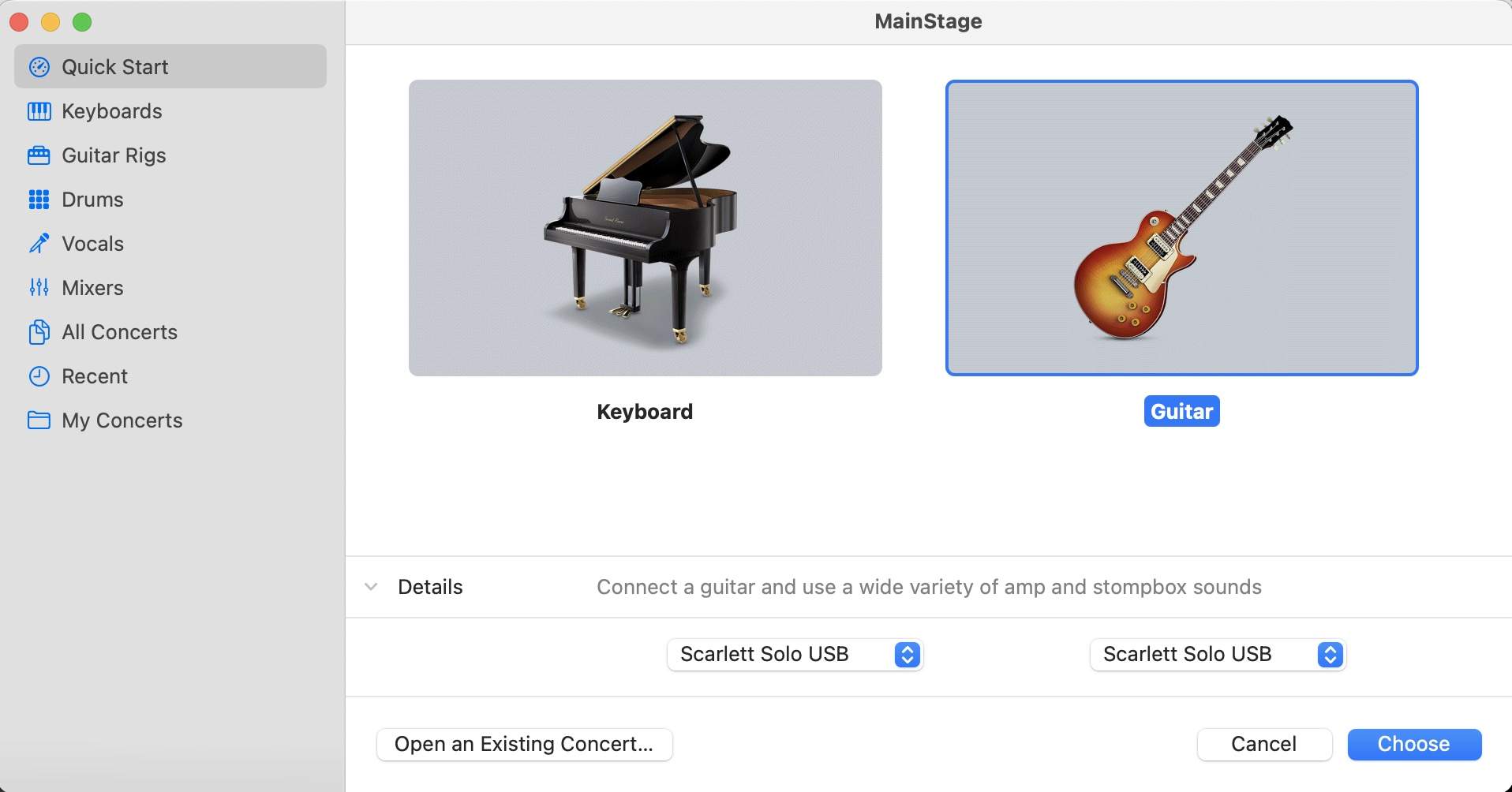
You will get a warning about no sound, click Okay.

Turn up the slider on the Channel Strip for Master (Far right of my screen).

The Output on the first channel strip labeled Brit and Clean should be Output 1-2
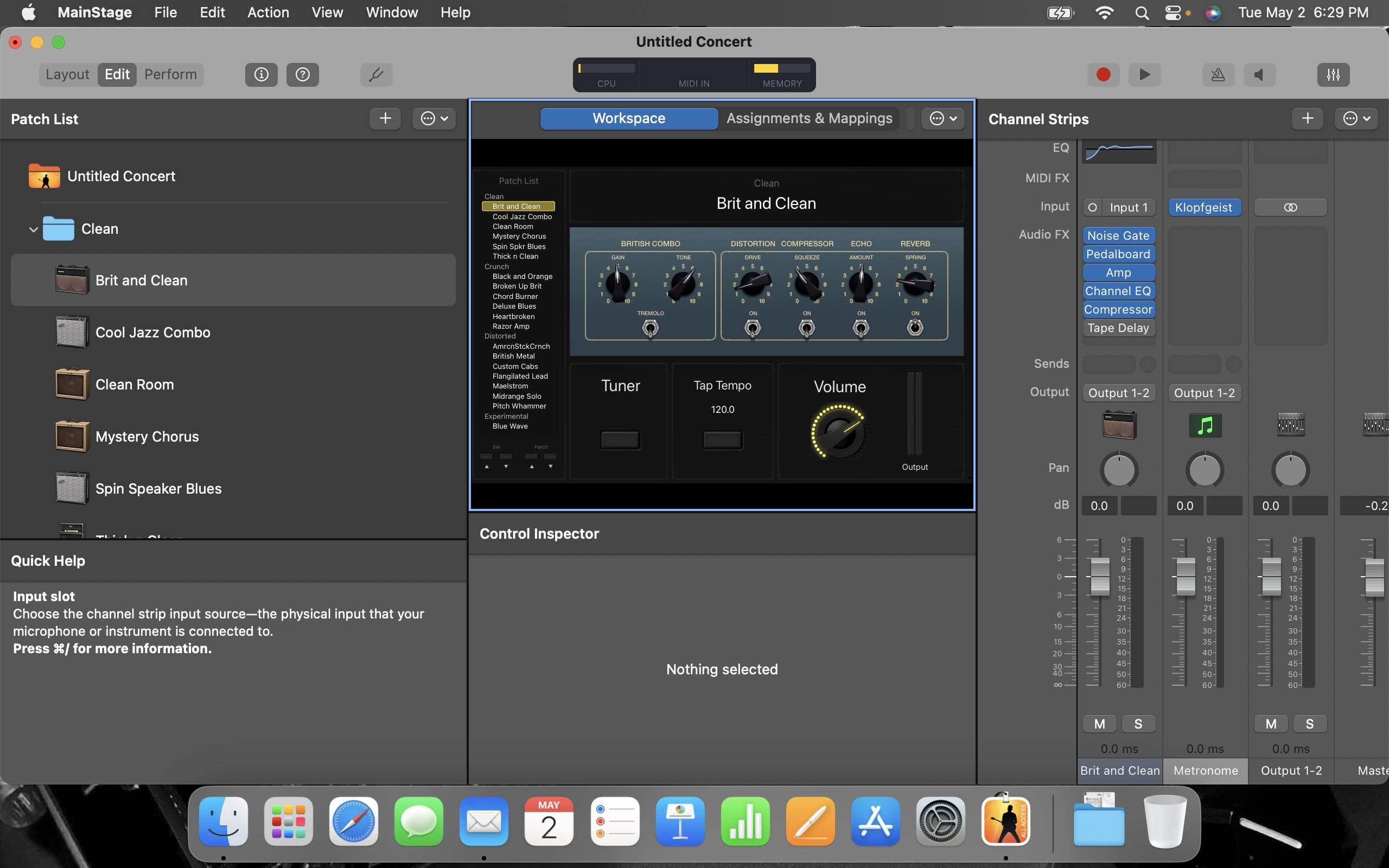
Click the Input on the channel strip and select Input 2 (The 1/4" input on the Scarlet Solo). You should have sound/indication on the channel strips for input and output sound.
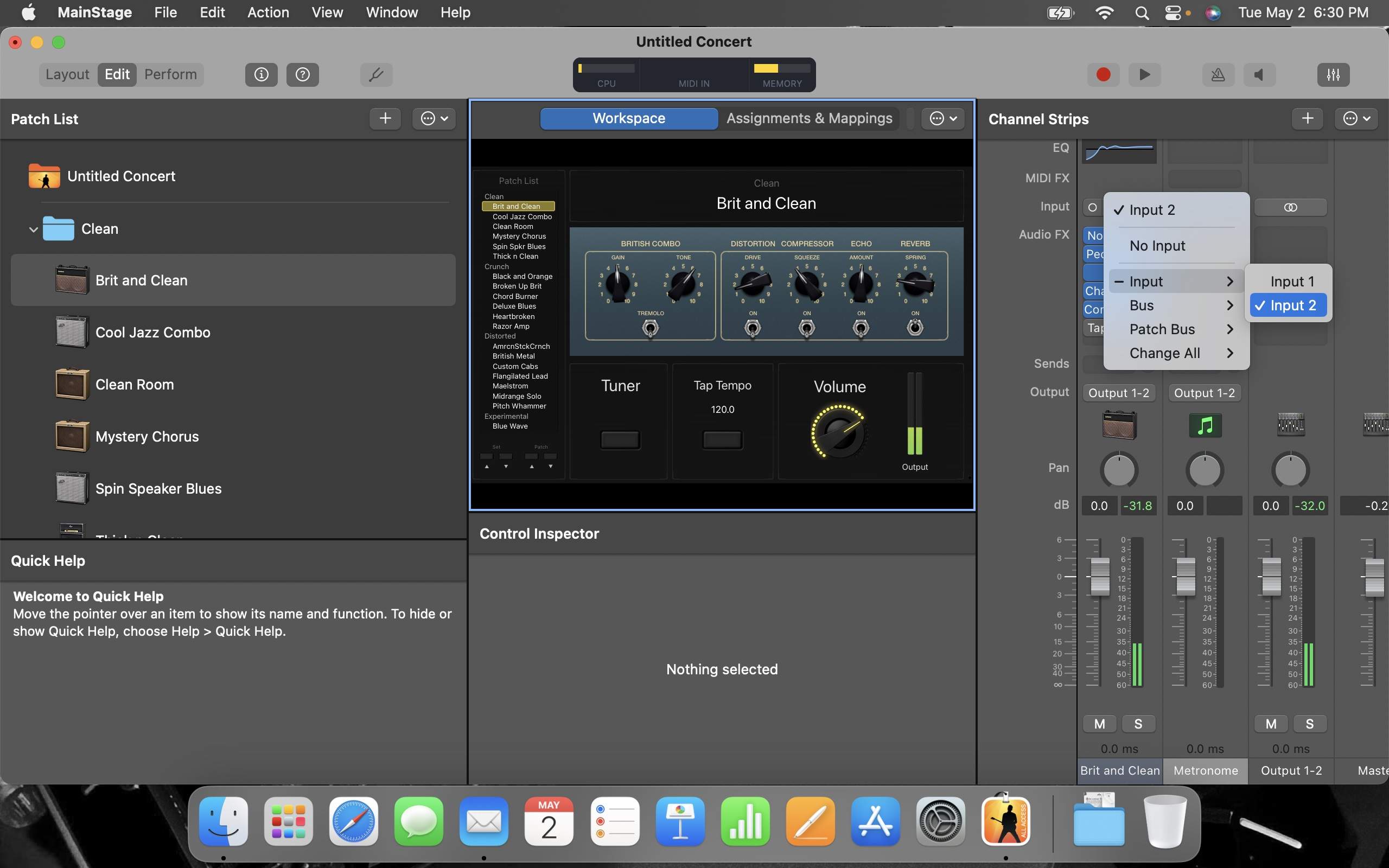
If this doesn't work, then maybe find someone local that can take a look at your setup. Good Luck.
This will not be the type of amp you would use for bass but this will let you test your system and try to get sound.
Then...Launch MainStage and choose a Quick Start Concert - Guitar
You will get a warning about no sound, click Okay.
Turn up the slider on the Channel Strip for Master (Far right of my screen).
The Output on the first channel strip labeled Brit and Clean should be Output 1-2
Click the Input on the channel strip and select Input 2 (The 1/4" input on the Scarlet Solo). You should have sound/indication on the channel strips for input and output sound.
If this doesn't work, then maybe find someone local that can take a look at your setup. Good Luck.
This will not be the type of amp you would use for bass but this will let you test your system and try to get sound.
I will try this. Thank you for taking the time and effort to illustrate this!
Step 1. Goto GarageBand and make sure you are getting input and output so that we know your system settings are good.
Then...Launch MainStage and choose a Quick Start Concert - Guitar
View attachment 5050298
You will get a warning about no sound, click Okay.
View attachment 5050299
Turn up the slider on the Channel Strip for Master (Far right of my screen).
View attachment 5050300
The Output on the first channel strip labeled Brit and Clean should be Output 1-2
View attachment 5050301
Click the Input on the channel strip and select Input 2 (The 1/4" input on the Scarlet Solo). You should have sound/indication on the channel strips for input and output sound.
View attachment 5050302
If this doesn't work, then maybe find someone local that can take a look at your setup. Good Luck.
This will not be the type of amp you would use for bass but this will let you test your system and try to get sound.
Let me know if you are still having troubles. I managed to get mine working and have used it for two Sunday worship services now. It is picky about the input and output settings.I will try this. Thank you for taking the time and effort to illustrate this!
Furym, your instructions worked, but there's a problem. It was switching the amp slider input to 2 that worked. I could hear it for a few minutes and then I went to switch to a different amp and I could no longer hear. I could see the meter is moving and everything but I couldn't hear it. I verified I could hear it for a few minutes and then I went to switch to a different amp and I could no longer hear it. I could see the meters moving and everything but I couldn't hear it. I verified all the other settings which I have here in screenshots. I closed it restarted it and what happens is at first I can hear it and then sometimes in a few minutes or a few seconds the audio will cut off from the amp. Again, I can still see all the meters both on the application and on the scarlet device itself so I know it's receiving input but at the sound quits coming out of the app.
I will add that occasionally using garage band I would get no audio like this, but a simple reboot would fix it. I'm not sure what's going on.
I will add that occasionally using garage band I would get no audio like this, but a simple reboot would fix it. I'm not sure what's going on.
Attachments


Your input on the Focusrite Solo for instrument is Input 2. Anytime you choose a new amp, the default seems to be Input one on that channel strip and would have to be changed. I think if you create a new concert, not a "Quick start", but select from All Concerts, Bass/Guitar then on its opening screen it asks what your input device is and on what input number. I think then you can load new amps and they will default to Input 2. I am trying to recall from memory on this as I don't have the whole rig in front of me right now.Furym, your instructions worked, but there's a problem. It was switching the amp slider input to 2 that worked. I could hear it for a few minutes and then I went to switch to a different amp and I could no longer hear. I could see the meter is moving and everything but I couldn't hear it. I verified I could hear it for a few minutes and then I went to switch to a different amp and I could no longer hear it. I could see the meters moving and everything but I couldn't hear it. I verified all the other settings which I have here in screenshots. I closed it restarted it and what happens is at first I can hear it and then sometimes in a few minutes or a few seconds the audio will cut off from the amp. Again, I can still see all the meters both on the application and on the scarlet device itself so I know it's receiving input but at the sound quits coming out of the app.
I will add that occasionally using garage band I would get no audio like this, but a simple reboot would fix it. I'm not sure what's going on.
As for the output dropping out, I do have to go into my MainStage settings and make sure that the output is on Scarlett as it seems to default back to MacBook Speakers when I first open it. That probably has to do with not having restarted after hoking up the Scarlett. Once I have made that change though, it stays outputting to my amp so not sure what is happening there. Have you tried different cables? Scarlett->Amp cable? maybe leave headphones hooked into the Scarlett (not on direct monitor) and the next time the audio drops out on your amp see if it is still coming out of the headphones. Might help narrow down where the issue is.


