• TalkBass has been independent since 1998. Add your voice.
    Create a free account to reply to discussions, view embedded media, and browse with fewer display ads.
    Join freeLog in
    Want zero display ads or expanded classifieds tools? Compare plans.

My New Studio Build (perhaps overly detailed)

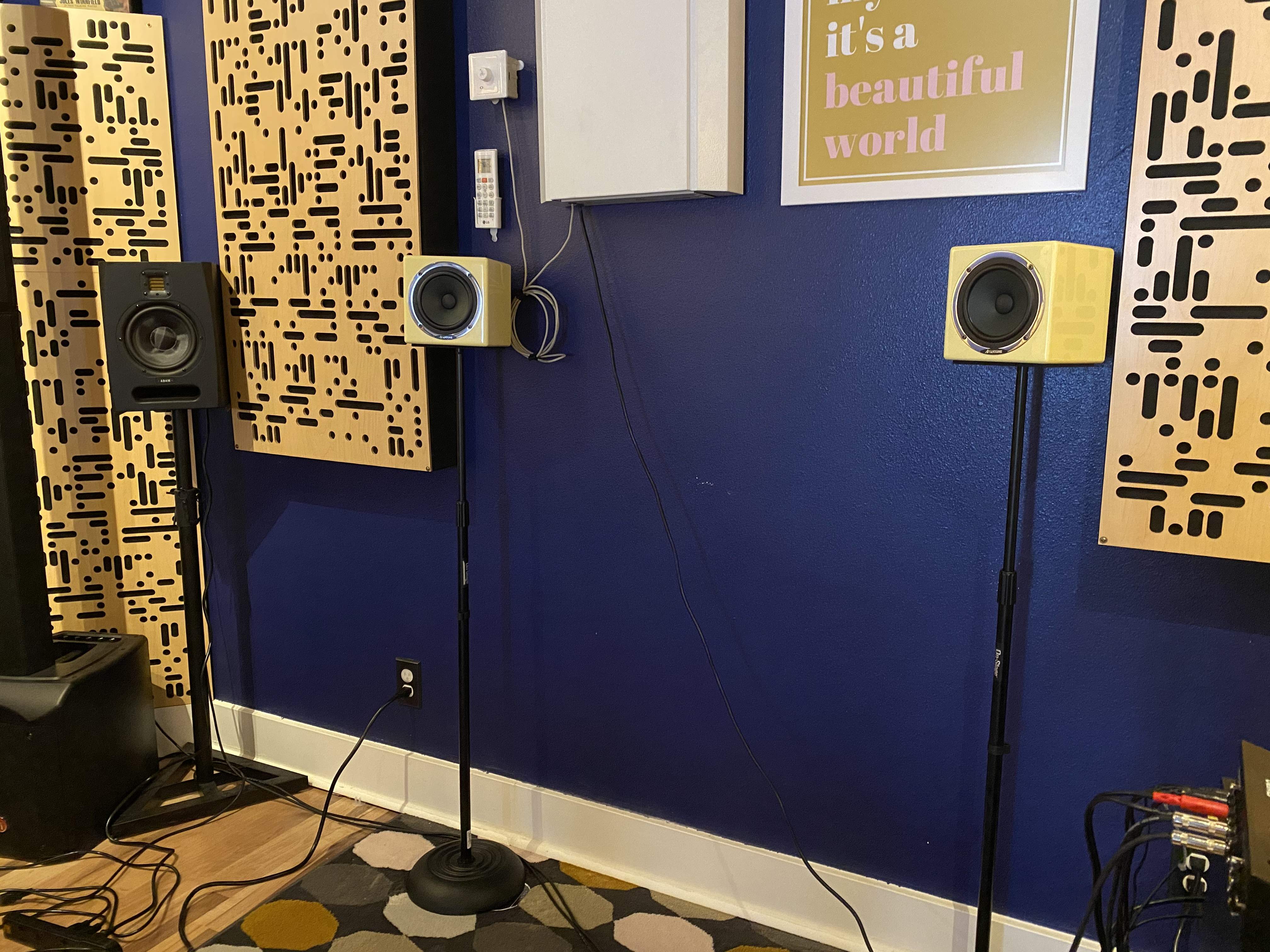
Placements nearly dialed in. I’m going to shorten my computer monitor stand after work and will get everything roughed in. Re-cabling will be the tricky part.
D31CACD3-9D3D-49F5-B420-E89FBCE9057B.jpeg
 
First day of mixing with both sets of speakers. My process has distilled down to this (after gain staging and general channel routing setup):
  1. Rough mix levels in mono with the Avantones
  2. Switch to mains and do the bulk of the EQ, compression, etc.
  3. Switch back to the Avantones and “seat” the lead vocal in the mix.
  4. Switch to mains and make final mix tweaks
  5. Check on both speaker sets.
This sounds like a lot of switching back and forth, but it’s become REALLY fast. I’ve mixed three tracks today and on my first pass they’re all nearly done. Loving this new setup.
 
How does the sub fit in? You don't mention the Nero, which I'd guess, means its doing the job and fading into the background of the workflow, like it should?
The sub can be implemented with any of my three monitor sets, one of which being my PA that I don’t really use for mixing purposes. The sub (ADAM Audio Sub8) paired with the Avantones sort of defeats the narrow bandwidth purpose, so I only use it with my ADAM Audio F7 nearfields. The Nero is wonderful aside from sending a pop through the system when powering down. Audient has confirmed this is normal, so my solution was to put all the speakers on a power strip and shut them off before powering down the Nero.
 
The Avantone monitors are on my shopping list. Also looking at the Drawmer CM3.1 monitor controller. Has an assortment of mix checking capabilities. Great job on your studio.
Thanks!

I considered the Drawmer monitor controllers as well, but the Audient Nero won out because I liked the feel of the buttons more. The routing appears to be equally transparent between both units. I don’t think you can go wrong.
 
  • Like
Reactions: Krisfield
Got my headphone mix routing worked out. I can now send four independent headphone mixes to performers with their own volume control via these cheap Behringer P1 headphone amps that sound surprisingly good. I’ve also got four headphone outputs from my monitor controller, but I’ll likely just use HP1 for myself and leave the others unused in favor of these ones direct from the 16A via the TRS patchbay.

E82EA1CA-4075-4DD5-81C1-35C44BBF440C.jpeg
 
Finally got my reamp signal path sorted out and it’s working beautifully.
Login • Instagram (just like before, I’m not sure why this link says ‘login’ since it’s to an IGTV video that I made showing this all working)

Edit the post, click on the bbcode editor button (top right in the frame, with the wrench), you’ll see the URL link, change the “Login • Instagram” text to whatever you want, save.
 
Everything about the MOTU 16A is incredibly well thought out. I was having an issue where signals from my DAW were just fine for my Radial X-Amp reamp box, but any signal that went to that analog output (16A's analog output 10) from things like Spotify, YouTube, etc. would be too hot for the X-Amp and the clip light would start flashing. I'm not reamping from those sources, but I do use them a lot for background music when working on other things, reference tracks, watching videos, etc. My solution was to disable the routing for that particular analog output and only enable it when I was going to reamp something. I message MOTU tech support about it and an hour later they pointed me to a settings page I had forgotten about which allows you to manually configure the input or output trim level of every analog input and output on the unit. All 32 analog i/o ports are configurable, which is very smart given the "patch anything to anything" idea behind this unit. I keep waiting for find something I liked more about my previous Apogee Elements, but the MOTU 16A keeps coming out on top for features, stability, sound quality. So glad to have that saga behind me.

Screen Shot 2020-07-13 at 11.24.41 AM.png
 
no problems with your main speakers right in the corners of the room?
Not really since the corners are completely filled with GIK Alpha CTs. Combine that with the GIK Alpha 4" panel immediately on the other side of each monitor it all works pretty well. For correct placement they need to be that wide, and the only way to get them further from the corner would be to have a wider structure. It's a little late for that :p

Addendum: If you measure from the actual wall, ignoring the bass trap, to the nearest point on the monitors, they're spaced ~21" from the corners (~19" to the side walls and nearly touching the front wall).
 
  • Like
Reactions: And I