• TalkBass has been independent since 1998. Add your voice.
    Create a free account to reply to discussions, view embedded media, and browse with fewer display ads.
    Join freeLog in
    Want zero display ads or expanded classifieds tools? Compare plans.

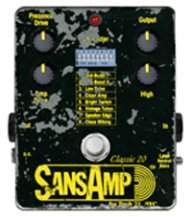
SansAmp Programmable Bass Driver ELITE

Another question for those who have this. As you go through the presets, are their wide variations in volume, or is it a consistent volume? One of the things I did not like about the Zoom B1Four, is the volume varied widely with each preset. Thanks.

Also, do you see yourself primarily using the built in presets or skipping them and just creating your own?

Thanks!
no… and yes. In studio mode, which is where the large library of sounds are, you would not care about this, but there are volume differences as you scroll through. This mode would be used “in studio” or if you’re just checking out/editing the sounds at home. So generally, it’s a one at a time situation where it doesn’t matter.

For performance mode, you save your preferred tones to the three foot switches. When you’re creating your preferred tones, you can match the volumes, or scale them for flat on switch one, low gain on switch 2, high gain on switch 3. Or what ever combo you want.

So when it counts, in performance mode, there are no volume variations if you choose to set it up that way, like any other preamp or gain-staging.

One other highly recommended tip… turn on Special Function 6: Safe level mode!!
This is not on from factory. Without it, I found making adjustments very difficult and jumpy. But once I turned it on…everything smoothed out and felt very natural, with no jumps.

I’m starting to think of the pedal as follows: the performance mode is “the pedal” not the studio mode. The performance mode is what I will be using. The studio mode is my sketch pad with essentially unlimited ways to customize my sounds. I then pick three from my sketch pad that I will be using for when I play. It’s like having a shelf full of pedals(preamps/ drives and yes other effects) then picking three for your board.
Thanks!!! That was really helpful and gives me a better idea on how to use this pedal.
 
  • Like
Reactions: CamJazzBass
Got mine today. Short on time to try it out, but the default settings seem to send some 'computer noise' (like an old modem) into my amp. It very much could be too much gain on the default and given a few hours I might learn it's not the box itself. But that was a bit of a surprise.

Love that it came with a midi to usb interface. And I was happy to hear some noise gate and delay options, though it seems those are only configured via the application/midi connection. I'm a bit spoiled with Eden Traveler warmth, but for direct into FOH, this should be really sweet.

One neat discovery... when in "Studio mode" you can still bypass by switching into tuner mode, then click again. This is helpful to AB the sounds compared to bypass. To get into the patch again, just click the right or left button.
 
Got mine today. Short on time to try it out, but the default settings seem to send some 'computer noise' (like an old modem) into my amp. It very much could be too much gain on the default and given a few hours I might learn it's not the box itself. But that was a bit of a surprise.

Love that it came with a midi to usb interface. And I was happy to hear some noise gate and delay options, though it seems those are only configured via the application/midi connection. I'm a bit spoiled with Eden Traveler warmth, but for direct into FOH, this should be really sweet.

One neat discovery... when in "Studio mode" you can still bypass by switching into tuner mode, then click again. This is helpful to AB the sounds compared to bypass. To get into the patch again, just click the right or left button.
Were you connected to a computer when you had that noise? Thats quite worrying if not.
 
Last edited:
Were you connected to a computer when you had that noise? Thats quite worrying if not.
I was not connected to a computer. But I don't want to cast a shadow on the unit here.

I think it's boosting signal more than I'm used to and when I AB it with matched volume it seem to not be introducing ... too much (?) noise?

My kick-around-leave-it-out bass is not very well shielded. But I brought out my clean active Zon and going through the various patches it just sounded like there was digital noise introduced in there. But again, it's hard to swap clean and AB test it, because unless I save the patch with 'equal' gain/volume it resets every time I return to it. I only had an hour to test it before leaving town, so will return next week to try it more.

It definitely could be a boosted gain issue. Curious to see if others are experiencing something similar.
 
The unit should not add noise plus there is a built in noise gate you can use. As always, set the pedal for unity gain first, if you do experience some some noise turn off your instrument volume. If it goes away that indicates the issue is with your guitar.
 
  • Like
Reactions: Thom Fioriglio
Just got mine today!
I did try turning off the IRs (playing into the front of my amp) and everything sounded worse, kinda darker and very low volume.

Running through the presets tons of great stuff, but some of them are ice pick bright.
Will have to find it again, but one of the presets when I turned the treble down it actually got brighter, and got darker as I turned it up.

Haven't found a way in the app to rename presets after 50 yet.
 
Got mine today. Short on time to try it out, but the default settings seem to send some 'computer noise' (like an old modem) into my amp. It very much could be too much gain on the default and given a few hours I might learn it's not the box itself. But that was a bit of a surprise.

Love that it came with a midi to usb interface. And I was happy to hear some noise gate and delay options, though it seems those are only configured via the application/midi connection. I'm a bit spoiled with Eden Traveler warmth, but for direct into FOH, this should be really sweet.

One neat discovery... when in "Studio mode" you can still bypass by switching into tuner mode, then click again. This is helpful to AB the sounds compared to bypass. To get into the patch again, just click the right or left button.

As an update to this: Got back from travel and was able to use headphones and play a bit.

Two things:
  1. It definitely does not introduce untoward noise. But some may think so right out of the box. The default on the first few patches seem strongly boosted in signal (both drive and preamp) and it took me some learning/work to cut the gain enough for volume unity. As @tech21nyc said, at volume unity, the unit should be clean, and it is.
  2. I like this box. It just took me a bit of time (as predicted) to tweak it to what I expected to hear.
Two things that might be helpful to some: I suggest headphones for initial dial in. Also, while one must save a patch to use a bypass switch, I learned to use the blend dial as a 'bypass' comparison to my clean signal while adjusting settings, before saving.

After getting more than an hour with it, It's a keeper.
 
Just got mine today!
I did try turning off the IRs (playing into the front of my amp) and everything sounded worse, kinda darker and very low volume.

Running through the presets tons of great stuff, but some of them are ice pick bright.
Will have to find it again, but one of the presets when I turned the treble down it actually got brighter, and got darker as I turned it up.

Haven't found a way in the app to rename presets after 50 yet.

Some mea culpas:

You can rename the preset by clicking on the name displayed directly under the Import Export buttons on the top left, not the name in the list.

When I said I turned the High knob and it got brighter as I reduced it, the Red zone was on, so I was adjusting the Q not the High. Little reminder to keep an eye on that red light.

The phase/flange is really just a resonant chorus, they make a phasery and flangery type sound, but I think most would prefer an actual phaser or flanger. The flanger is very pronounced in the metallic swoosh, not jet plane style. Being digital maybe they could update it with a proper flange. Need to play with a little more.

I might be in the minority but a mobile app would be killer. The chorus knob only adjusts the mix of the chorus, but there are other parameters to adjust but you need to be connected to a computer to adjust those. Even a very rudimentary app would be great. Found myself having to disconnect it, take it to the computer, test it thru a monitor, then wash rinse repeat because obviously my monitors present the sound differently than into the front of my amp.

All that said this thing is a beast and I am still extremely pleased with it. For comparison I have the Programmable Bass driver, Bassrig 64 Black panel and SGT DI. I haven't tried to 100% clone the others but it definitely gets in the ballpark with some fast tweaking. I think if I move my computer to my rig and actually had access to the PC only features it would be easier.

Would love a way to drag and drop re-organize the presets, right now you would have to copy one of them to a blank one, then copy the one you want into the spot previously occupied by the one you copied to the blank. So copy Preset 1, to 51, then 45 to 1. Thats assuming you want to keep all the presets.

I find the tuner perfectly fine and it is in fact the only tuner now on the board.
 
The phase/flange is really just a resonant chorus, they make a phasery and flangery type sound, but I think most would prefer an actual phaser or flanger. The flanger is very pronounced in the metallic swoosh, not jet plane style. Being digital maybe they could update it with a proper flange. Need to play with a little more.
Thanks for the detailed post, very helpful. Can I ask what controls you get in the software for the Chorus/Phase/Flange? This section is what im most looking forward to, or at least was until you posted the above.
 
Thanks for the detailed post, very helpful. Can I ask what controls you get in the software for the Chorus/Phase/Flange? This section is what im most looking forward to, or at least was until you posted the above.
Here are screenshots of every knobs function in the software.

I know flangers are modified chorus (chori?) and maybe I just haven't hit the right setting to make it sound truly flangery.


Of note:
The ambience settings for Echo and Echoverb add a time control the other ones just have the level and decay options.
In the amp settings (drive knob) all the options are the same Preamp, Drive and Presence.

These are how the chorus is set for each, Chorus, Phaser and Flange:


I think I need to spend more time in the Chorus settings to find a good phaser/flanger setting. I've noticed when using the Chorus, which sounds good, there is at least a perceived if not actual level drop. I'm not losing low end, its just quieter.

It would be nice to have some sort of preset just for the modulation, so if I could come up with a Chorus, Phaser and Flanger sound I like, I can save those as defaults, then add them to whatever drive sound I want.

In a perfect world, if anyone has used a Pod Express, its knobs function this way, off is off, as you turn it up you get chorus that intensifies, then flange, then etc... That would be nice to integrate here.