• TalkBass has been independent since 1998. Add your voice.
    Create a free account to reply to discussions, view embedded media, and browse with fewer display ads.
    Join freeLog in
    Want zero display ads or expanded classifieds tools? Compare plans.

Setting up recording with Audacity

MarshallNole

Guest
Dec 1, 2013
414
96
I have the Behringer Q502 USB mixer for when I need to play with headphones. I have the Direct Out XLR on my amp running from amp to XLR in on the mixer (shown below). I have 1/8" to RCA cable running from the green sound output jack on my computer soundcard to the 2-track RCA In on the mixer to pipe sound from PC to mixer.

I want to record my bass with Audacity. Would I be correct in assuming the only other piece I need is another 1/8" to RCA cable to go from the 2-Track RCA OUT to the Line-In on my PC sound card?
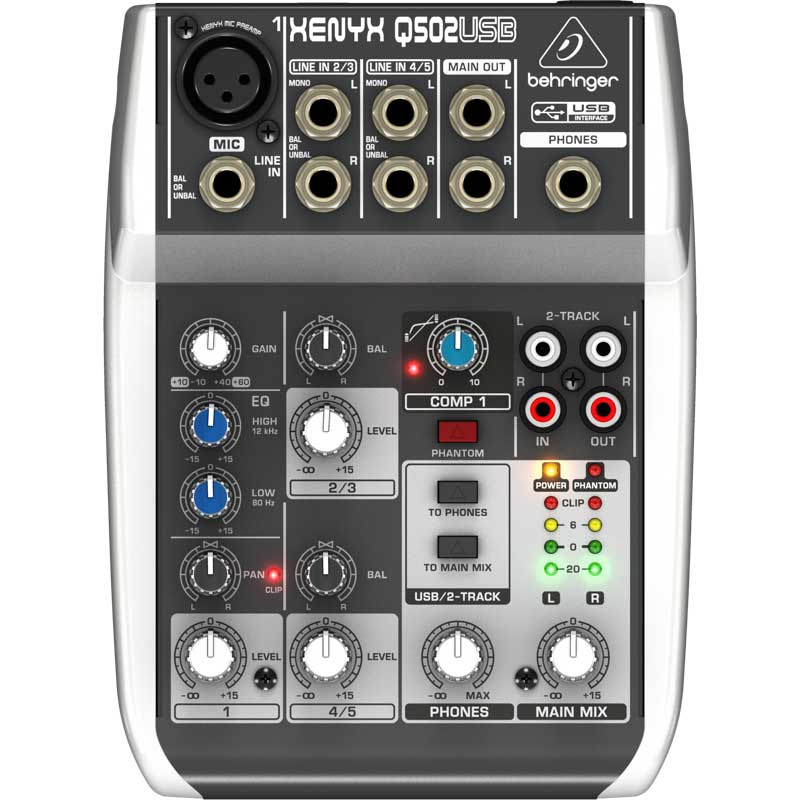
97819_l.jpg
 
This is probably where you get to go diving into manuals...
You -may- need a USB driver for the device -- did a CD or URL link come with the mixer?
I got a CD of stuff with my Scarlett 2i2 and it had some specific and generic drivers.
Once I did that, I was able to see my device on the "connect to" dropdown. Been a while since I've used Audacity but it's all set up to be pretty intuitive so I was able to recognize it.

If you connect the device (Windows-something?) and it tells you 'your device software has been installed and is ready for use' you're done...

I _think_ the 'generic' driver is ASIO4ALL -- search this forum or Google and you'll find it...

This should help set you on the path, and there are lots of people here with way more experience than me - we'll hope one of them will chime in with corrections or elaborations on anything I've got not quite right... Start here, report back progress, we'll get you going...
 
  • Like
Reactions: MarshallNole
Thanks for the replies. I will need to find the box and see what all is in there. IT looks like it will simply install the driver itself when plugged in with USB, but there are drivers on the Behringer website for download if needed.

Thanks!
 
Try using one of the line inputs on your mixer, instead of the Mic input. You may need to get an xlr to 1/4" cable to do that. It could be that you're overloading the microphone preamp. If you run the di out of your amp to a line input on your mixer you'll probably have better results. Also check the input gain slider in audacity, should be near the top of the screen, with a microphone icon next to it. You'll probably want to set that fairly low. Hope that helps!
 
All great suggestions! I'll just add, for the best sound from your bass, you'll want to plug into a high impedance input. That mixer doesn't have one, but your amp does.

As suggested above, use the DI from your amp so that all the impedance match nicely! Impedance mismatches can affect tone quite considerably.

In short:

Bass > Front of Amp, Amp DI > Mixer Line In, Mixer USB > Computer.

(noting that here, AMP can mean amp head, no load necessary, so long as it's not a tube power stage)

Good luck!
 
I have the Direct Out XLR on my amp running from amp to XLR in on the mixer (shown below).
This is what you said you were going to do originally...
Did you do that, or something else ?
I've had best results on my recording interface going from a DI in (either amp's or a standalone). I've plugged straight in and did not like the results...

It may be that your amp is sending "post-EQ" to the DI. If you have a choice, you might try setting the DI to 'pre-EQ'. Lacking that, make sure you have the bass and the amp set pretty flat.
 
Thanks all! There is a button on my amp (GK 700RB-ii) that toggles Pre and POst EQ. I am pretty sure it is set POST EQ. I will also check out the input gain slider.

ArtechnikA - I am indeed going from Direct Out XLR to the XLR input on the mixer.
 
Here's a picture of my model of amp. I am plugged into the 1/4" input. Then I have an XLR cable going from Direct Out to XLR/Mic in on the mixer. I am pretty sure the Post EQ button is pushed in, meaning it is set to Post EQ.

20100701_010.jpg
 
Yeah I don't know crap about this stuff. I may revisit in the future but don't feel like troubleshooting it.
Make no mistake, it can be very frustrating until you get the chain working just right.
There's a lot of pieces and they all have to play together nicely. I wish I could be more help but I have no experience with the Q502 which I feel is probably at the heart of the issue. But when you do want to dive in again, don't hesitate to ask. We'll try to help...

In my case I wanted to make a recording of a bass the night before it got shipped off to its new/old owner. _That_ was a long night and while I did manage to record some sounds, it was scarcely representative of what the bass sounded like. It took a couple of weeks of evenings before I really felt like I had a handle on everything. And now I think I've probably forgotten it all again!
 
Ok I am revisiting this...

Apparently you can record in Audacity using a Rocksmith cable. This cable is USB to 1/4". Apparently you can plug the USB end into your computer, then run the 1/4" somewhere to your amp, and be plugged into your amp and record that way..

Any idea which jack the 1/4" end would go to on my GK 700RB-ii? Would it plug into the FX Send?

GK700RB2.jpg
 
from the product page on Amazon:


plug directly into the instrument.

Yeah I realized you can do that now too, but there was a comment on a YouTube video that says the following:

"all you do is plug the usb end into the computer then plug the guitar imput end into your phone/record out jack on your amp if you have one. haha I thought I was the only person who thought of this. whatever distortion you have on your amp or recording programs is what you get. you dont need to download any drivers for it. but keep in mind I blew the cord out dosnt transfer sound so well."