

Enjoy the benefits of a premium membership!
Upgrade Account
-
TalkBass has been independent since 1998. Add your voice.
Create a free account to reply to discussions, view embedded media, and browse with fewer display ads.
Join free Log in
Want zero display ads or expanded classifieds tools? Compare plans.
You are using an out of date browser. It may not display this or other websites correctly.
You should upgrade or use an alternative browser.
You should upgrade or use an alternative browser.
Sterling SUB NBD and need your thoughts
- Thread starter thebassbuilder
- Start date
More options
Who Replied?

Ric5
Inactive
- Jan 29, 2008
- 29,772
- 30,452
- Disclosures
- I like 5, 8, 10, and 12 string basses
Musicman basses are famous for having a good low B ... I can't imagine buying the 4 string version


I had to replace both the pickup and the pre-amp on my Sub. Pickup change alone didn't do it.

Well I fixed the problem and I took it back for this beauty. I did have to file the fret sprouts, clean up the nut and give it a good setup. Plays great now other than overdriving my interface I use to play with. I have my Focusrite all the way down and it is clipping like crazy even with the volume knob at 3/4%.
this is likely a focusrite issue, if you’re using a Scarlett 2i2 you have no input pad and essentially can’t use an active bass, and the 2i4 has incredibly finicky drivers and inconsistent output in my experience. Enjoy your bass and don’t worry about the interface!
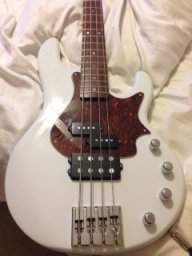
I have a set of Fluence pickups and electronics ready to go but now worried I will not like them that much. Lobster is also someone helping to inspire this after watching all his videos. To be honest if I could have that sweet crunchy tone the stock pup has but one I can turn all the way up, I would be very happy.
I only play through my interface and iPad these days. I am a headphone only guy for the last 3 years. So it is important for everything to work as it should. My main bass is loaded with active EMG P J SET AND I can turn the interface up a good bit before clipping.this is likely a focusrite issue, if you’re using a Scarlett 2i2 you have no input pad and essentially can’t use an active bass, and the 2i4 has incredibly finicky drivers and inconsistent output in my experience. Enjoy your bass and don’t worry about the interface!
I only play through my interface and iPad these days. I am a headphone only guy for the last 3 years. So it is important for everything to work as it should. My main bass is loaded with active EMG P J SET AND I can turn the interface up a good bit before clipping.this is likely a focusrite issue, if you’re using a Scarlett 2i2 you have no input pad and essentially can’t use an active bass, and the 2i4 has incredibly finicky drivers and inconsistent output in my experience. Enjoy your bass and don’t worry about the interface!

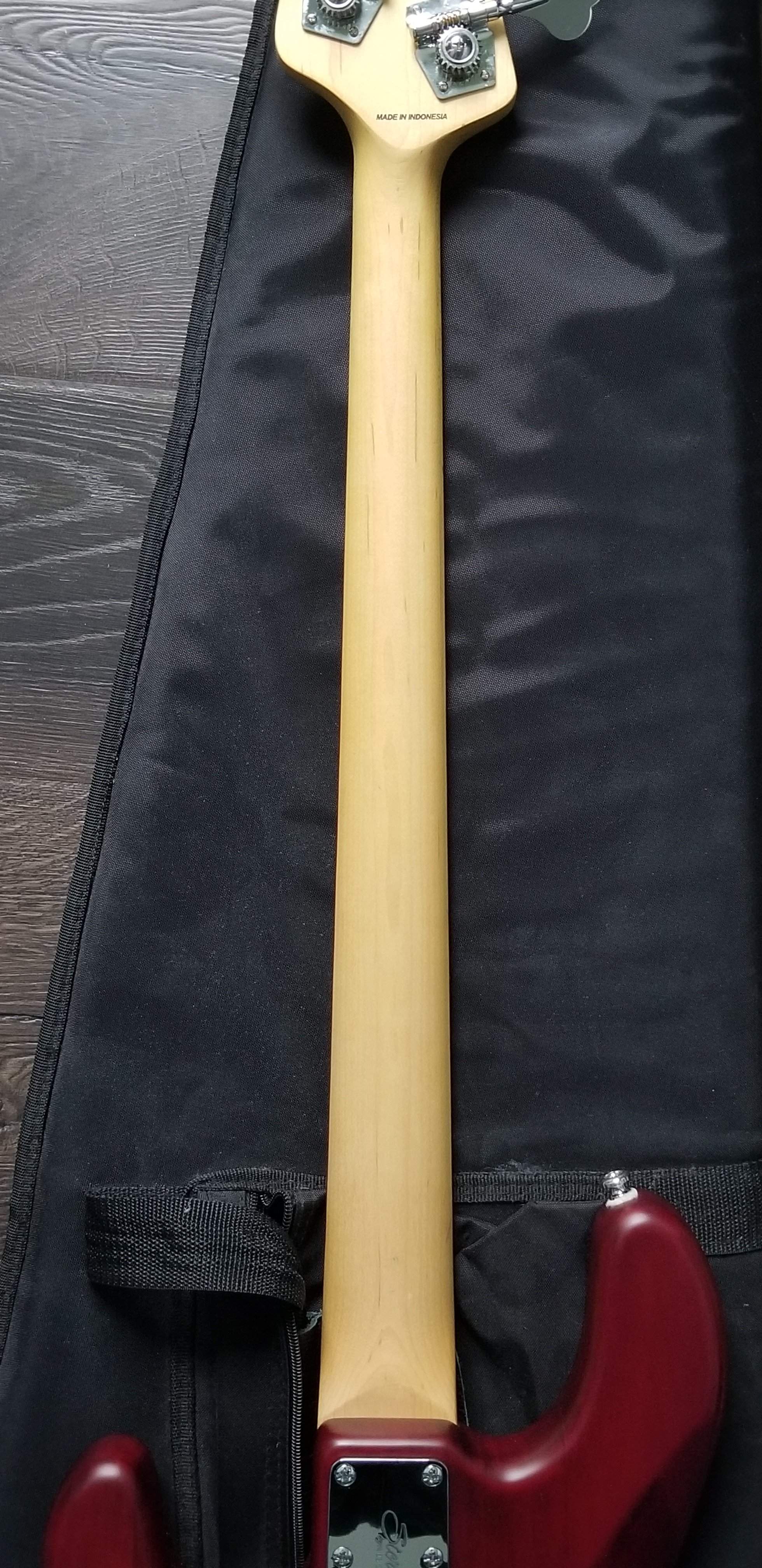
Glad you sent back. Look at the picture the neck of my latest version of the ray4. The grain is mostly north/south. Very limited run out. (u or v shaped grain lines) guitar builders say that a clean straight grain results in a more stable neck. Your previous bass neck grain was less than straight.

Might have the same problem with Sub sb4. Volume knob on bass goes directly from 0 to 100%. Nothing in between. The only way I can play it through my amp is to turn the gain knob on the amp all the way down to 1 (normally set at 7).I have volume knob at 50% and still over driving the interface. There is no way this should be right.
I'm always amazed by people who post things like "did you trying turning down the volume on your bass." Not helpful

Just bass straight to focusrite.
Invalid Link Removed
Your interface may have a setting that allows you to change the level of the preamp inputs from line/instrument/mic. If it's set to line level what's happening makes sense. Use mic or instrument level inputs. If instrument is still too hot use mic input levels.
From the manual of the Focusrite Scarlette 2i2 3rd gen.
Inst/Line Some of the channels on your interface will be configurable as dedicated instrument inputs for connecting electric guitars and basses directly. Selecting INST for these channels switches the ¼” jack contacts of the input to a high impedance, unbalanced input to configure it for direct connection of electric guitars/basses. Selection of INST mode is confirmed by a red LED on the unit’s front panel. Depending on the Scarlett model you have, you may be able to select INST or LINE from the front panel of the unit as well. The alternative switch position for these channels is LINE; in this mode, the inputs are suitable for a standard balanced line level signal. Use a 2-pole (TS) ¼” jack when using the inputs in INST mode, and a 3-pole (TRS) ¼” jack when using them in LINE mode with a balanced source.
If that doesn't help.. I had a Zoom R-16 that didn't like the mic or line level signals from my amp once I started trying to break up the tube. Clip city.
The preamps on my M-Audio Air apparently have more headroom, because it handles a mic level signal from my amp just fine with the input gain of my amp cranked.
Last edited:
So... my mind was thinking in term of decibels when I posted and it's kind of bass aackwards in regards to a preamp's input vs some devices output but the whole bit about how it expects stereo TRS for line and mono TS for instrument kind of makes that a moot point. Sorry if you already flipped the circled switch(es) to inst, if applicable. If there aren't switches on the front there might be software, but I'm just guessing. Good luck.
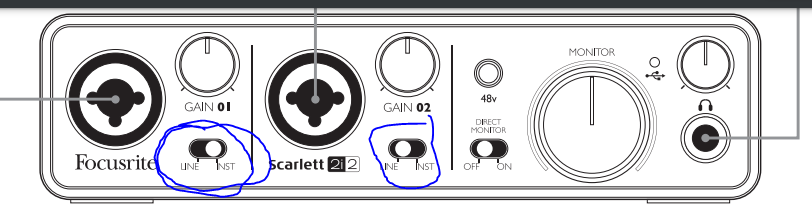
I have the solo and it does not have the switches for the instrument input.So... my mind was thinking in term of decibels when I posted and it's kind of bass aackwards in regards to a preamp's input vs some devices output but the whole bit about how it expects stereo TRS for line and mono TS for instrument kind of makes that a moot point. Sorry if you already flipped the circled switch(es) to inst, if applicable. If there aren't switches on the front there might be software, but I'm just guessing. Good luck.
View attachment 4185352


my wife has one of these as well and it is super hot going into anything i plug it in to...so much so i quit trying to use it for anything...

Last edited:
So, that button under gain with the red "INST" above it isn't there? Asking because I don't know if there are different revisions of the solo.
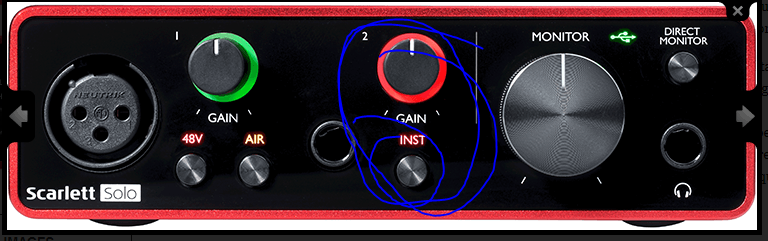
*Edit* The photo above is the Solo 3rd gen, the 1st and Second Gen both had a single switch like the two that the 2i2 diagram above showed.
Anyway.. your Solo should apparently say "Inst" lit in red on the front if it's set to instrument input, given it's 3rd gen. I'm guessing it's that button under the gain knob. I haven't read the manual for the solo but I'm going to guess that it works the same was as the 2i2, where you use TRS for line and TS for inst/mono.
*Edit* The photo above is the Solo 3rd gen, the 1st and Second Gen both had a single switch like the two that the 2i2 diagram above showed.
Anyway.. your Solo should apparently say "Inst" lit in red on the front if it's set to instrument input, given it's 3rd gen. I'm guessing it's that button under the gain knob. I haven't read the manual for the solo but I'm going to guess that it works the same was as the 2i2, where you use TRS for line and TS for inst/mono.
Last edited:
I have tried that but with any guitar you loss too much definition and tone when volume too low. You should always be able to have a guitar volume all the way up and adjust gain to handle the rest. So not a good design on Sterlings part."volume knob at 3/4%"?
You must mean "volume knob at 3/4". "3/4% is less than 1%; no way you can determine that!
Don't be afraid to turn the volume down to, say, 1/10 (10%) if you have to!
I have tried that but with any guitar you loss too much definition and tone when volume too low. You should always be able to have a guitar volume all the way up and adjust gain to handle the rest. So not a good design on Sterlings part.
^^ this is more of a concern when you're dealing with passive electronics isn't it? Kind of defeats the purpose of being able to boost EQ on the bass if you can't use the volume knob to compensate for the increase in decibels from the boosted frequencies. My TMB505 can boost/cut bass/treble up to somewhere around 16-18dB. I was playing the other night with the bass knob dimed and opted to play at half volume rather than adjust the input gain on my amp or the preamp gain on my interface. Sounded great.
Not to discount the issues you're having or anything.
If I were in your shoes.. I'd want to rule out the interface's capability of handling active electronics in the instrument input. If I could plug your new bass into my interface or amp I'd be able to get an idea about it quickly.
I'm a little jelly you have two Guitar Centers with 20mi of each other and what seems like more offerings for bass gear that I get in my town.
Both of them have Sterling Stingray 4's to demo as well. I'd take your bass down there.. plug into one of their amps, specifically one with a clip light and separate input gain/master volume controls. Turn the master volume on the amp down and set your input gain and see if you can find the spot where the light doesn't light up. If you find it.. turn up the master volume and give it a listen. Potentially compare it to the Sterling Ray4's they have on the wall.
The GC in Greenville has a Transparent Blue Sterling Ray4 in stock according to the GC website. You'd get a better idea of what's going on and what needs fixing or replacing, whether it's the bass, it's electronics, or the interface. If it turns out the bass is the problem.. send it back for a refund and buy one of the ones on the wall at GC if they sound better and feel good enough to play.
Last edited:


