Well Presonus doesn't make it... so what's a good 4-8 track interface that uses USB rather than Firewire, with the most bang for your buck? 6-8 inputs/outputs is ideal! ...4 if there's a really good one out there...

Enjoy the benefits of a premium membership!
Upgrade Account
-
TalkBass has been independent since 1998. Add your voice.
Create a free account to reply to discussions, view embedded media, and browse with fewer display ads.
Join free Log in
Want zero display ads or expanded classifieds tools? Compare plans.
You are using an out of date browser. It may not display this or other websites correctly.
You should upgrade or use an alternative browser.
You should upgrade or use an alternative browser.
What is the USB equivalent of the Firepod?
- Thread starter jenderfazz
- Start date
More options
Who Replied?
Line 6 make one.
But the reason most dont, is because USB just cant handle it. USB sends info in bursts as opposed to the streaming of Firewire. If you use a 4-8 track interface with USB, the latency will be alot higher than with firewire and can lead to all kinds of problems.
Whats the problem with getting a firewire unit?
But the reason most dont, is because USB just cant handle it. USB sends info in bursts as opposed to the streaming of Firewire. If you use a 4-8 track interface with USB, the latency will be alot higher than with firewire and can lead to all kinds of problems.
Whats the problem with getting a firewire unit?

Line 6 make one.
But the reason most dont, is because USB just cant handle it. USB sends info in bursts as opposed to the streaming of Firewire. If you use a 4-8 track interface with USB, the latency will be alot higher than with firewire and can lead to all kinds of problems.
Whats the problem with getting a firewire unit?
Ahh, I guessed that was the reason. I personally would love to use Firewire, but my band and I use a laptop that doesn't have a Firewire input... on the plus side, my drummer's computer does, and it's pretty good... the only problem is, it's not dedicated to recording and I'm a bit wary about using it for that reason. Still, if we can pick up a nicely-priced Firepod, I'll clean that computer up and optimize it for home recording (nothing professional anyways).
That Tascam looks awesome, too. Wonder if anyone has any experience with it? Any latency issues using all 8 inputs?
You could just stick a $40 firewire card into the laptop if you wanted to. Otherwise, all a computer really needs to record is the software and the interface. If the computer is at least somewhat decent, then you should be just fine. You may want to get an extra hard drive just for the audio though- I had a HD fail on me and I think it could possibly be at least in part from all the recording and such. Plus, audio files are pretty big.
The computer doesnt need to be optimised per-say for audio/firewire. You can leave what is there as it is, and set up different profiles.Ahh, I guessed that was the reason. I personally would love to use Firewire, but my band and I use a laptop that doesn't have a Firewire input... on the plus side, my drummer's computer does, and it's pretty good... the only problem is, it's not dedicated to recording and I'm a bit wary about using it for that reason. Still, if we can pick up a nicely-priced Firepod, I'll clean that computer up and optimize it for home recording (nothing professional anyways).
That Tascam looks awesome, too. Wonder if anyone has any experience with it? Any latency issues using all 8 inputs?
I use the firepod, and what i found to work best was creating a user profile specifically for recording, and having only recording software/VSTs etc installed in that account. And also creating a hardware profile, spefically for recording, with the minimal background process and such running.
So when using the computer normally, you just select the normal hardware profile on startup (you'll get a choice when the computer is booting up), then choosing whatever normal user profile is used.
When recording, choose the recording hardware profile, and recording user account.
Thats assuming you are using windows XP. On saying that, you might not even need to do that, my firepod generally ran ok before i made a seperate account for everything. But when everything recording related was in its own profile, i can run many many tracks, each with numerous VSTs and not have any latency issues

If you want to use the laptop, see about getting a firewire card installed if you can, you can also get the PCMCIA firewire cards. However, i do not know how well they will run/what the latencies will be like.
The only problem with using a non-dedicated computer for DAW work is that most people's computers are chock full of spyware/malware, viruses, bloatware from dell or whoever, not tuned for even general use let alone audio... And I guess there's the risk of "oops... I tried to free up some HD space to install doom XVIII and I deleted our album... SORRY!"
USB is a total nightmare, trust me. Having used one of the original mbox's you couldnt even real time monitor anything. Latency is aweful on every usb device ive ever used. like someone above said, $40 firewire card and your set.
The only problem with using a non-dedicated computer for DAW work is that most people's computers are chock full of spyware/malware, viruses, bloatware from dell or whoever, not tuned for even general use let alone audio... And I guess there's the risk of "oops... I tried to free up some HD space to install doom XVIII and I deleted our album... SORRY!"
Yep that's the main thing I'm afraid of, though he uses Firefox and has ample protection. Pretty much just a few spyware checks, antivirus, msconfig, removing useless programs, closing running processes, etc.
I'll try the user profile suggestion, though. Sounds like the ideal thing to do on a computer that's also used for everyday MSN, etc. Thankfully, no games.


The only problem with using a non-dedicated computer for DAW work is that most people's computers are chock full of spyware/malware, viruses, bloatware from dell or whoever, not tuned for even general use let alone audio... And I guess there's the risk of "oops... I tried to free up some HD space to install doom XVIII and I deleted our album... SORRY!"
add to that most of that type of software is chewing up CPU cycles and generating interrupts interrupting the DAW software. So some latency for example might being your anti-virus checking the files your DAW is writing. I would say you have to use one computer for everything then set it up to dual boot to another Windows install with just the Windows and your recording/music software running, nothing else.
Dont know about either of those, but a few of my friends use these:
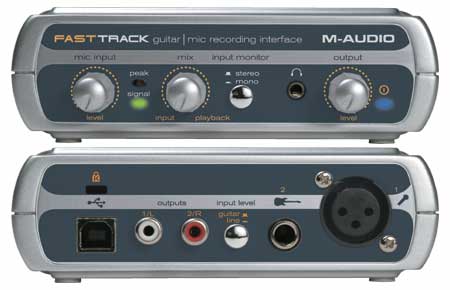
for simple recordings.
But if you are looking for using more than one track, or adding more tracks ontop of a recording, i'd seriously stear clear of USB
for simple recordings.
But if you are looking for using more than one track, or adding more tracks ontop of a recording, i'd seriously stear clear of USB
I live in the uk and wouldn't mind getting some recording equipment for my laptop it has USB but if i could get a firewire port for cheap enough i would get it.

I use that m-audio box thing it works good. It has good software that comes with it, but if you use it with audacity you can do so cool stuff with it.

I have yet to encounter a USB unit that was worth using as a main unit, unless it was for single channel demo recording use. Firewire is much more likely to keep you sane.
I use the $40 firewire card in the laptop method. It works like a freaking champ and there's no problem with compatibility issues from an onboard firewire chip. I've used the same card and interface with four laptops now and it's totally stress free.
I use the $40 firewire card in the laptop method. It works like a freaking champ and there's no problem with compatibility issues from an onboard firewire chip. I've used the same card and interface with four laptops now and it's totally stress free.
I live in the uk and wouldn't mind getting some recording equipment for my laptop it has USB but if i could get a firewire port for cheap enough i would get it.
Look for a firewire card or PCMIA and get a presonus firepod. Tis what i use, and has been great
Or even better the Firestudio Projects which is coming out soon looks sweet!
There are other great units out there in the similar price, but there isnt much between them all.
Latest posts
-
 Pedaltrain Pedalboard Planner website experiencing "difficulties"...! ;^p
- Latest: Roland GR 88
-

-
-

-
