• TalkBass has been independent since 1998. Add your voice.
    Create a free account to reply to discussions, view embedded media, and browse with fewer display ads.
    Join freeLog in
    Want zero display ads or expanded classifieds tools? Compare plans.

Windows software for recording

Jan 4, 2015
93
176
47
Hello!

I have a focusrite Scarlett 2i4 and a logitech webcam. I just want to record some play-along videos (me playing the bass with some background track). Any suggestion of a software that can do that? I have StudioOne, but I don´t think it also records video...
 
Hello!

I have a focusrite Scarlett 2i4 and a logitech webcam. I just want to record some play-along videos (me playing the bass with some background track). Any suggestion of a software that can do that? I have StudioOne, but I don´t think it also records video...
Studio One doesn't actually record the video, but it's pretty easy to embed a video in the Studio One session to match up with the audio. There's videos on the subject out there.
 
One usually doesn't record at the same time, because with a combined solution, there probably is still some delay.

What you do, is use a recording software like Reaper and record the audio. At the same time, you record a video (with sound). Then slap on the bass super hard once. After recording, mix everything in the DAW and export that.
Then use a video editor like DaVinci Resolve and import both. Align the slap transient from the video and from the audio. Then mute the video audio and cut the video/audio in a way to not have a long silent intro.
 
Use OBS for video, but possibly record your audio separately in something like Audacity. One, OBS doens't like ASIO audio. Two, OBS creates compressed files, though it might be possible to configure it to save lossless audio. Sure the final video will be compressed anyway, but if you need to do any level changes, noise reduction etc. it's good to have lossless audio.
 
Use OBS for video, but possibly record your audio separately in something like Audacity. One, OBS doens't like ASIO audio. Two, OBS creates compressed files, though it might be possible to configure it to save lossless audio. Sure the final video will be compressed anyway, but if you need to do any level changes, noise reduction etc. it's good to have lossless audio.
OBS can be configured to record in WAV format. You can then load that audio from the container into a DAW for further processing if needed.
 
One usually doesn't record at the same time, because with a combined solution, there probably is still some delay.

What you do, is use a recording software like Reaper and record the audio. At the same time, you record a video (with sound). Then slap on the bass super hard once. After recording, mix everything in the DAW and export that.
Then use a video editor like DaVinci Resolve and import both. Align the slap transient from the video and from the audio. Then mute the video audio and cut the video/audio in a way to not have a long silent intro.

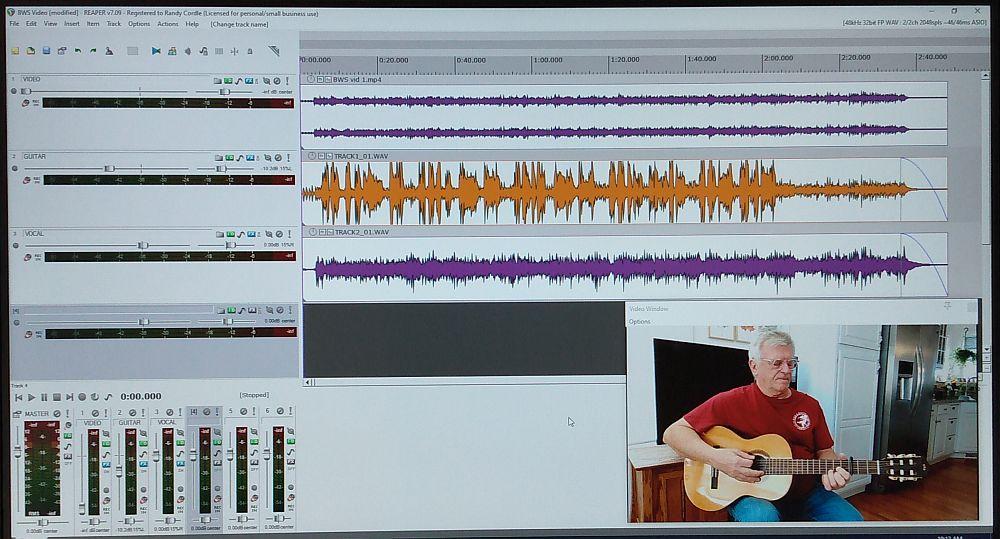
Reaper will handle video editing,too. I record audio with a MTR and video with my phone, import audio and video into Reaper to align, trim out anything I don't want and apply fades if desired.

vT5l00K.jpg
 
  • Like
Reactions: zardeefonder