• TalkBass has been independent since 1998. Add your voice.
    Create a free account to reply to discussions, view embedded media, and browse with fewer display ads.
    Join freeLog in
    Want zero display ads or expanded classifieds tools? Compare plans.

MALWARE--> http://results.google-analytics.com/ <--MALWARE

MIJ-VI

Inactive
Jan 12, 2009
5,279
18
For the past several hours I've been sporadically re-directed to what looks to be a phony Google start page when I click on an increasing number of links on TalkBass.

In the most recent occurrence I was redirected to a site which the Firefox Add-on WOT (Web Of Trust) identified as being dangerous and thus blocked. In the ULR box of the intercepted redirect was 'http://results.google-analytics.com/', so I Googled 'http://results.google-analytics.com/, malware' and found that quite a few Windows and Mac users (I'm using Ubuntu 10.04) have been experiencing the same problem in Firefox and in Safari.

CAUTION. WOT tagged these links from the first page of the above Google search as being dangerous and there's likely more on other pages of the said search results:

Remove Results.google-analytics.com With Simple Remover Software ...

Results.google-analytics.com Removal Guide, Remove Search Hijacker ...

Results.google-analytics.com Removal Guide

--------

EDIT:

If you're running Firefox then you may wish to use the following Add-ons if you aren't doing so already, since they seem to harden Firefox against security issues in general, and the hijacking issue in particular--for now...

An updated list:

- Ghostery
- Adblock Plus
- NoScript
- [Invalid or Expired Link Removed]
- WOT
- [Invalid or Expired Link Removed] "Super-Cookie Safeguard"
- [Invalid or Expired Link Removed]
- Flagfox

(And optionally, this time saving bookmark and password synchronizer):
- [Invalid or Expired Link Removed]

Please Google each of the above Add-ons in turn to learn what they do before installing them.

Also please download Firefox Add-ons only from Mozilla. Once one has the Add-on WOT (Web Of Trust) running, one can see that there are attack sites which use offerings of legitimate software to lure in computer users.

For Ubuntu: After using Xmarks to back up your bookmarks and passwords, BleachBit can be used wipe clean Firefox's (and other apps. & utils.) cache files etc to get rid of unwanted, performance impairing crud. It can be installed from the Ubuntu Repositories:
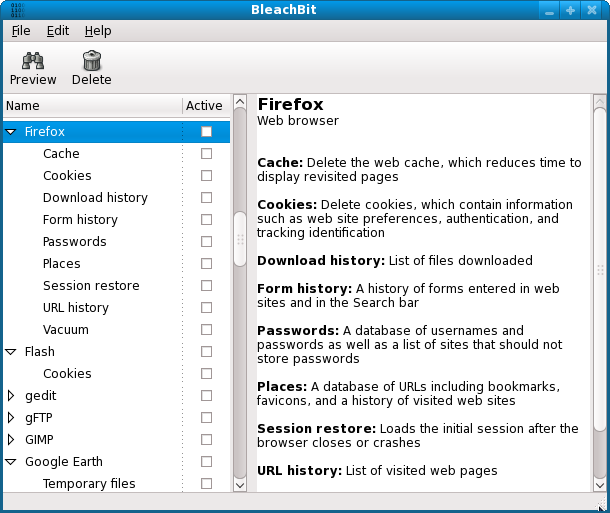
BleachBit-064-Firefox-Fedora11-English.png


After backing up my bookmarks and passwords via Xmarks, I used BleachBit to clean out Firefox (all of the Add-ons I had installed were retained) and then restored said bookmarks & passwords from Xmarks' on-line server. The result was a slight but noticeable performance improvement in Firefox--and hopefully the elimination of anything nasty. :)

I've also posted a link to this thread in TalkBass Forums > Customer Service > Forum Usage Issues.

Thank you.

--------

BROWSER, REDIRECT, HIJACK, HIJACKING, SUPER COOKIES

 
Online Threats - Browser exploits

--------

Some threads which are trying to resolve the ongoing cross-platform browser redirect problem:

Firefox is being redirected to wwwDOTvideocopDOTcom
(Linux, Firefox 3.6.8)
http://support.mozilla.com/en-US/questions/739986#threadId742006

How to httpCOLON//results5.googleDOTcom redirects
(Firefox version: 3.6.3 Operating system: Windows XP)
[Invalid or Expired Link Removed]

Firefox (& Safari) open incorrect (undesirable!) website or I get a 'server not found' message.
(Mac OS X 10.4, Firefox 3.6.3)
https://support.mozilla.com/en-US/questions/697578
 
That you're trying to raise awareness is definitely a good thing. I get lazy sometimes because I run Linux, and I assume my system is immune as long as I keep it updated.

I too use GNU/Linux (Ubuntu 10.04) and generally this is true.

However, cross-platform browser exploits throw a wrench in the works for all computer users.

--------

To those who are thinking about trying GNU/Linux:

The growing popularity of GNU/Linux (spearheaded by Ubuntu due to its ease-of-use) is largely taking the form of former Windows users who are accustomed to installing this & that from sites all over the Internet (when they really should be sourcing additional apps. & utilities from their distro's repositories until they better understand how their new OS works).

This innocent (and naive) stumbling about is bound to result in more GNU/Linux machines being compromised via 'dupe-ware' in which users are tricked into running this thread and/or mysterious scripts which damage software and/or imperil their PC's security.

Thus ALL GNU/Linux users should:

- never run their machines as root (or super user), and

- never run any command or script until after they completely understand what the results of doing so will be.

Google is one's friend in this, and so is the informed fellowship of the various GNU/Linux distros' discussion forums.

Properly implemented and managed some flavours of GNU/Linux are reliable and secure enough for mission-critical use.

As always: be a friend to your tools, and your tools will be a friend to you. :)

--------

Though ostensibly about Ubuntu Studio 9.10 there's plenty of general Ubuntu hardware and software links in this thread.
 
Looks like another good Firefox addon:

Beef Taco (Targeted Advertising Cookie Opt-Out)

"Sets permanent opt-out cookies to stop behavioral advertising by 102 different advertising networks, including Google, Yahoo, Microsoft, all members of the Network Advertising Initiative, and many other companies."

[Invalid or Expired Link Removed]
 
Looks like another good Firefox addon:

Beef Taco (Targeted Advertising Cookie Opt-Out)

"Sets permanent opt-out cookies to stop behavioral advertising by 102 different advertising networks, including Google, Yahoo, Microsoft, all members of the Network Advertising Initiative, and many other companies."

[Invalid or Expired Link Removed]

Hmm... Interesting...

I decided to Google 'Beef Taco (Targeted Advertising Cookie Opt-Out), malware' to see if I could dig up anything before installing Beef Taco (five pages of search results yielded no dirt on Beef Taco although some of the sites offering it were marked by WOT as being dangerous) and from this thread...

Reviews for Targeted Advertising Cookie Opt-Out (TACO)
[Invalid or Expired Link Removed]

...I found this eye-opening post by one Ty Evans from July 16, 2010:

"Sadly, there is no software currently available anywhere that will remove Flash Cookies. All any of these programs do at best is temporarily remove some of them. The developers of these flash cookies are very aware of all these deletion attempts, so they add a variety of codes that prevent any deletions. The programs move the cookies to several different files in the system which allows them to continuously repopulate immediately after they are removed from any of the locations. No developer of any of these deletion programs has come up with a way to find and delete these flash cookies all at the same time, and prevent them from being added again. One of the biggest culprits is Adobe with their Flash Player, along with other programs, which has always been a security risk and still is. Adobe is in cooperation with the advertising community and develops their products in cooperation with them, with features that allow advertisers to use the Adobe Flash Player to infiltrate any computer using the Flash Player and place flash cookies on any user’s system. The Adobe Flash Player therefore as a result is very vulnerable to hackers, etc. If advertisers can use it to place Flash Cookies on a user’s system, a hacker can easily place a Trojan program or any other type program on anyone’s system. The Adobe Flash Player is especially vulnerable when a user allows the Flash Player to take control of their webcam and microphone hardware. The Adobe Flash Player is FREE to the user. Adobe does not charge the user for the Flash Player; they get paid by the advertisers. That’s how Adobe makes their money for Flash Player. Even more insidious is they way Adobe provides the settings feature for Flash Player; it’s controlled by them on their site, and apparently the advertisers as well. Users who attempt to change the settings only think they are being changed. This is another way in which Adobe and the advertisers trick users. The settings will return to the original state the advertisers have programmed them for to ensure that they can continue to place Flash Cookies on a user’s system. A user can verify this by selecting the settings option, which accesses the Adobe site, then change the settings to their preferences, and then close the program. Then restart the program and access the settings again. The user will discover that the settings have been changed back to the way Adobe and the advertisers set them. There are numerous reliable sources that support these facts. Anyone who disputes them is likely a plant or part of the Adobe and advertiser ilk.

Here are a couple of sites where you can verify these facts (there are many more, just do your research):

[Invalid or Expired Link Removed]

http://lifehacker.com/5334984/web-s...ead-of-browser-cookies-to-track-your-activity

It's sad that this is how unscrupulous these businesses are, but that's what greedy companies do everywhere. Ethics are not a part of any business like these.

Good luck!"

And a few Google search results pages later I found this must-read piece on a site named Slashdot:

Hackers Use Banner Ads on Major Sites to Hijack Your PC
http://it.slashdot.org/it/07/11/19/1517209.shtml
 
What began as a moment of mirth in this post...

...soon produced (perhaps by coincidence as this browser redirect problem has been dragging on for a while now) an intrusion attempt alert in Firestarter (a firewall commonly employed by Ubuntu users):

Time: Aug 11 00:26:10 Source: 213.109.65.90 Destination: :p In IF: wlan0 Out IF: Port: 53 Length: 88 ToS: 0x00 Protocol: ICMP Service: DNS

So I checked out the source of said attempt:

this post

213.109.65.90

213.109.65.90 IP:

213.109.65.90
213.109.65.90 server location:
Russian Federation
213.109.65.90 ISP:
ProLite Ltd.

213.109.65.90 Whois Information
% This is the RIPE Database query service.
% The objects are in RPSL format.
%
% The RIPE Database is subject to Terms and Conditions.
% See http://www.ripe.net[Who Is Domain][trace][Reverse DNS Search]/db/support/db-terms-conditions.pdf

% Note: This output has been filtered.
% To receive output for a database update, use the "-B" flag.

% Information related to '213.109.64.0[Who Is IP][trace][Reverse IP Search] - 213.109.79.255[Who Is IP][trace][Reverse IP Search]'

inetnum: 213.109.64.0[Who Is IP][trace][Reverse IP Search] - 213.109.79.255[Who Is IP][trace][Reverse IP Search]
netname: PROLITE-NET
descr: ProLite Ltd.
country: RU
org: ORG-PL83-RIPE
admin-c: NF1275-RIPE
tech-c: NF1275-RIPE
status: ASSIGNED PI
mnt-by: RIPE-NCC-END-MNT
mnt-lower: RIPE-NCC-END-MNT
mnt-by: MNT-PROLITE
mnt-routes: MNT-PROLITE
mnt-domains: MNT-PROLITE
source: RIPE # Filtered

organisation: ORG-PL83-RIPE
org-name: ProLite Ltd.
org-type: OTHER
address: Russia, Nizhniy Novgorod, Pecherskiy syezd 22, off.12
e-mail: [Who Is Domain][trace][Reverse DNS Search]
mnt-ref: MNT-PROLITE
mnt-by: MNT-PROLITE
source: RIPE # Filtered

person: Nikolay N. Filimonov
address: Russia, Nizhniy Novgorod, Pecherskiy syezd 22, off.12
phone: +7 831 4284242
nic-hdl: NF1275-RIPE
source: RIPE # Filtered
mnt-by: MNT-PROLITE

% Information related to '213.109.64.0[Who Is IP][trace][Reverse IP Search]/20AS49727'

route: 213.109.64.0[Who Is IP][trace][Reverse IP Search]/20
descr: ProLite
origin: AS49727
mnt-by: MNT-PROLITE
mnt-routes: MNT-PROLITE
source: RIPE # Filtered

% Information related to '213.109.64.0[Who Is IP][trace][Reverse IP Search]/21AS49727'

route: 213.109.64.0[Who Is IP][trace][Reverse IP Search]/21
descr: ProLite
origin: AS49727
mnt-by: MNT-PROLITE
source: RIPE # Filtered


Can anyone shed light on this?

Thank you.

--------

UPDATE:

"Poisoned" Router DNS Settings
http://www.technibble.com/forums/showthread.php?p=146396

"FYI

Discovered a new one today (new to me!). A virus that changed the DNS settings in a Netgear WPN824 router. The router had the default password. A quick search on the Internet shows routers "poisoned" by viruses that can modify router settings when the user has NOT changed the default password. Y'all be sure to change your default passwords on customer routers (I usually do this).

Background:
Customer brings me an infected laptop that has a hijacked browser and I pulled the hard disk and slaved to my bench PC to clean it (SOP). It had several Java script viruses (AVG shows twitters.class, skypeqd.class, mailvue.class, AppleT.class all in jar_cache). Removed viruses with AVG.

So I gave the laptop a "clean up/tune up" afterward. Customer picks up laptop, goes back home, and calls me within hours: "it's still going to the wrong web sites". So I ask him to drop it back by the shop to check it out again. Pull the hard disk, scan with AVG & Malwarebytes and it's clean. The browser is NOT hijacked in my shop. Put it back into PC and scan with his AVG & Malwarebytes and it's clean. He calls while I have it and says: "now my wife's laptop is hijacked!". I pack up his machine and go over to his home and run an IPCONFIG /ALL in a CMD window and the DNS servers shown is 213.109.64.5 (which resolves to a Russian network!) Wow!

Go into his Netgear router and low and behold the DNS setting has been changed from "Get Automatically from ISP" to "use these DNS Servers" with the above numbers typed in. Bingo. Change it to "Get Automatically from ISP" and it's all good.

It is a good reason to always change the default password."

--------

EDIT:

If your PC's firewall reports an intrusion attempt then you can use one of these tools to run a trace on the would-be intruder:

Invalid Link Removed

Invalid Link Removed

http://whois.domaintools.com/

I expect that this is one tool being used by intruders to take control of unprotected routers:

Invalid Link Removed

And here's another:

Default Password List
Last updated: 08.13.2010
 
For everyone:

[Invalid or Expired Link Removed]

Link Removed: a cross-platform, feature-rich firewall available from the Ubuntu & other distros repos and as a commercial version for Windows and Mac.

For Ubuntu:

:) Easy...
Link Removed

Two other GUI-based firewalls for Ubuntu are *Link Removed, and [Invalid or Expired Link Removed] (whose functions offer helpful explanations).
And like GUFW, they're both in the **Ubuntu Repositories and can be downloaded via Ubuntu Software Center or Synaptic Package Manager.
*How-To: Firestarter on startup (better & safer way)

And if you are using **Samba (the standard Windows interoperability suite of programs for GNU/Linux and Unix i.e. file & print sharing):
Firestarter firewall settings with Samba and Ubuntu Lucid 10.04 LTS

:smug: Harder...
Link Removed

:atoz: Harder still... :confused:
Link Removed

:eek: Suck it up! We're goin' IN! :hiding:
Invalid Link Removed

--------

An explanatory excerpt from Guarddog's on-line manual:

What is a firewall and why do I need one?

"A firewall is a software and/or hardware tool for defending a computer or network of computers, from attacks via the network performed by malicious or curious computer users. It protects by restricting what hostile computers are permitted to do to the protected computers. It does this by filtering and blocking the network communication between the protected computers and the Internet at large.

With the arrival of fast, permanent, 24 hour/7 day, internet connections for home users, your computer is now exposed to constant attacks from anywhere in the world. You may ask yourself "why would anyone want to break into my computer? I don't have anything important". Actually you do, even a home computer stores usernames and passwords for connecting to the internet, personal email, possibly financial information and perhaps even credit card information. Even without these things, your computer can be used as a stepping stone by malicious users (often called 'crackers') to attack other computers. The worst part of this is that these further attacks will look like they are coming from you!..."
 
Are hackers pinging your firewall with the persistence of telemarketers at mealtimes?

If so...

dbimage.jpg


HOWTO: Graphical IP Blocker
Invalid Link Removed

EDIT: If you'd rather download and install the .deb file yourself, it is available in both i386 (32 bit) and amd64 (64 bit) versions via the download link found on the following web page: IPBlock - Graphical IP Blocker
Invalid Link Removed

"iplist allows users with no or basic knowledge of iptables to filter (e.g. to block) network traffic based on (automatically updated) lists. These lists have various formats and are sorted by different categories (e.g. countries, adware, corporations).

IPBlock (iplist) Features

* to protect your privacy while sharing with others
* to ban unwanted clients from servers
* to block whole countries or networks
* to block spam- and ad-servers..."

--------

If anyone knows of an effective IP Blocker for Windows or Macintosh, then please post a link.

Thank you.
 
My non-tech-savvy neighbour is sharing her Wi-Fi router with me (I pay half of her monthly bill) but it got hijacked by a hacker in Russia.

Here is a screen-shot and the details:

Link Removed

http://www.facebook.com/group.php?gid=34542190945#!/photo.php?pid=5388898&id=660216385&ref=fbx_album

And here's a thread post on a remedy for the router hijacking problem--caused by the same hacker :eyebrow:

http://www.technibble.com/forums/showpost.php?p=144318&postcount=1

I've posted this info here in case anyone else has been experiencing weird behaviour with their Internet connection.
 

Latest posts