• TalkBass has been independent since 1998. Add your voice.
    Create a free account to reply to discussions, view embedded media, and browse with fewer display ads.
    Join freeLog in
    Want zero display ads or expanded classifieds tools? Compare plans.

Resolved ad-block popup

I keep seeing the popup asking that my ad-block be turned off, even tho it's already off. This happens about half the time, and from either my desktop Windows machine or my MacBook. Both machines have Firefox and the Adblock Lite plugin installed.

Hmm.. When you disable it for TalkBass, do you see ads?

I might suggest running AdBlock Plus. AdBlock Lite is actually a totally different product that was just released last week, it looks like, and has 0 reviews:

[Invalid or Expired Link Removed]

AdBlock Plus is free, and has over 300 million installs:

https://adblockplus.org/en/

I think that's what you want.... and that one is tested and works ;)
 
Right now (and on my desktop machine), I see one ad up at the top of the page, below the forum banner, and another one right above this box that I'm typing in now. Neither ad is intrusive, if that's worth anything.

The Adblock I'm using can't be the same one you mentioned (EDIT - I just now went looking for mine on the Firefox download pages and it seems to be gone, FWIW)...I've had this one installed for at least a year. I will try your suggestion for Adblock Plus tho, since it seems to have better config options.
 
After uninstalling Lite and installing Plus, I'm still getting the occasional popup about adblocks on my Windows desktop machine (Win7 HP, 64 bit). It's supposed to be disabled on TB in general.

I'm on abut this more for your info, as opposed to my bitching about it...I can deal with it, but I thought y'all might like to know for future improvement or something.
 
Hey Paul,

running adblock plus here, and disabled on your site. I'm getting the popup, and no ads. Yours is a website I'm happy to support through ad revenue, but i don't know what else I can do, having totally whitelisted the entire domain.

Is it possible that adblock has pushed an update that might mean some code adjustment?
 
Hey Paul,

running adblock plus here, and disabled on your site. I'm getting the popup, and no ads. Yours is a website I'm happy to support through ad revenue, but i don't know what else I can do, having totally whitelisted the entire domain.

Is it possible that adblock has pushed an update that might mean some code adjustment?

Hmm. Maybe try removing tb from your whitelist and re-adding it? That's odd that Adblock would block ads when tb is on your whitelist.

I did push out an update for the detector a couple days ago, but the detector wouldn't block ads... I'll check into any bugs though. Let me know if the above works.

Oh also, what browser/os are you using?
 
Hmm. Maybe try removing tb from your whitelist and re-adding it? That's odd that Adblock would block ads when tb is on your whitelist.

I did push out an update for the detector a couple days ago, but the detector wouldn't block ads... I'll check into any bugs though. Let me know if the above works.

Oh also, what browser/os are you using?

Using mac / google chrome
 
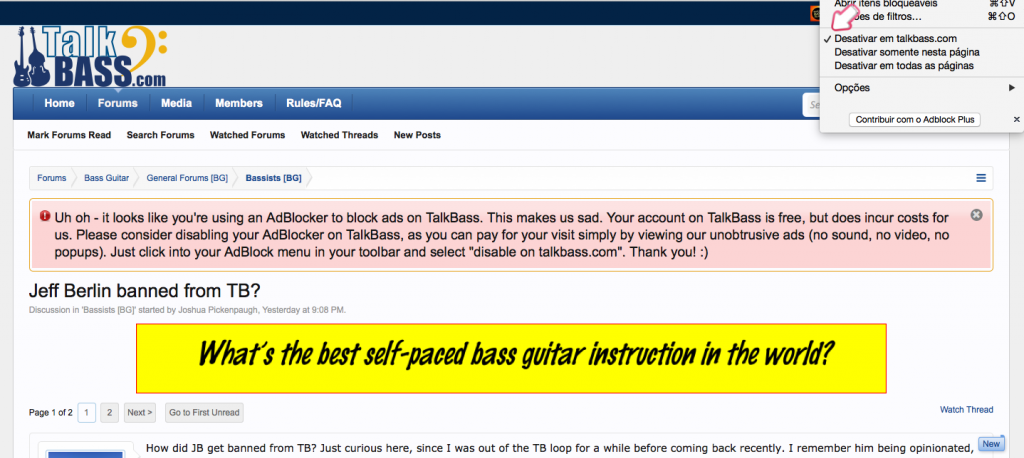
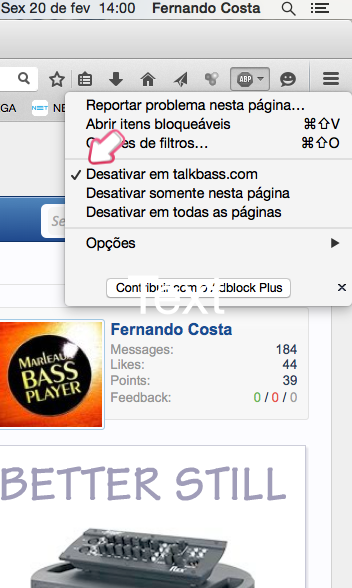
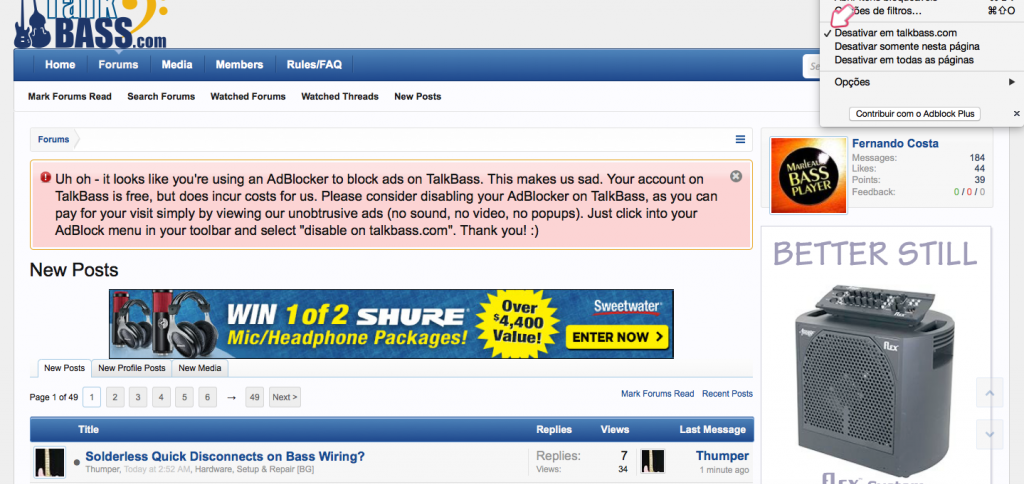
Adblock Plus (2.6.7) disable on Talkbass. Firefox (35.0.1) - Bug?
adblock2_zps5a79f6f3.png


adblock3_zps23c9b84f.png


adblock_zps4ce6008b.png
 
Mine does the same thing...ABP disabled and I still get the 'please turn off' banner. Admittedly, I'm still running Firefox 28 (I got tired of their constant update rollouts and now update selectively), but my plugins, etc don't seem to care.

And as I hit the preview to look at this post, the 'please turn off' banner is at the top of the page right now.

What I have installed...

n8m7x2J.jpg


X7iuCot.jpg
 
  • Like
Reactions: paul

Mine does the same thing

Thanks for the screens guys! Ok so here's one last request. The hypothesis is that your browser is sending old cached data. Can you please try this:
  1. close all talkbass tabs, then clear your browser's cache
  2. restart your browser
Let me know if that makes a difference. Thanks again!
 
UPDATE - I maybe should have mentioned earlier that I was on my desktop PC (Win7, 64bit); I'm now on my Macbook (OSX 10.6.8) w/Firefox config'd exactly as above, including a defeated ABP and a clear cache...I have the popup banner showing here as well.

I have not yet been back to my desktop machine to see what's going on there, btw.
 
UPDATE - I maybe should have mentioned earlier that I was on my desktop PC (Win7, 64bit); I'm now on my Macbook (OSX 10.6.8) w/Firefox config'd exactly as above, including a defeated ABP and a clear cache...I have the popup banner showing here as well.

I have not yet been back to my desktop machine to see what's going on there, btw.

I just now updated the code to fix a bug with FireFox. Please let me know if you see the notice again.
 

Latest posts