• TalkBass has been independent since 1998. Add your voice.
    Create a free account to reply to discussions, view embedded media, and browse with fewer display ads.
    Join freeLog in
    Want zero display ads or expanded classifieds tools? Compare plans.

Automatic conversion from MP3 to sheet music: praise for Logic Audio

Yesterday, my band leader sent us the mp3 of a new song he just wrote.

I wanted to prepare tonight's rehearsal, but the structure of the song is complex. Easy to play but super hard to memorise.

I've tried something new:
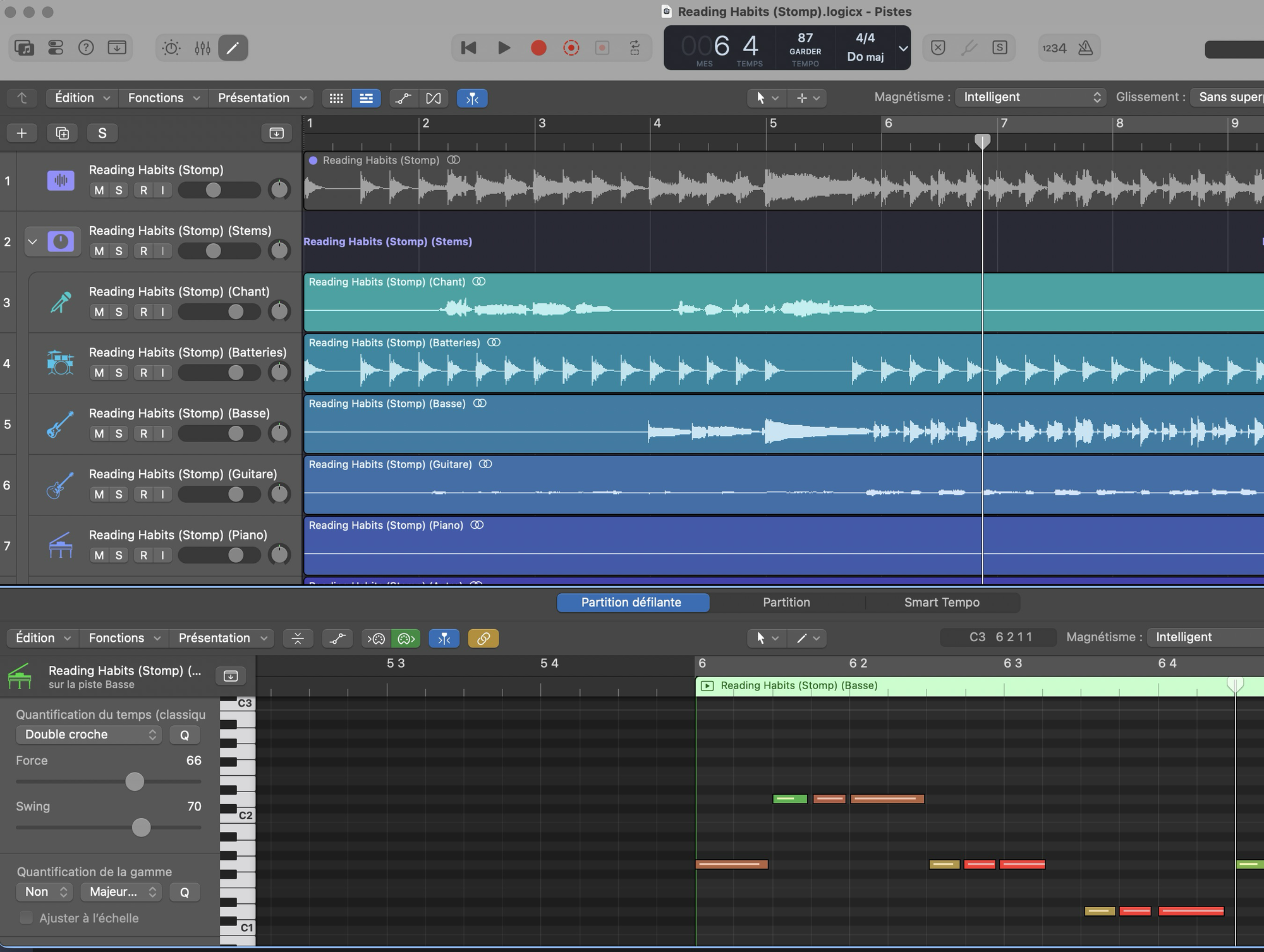
- Imported the MP3 in Logic Audio
- Used the Stem Separator to isolate the bass track
- Converted the audio bass track to midi
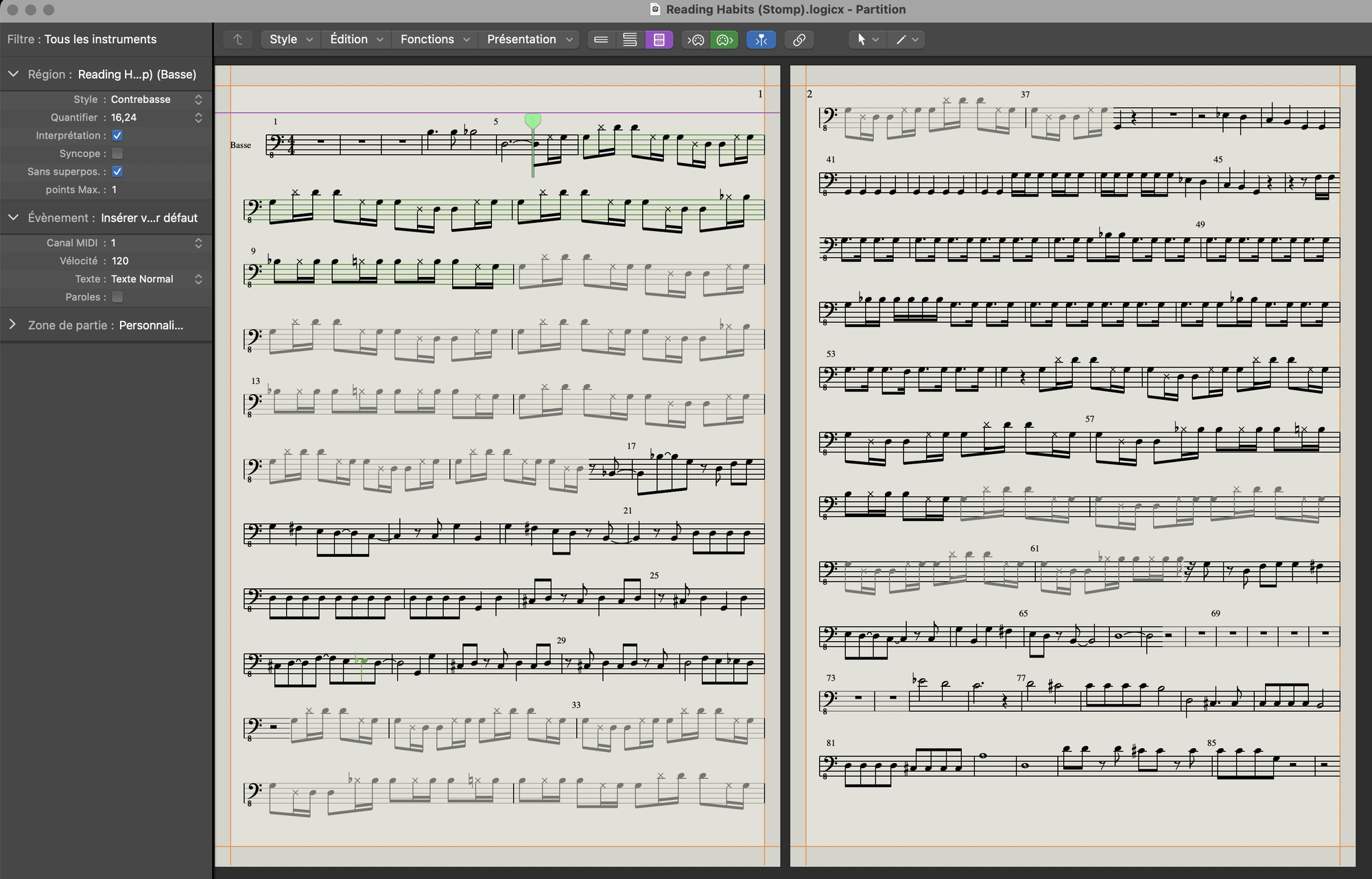
- The result was a bit messy in the grid editor, so I had to clean it up a little bit, which was a good was to understand and analyse it.
- Then edit the corresponding sheet music (replacing some notes by ghost note symbols), and played along in order to learn the song
- Finally print the sheet music, I'll take it with me tonight at the rehearsal as a reminder

All this with just one software. It took me one hour.
1773297376000.png


1773297319764.png


I like the fact that when I clone a sequence, it is grayed out in the sheet music, so that I konw it's a repetition of the previous bars.
I could certainly spend more time on the sheet music in order to improve the presentation and make more legible, but the result is already very useful with very little time spent.

I also like that when I play along with the sheet music, there's a green moving cursor that helps viewing where I am in the song
 
Last edited:
I was just talking to someone today about how much easier it would be to create transcriptions for lessons plans via MIDI instead of notating by hand in Musecore. Ideally he'd like to play via MIDI and then auto-convert that into transcription, or at least something close enough we could edit it properly later.

Is Logic doing all the lifting here or is there another step involved?
 
I was just talking to someone today about how much easier it would be to create transcriptions for lessons plans via MIDI instead of notating by hand in Musecore. Ideally he'd like to play via MIDI and then auto-convert that into transcription, or at least something close enough we could edit it properly later.

Is Logic doing all the lifting here or is there another step involved?
Logic really does all the lifting from midi to sheet music. No other software used, only Logic Audio, from MP3 to the sheet music.
I may record a demo video if I find the time.

The most difficult part is when you convert the audio track to midi: you have to clean up the result (because human don't play musci as clean as a sequencer, so every fret noise will be converted into a weird midi note)

Once you have a clean midi track, the notation editor is just a different view of that track, there's no conversion involved it's automatic.

You can add notation details (like ghost note symbols in my case), and it's still linked to the midi track. For example, if you go back to the grid view and change a note, or a note length, that change will be reflected instantly in the notation editor. And reverse: you can edit a note in the notation editor, it will be changed instantly in the midi editor. Just 2 different views of the same track.
 
  • Like
Reactions: Dynacord
Logic really does all the lifting from midi to sheet music. No other software used, only Logic Audio, from MP3 to the sheet music.
I may record a demo video if I find the time.

The most difficult part is when you convert the audio track to midi: you have to clean up the result (because human don't play musci as clean as a sequencer, so every fret noise will be converted into a weird midi note)

Once you have a clean midi track, the notation editor is just a different view of that track, there's no conversion involved it's automatic.

You can add notation details (like ghost note symbols in my case), and it's still linked to the midi track. For example, if you go back to the grid view and change a note, or a note length, that change will be reflected instantly in the notation editor. And reverse: you can edit a note in the notation editor, it will be changed instantly in the midi editor. Just 2 different views of the same track.
Wow, that's fantastic! I'm helping my friend/mentor launch a guitar lesson Patreon page and one of the time consuming steps is generating notation/tab for the lessons. He said in a perfect world he'd just play through a MIDI input and convert that into notation. Sounds like we need to do some homework into how to set things up, because this would save a lot of time.

Thanks for sharing!
 
  • Like
Reactions: gtirard
Wow, that's fantastic! I'm helping my friend/mentor launch a guitar lesson Patreon page and one of the time consuming steps is generating notation/tab for the lessons. He said in a perfect world he'd just play through a MIDI input and convert that into notation. Sounds like we need to do some homework into how to set things up, because this would save a lot of time.

Thanks for sharing!
I haven't seen a 'tabs' editor in Logic though, only classic notation.
 
If we can get even half the work semi-automated the whole workflow will improve. We might be able to throw the MIDI into something like Musecore to create tabs, too. I'm learning so much working on this project, I can't wait to share it!
Well, doing more research, I've seen there is a way to use tab notation in fact, but I'm currently not able to find out how because all the tutorials I'm watching seem to be made with old versions of Logic Pro, and the user interface is different from mine.

I will investigate — it seems powerful but slightly complex. But doable.
 
  • Like
Reactions: JonathanPDX
The "audio to tab" was already discussed here:

Back to the original request ;)

I use Logic Pro: not fully automated, but you can convert the track to midi and then display it as a tablature, all in Logic.

If you don't expect perfect results "out of the box", it should give you a very good starting point for "exotic songs" for which you cannot find an already made bass-tab video on the tube.

My 0.02$
 
Musescore does a great job of handling Midi files. As noted the hard part is getting from Audio to Midi (great to hear Logic is starting to get to grips wit this - I may try a subscription for this feature alone).

For one of my projects where I have a similar problem as to OP - parts are very playable, but structure is insane, I've been tracking down midi files for the songs, and just loading them into Musescore, with good results. The midi files are generally more accurate than online bass tabs, and are easy to tweak. Main things that need adjustments are time signatures and key signatures (as Midi has no concept of those), before just listening through and fixing real errors in the source. Then I export the PDF's to an iPad as notation (or tab if you prefer).
 
  • Like
Reactions: gtirard
Using Logic all the time like this - my personal workflow differs a bit: I export the midi file from logic to Guitar Pro and there I adjust the fingerings and mark all variations like slap, pop, slides, ghost notes etc. You can also see the notation there.

One of the nicest things I enjoyed in Guitar Pro lately is the ability to also add audio - in this case a baseless backing track from Logic. Really easy to practice and learn after doing that.
 
Man, that's cool. Hopefully it's just a matter of time before the same feature shows up in the iPad app, too!

Duck Duck Go tells me you can:

To convert audio to MIDI in Logic Pro for iPad, enable Flex Pitch on the audio track, make any necessary corrections, and then select "Create MIDI Track from Flex Pitch Data" from the Edit menu. This will generate MIDI regions based on the audio input.
 
  • Like
Reactions: gtirard
Duck Duck Go tells me you can:

To convert audio to MIDI in Logic Pro for iPad, enable Flex Pitch on the audio track, make any necessary corrections, and then select "Create MIDI Track from Flex Pitch Data" from the Edit menu. This will generate MIDI regions based on the audio input.
That seems like a hallucination - I found the flex mode options on iPad, but the only options are flex time, not flex pitch.

Probably just a matter of time before Apple includes this in an update. I can't see why they wouldn't; the hardware is certainly capable since they use the same chips anyway.
 
  • Like
Reactions: gtirard
Is Logic doing all the lifting here or is there another step involved?

A number of DAWs can do audio to MIDI conversion. Logic has a basic notation editor built in, though, which many DAWs do not have. The stem separator was only added recently in v11 so the bass track can be isolated. So yes, Logic Pro 11 or 12 has all you need, but it is multiple steps and as gtirard mentioned you typically have to clean up the MIDI first before converting to notation.

Duck Duck Go tells me you can:

To convert audio to MIDI in Logic Pro for iPad, enable Flex Pitch on the audio track, make any necessary corrections, and then select "Create MIDI Track from Flex Pitch Data" from the Edit menu. This will generate MIDI regions based on the audio input.

Flex Pitch is limited to monophonic lines, so it works for most bass lines but will get confused with double stops and chords.

That seems like a hallucination - I found the flex mode options on iPad, but the only options are flex time, not flex pitch

It's only in the Mac version.
 
Last edited:
as gtirard mentioned you typically have to clean up the MIDI first before converting to notation.
Well, I'm sure you can do some automatic cleaning, with tools like "quantize" for example. It's time consuming to find the good settings at first, but if you to work on multiple songs, it's worth it.

There's a trade off between "good automatic results" and "better with some efforts to fine tune the conversion settings" or "better thanks to a lot of time spent on optimizing manually every detail". Logic is rich and complex, it's not the best software for instant gratification, but if you are willing to spend the time to fine tune everything, it is very powerful.

Flex Pitch is limited to monophonic lines, so it works for most bass lines but will get confused with double stops and chords.
Yes, unfortunately. I can't think of many intruments other that fretted bass where it would work well. Vocals or saxophones are also monophonic, but there are too many pitch variations for it to work properly.

At least, for once we bassists are in luck compared to other musicians, so let's enjoy! ;)
 
Last edited:
I've used Logic for years to "write" out horn charts for players I hire to track horn parts remotely. But that's just playing parts via virtual horns/keyboard and doing MIDI>notation (I'm not a horn player so they still have to fix stuff on their end;)).
Don't use audio to midi too much, but I did just have to re-build from the ground up some crappy sounding AI-generated tracks someone sent me and that sped up the process a little bit(as opposed to just figuring all the parts out by ear). LOTS of time in the piano roll of course cleaning up that mess.
 
Last edited:
  • Like
Reactions: gtirard
Just a quick & dirty demo of how to go from a full band mix mp3 file to a bass score with tabs:


  1. Import the song
  2. Find the tempo
  3. Stem Spliter
  4. Show the audio bass isolated track
  5. Show Flex
  6. Select Flex Pitch
  7. Edit -> Create Midi track from Flex Pitch data
  8. Cleanup the track in the piano roll (*)
  9. Show the score
  10. Add bass tabs
Everything was recorded in real time, it only took me 3 minutes.
(*) In real life, step #8 may require much more time than what I did here

Edit: Let's be honnest, I choose "The Look" from Metronomy because it works well with this track, but I've tried with a few other songs before making the demo and it didn't work as well. The result is often so messy that you'd have to spend a lot of time in the piano roll editor cleaning up everything before you can get a usable score.
 
Last edited:
Just a quick & dirty demo of how to go from a full band mix mp3 file to a bass score with tabs:


  1. Import the song
  2. Find the tempo
  3. Stem Spliter
  4. Show the audio bass isolated track
  5. Show Flex
  6. Select Flex Pitch
  7. Edit -> Create Midi track from Flex Pitch data
  8. Cleanup the track in the piano roll (*)
  9. Show the score
  10. Add bass tabs
Everything was recorded in real time, it only took me 3 minutes.
(*) In real life, step #8 may require much more time than what I did here

Edit: Let's be honnest, I choose "The Look" from Metronomy because it works well with this track, but I've tried with a few other songs before making the demo and it didn't work as well. The result is often so messy that you'd have to spend a lot of time in the piano roll editor cleaning up everything before you can get a usable score.

Maybe the "scale quantize" could help speeding up the cleanup process, does anybody know how it works? It should be similar to "time quantize", but for the pitch? Is it like a "auto-tune"?

I think there should also be a sort of "noise gate"