• TalkBass has been independent since 1998. Add your voice.
    Create a free account to reply to discussions, view embedded media, and browse with fewer display ads.
    Join freeLog in
    Want zero display ads or expanded classifieds tools? Compare plans.

Behringer X32r Aux Setups

I decided to start a new thread on the X32 and SD16 units.

The original got a bit afield and can be found here

https://www.talkbass.com/threads/be...sion-sd8-sd16-m32c-xr18-x32-rack-etc.1604904/

So Sweetwater sent me a replacement SD16 and behold the new one works.

I have been able to assign channels 1-16 to the SD16 and 17-32 to the X32r.

I also was able to set Outputs 1-8 to the same outs on both the SD16 and the X32r which is what I wanted to do.

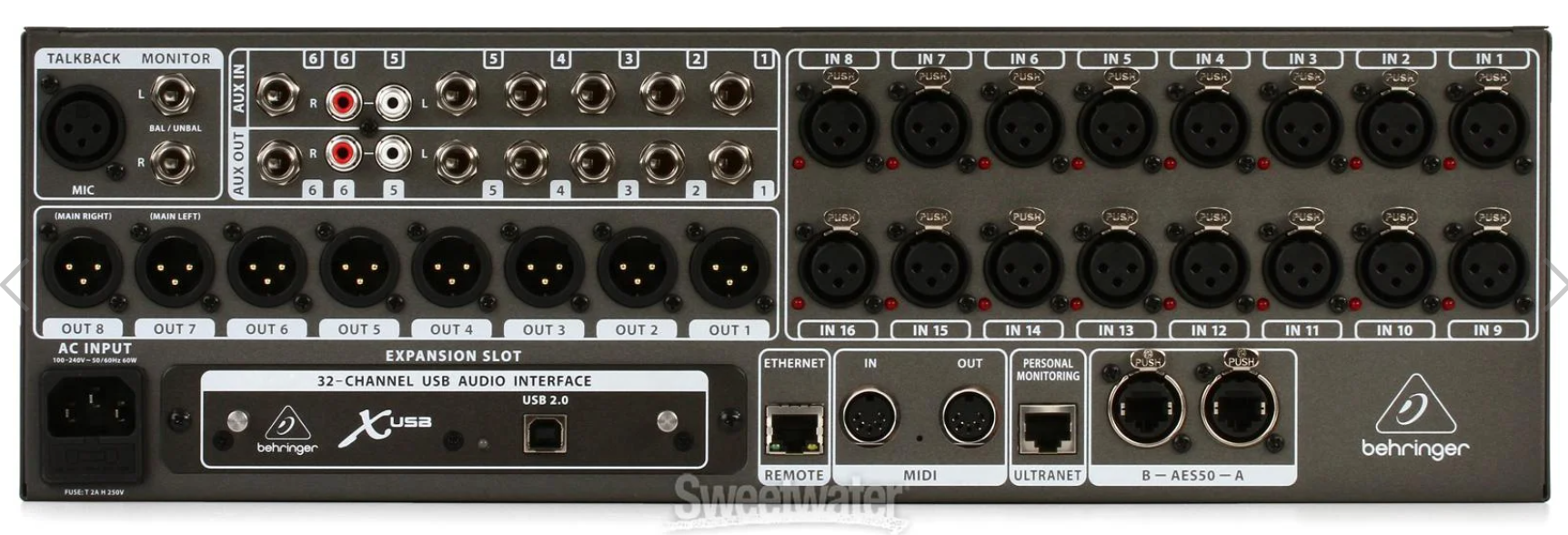
Now I need a few more aux outs. I need 7 and currently the 32r only offers me 8 in xlr form and two of them are left and right. They do offer 6 1/4" aux outs.

I have tried to find out how to activate the other 6 - 1/4" outs for additional aux outs but have hit a brick wall.

Here is a picture.

Can anybody lend a hand?

upload_2023-9-29_14-2-53.png
 
"I also was able to set Outputs 1-8 to the same outs on both the SD16 and the X32r which is what I wanted to do."

Why?
The X32 has 16 outputs.. 1-8 on X32 and 9-16 on SD8 - or vice versa.
Not sure why you need the AUX outs..

PS: But, if you NEED to, you CAN route to the 6 AUX outs on the routing table.. but NOT separate mixes like the other output busses.
You can route the following to EACH 1/4"AUX:
  • L/R aka Main
  • Output Buss 1-16
  • Direct Channels
  • Matrix mixes
  • FX
 
Last edited:
Monitor Pre DSP Question

I want to configure my monitor wedge Bus outputs to be what was called "Pre DSP" in the Mackie world. I can't figure out which setting to choose on this dang Behringer X32r. In other words I want the monitor feed for a wedge to by un affected by the volume or EQ. settings of each channel being run through it.

Thank you in advance

Chris
 
Monitor Pre DSP Question

I want to configure my monitor wedge Bus outputs to be what was called "Pre DSP" in the Mackie world. I can't figure out which setting to choose on this dang Behringer X32r. In other words I want the monitor feed for a wedge to by un affected by the volume or EQ. settings of each channel being run through it.

Thank you in advance

Chris

Here's my guess...hope it's right.

Is this screen available in the X32R? See far right column labeled "tap"
X32-Mix-App-Tutorial-Routing-Tab_003.jpg

Here's a related article: X32 Output Tap - Pre Fader & Pre Fader+M | What is +M anyway?! (drewbrashler.com)
 
Here's my guess...hope it's right.

Is this screen available in the X32R? See far right column labeled "tap"
X32-Mix-App-Tutorial-Routing-Tab_003.jpg

Here's a related article: X32 Output Tap - Pre Fader & Pre Fader+M | What is +M anyway?! (drewbrashler.com)
Nope.. if one wants pre-fader and pre-eq for each channel going to the AUX, one would choose “Pre EQ” on last column.
Settings in that screenshot will send mains, post [main] fader to AUX-1.
Output to AUX will vary based on main fader position.
 
  • Like
Reactions: Wasnex
Monitor Pre DSP Question

I want to configure my monitor wedge Bus outputs to be what was called "Pre DSP" in the Mackie world. I can't figure out which setting to choose on this dang Behringer X32r. In other words I want the monitor feed for a wedge to by un affected by the volume or EQ. settings of each channel being run through it.

Thank you in advance

Chris
Chris, are you using the standard output busses (1-16) for the wedge feeds or still looking at the AUX outs?
 
Nope.. if one wants pre-fader and pre-eq for each channel going to the AUX, one would choose “Pre EQ” on last column.
Settings in that screenshot will send mains, post [main] fader to AUX-1.
Output to AUX will vary based on main fader position.

Sorry I did not mean to imply the screen was properly configured...only that it was the correct place to make the change.

AFAIK: The selection of the TAP column should be changed to Pre EQ or Pre EQ +M
upload_2023-10-11_11-0-12.png
 
  • Like
Reactions: s0c9
Thanks for everybody's help on this and my other X32 thread. I have decided to pack it all in and send it back. I have wasted so much time on this and my only reason for buying this crappy system was to have the small foot print stage snake. So I will continue to use my Mackie DL32s and Master fader 5 which is heads better than this X32 app and be very happy. At least the Mackie has all 32 ins and 10 outs physically onboard.

Cheers
 
Thanks for everybody's help on this and my other X32 thread. I have decided to pack it all in and send it back. I have wasted so much time on this and my only reason for buying this crappy system was to have the small foot print stage snake. So I will continue to use my Mackie DL32s and Master fader 5 which is heads better than this X32 app and be very happy. At least the Mackie has all 32 ins and 10 outs physically onboard.

Cheers


Sorry... I understand and agree the manuals and user interface seems confusing...very different from the Yamaha digital boards I mixed on.
 
I mix on many different units from various X32’s (and XR’s) to mackie DL, presonus, Yamaha, QSC, Souncraft and A&H.
They all have their idiosyncrasies, but I’ve never had an issue with workflow or apps on X series Behringer.
I guess the biggest challenge is see is that the X32 is the Swiss Army knife of consoles and can be really confusing to some. That said, I would not run buss mixes thru their Aux outs, and only use them for matrix mixes or additional L/R mixes. Every other mix should go via one of the output busses.

I can work with any of them and carry a USB stick with my default profiles. Saves a ton of setup time.
 
Last edited:
  • Like
Reactions: Wasnex
I mix on many different units from various X32’s (and XR’s) to mackie DL, presonus, Yamaha, QSC, Souncraft and A&H.
They all have their idiosyncrasies, but I’ve never had an issue with workflow or apps on X series Behringer.
I guess the biggest challenge is see is that the X32 is the Swiss Army knife of consoles and can be really confusing to some. That said, I would not run buss mixes thru their Aux outs, and only use them for matrix mixes or additional L/R mixes. Every other mix should go via one of the output busses.

I can work with any of them and carry a USB stick with my default profiles. Saves a ton of setup time.

My perception is a significant part of the confusion relates to words having different meanings or usages.

In particular Aux Out has a bit different meaning than I am used to.
upload_2023-10-12_14-26-40.png
 

Attachments

  • upload_2023-10-12_14-23-35.png
    upload_2023-10-12_14-23-35.png
    133.3 KB · Views: 74
My perception is a significant part of the confusion relates to words having different meanings or usages.

In particular Aux Out has a bit different meaning than I am used to.
View attachment 5217762
Oh, I totally agree. What are now labeled “output busses” on digital consoles are what I remember as AUX outs from my analog console days.
Same fundamental usage for both.. with the additional built-in capabilities one gets from digital vs needing multiple outboard devices.
I still have an old Presonus APC88 compressor somewhere that I used on my old analog boards.. yes.. fed via an AUX send and return.
Great unit (back then) but basically no longer viable.

IME, AUX outs on the X32 are basically expanded-capability matrix mixes.
 
  • Like
Reactions: Wasnex
I guess the biggest challenge is see is that the X32 is the Swiss Army knife of consoles and can be really confusing to some. That said, I would not run buss mixes thru their Aux outs, and only use them for matrix mixes or additional L/R mixes. Every other mix should go via one of the output busses.
i've used the XR18 plenty but i'll admit to not really grasping the X32 setup, the app is still opaque to me :(

you "would not" use the 1/4" aux outs as additional monitor mixes, does that mean you can't?

can you or can you not use the six XLR outs and the six 1/4" aux outs to get 12 separate monitor mixes from say one X32R by itself?
 
i've used the XR18 plenty but i'll admit to not really grasping the X32 setup, the app is still opaque to me :(

you "would not" use the 1/4" aux outs as additional monitor mixes, does that mean you can't?

can you or can you not use the six XLR outs and the six 1/4" aux outs to get 12 separate monitor mixes from say one X32R by itself?
Basically NO!
The 6 AUX outputs have limited tap points and are NOT mix busses.
One can route the following to them:
  • Individual channels (direct Out)
  • USB inputs
  • FX busses
  • Mix buss (1-16)
  • Main mix (L/R/C)
  • Matrix mix (1-6)
  • Monitor (L/R)

There is NO "Sends on Fader" channel mixing capability on an AUX out on the X32.

Here's MusicTribe's official video on their usage!
 
Last edited:
Basically NO!
The 6 AUX outputs have limited tap points and are NOT mix busses.
One can route the following to them:
  • Individual channels (direct Out)
  • USB inputs
  • FX busses
  • Mix buss (1-16)
  • Main mix (L/R/C)
  • Matrix mix (1-6)
  • Monitor (L/R)
and i'm more confused than before

the first thing the guy does in the video is show assigning an aux out to something, and right there on the screen we see mixes 1 through 16 as an option
 
and i'm more confused than before

the first thing the guy does in the video is show assigning an aux out to something, and right there on the screen we see mixes 1 through 16 as an option
Right.. you are simply routing one of the selected mix busses (1-16) to an AUX out.
If that buss mix is already in use for a monitor mix, then you are simply cloning (routing) that IDENTICAL mix to the AUX. You don't get a separate mix for the AUX like you would another mix buss. Make a change to the mix on the BUSS and you get the SAME change on the AUX.
Make sense?
 
  • Like
Reactions: Wasnex