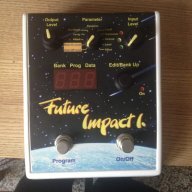
ok, here is an update/clarification on the switch functionality from the dev:
I see a lot of discussion appeared about the switch functionality. Of course, I will follow basically the SB1 functionality, but extending it wherever it makes sense. The lack of the patch down functionality is a drawback of the original design, therefore I planned to solve that, but without an extra switch that would require enlarging the case by a lot. There were two ideas for this function in the list:
1.Pressing both switches at the same time;
2.Keeping the switch for longer time.
First, let me remind people how the original SB1 works:
In normal state the right switch is ON/OFF (Effect/Bypass). If you press Program Up then the
PROG.NO will be increased by one, and it starts to blink. As long as it blinks nothing will change on the sound, you can increase multiple steps, “preparing” for the next sound. The sound is activated only when you hit the right pedal, which will not switch between ON/OFF this time, just activate the new sound and stay ON.
Therefore, (1.) is in contradiction with this functionality, and anyway that would be very tough to press two switches at once.
My plan is that the Future Impact will have three different modes, one is the original functionality of the SB1, and two extended modes. You can reprogram your device between these either with a SYSEX command, or with a special boot option when turning on the FI. Of course, selecting once one of these three modes the FI will always remember your choice.
1.SB1 functionality
2.SB1 functionality, extended with the following: If you want to move up the Program No. by a lot, press down the left pedal and keep it. After a while it will start to scroll quickly. When you reached the required number just release it, and press the right pedal. A quick double step (like double click with a mouse) will step down by one. If you perform a double step and keep the pedal at the second step, it starts to scroll down quickly. When you reached the required number just release it, and press the right pedal.
3.SB1 functionality, extended with the following: If you want to move up the Program No. by a lot, press down the left pedal and keep it. After a while it will start to scroll quickly. When you reached the required number just release it, and press the right pedal. A quick double step (like double click with a mouse) will change the direction of the pedal, and immediately perform a step down. At the same time the decimal point of the BANK NO. will light up, indicating that the pedal direction is DOWN. From this point on the pedal will always perform step down, until you change the direction again. Scrolling is possible either in UP or in DOWN mode. When you reached the required number just release it, and press the right pedal.