• TalkBass has been independent since 1998. Add your voice.
    Create a free account to reply to discussions, view embedded media, and browse with fewer display ads.
    Join freeLog in
    Want zero display ads or expanded classifieds tools? Compare plans.

putting together a home project studio

Lookin' good, Dave! As I said, I really dig that desk. I need to pick up some of those Auralex monitor pads, as you've got. Any special reason you went with the speaker stands, rather than just placing them on the top shelf?
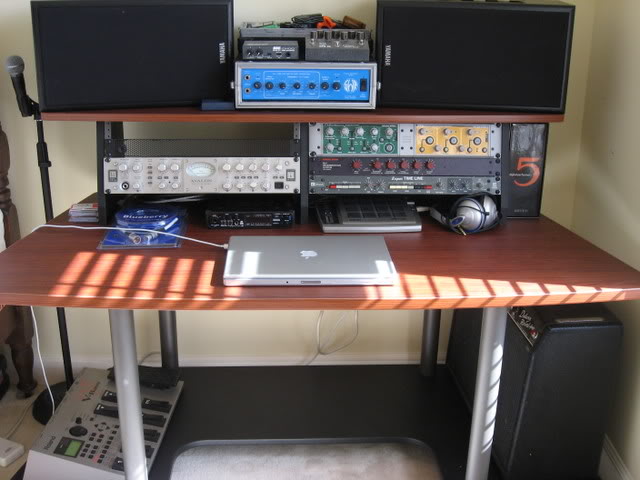
IMG_0072.jpg
 
Looks like the start of a nice setup - I'm jealous. If you are doing some mixing, I'd recommend buying some really high quality headphones and possibly treating the room with broadband absorbers/bass traps. Mixing is miles easier for me with a nice monitoring situation in a room that sounds fairly neutral. I need to get some nice monitors and upgrade my hd280 pros to something like the hd580.

Do you plan on micing bass cabs or just using the DI? Do you have any mics?
 
hey, i just got the room painted! i'll get to hanging the diffuser array and gluing up some auralex...patience! :D i went with monitors on the stands because they just aren't going to fit with the computer monitors up there...i haven't even ordered my headphones yet...i won't be mixing at all, though, other than giving them a rough mix of just the bass part...ken fordyce up at mirror sound in seattle is doing all that...i'm not doing much more than recording bass tracks...not sure i'm going to mic a cab or not...i really want to, because i love the color and dynamics it adds to a recording when you mix in about 20% of the cab with the DI...i'll be using two simaltaneous DI recordings, one with the DI from my navigator and the other from a radial JDI...i have a mic from the studio i recorded at up in silverdale, but i have no idea what it is...i know nothing about the differences between microphones...joel, the guy that ran the studio said, 'here, use this mic, and i emailed you some detailed pictures on mic placement.' that's good enough for me...with my 4 and 6 year olds running around all the time, who knows...home may not be the best place for it...
 
This may not be what you want to hear, but how about upgrading from Sonar 5 Pro to Sonar 6 Pro? An upgrade deal at the minute means this is $130. I upgraded about 4 months ago and 6 has some very sweet additional functionality (although I upgraded from 4 to 6). I'm loving the Vintage Channel plugin - very useful presets for tweaking the sound, and the Roland V-Vocal plugin is very useful for tweaking any tuning that's wayward. I haven't done anything serious with the Audio-quantize tool yet, but this sounds like it would be a great tool for locking in bass and drums...

If you're familiar with the workflow in Cakewalk, I don't see any point in relearning Cubase or ProTools or any such...

BTW, for computers, I've just migrated from PC to Mac. I'm able to dual boot into XP as well via bootcamp, so I can run Sonar when I need to but also have the benefit of nice functionality on the Mac side. In fact, I have the XP partition set up "super clean" with no access to the internet, no virus checkers etc. Anything I need to download I do from the Mac partition and copy over. Just another option!
 
hey, i just got the room painted! i'll get to hanging the diffuser array and gluing up some auralex...patience! :D i went with monitors on the stands because they just aren't going to fit with the computer monitors up there...i haven't even ordered my headphones yet...i won't be mixing at all, though, other than giving them a rough mix of just the bass part...ken fordyce up at mirror sound in seattle is doing all that...i'm not doing much more than recording bass tracks...not sure i'm going to mic a cab or not...i really want to, because i love the color and dynamics it adds to a recording when you mix in about 20% of the cab with the DI...i'll be using two simaltaneous DI recordings, one with the DI from my navigator and the other from a radial JDI...i have a mic from the studio i recorded at up in silverdale, but i have no idea what it is...i know nothing about the differences between microphones...joel, the guy that ran the studio said, 'here, use this mic, and i emailed you some detailed pictures on mic placement.' that's good enough for me...with my 4 and 6 year olds running around all the time, who knows...home may not be the best place for it...

I've heard that DIY bass traps and broadband absorbers made out of Owens Corning 703 tend to be a bit more effective than Auralex - and cheaper too. Although Auralex isn't as time consuming.

Is one of the following the mic?:
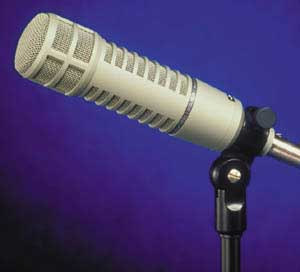
re20.jpg

[Invalid or Expired Link Removed]
beta52.gif

Invalid Link Removed

If you record DI signals, you can always reamp them. So anyone could take the bass track, and bring it through any bass amp/cab, and use any mic to record it in any room.
 
I've heard that DIY bass traps and broadband absorbers made out of Owens Corning 703 tend to be a bit more effective than Auralex - and cheaper too. Although Auralex isn't as time consuming.

Is one of the following the mic?:
re20.jpg

[Invalid or Expired Link Removed]
beta52.gif

Invalid Link Removed

If you record DI signals, you can always reamp them. So anyone could take the bass track, and bring it through any bass amp/cab, and use any mic to record it in any room.


hey, never thought of that! i'll have to call up ken and see if mirror has any eden lying around...i don't think it's any of those mics...this one has a little age to it, and it's farkin' huge
 
This may not be what you want to hear, but how about upgrading from Sonar 5 Pro to Sonar 6 Pro? An upgrade deal at the minute means this is $130. I upgraded about 4 months ago and 6 has some very sweet additional functionality (although I upgraded from 4 to 6). I'm loving the Vintage Channel plugin - very useful presets for tweaking the sound, and the Roland V-Vocal plugin is very useful for tweaking any tuning that's wayward. I haven't done anything serious with the Audio-quantize tool yet, but this sounds like it would be a great tool for locking in bass and drums...

If you're familiar with the workflow in Cakewalk, I don't see any point in relearning Cubase or ProTools or any such...

BTW, for computers, I've just migrated from PC to Mac. I'm able to dual boot into XP as well via bootcamp, so I can run Sonar when I need to but also have the benefit of nice functionality on the Mac side. In fact, I have the XP partition set up "super clean" with no access to the internet, no virus checkers etc. Anything I need to download I do from the Mac partition and copy over. Just another option!
i really didn't understand much of what you said, but i was talking to cyrus (guitarist/songwriter/band leader guy) and was telling him that i was ready from him to send me my copy of sonar 5, and he told me that he thinks its 6...i have no basis for comparison as i've never done any of this at all before, so, it's going to be just as unfamiliar to me as walking on mars
 
i really didn't understand much of what you said, but i was talking to cyrus (guitarist/songwriter/band leader guy) and was telling him that i was ready from him to send me my copy of sonar 5, and he told me that he thinks its 6...i have no basis for comparison as i've never done any of this at all before, so, it's going to be just as unfamiliar to me as walking on mars

If you're just tracking bass, you can always import .wavs/aiffs/etc. into any program.
 
www.tracertek.com

click on the link that says 'audiocenter PCs'

They're custom built PCs, and you can order them with whatever operating system you jolly well please. That means you don't have to get vista.

I just ordered a new pc from them which'll be well-equipped for all my audio needs (meager though the needs are) with two 320 GB harddrives (which are also fast ones), 2 GB of RAM, an AMD Athlon 5200+ dual core processor (I believe it clocks in at about 2.6 GHz) not to mention enough firewire and USB 2.0 ports to keep me happy, and an M-Audio delta 1010 + N-Track studio.
 
Nice start, neptoon. I'm envious. My setup is crammed into a small computer desk in a small area that has been our junk accumulation room for far too long. It's amazing how fast outgrown kid's stuff builds up. This weekend will (hopefully) be one of making some space for my toys - YAY! :)

heh my setup is all in my already small bedroom, in which are several large pieces of furniture (large bunkbed, two large cabinets/ bookcases, one tall/thin bookcase, several racks to put clothes on), the two desks my stuff is on (arranged to make a corner, but one cabinet is virtually inaccessible behind a desk), two LARGE speakers (a pair of 28" tall marantz speakers), and a reel-to-reel / 8track deck which is so big it has to go on the floor. and I barely have room to walk to my bed between all this stuff, and my mic stands and music stands when they're set up. and my trumpet case, clarinet case, and my electric bass of course.

here's an old picture. it's slightly rearranged since this picture was taken, but doesn't take any less space.
[Invalid or Expired Link Removed]


in short you have someone who can sympathize with the lack of space. only I can't get rid of all the stuff in my bedroom until I move out and have more space.
 
I'm pretty sure Sonar is only designed for Windows.

I wouldn't get bogged down so much on what program to use. All of the major ones (ProTools, Sonar, Digital Performer, Cubase, Logic...), more or less, have all of the same features, but it is just a matter of user interface. Protools is probably the easiest for basic tracking and mixing, but midi has been easier for me with Digital Performer and Cubase. Cubase's downfall is its unflexible routing, which makes a task like printing effects on an auxillary channel difficult. Digital Performer is a major pain in the ass when it comes to transferring audio files, because Digital Performer doesn't run on WAVs or AIFFs. That said, I've used Cubase SX 3 (when 4 is now out), DP 5 (which i think is the most up-to-date version), and ProTool 6.7 (7.3? is now out?). I've dabbed a little bit with Sonar 6, but not enough to get a great feel for it.

You might want to try Audacity. I personally haven't used it for tracking/mixing, but it is freeware, so there is nothing to lose. It is also open-source AND it works.
 
well, they're going to be sending me the files for the drums and guitars which are going to be sonar files, so can i import into the format i need, record the bass, send it back, and they can convert back again? i'm sure this will be easier when i get my computer hooked up and start messing with it
 
well, they're going to be sending me the files for the drums and guitars which are going to be sonar files, so can i import into the format i need, record the bass, send it back, and they can convert back again? i'm sure this will be easier when i get my computer hooked up and start messing with it

You will probably only be able to import a sonar session file with sonar, but they will have to send you the audio files with the session file. If there is already some edits, you might need to import a session file rather than just the audio files. I think there might be somewhat of a standard for session files across programs (.omf I believe), but they don't always work correctly.
 
does anyone know if the same copy of sonar will run on PC and apple? i only ask because i haven't seen seperate versions of sonar

Sonar definitely only runs on Windows. What I was trying to say earlier though is that you can get Sonar to run on a Mac computer / laptop if you set the computer up to boot into either Windows or the Mac operating system. It's fairly painless to set up...