
Enjoy the benefits of a premium membership!
Upgrade Account
-
TalkBass has been independent since 1998. Add your voice.
Create a free account to reply to discussions, view embedded media, and browse with fewer display ads.
Join free Log in
Want zero display ads or expanded classifieds tools? Compare plans.
You are using an out of date browser. It may not display this or other websites correctly.
You should upgrade or use an alternative browser.
You should upgrade or use an alternative browser.
The "Laptop-based live rig" club
- Thread starter Naigewron
- Start date
More options
Who Replied?
I'm looking at Neural DSP plugins using my M1 MacBook to replace my hardware guitar modeller. But I will probably continue to use my TC Plethora X3 in the front of my Axe IO to limit the number of apps running on the computer as I don't see a way to use guitar effects before the amp in the Neural standalone app. All of this because I want to use Loopy Pro and I want to limit the number of AD/DA involved.
PS: I will never use a Windows laptop live, never.
PS: I will never use a Windows laptop live, never.
As @dsteinschneider mentioned, I have used Cantabile with a PC laptop for 8 years to run my live keys.
Just recently I discovered Gig Performer and just did my first live shows using GP and a MacBook Pro this past weekend. I have to say that the switch was at first a bit unfamiliar but after a small learning curve GP shined! Although Cantabile is and will always be an outstanding vst host I found that GP was just easier to navigate and extremely intuitive. It's easier to "see" what I am creating if that makes any sense.
Just recently I discovered Gig Performer and just did my first live shows using GP and a MacBook Pro this past weekend. I have to say that the switch was at first a bit unfamiliar but after a small learning curve GP shined! Although Cantabile is and will always be an outstanding vst host I found that GP was just easier to navigate and extremely intuitive. It's easier to "see" what I am creating if that makes any sense.
Attachments


As @dsteinschneider mentioned, I have used Cantabile with a PC laptop for 8 years to run my live keys.
Just recently I discovered Gig Performer and just did my first live shows using GP and a MacBook Pro this past weekend. I have to say that the switch was at first a bit unfamiliar but after a small learning curve GP shined! Although Cantabile is and will always be an outstanding vst host I found that GP was just easier to navigate and extremely intuitive. It's easier to "see" what I am creating if that makes any sense.
I have a bass player friend who was on Windows using Cubase and moved over to a Mac running Logic. One thing I liked was you can send out the Mac's built-in audio output in addition to the USB interface which is helpful for situations like sending the mix out to the recording room so the players can listen to what's just been recorded. With our PC based rig, I have doing physical patching to achieve the same. We're considering picking up a Mac Mini 16GB 256TB SSD for $600 and Logic for that studio. It also will be easier to record from the studio using an iPad to remote control Logic.
I won't be switching from Cantabile for live performance using VST's because every time I need it to do something new, I always find a way, usually because Cantabile maestros on their forum have an answer.
I won't be switching from Cantabile for live performance using VST's because every time I need it to do something new, I always find a way, usually because Cantabile maestros on their forum have an answer.
Brad and the guys at Cantabile are outstanding for sure. I thought I would never switch but found GP (which also works on PC) was a very interesting alternative and ultimately swayed me over with it's ease of use approach. I was able to recreate my whole 35 song setlist in a day of two.
The switch to Mac was just something I always wanted to try. Another cool thing with GP is that any "GIG" I create on either platform is fully transferable.
As far as audio routing goes, Mac core audio allows me to "Aggregate" interfaces so I use two small Radial USB Pro's combined as one interface so I can route the Bass Keys ie: Taurus, Moog, etc as a Mono signal and keep two discreet L&R for the pads and synthy stuff.
The Gig Performer community forum is extremely helpful as well.
On the foot controller front I use a set of Roland pk-5 midi foot pedals to my laptop or for some gigs to a Moog lil phatty for the instant taurus +

I used Logic Pro for backing tracks and MainStage for bass tones and a synth bass for a couple of years with great success.
While I do recommend it to everybody I do understand that it’s not for everyone as it has a steep learning curve at least for my uses.
The only couple of problems I had with MainStage seems to have got fixed after updating to 3.7.0.
Our setup was this:
Dingwall Droc 5 -> RNDI -> mixer
Novation Launchkey 37 -> MacBook Pro 14 M1 Pro 16GB 512GB
Now for the important part - the laptop was connected to the mixer via the USB port, not through physical connection like another interface. This is super useful as it doesn’t take up any inputs on the stagebox or mixer.
Our mixer had 16 physical channels + 8 on the expander up to a total of 24. 25 to 32 are digital channels and can only come via USB in the absence of a bigger 16 ch expander.
25+26 were used for backing tracks while 27 was used for click and 28 for counts. MainStage’s output went to 3 unused channels, usually 21+22 for synth bass and 23 for the bass guitar affected tone.
MainStage was set up so that it takes the input from my RNDI (input 10 from the mixer let’s say), process it however I wanted and return it to 29+30. I used Neural DSP Parallax for the dirty tones and Waves 1176, LA-2A, Pultec and FabFilter Saturn 2 for mild saturation. I also used the stock Logic EQ as HPF + LPF.
Tuner and mute were triggered upon pressing the sustain pedal connected to the keyboard. I gotta say it’s super convenient to have a 10$ pedal that needs no power supply as a mute - the tuner appears full screen on the laptop while in Performance mode in MainStage.
It also took the midi input from my Novation keyboard and run it through any virtual instrument I wanted it to - I mainly used Serum for modern pop trap rnb or dance tones because that’s what was used in the original songs. I really enjoyed the flexibility that MainStage offers when mapping parameters for virtual instruments.
For example one of the knobs on my keyboard controlled the frequency of the filter and could brighten up the tone as needed. Another one controlled the HPF frequency of the stock logic eq further down the audio chain. The third one controlled both and also increased the send level into a separate bus that had a crushing distortion with a widener and a lot of reverb, making my synth bass morph from a clean sub on the verses to an awesome wide uplifter saw by the end of the prechorus.
I also had some general things mapped on the last three knobs - 2 of them controlled a low and hi shelf on the master and the third one controlled the master volume.
The first row of pads directly below the knobs reset said parameters to their default value so if I accidentally touched one of the knobs I could quickly reset it. Don’t think I ever used them though - just the one that reset the whole patch.
Awesome thing #1 about mapping these parameters is that you can set the limit and the sensitivity independently for any mapping.
For example the master volume didn’t go from -inf to +6db, it went from -8db to +2db while the HPF mentioned above didn’t have a linear curve but a logarithmic one, so that the filter could open slowly while being super bright only at the last 10% of the knob’s full turn.
These can be assigned per patch or have them affect the tone globally so you really have endless flexibility. The same is true for signal chains - you could have one clean bass channel on all presets and changing compression or amp gain settings will impact everything, no need to go through all the patches to remap or change settings.
Awesome thing #2 is how MainStage and Logic can interact with each other. All patch changes were automated by Logic via cc program changes. Knob turns could also be automated but I preferred to do it by hand.
I did have the patch list on the left of the screen and I had the drum pads mapped to go between banks and patches just in case.
Next song, previous song, play and pause were also mapped to buttons on the keyboard. Only thing you need to be careful about is midi channels - I had to configure the keyboard to send keys on midi channel 1, knobs on channel 2 and drum pads to channel 3 while patch changes via cc were handled on channel 16. This makes sure every part of the setup is communicating exclusively with what it’s supposed do, leaving less room for error.
Learned this the hard way - I was playing a synth bass in MainStage while simultaneously ‘playing’ the midi click track that we have in logic and nobody knew where that loud pop in the drummer IEMs was coming from, especially since I barely have any click in my IEM mix. That was fun.
Only problems I had with MainStage were Neural DSP Tim Henson freezing the whole MainStage user interface for 20s when changing any parameter inside it - audio was still working fine in the background.
I’m guessing experience will vary depending on how well optimized the plugin is in the first place..
Another weird bug was MainStage not responding when coming from home to the gig or viceversa.
Both issues seemed to have been fixed for me after updating to 3.7.0 as mentioned above and they were nothing a restart of the program or the laptop wouldn’t fix anyway.
These days I’m not using MainStage so much because of two reasons.
First one is that my Dingwall and RNDI sound so good that I leave the sound guy have control over EQ and compression changes depending on the room.
Second one is that I don’t really need the synth bass for most songs and projects. Plucking soft to medium precisely 12 frets above the fretted note also makes a very good sub bass impression on the Dingwall (ty Michael League for the tip).
If anybody needs any help figuring this stuff out let me know since I already went through a lot of hours and frustrations w this and I would rather have avoided it
All in all I’m liking MainStage a lot and I still use it daily for home practice - only thing I’m missing right now is a Bluetooth midi foot controller so I could change patches without having to use the mouse and keyboard.
While I do recommend it to everybody I do understand that it’s not for everyone as it has a steep learning curve at least for my uses.
The only couple of problems I had with MainStage seems to have got fixed after updating to 3.7.0.
Our setup was this:
Dingwall Droc 5 -> RNDI -> mixer
Novation Launchkey 37 -> MacBook Pro 14 M1 Pro 16GB 512GB
Now for the important part - the laptop was connected to the mixer via the USB port, not through physical connection like another interface. This is super useful as it doesn’t take up any inputs on the stagebox or mixer.
Our mixer had 16 physical channels + 8 on the expander up to a total of 24. 25 to 32 are digital channels and can only come via USB in the absence of a bigger 16 ch expander.
25+26 were used for backing tracks while 27 was used for click and 28 for counts. MainStage’s output went to 3 unused channels, usually 21+22 for synth bass and 23 for the bass guitar affected tone.
MainStage was set up so that it takes the input from my RNDI (input 10 from the mixer let’s say), process it however I wanted and return it to 29+30. I used Neural DSP Parallax for the dirty tones and Waves 1176, LA-2A, Pultec and FabFilter Saturn 2 for mild saturation. I also used the stock Logic EQ as HPF + LPF.
Tuner and mute were triggered upon pressing the sustain pedal connected to the keyboard. I gotta say it’s super convenient to have a 10$ pedal that needs no power supply as a mute - the tuner appears full screen on the laptop while in Performance mode in MainStage.
It also took the midi input from my Novation keyboard and run it through any virtual instrument I wanted it to - I mainly used Serum for modern pop trap rnb or dance tones because that’s what was used in the original songs. I really enjoyed the flexibility that MainStage offers when mapping parameters for virtual instruments.
For example one of the knobs on my keyboard controlled the frequency of the filter and could brighten up the tone as needed. Another one controlled the HPF frequency of the stock logic eq further down the audio chain. The third one controlled both and also increased the send level into a separate bus that had a crushing distortion with a widener and a lot of reverb, making my synth bass morph from a clean sub on the verses to an awesome wide uplifter saw by the end of the prechorus.
I also had some general things mapped on the last three knobs - 2 of them controlled a low and hi shelf on the master and the third one controlled the master volume.
The first row of pads directly below the knobs reset said parameters to their default value so if I accidentally touched one of the knobs I could quickly reset it. Don’t think I ever used them though - just the one that reset the whole patch.
Awesome thing #1 about mapping these parameters is that you can set the limit and the sensitivity independently for any mapping.
For example the master volume didn’t go from -inf to +6db, it went from -8db to +2db while the HPF mentioned above didn’t have a linear curve but a logarithmic one, so that the filter could open slowly while being super bright only at the last 10% of the knob’s full turn.
These can be assigned per patch or have them affect the tone globally so you really have endless flexibility. The same is true for signal chains - you could have one clean bass channel on all presets and changing compression or amp gain settings will impact everything, no need to go through all the patches to remap or change settings.
Awesome thing #2 is how MainStage and Logic can interact with each other. All patch changes were automated by Logic via cc program changes. Knob turns could also be automated but I preferred to do it by hand.
I did have the patch list on the left of the screen and I had the drum pads mapped to go between banks and patches just in case.
Next song, previous song, play and pause were also mapped to buttons on the keyboard. Only thing you need to be careful about is midi channels - I had to configure the keyboard to send keys on midi channel 1, knobs on channel 2 and drum pads to channel 3 while patch changes via cc were handled on channel 16. This makes sure every part of the setup is communicating exclusively with what it’s supposed do, leaving less room for error.
Learned this the hard way - I was playing a synth bass in MainStage while simultaneously ‘playing’ the midi click track that we have in logic and nobody knew where that loud pop in the drummer IEMs was coming from, especially since I barely have any click in my IEM mix. That was fun.
Only problems I had with MainStage were Neural DSP Tim Henson freezing the whole MainStage user interface for 20s when changing any parameter inside it - audio was still working fine in the background.
I’m guessing experience will vary depending on how well optimized the plugin is in the first place..
Another weird bug was MainStage not responding when coming from home to the gig or viceversa.
Both issues seemed to have been fixed for me after updating to 3.7.0 as mentioned above and they were nothing a restart of the program or the laptop wouldn’t fix anyway.
These days I’m not using MainStage so much because of two reasons.
First one is that my Dingwall and RNDI sound so good that I leave the sound guy have control over EQ and compression changes depending on the room.
Second one is that I don’t really need the synth bass for most songs and projects. Plucking soft to medium precisely 12 frets above the fretted note also makes a very good sub bass impression on the Dingwall (ty Michael League for the tip).
If anybody needs any help figuring this stuff out let me know since I already went through a lot of hours and frustrations w this and I would rather have avoided it
All in all I’m liking MainStage a lot and I still use it daily for home practice - only thing I’m missing right now is a Bluetooth midi foot controller so I could change patches without having to use the mouse and keyboard.
Last edited:
Great stuff @Alecu , and we share a love for the RNDI and Novation controllers. I’m curious to know how running Logic in tandem with MainStage is vs using Playback in MainStage for your tracks in a live performance? I never liked the resource/GPU spike when both were open, so I bounce my tracks from Logic to MP3 anfter getting them output balanced and use Playback in MS. Thanks!
On my MacBook Pro 14" base model M1 Pro 16GB 512 SSD I never had any issues either w Logic during playback nor MainStage handling the virtual instruments or plugins, even with multiple Safari tabs open and other apps like Spotify, Mail, Notes and iMessage in background. I also get a slight resource bounce in the CPU and SSD meter when opening either program but it seems to go away after a few seconds once everything is loaded in RAM.Great stuff @Alecu , and we share a love for the RNDI and Novation controllers. I’m curious to know how running Logic in tandem with MainStage is vs using Playback in MainStage for your tracks in a live performance? I never liked the resource/GPU spike when both were open, so I bounce my tracks from Logic to MP3 anfter getting them output balanced and use Playback in MS. Thanks!
While I try to playback from just a few tracks from Logic I often find myself with playing full production projects during rehearsals and then not bothering to bounce in place to a single file, just turning off and hiding what I don't need.
I don't think this is a problem with a modern laptop on 44.1 and 48 khz sample rates, personally I've hit the MacBooks limit just a couple of times with two mixing big projects at 96 khz - I'm talking 10 channels of drums, 1 clean 1 dirty for bass, 1 rhythm 1 solo for guitar, 1 for vocals and of course busses, sends and master effects all in the box.
IMO A couple of audio tracks and a bunch of VSTis with some plugins on them easily handled by modern MacBooks and are as stable as it can get.
I might be doing this again... probably shouldn't be using that decade-year-old Windows tablet that doesn't even tablet anymore (the screen started, for lack of a more descriptive term, repeatedly touching itself in one spot).
A singer from a project that kinda went nowhere a year ago because of having trouble scheduling everybody decides she likes the songs she wrote, wants to finish them, and basically change the style so she (or we) can use tracks, and turn some tracks off and use more live instruments when people are available. We'll see... but they are good songs I think.
A singer from a project that kinda went nowhere a year ago because of having trouble scheduling everybody decides she likes the songs she wrote, wants to finish them, and basically change the style so she (or we) can use tracks, and turn some tracks off and use more live instruments when people are available. We'll see... but they are good songs I think.
Got my little controller pedalboard put together this week, to keep everything neat and tidy. Threw my wireless receiver on there too, although I suspect this might prove to be just a little bit tight. I'll put it through its paces in the coming weeks and see how it performs.
The front four switches are for my main effects for any given chain. The upper left switch activates my tuner, while the other three are a bit undefined as of now. Still experimenting with GigPerformer and what switches will allow me to do.
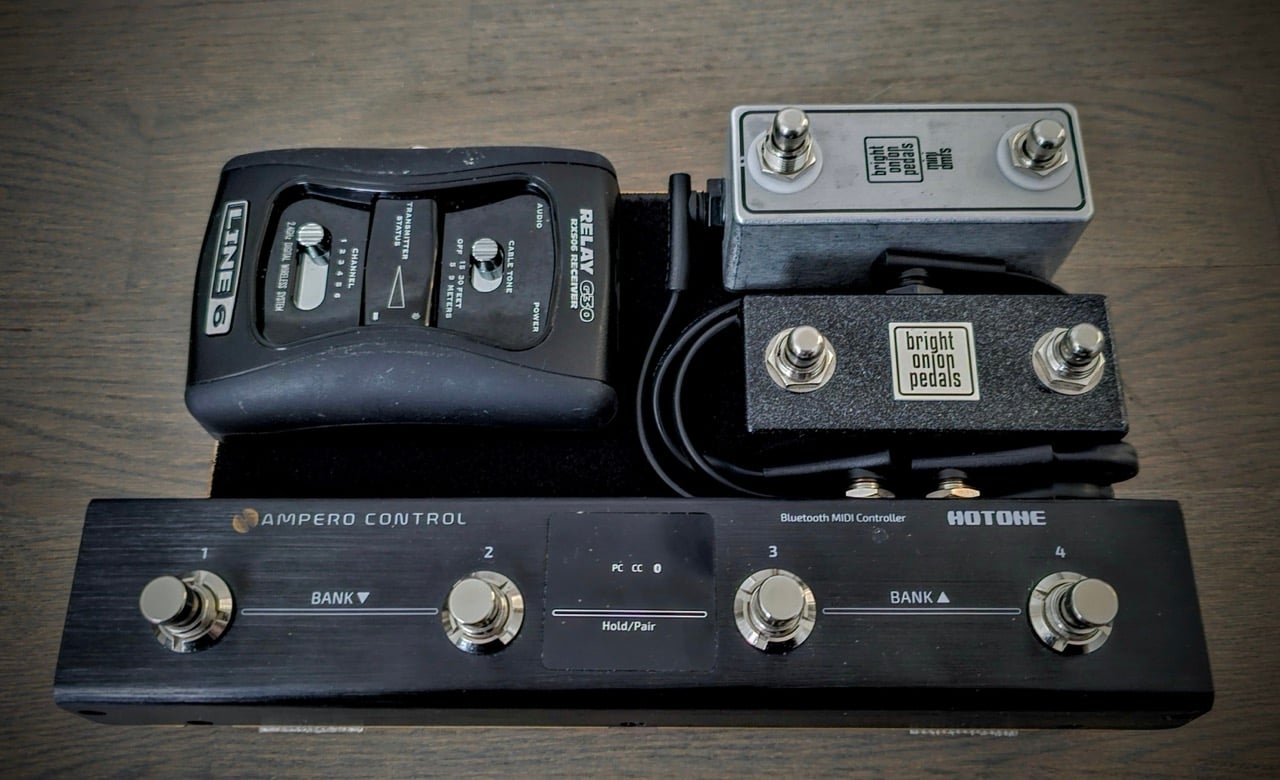
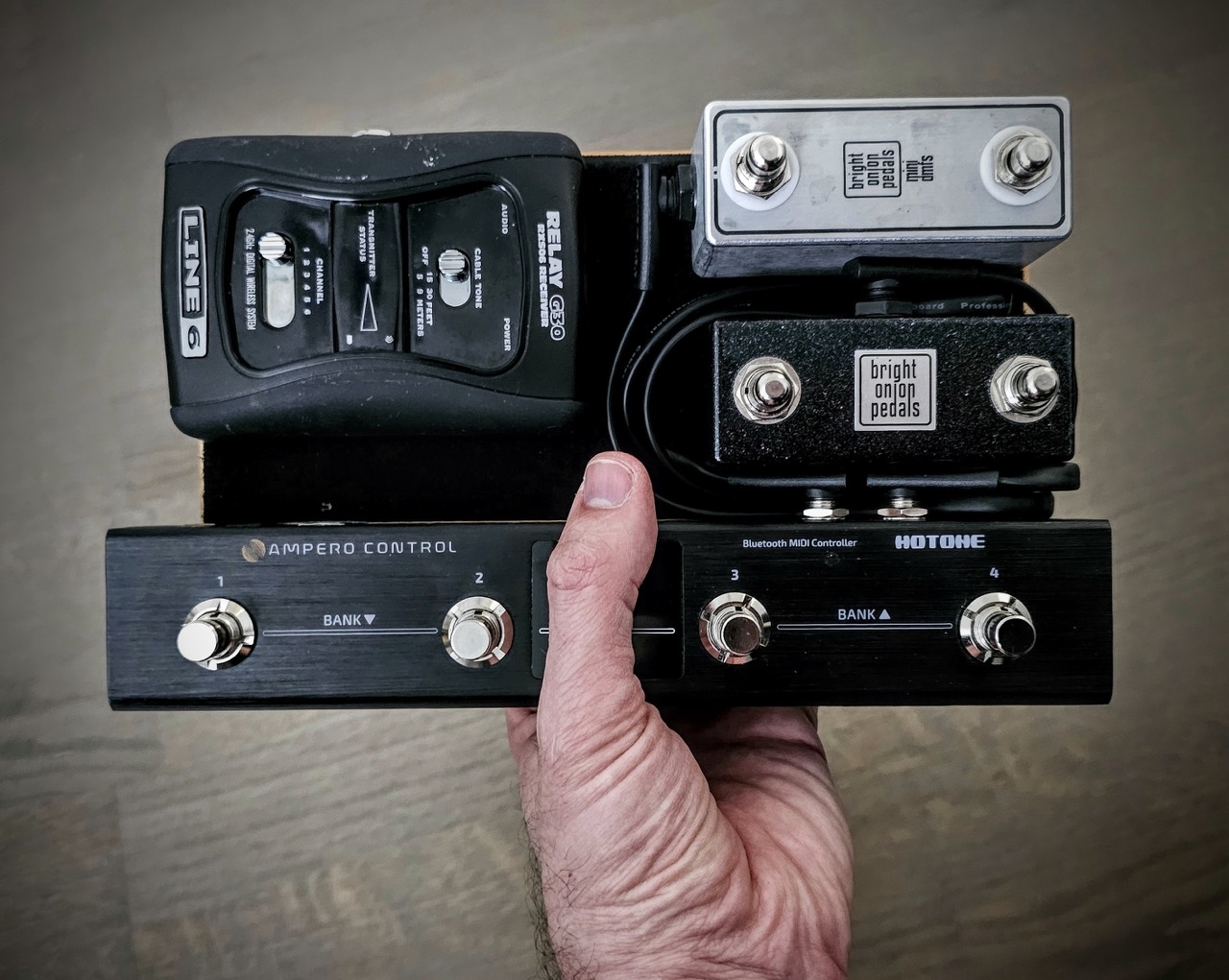
The front four switches are for my main effects for any given chain. The upper left switch activates my tuner, while the other three are a bit undefined as of now. Still experimenting with GigPerformer and what switches will allow me to do.
Do you automate any of the turning effects on/off during songs? Of course whether that will work depends on the music, but if you have tracks and preset structures and clicks on the laptop anyway, then turning the distortion on via automation becomes a lot more convenient than stepping on a pedal. But with more freeform stuff, stepping on pedals really is much more convenient than any other option.
Back in the day, I programmed a ridiculous high-feedback delay in one song which basically turned things into a cloud of uncontrolled howl. During the sections that used it, I automated the feedback down to 0 and then up during every bar. That was neat.
Back in the day, I programmed a ridiculous high-feedback delay in one song which basically turned things into a cloud of uncontrolled howl. During the sections that used it, I automated the feedback down to 0 and then up during every bar. That was neat.
Not as of now, but I do have that option if I ever need to utilise it.Do you automate any of the turning effects on/off during songs? Of course whether that will work depends on the music, but if you have tracks and preset structures and clicks on the laptop anyway, then turning the distortion on via automation becomes a lot more convenient than stepping on a pedal. But with more freeform stuff, stepping on pedals really is much more convenient than any other option.
Back in the day, I programmed a ridiculous high-feedback delay in one song which basically turned things into a cloud of uncontrolled howl. During the sections that used it, I automated the feedback down to 0 and then up during every bar. That was neat.
We're currently working on getting a whole new live setup settled (including auditioning 1-2 new members), and we will probably be going the click track route (not sure about backing tracks yet; personally I would love to avoid them).
Running a click track and "standardising" our song structures will open up the option of automating effects, and it will probably be my laptop that will run the click and/or tracks. GigPerformer has full support for running multichannel backing tracks and sending user-defined MIDI at specific timestamps if needed.

A few weeks ago I finally hit the wall with the whole pedalboard thing. The constant tweaking of setups by buying and selling pedals, the carrying it around, etc., and decided to sell off the whole lot. I’ve got some Darkglass gear that pretty much replaces all the effects I had in pedal form and is controllable by midi footswitches, so I’m kind of there.
But then I saw a video on Loopy Pro and want to try that out. Can you guys let me know if this is how it would work for a live setup?
Bass 1/4” into audio interface
MIDI controller into interface
Interface USB C to Ipad for effects/loops
Interface 1/4” out to amp
Is that all the equipment needed? And any recommendations for the smallest audio interface that has the midi in for foot switch? There are tiny single channel interfaces out there but so far it seems larger multi-input units are the only I’ve seen with the midi in/outs
But then I saw a video on Loopy Pro and want to try that out. Can you guys let me know if this is how it would work for a live setup?
Bass 1/4” into audio interface
MIDI controller into interface
Interface USB C to Ipad for effects/loops
Interface 1/4” out to amp
Is that all the equipment needed? And any recommendations for the smallest audio interface that has the midi in for foot switch? There are tiny single channel interfaces out there but so far it seems larger multi-input units are the only I’ve seen with the midi in/outs
I don't know anything about the Loopy Pro in particular, but for a general laptop/tablet based rig that's generally all you need. I would probably also get a DI box to plug your interface into, just to be sure your signal is as "standardised" as possible running to FoH, and to have access to a ground lift.A few weeks ago I finally hit the wall with the whole pedalboard thing. The constant tweaking of setups by buying and selling pedals, the carrying it around, etc., and decided to sell off the whole lot. I’ve got some Darkglass gear that pretty much replaces all the effects I had in pedal form and is controllable by midi footswitches, so I’m kind of there.
But then I saw a video on Loopy Pro and want to try that out. Can you guys let me know if this is how it would work for a live setup?
Bass 1/4” into audio interface
MIDI controller into interface
Interface USB C to Ipad for effects/loops
Interface 1/4” out to amp
Is that all the equipment needed? And any recommendations for the smallest audio interface that has the midi in for foot switch? There are tiny single channel interfaces out there but so far it seems larger multi-input units are the only I’ve seen with the midi in/outs
Do you need MIDI in, or USB in? If you want MIDI over USB, look into the Arturia Minifuse series. I use the Minifuse 1 live, which is a single input interface with a USB port for hooking up an external MIDI controller
That’s great, thanks. My midi footswitch does have usb c port so…I see the Minifuse1 has two usb ports so one connects the footswitcher? And I see there are beefy usb cables that’ll work for stage floor. Brilliant!
Last edited:
Yep, one for the footswitch, and the other for the laptop/tablet. It's a really nice bonus feature for setups with limited USB ports availableThat’s great, thanks. My midi footswitch does have usb c port so…I see the Minifuse1 has two usb ports so one connects the footswitcher? And I see there are beefy usb cables that’ll work for stage floor. Brilliant!
I'd be tempted. I'd need to find a good floor Interface/pedals and live loader for VSTs. My concern would be fragility of the laptop. I might be tempted to build something more ruggedIt's 2025 - How many have abandoned physical rigs, amps, floorboards and pedals and moved to the ultra-digital realm of using a laptop rig live (and elsewhere)?
Let's share experiences, tips and tricks.
I'm just getting into this world permanently now, but it's been moving this way for a few years.
My rig has gotten more and more digital over the past decade, with fewer and fewer individual pedals and components.
Last year I ended up with a Helix Floor straight to FoH as my entire rig, moving up from an HX Stomp with external pedals and an optional amp, and this year I finally made the last step and went for a full laptop-based rig. So now I have the exact same setup and tones available in my home studio (using the laptop as my studio machine) as I do when playing live or recording in other studios (routing my audio interface straight to the desk), and as a bonus my studio is now super portable as well (no more big and bulky desktop computer).
Side note: I've already used plugins for my live synth rig for 1-2 years, so from that perspective it made even more sense to just adapt my bass and guitar rig to that setup, to minimise the amount of gear I have to maintain and lug around. The Helix is huge and heavy.
The biggest part of making this transition seamless was that Line6 offers the Helix as a full-featured plugin, which no other modeler does. So I was up and running with all my core tones straight out of the box; I just had to set up the laptop. Using Gig Performer as my VST host and virtual rack, and a simple Arturia interface for traveling (leaving my main one at home).
The rig had its first real test yesterday in a studio session, and it performed flawlessly. Very eager to test it out live once I get it even more properly set up, and get a MIDI footswitch added to the setup.
Looking at one of the Morningstar MIDI footswitches, preferrably the MC6 Pro, but that's not decided yet. I figure I'll let the rig live like this for a little while and see what my needs are, since I don't have any gigs lines up at the moment.
Current specs:
- Laptop: Macbook Air M1 (16GB RAM, 512GB SSD)
- Travel interface: Arturia Minifuse 1
- Keyboard controller: Arturia Minilab 3
- Plugin host: Gig Performer 5
- Main bass/guitar tone plugin: Line6 Helix Native
View attachment 7144474
View attachment 7144473

Hi all, I’m very interested in this topic, so thank you for sharing, but I’m also very naïve about it. For live performance I recently went ampless with IEMs so I’m moving in that direction. I even dabble with a 12 step, with the help of some more technology minded friends haha. But I still have a number of effects pedals, plus an interest in options for amp/cab modeling. I’m finding the next step a little intimidating though: lots of options, and whether it’s hardware or software, experimenting is $$ to $$$$. Any advice for someone making their entree? Which route gives the most options, specifically for bassists? Or best bang for the buck? The floor based modeling processors (helix, tonex, quad cortex)? The laptop/tablet programs with midi controllers (guitar rig pro, amplitude, loopy pro, gig performer, ableton, mainstage, cantabile)? My needs aren’t crazy, just a few effects preferably in parallel (octaves up/down, envelope filter, something synthy, maybe a little drive), some functional stuff (EQ, hpf/lpf, noise gate, compression), and maybe a couple amp models (b15, svt, maybe something darkglass-y). Maybe there is something free or reasonably priced that would get my foot in the door? As I said I’m naïve and I don’t really have all the lingo down (DAWs VSTs plug-ins) so please be merciful lol. Thanks
For what you need, I think you can get pretty far with free VSTs. Not sure how trial versions of other DAWs work, and assuming you already have a half-decent laptop, you can try Reaper or the free trial of FL Studio to see if things work and then probably eventually get Gig Performer. But free VSTs worth trying:
Ignite Amps NadIR for loading cab impulse responses, SHB-1 which is a vaguely SVT-ish amp, and various distortion pedals
RS-MET ToolChain has a bunch of basic stuff, but EngineersFilter is a really great HPF/LPF
EXE Consulting amp sims are not well known but have a decent model of Fender bass amps
Tokyo Dawn compressors, I think the free Kotelnikov is great and use it all the time
Lots of choruses, delays etc... but built-in DAW ones might be totally fine there
You'll also need impulse responses but I'm totally happy with some Ampeg 8x10 ones I downloaded over a decade ago and don't really know what's current
Paid VSTs that I think are well beyond any free stuff and you should look into after playing with the free stuff for a bit:
Neural DSP Parallax bass amp sim
the brainworx B15 - perhaps not all that great, but really the only proper B15 model that was around last I asked
You'll also need an audio interface with at least one high-impedance input, I think the inexpensive Behringer stuff is totally fine.
Ignite Amps NadIR for loading cab impulse responses, SHB-1 which is a vaguely SVT-ish amp, and various distortion pedals
RS-MET ToolChain has a bunch of basic stuff, but EngineersFilter is a really great HPF/LPF
EXE Consulting amp sims are not well known but have a decent model of Fender bass amps
Tokyo Dawn compressors, I think the free Kotelnikov is great and use it all the time
Lots of choruses, delays etc... but built-in DAW ones might be totally fine there
You'll also need impulse responses but I'm totally happy with some Ampeg 8x10 ones I downloaded over a decade ago and don't really know what's current
Paid VSTs that I think are well beyond any free stuff and you should look into after playing with the free stuff for a bit:
Neural DSP Parallax bass amp sim
the brainworx B15 - perhaps not all that great, but really the only proper B15 model that was around last I asked
You'll also need an audio interface with at least one high-impedance input, I think the inexpensive Behringer stuff is totally fine.


