outputs are fine... unless you are mixing to surround sound but I doubt you are..
It looks like, for Mono In 1 Mic/Inst 1 is on the left input. and Mono in 6 is on the right.
So nothing is recorded when you have a track set to Mono with a Mono input? Weird... Maybe your sound card will only record "Stereo Pairs"...
Well, here is a work around for you... its not ideal, but it will get you some workable recordings.
- Set in / out markers at the beginning and end of the recording you want to use, and have that recorded track SOLO'ed (better to do this on a dry track / no effects etc)...
- Go to File - Export - Audio Mixdown
- Make sure your destination folders are in the project you are working in
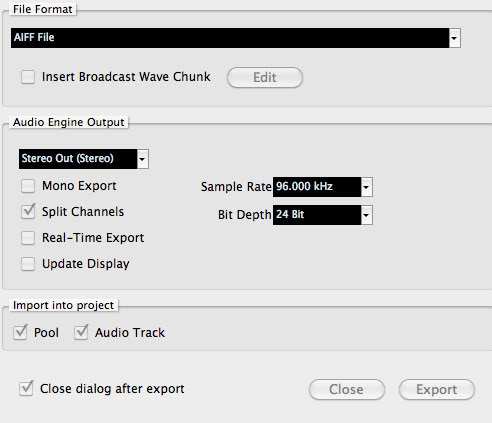
- Make sure the File Format is AIFF or WAV, nothing compressed...
- Audio Engine Output should look like this... Stereo Out, check off "SPLIT CHANNELS" (sample rate / bit depth should match your project settings / record settings).
- Import into project - check Pool and Audio Track.
Then click export...
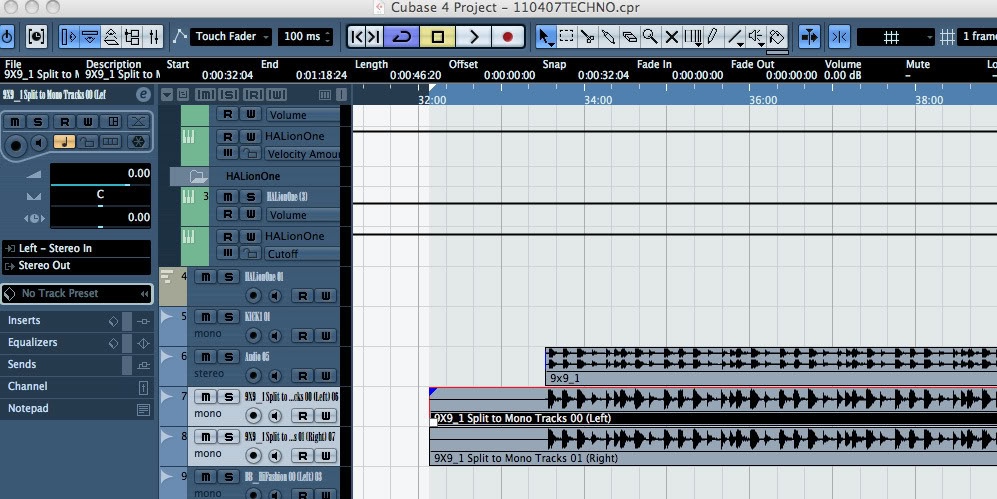
What this will do is "SPLIT" the "Stereo" recording into TWO MONO TRACKS... Left and Right and put it inline with the actual recrding... THEN, cut the original useless stereo track and blank track (the other track that was newly created) from the sequence window.
Should look like these shots...
The result... The stereo recording split to separate tracks... delete the one with nothing on it... keep the one that does...

It looks like, for Mono In 1 Mic/Inst 1 is on the left input. and Mono in 6 is on the right.
So nothing is recorded when you have a track set to Mono with a Mono input? Weird... Maybe your sound card will only record "Stereo Pairs"...
Well, here is a work around for you... its not ideal, but it will get you some workable recordings.
- Set in / out markers at the beginning and end of the recording you want to use, and have that recorded track SOLO'ed (better to do this on a dry track / no effects etc)...
- Go to File - Export - Audio Mixdown
- Make sure your destination folders are in the project you are working in
- Make sure the File Format is AIFF or WAV, nothing compressed...
- Audio Engine Output should look like this... Stereo Out, check off "SPLIT CHANNELS" (sample rate / bit depth should match your project settings / record settings).
- Import into project - check Pool and Audio Track.
Then click export...
What this will do is "SPLIT" the "Stereo" recording into TWO MONO TRACKS... Left and Right and put it inline with the actual recrding... THEN, cut the original useless stereo track and blank track (the other track that was newly created) from the sequence window.
Should look like these shots...
The result... The stereo recording split to separate tracks... delete the one with nothing on it... keep the one that does...