

Enjoy the benefits of a premium membership!
Upgrade Account
-
TalkBass has been independent since 1998. Add your voice.
Create a free account to reply to discussions, view embedded media, and browse with fewer display ads.
Join free Log in
Want zero display ads or expanded classifieds tools? Compare plans.
You are using an out of date browser. It may not display this or other websites correctly.
You should upgrade or use an alternative browser.
You should upgrade or use an alternative browser.
Windows working ok for those who use it for recording ?
- Thread starter pfschim
- Start date
More options
Who Replied?
Nothing against what you said. Just pointing out the other guy spent tons of money making sure anyone doing anything "creative" would feel the need to have this exact line of questions you're asking.I don't disagree with you on this for the most part. OTOH, it's not so much that I don't want to talk about other platforms or stop others from doing so, it's more a matter of being primarily interested to hear specifically about Windows experiences .... good or bad ... and so far it would appear that most users responding are having reasonable experiences with Windows and recording, at least here on TB which I recognize can be a bit of a bubble.
Genius really.
Puts unfounded doubts in everyone's mind so they feel safer just going with the other guys option.

yes, I totally get that and they are brilliant at doing that, always have been. That said though, it would seem that Windows is just as capable a platform for all kinds of work including creative work, and more and more musicians, artists, photographers etc etc realize this and are focusing more on the apps that enable them rather than the OS or even the basic physical looks of a machine. IMO/IME the OS should really just get out of the way and quietly enable work/creativity and not be a thing unto itself.Nothing against what you said. Just pointing out the other guy spent tons of money making sure anyone doing anything "creative" would feel the need to have this exact line of questions you're asking.
Genius really.
Puts unfounded doubts in everyone's mind so they feel safer just going with the other guys option.

I gave up on Windows for home recording purposes years ago.
After several custom builds with lots of memory and good processors, I would still get tons of latency and performance issues when I had a lot of audio tracks mixed with midi tracks in Ableton Live - and it got much worse when I started layering effects on top of that.
Now I've got a Macbook pro and I have never had one single issue when using Ableton, regardless of how many tracks and effects plugins I use. Plus it makes my dayjob of software development easier, so I personally see no reason to return to Windows.
But everyone's mileage varies along with their needs, so you should use whatever works for you!
After several custom builds with lots of memory and good processors, I would still get tons of latency and performance issues when I had a lot of audio tracks mixed with midi tracks in Ableton Live - and it got much worse when I started layering effects on top of that.
Now I've got a Macbook pro and I have never had one single issue when using Ableton, regardless of how many tracks and effects plugins I use. Plus it makes my dayjob of software development easier, so I personally see no reason to return to Windows.
But everyone's mileage varies along with their needs, so you should use whatever works for you!
thanks for telling your story. Interesting that it took 5 pages of generally positive replies on the Windows recording experience to get to one of these, and I'm sure your story is not singular ... probably many others too. I also am aware of this story in reverse .... MacOS user abandons it for Windows or Linux, that's just inevitable.I gave up on Windows for home recording purposes years ago.
After several custom builds with lots of memory and good processors, I would still get tons of latency and performance issues when I had a lot of audio tracks mixed with midi tracks in Ableton Live - and it got much worse when I started layering effects on top of that.
Now I've got a Macbook pro and I have never had one single issue when using Ableton, regardless of how many tracks and effects plugins I use. Plus it makes my dayjob of software development easier, so I personally see no reason to return to Windows.
But everyone's mileage varies along with their needs, so you should use whatever works for you!
My experience is primarily on Windows (XP thru Win 10) but I have also had some (modest) experience with MacOS and Linux for recording. I totally get that the other platforms have their plusses, and minuses ... you only have to go to a recording forum for one of the other OS platforms to realize there can be issues on any of them.
ultimately I agree with your closing comment .... "you should use whatever works for you"

Your iLok probably “tattooed” the dll with some hardware information from your old machine to make sure you didn’t just copy it over to a new one.
Try contacting iLok tech support and see if they can help you with the issue.
I deactivated all licenses on the old pc (using the latest iLok software) before re-activating the licenses on the new pc (nothing was copied over, everything was installed). Also, based on my research, I found iLok was of no help to anyone other than to tell them to install the latest version. I have since uninstalled the Sonovox plugin and run Reaper without crashing. I'm hoping this issue does not reoccur (though I do miss the plugin; it was the best sounding grand piano I had).

I've had a windows 7 machine with a now-ancient version of protools (perpetual license) for about ten years now. besides recently maxing out ram and adding an ssd to record to (had some issues recording multiple tracks), i believe in the philosophy of "if your daw works, LEAVE IT ALONE"
Good point... DAW get nutty with hardware conflicts etc.
I've recorded record label tracks in Audacity (exported as WAV)... and yes, I have other things... folks in recording make guitar gear lust look infantile.

I deactivated all licenses on the old pc (using the latest iLok software) before re-activating the licenses on the new pc (nothing was copied over, everything was installed). Also, based on my research, I found iLok was of no help to anyone other than to tell them to install the latest version. I have since uninstalled the Sonovox plugin and run Reaper without crashing. I'm hoping this issue does not reoccur (though I do miss the plugin; it was the best sounding grand piano I had).
Sounds to me like you did what you could then.
Shame about losing a plug-in. I’ve had that happen a few times when a 32-bit plug-in or VST couldn’t successfully transition over to a 64-bit environment. Most developers handled it pretty well once they got up to speed on 64-bit and fixed their code. There were only a few I encountered that couldn’t seem to get their act together.

Unfortunately, I don't know why it didn't work. Ultimately, I just gave up. Basically Ableton and all of the plugins (literally thousands of them) needed to be re-installed, (and I didn't have all of the necessary files) and updating drivers, etc. It seemed that every attempt to record something turned into a 2-hour fight with Windows whether or not I had "permission" to do something. Add to that the computer ran slower, I just never saw the value.any idea why Windows 10 did not work for your set-up ?
A few years ago I decided to abandon a several year old Ableton setup (Ableton Live 9 ?) when I had to migrate off of an older laptop running Win7 which had a fatal hardware failure of some kind. I ended up on Windows 10 and Ableton's pricing for a full version had gone up beyond what I was willing to pay, so I decided to go elsewhere ... in this case to Reaper.
It was kind of a pain because I had learned Ableton pretty well and had my workflow down ... at least for my limited tracking needs. I like Reaper just fine but I still miss some of what Ableton brought to the table. Of course none of that had to do with Windows functionality really, other than the fact that Win 7 was no longer available.
I know I'm going to have issues when these machines die, but I'm going to hold out as long as I can.

I tried for a long time to stay out of this thread since it seems like a very biased discussion.
I do not use any Apple stuff for music (or phone). I have been a windows guy since my first 8088-based IBM computer. I was using MS products before almost anyone had heard of them.
That being said, nothing is perfect. I think Windows XP was their best product and used it until recently when noting would run on it anymore.
Windows 10 is not so great, but mostly due to embedded hidden programs and RAM/CPU stealing background processes that slow everything down and clash with my DAW software (Pro Tools 2020).
Getting a recording or editing session started is like starting up a 1910 Model T. I have to reboot fresh each session and then kill a bunch of background processes that are not found in old-fashion startup registry entries like they were in Win XP. I gutted Cortana, which took days to root out. Ditto Defender. I disabled updates, which occasionally still install even though I "disabled" them. Adobe has somethings that always start up as well.
So anyway, I boot, make sure that nothing else is running, then start Pro Tools. About 50% of the time it goes into a spasm, hangs and eats up processor time. REBOOT. Try again. Once I finally get it all going I am good for the session. But I have to repeat this ordeal each time.
It is a combination of the DAW software doing something wrong and conflicting with other running applications.
I don't like it, but after being a super-user since 1984, I am used to it. I would love to get a 'naked' Windows OS that had nothing but the basics. That is not what they (or Apple) are about.
I do not use any Apple stuff for music (or phone). I have been a windows guy since my first 8088-based IBM computer. I was using MS products before almost anyone had heard of them.
That being said, nothing is perfect. I think Windows XP was their best product and used it until recently when noting would run on it anymore.
Windows 10 is not so great, but mostly due to embedded hidden programs and RAM/CPU stealing background processes that slow everything down and clash with my DAW software (Pro Tools 2020).
Getting a recording or editing session started is like starting up a 1910 Model T. I have to reboot fresh each session and then kill a bunch of background processes that are not found in old-fashion startup registry entries like they were in Win XP. I gutted Cortana, which took days to root out. Ditto Defender. I disabled updates, which occasionally still install even though I "disabled" them. Adobe has somethings that always start up as well.
So anyway, I boot, make sure that nothing else is running, then start Pro Tools. About 50% of the time it goes into a spasm, hangs and eats up processor time. REBOOT. Try again. Once I finally get it all going I am good for the session. But I have to repeat this ordeal each time.
It is a combination of the DAW software doing something wrong and conflicting with other running applications.
I don't like it, but after being a super-user since 1984, I am used to it. I would love to get a 'naked' Windows OS that had nothing but the basics. That is not what they (or Apple) are about.

interesting perspective, appreciate the input.I tried for a long time to stay out of this thread since it seems like a very biased discussion.
I do not use any Apple stuff for music (or phone). I have been a windows guy since my first 8088-based IBM computer. I was using MS products before almost anyone had heard of them.
That being said, nothing is perfect. I think Windows XP was their best product and used it until recently when noting would run on it anymore.
Windows 10 is not so great, but mostly due to embedded hidden programs and RAM/CPU stealing background processes that slow everything down and clash with my DAW software (Pro Tools 2020).
Getting a recording or editing session started is like starting up a 1910 Model T. I have to reboot fresh each session and then kill a bunch of background processes that are not found in old-fashion startup registry entries like they were in Win XP. I gutted Cortana, which took days to root out. Ditto Defender. I disabled updates, which occasionally still install even though I "disabled" them. Adobe has somethings that always start up as well.
So anyway, I boot, make sure that nothing else is running, then start Pro Tools. About 50% of the time it goes into a spasm, hangs and eats up processor time. REBOOT. Try again. Once I finally get it all going I am good for the session. But I have to repeat this ordeal each time.
It is a combination of the DAW software doing something wrong and conflicting with other running applications.
I don't like it, but after being a super-user since 1984, I am used to it. I would love to get a 'naked' Windows OS that had nothing but the basics. That is not what they (or Apple) are about.
Not sure why you'd be hesitant to post on this thread. It seems like you are generally happy with Windows for DAW use, even if you prefer an older un-supported version (XP) and have had some issues with Windows 10. I do understand that Windows has some aspects (some of which are OEM built drivers and BIOS optimizations etc) that have negative impacts on DAW use and audio, but I'm also aware (as are others here on TB) of optimizations and tweaks that seem to keep most of the worst offending aspects of the OS in check.
I suppose you could say the thread is specifically "biased" towards Windows ... but only in the sense that it was intended by me to see what TB members experience was with only Windows (not other OS'es) after another member trashed Windows audio as being "flakey" as it related to recording. I had never experienced it that way but honestly wondered if maybe my reasonably positive experience was somehow unique. The replies to in this thread, and the experiences of other folks I know personally, show that Windows would appear to be, if not exactly perfect, at least a perfectly usable OS for DAW/audio work.
Beyond that, I'd say that none of the current major OS'es are purpose built for Music Production. I know there are Linux distros that are aiming for that, and I know that there are Audio Workstation builders/customizers who optimize/tweak/strip down the Windows OS for their products, but I am not aware of a purpose built OS for DAW/audio work. And after all, all of the major OS'es are intended for a wide array of work/apps/functions, so they are meant to be highly multifunctional and not just focused on single functions.
anyway thanks for posting.

Thanks for the feedback. Just want to make it clear: I do not like Windows at all for music/DAW, but it is all I have got. I do not have time to learn a new OS and tweak software. If I was doing this commercially, I'd hire a consultant to build a system that ran nothing but the DAW. It would probably not be Windows based.interesting perspective, appreciate the input.
Not sure why you'd be hesitant to post on this thread. It seems like you are generally happy with Windows for DAW use, even if you prefer an older un-supported version (XP) and have had some issues with Windows 10. I do understand that Windows has some aspects (some of which are OEM built drivers and BIOS optimizations etc) that have negative impacts on DAW use and audio, but I'm also aware (as are others here on TB) of optimizations and tweaks that seem to keep most of the worst offending aspects of the OS in check.
ok, fair enough. the basic idea that "you should use whatever works for you" has been expressed on this thread several times. I was never trying to advocate for Windows, nor do I have any vested interest in Windows per se. It's just what I have used for many years, and through many Win versions starting with Cakewalk on XP on through Reaper on Win 10 20H2, and I'm personally just more comfortable with the overall Windows workflow vs other OS'es I have had a bit of exposure to.Thanks for the feedback. Just want to make it clear: I do not like Windows at all for music/DAW, but it is all I have got. I do not have time to learn a new OS and tweak software. If I was doing this commercially, I'd hire a consultant to build a system that ran nothing but the DAW. It would probably not be Windows based.
The good news is there are obviously other OS options for anyone to choose to work ... some Linux distro or MacOS. Hopefully you will eventually be able to get your dream system and be happier with it that what you have now. Of course, this thread has already shown that people from small home users to professional studios successfully use Windows for their OS, so I don't feel like it does not have the potential to work well for all sizes of recording systems.
good luck!
Its not necessarily a Windows issue sometimes. It would be " features" such as security and applications running in the background. Which goes for any OS.
After 2001 the extra garbage packed into windows was pretty bad.
Maybe not a consultant is needed but a Computer Wiz. That can turn off a lot of things, and remove a lot of software that is uneeded and runs in the background.
In XP times a lot of guys were stripping down windows to unheard of levels to get performance out of old processors. And right when Dual Cores were more affordable. Right away more garbage got packed into windows.
Im talking physically deleting a lot of sections from windows so it has one thing to think of. The audio card and the software running.
When I was recording more often at what was considered professional and charging people.
My recording computer was stripped down as much as possible and it never touched the internet.
Some guys spoke of linux systems, but it opened up to even more software conflictions.
But it was easier to strip down linux.
Most the biggest issues was the same issues with any recording studio. Microphones, good rooms, and enough ins and outs requiring a much more expensive soundcard. Computers eliminated thousands in costs because you didnt need 5 to 10 grand or more. For basic mixers or compression. You just went click click click. And you could have very advanced compression on every channel
After 2001 the extra garbage packed into windows was pretty bad.
Maybe not a consultant is needed but a Computer Wiz. That can turn off a lot of things, and remove a lot of software that is uneeded and runs in the background.
In XP times a lot of guys were stripping down windows to unheard of levels to get performance out of old processors. And right when Dual Cores were more affordable. Right away more garbage got packed into windows.
Im talking physically deleting a lot of sections from windows so it has one thing to think of. The audio card and the software running.
When I was recording more often at what was considered professional and charging people.
My recording computer was stripped down as much as possible and it never touched the internet.
Some guys spoke of linux systems, but it opened up to even more software conflictions.
But it was easier to strip down linux.
Most the biggest issues was the same issues with any recording studio. Microphones, good rooms, and enough ins and outs requiring a much more expensive soundcard. Computers eliminated thousands in costs because you didnt need 5 to 10 grand or more. For basic mixers or compression. You just went click click click. And you could have very advanced compression on every channel
Yes. I used to have naked OS for XP and NT was pretty good. Like you said, after XP they started adding so many hidden backdoor processes that had nothing to do with performance. When you look at the number of things that are running 24/7 at the system level it is crazy. I am not talking about easy to remove added software, I am talking about root-level crap.Its not necessarily a Windows issue sometimes. It would be " features" such as security and applications running in the background. Which goes for any OS.
After 2001 the extra garbage packed into windows was pretty bad.
Maybe not a consultant is needed but a Computer Wiz. That can turn off a lot of things, and remove a lot of software that is uneeded and runs in the background.
In XP times a lot of guys were stripping down windows to unheard of levels to get performance out of old processors. And right when Dual Cores were more affordable. Right away more garbage got packed into windows.
Im talking physically deleting a lot of sections from windows so it has one thing to think of. The audio card and the software running.
When I was recording more often at what was considered professional and charging people.
My recording computer was stripped down as much as possible and it never touched the internet.
Some guys spoke of linux systems, but it opened up to even more software conflictions.
But it was easier to strip down linux.
Most the biggest issues was the same issues with any recording studio. Microphones, good rooms, and enough ins and outs requiring a much more expensive soundcard. Computers eliminated thousands in costs because you didnt need 5 to 10 grand or more. For basic mixers or compression. You just went click click click. And you could have very advanced compression on every channel
Riddle me this? Why is Xbox stuff installed and running at the root level? It cannot be removed without seriously digging deep and I can do it, but most people cannot. I do not own an Xbox and probably never will. Ditto for Cortana, their version of Siri or "Hey Google" / Alexa. I have a procedure for removing it, but it is seriously involved and each time window runs a major update it scans and reinstalls.
And don't get me started on AV software and frequent "urgent" security updates. These things are actually the real virus. I have not ever lost work time due to a real virus attack, but have lost hours of downtime due to frequent updates and they constant background scans that bring my system to a crawl.
Anyway, back on topic, I am now very sure that Adobe Cloud software if one of the major culprits that conflict with Pro Tools. I have Premier onboard a couple of my boxes so I can do video as well as audio editing. I discovered that you cannot prevent the Adobe Creative Cloud from automatically starting each time. I had to finally take ownership of the directories and rename all the Abode .exe files to keep them from loading. They bypassed the registry startup places somehow (still trying to figure out how they got that to work). Like I said, deep level trickery.
At some point I will ask some Russians if they can get me a hacked clean version of Win10. I'd rather pay them to do that and roll the dice than continue to use such a needlessly crappy OS.
Here is this particular computer running Win10. Supposedly disabled Adobe stuff from starting using both their instructions and cleaning the registry. But look what there is:
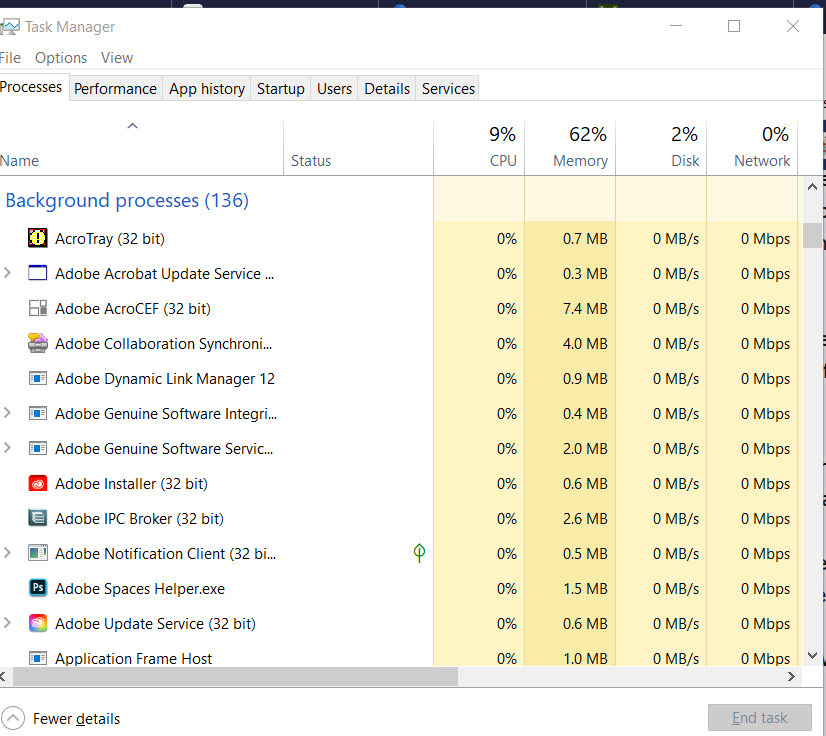
Yeah Adobe is one of the worst. And anti virus software.
I had a used desktop and was too lazy to wipe the system.
But eventually old software installed was haunting me.
Finally wiped that thing. It wasn't even a music production computer.
I had a very old version of premiere, I wanna say it didnt work well for me.
Steinberg out sourced some pretty high level encryption for Nuendo.
And when that russian crack came out.
I guess it was pretty remarkable they even cracked it.
Some deep level stuff. Not a basic registry key.
Anything and everything done is encrypted
Its almost impossible to crack
but they did it
I had a used desktop and was too lazy to wipe the system.
But eventually old software installed was haunting me.
Finally wiped that thing. It wasn't even a music production computer.
I had a very old version of premiere, I wanna say it didnt work well for me.
Steinberg out sourced some pretty high level encryption for Nuendo.
And when that russian crack came out.
I guess it was pretty remarkable they even cracked it.
Some deep level stuff. Not a basic registry key.
Anything and everything done is encrypted
Its almost impossible to crack
but they did it

I use a very old W10 machine and Ableton Live 10. The computer is severely underpowered, and doesn't handle automation at all. I know the limits of my setup, and I only use it for demo and songwriting.
But despite giving Windows and that computer way more than it can handle, it has never once failed me.
But despite giving Windows and that computer way more than it can handle, it has never once failed me.

As found on many of the DAW Optimization sites for Windows 10:
Adobe Update Server and other services can also be disabled in Windows with "msconfig"
This can be reversed in msconfig
Adobe Update Server and other services can also be disabled in Windows with "msconfig"
- Windows key, type in: msconfig
- Services Tab
- Uncheck Adobe ...
- OK - reboot and it won't start up again.
This can be reversed in msconfig

As found on many of the DAW Optimization sites for Windows 10:
Adobe Update Server and other services can also be disabled in Windows with "msconfig"
- Windows key, type in: msconfig
- Services Tab
- Uncheck Adobe ...
- OK - reboot and it won't start up again.
This can be reversed in msconfig
Exactly, plus, I just let pdf's open in edge. Other programs like Discord, I just turn off the load at startup (in the task manager?), and it doesn't. And no matter what you do with a computer, you want to be selective about what you install.
Plus again, notice the only resources it's using is some ram, which shows windows itself is handling what you've installed pretty well. What's it supposed to do with it?


